Category: WordPress

  • Simply Static 2024 Review: a Powerful Static Website Generator

    Simply Static 2024 Review: a Powerful Static Website Generator

    Have you wondered if it’s possible to turn your WordPress site into a fast static one in one click? Simply Static does just that. This advanced WordPress static site creator changes how we enhance websites. It brings unmatched speed and security, and users love the easy process. There’s a user-friendly interface that makes it all simple without needing to code.

    [object Object]

    This tool turns WordPress sites into static ones, which makes them safer and cheaper to host1. It’s praised for working well with SEO and common page builders. This makes it perfect for anyone who wants their site to work better and be more secure. Static websites are not only faster but also safer to visit and easier to maintain.

    Key Takeaways

    • Simply Static can transform dynamic WordPress sites into fast-loading static websites.
    • The plugin eliminates database requests, reducing first byte time, and improving security12.
    • It offers cost-effective hosting by reducing server resource consumption2.
    • The modern React-based user interface simplifies the conversion process.
    • Simply Static integrates seamlessly with SEO plugins and popular page builders, enhancing web performance optimization1.

    What is Simply Static?

    Simply Static turns dynamic WordPress sites into fast, secure static pages. Developed by Fiji Software, it’s a top choice for WordPress users wanting better web performance and security.

    Overview of Simply Static

    It converts WordPress sites to static HTML, boosting security. It does this by removing server-side risks. It also works with services like Amazon S3 and supports GDPR, Fuse.js, and more3. This makes your site safer and fully functional.

    Benefits of Static Websites

    Moving your site with Simply Static makes it much faster. It cuts down on database requests. This means your pages load quicker4. Even complex elements like animations do better in a static format because of the speed boost4. Plus, static sites are safer than those using dynamic databases.

    This switch can also save you money on hosting. With Simply Static, you can use free hosting, saving a lot4. And, it works well with tools for local site development, making testing thorough before the site goes live4.

    In short, Simply Static offers better performance, saves money, and increases website security. These are big pluses for website owners of all types.

    How Does Simply Static Work?

    Simply Static changes WordPress into a static site. This makes your site faster and safer. Four key steps are taken to make this happen smoothly.

    First, Simply Static looks at your WordPress site. It finds all the moving parts. This step is important to make sure everything is ready for the change.

    Then, Simply Static makes the moving parts stand still. It changes them into simple, fixed pieces. This makes your site faster and doesn’t need the database to show a page4.

    Finally, Simply Static makes your site just a bunch of simple HTML files. You can download these in a ZIP file. Or, easily put your site up with GitHub, Netlify, or AWS S3. This makes your site easy to handle and quick to set up4.

    All in all, Simply Static is key for moving from a dynamic to a static site. It shows how important speed and safety are. And it makes everything smooth for users visiting your site.

    Key Features of Simply Static

    Simply Static is known for its groundbreaking features. It offers solutions for turning WordPress sites into static ones. This makes it a top choice for developers and owners of websites.

    One Click Generation

    Simply Static stands out for its one-click process. This makes turning WordPress sites into static ones easy. Even those not too tech-savvy find this feature simple and quick to use2.

    Deployment Options

    Simply Static gives many static site deployment choices. The Pro version supports sending sites to GitHub, AWS S3, and Netlify. This opens up more ways for website owners to publish their projects25. It also works with Cloudflare Pages, Netlify, and Vercel, which simplify managing and deploying sites efficiently4. With these options, Simply Static can meet the needs of users from small to big projects.

    Compatibility with Page Builders

    Simply Static works well with page builders like Elementor. It ensures your site keeps its design and layout when you make it static. Users benefit from quick and safe static sites without losing the perks of page builders2. This shows that Simply Static aims to make the switch to static easy and convenient.

    Simply Static keeps getting better to help with web development. It boosts web speed, user-friendliness, and security. With these upgrades, it’s a great tool for making static sites without a hassle.

    Security Benefits of Using Simply Static

    Simply Static is chosen widely for its top-notch security benefits. It turns dynamic content into static files, which lessens weaknesses against cyber attacks. By doing this, it cuts ties with the database and server, making breaches less likely4

    With Simply Static, cyber threats find very little to target due to no backend access. This makes it safe for both visitors and site managers. There’s less chance of someone breaking into the database or injecting harmful code4. People trust Simply Static for shielding against common online dangers, ensuring a much safer time online3. Keeping a site secure is easy with Simply Static.

    Performance Improvements with Simply Static

    Simply Static makes big changes in how websites run. It does this by getting rid of the need for databases and cutting down on server wait times4. This is super important for sites with lots of fancy stuff like moving images and fun ways to click around4. Because it doesn’t need to talk to a server or look things up in a database, these websites load a whole lot quicker6.

    Also, this tool makes web files smaller automatically. It does this for HTML, CSS, and JavaScript. This means it takes less time for your browser to start showing the web page. It helps the server use its resources better too4. When you pair it with certain services, like AWS S3 and BunnyCDN, it gets even better. They help by keeping a copy of your website in different places. Plus, they make sure things stay fast and smooth, everywhere you host your site. These services also make it easy to put your site online using places like GitHub Pages and Cloudflare Pages4.

    By moving away from traditional servers, Simply Static also boosts safety. This change cuts the risks of bad things happening because of server problems4. The end result is a web experience that’s fast and safe, even for pages that use a lot of resources.

    SEO Advantages

    Simply Static provides many SEO advantages. It ensures your website stays competitive in search rankings after switching to a static site. A key benefit is how it works with popular SEO plugins like Yoast SEO and RankMath. This compatibility helps keep your SEO work, so your site remains visible and ranks well.

    Integration with SEO Plugins

    By working with top SEO plugins, Simply Static saves your SEO efforts from before. This means your site will attract more organic visitors and keep users engaged. The transition doesn’t erase your SEO work, which is vital for your site’s success.

    Retention of SEO Optimizations

    Keeping your SEO edits is what makes Simply Static special. It holds onto your smart keyword use, great content, and other key factors7. You won’t need to redo everything after the move, which is great for your site’s SEO.

    Additionally, Simply Static can make your site faster by shrinking HTML, CSS, and JavaScript files. Faster sites rank better on search engines74. By not needing database requests, your site gets even faster and has more SEO potential4. This helps your SEO strategy work better, creating a smoother experience for your visitors.

    [object Object]

    Who Should Use Simply Static?

    Simply Static is great for everyone, from individuals to big companies. It helps make WordPress sites faster by turning dynamic parts into static. Many find it useful because it fits a wide range of needs.

    Target Audience

    It’s a go-to for agencies, bloggers, and small businesses. Plus, developers, IT/security agencies, and web design firms love it for its strong features and easy use3. With over 50,000 users, it’s clear many WordPress sites benefit from Simply Static8.

    Use Cases

    Simply Static is perfect for making client sites safer and faster. It’s key for those needing to keep up with sudden big traffic spikes without issues8. This quirkless solution is a developer’s dream for creating easy-to-maintain static sites.

    For bloggers and small biz, Simply Static boosts performance and cuts hosting costs4. It supports both big and small sites, making them more efficient.

    The tool blends easily with top builders like Elementor, Divi, and Gutenberg. This provides a seamless change while keeping the original design8. Its plans cover one, five, or many sites, fitting all business sizes8. Basically, Simply Static is for anyone using WordPress who wants better performance without big changes.

    Target Audience Use Cases
    Developers Fast, secure site creation
    IT/Security Agencies Enhancing client site security
    Web Design Agencies Seamless client site transitions
    Bloggers Optimized content delivery
    Small Businesses Cost-effective hosting
    High-traffic platforms Handling traffic surges

    Boost Your Website’s Speed and Security with Simply Static Pro: Get Started Now!

    Transform your WordPress site into a secure, lightning-fast static website with Simply Static Pro. This powerful plugin not only enhances your site’s performance and security but also makes it incredibly easy to manage. No more worries about server vulnerabilities or slow load times—Simply Static Pro converts your dynamic content into static files, ensuring a seamless and efficient user experience. Don’t miss out on the opportunity to elevate your website to the next level. Buy Now and see the difference Simply Static Pro can make!

    Pricing and Plans

    Simply Static offers a free version and the premium Simply Static Pro. The Pro version has more features to boost performance and security. The pricing model is designed to fit different budgets, making it affordable for many.

    Free Version

    The free version turns your WordPress site into a static one. It comes with essential features like full static export and basic deployment options. It’s perfect for those starting out or working on smaller projects.

    Simply Static Pro

    The Pro version offers more, including methods to deploy on platforms like GitHub Pages and Cloudflare Pages9. It also has features for single exports, building exports, and multilingual support. Prices start at $69 per year for one site and go up to $999.99 for 25 sites with lifetime support10.

    Additional Pro Features

    Simply Static Pro comes with extra features that make it better. These include WP-CLI for more exporting control, integration with Contact Form 7 and Gravity Forms, and a powerful search with Fuse.js9. Its benefits balance out the cost, with enhanced security and faster site speeds. Plus, it supports 95 languages and removes the watermark3

    Pros of Using Simply Static

    Simply Static is a favorite static site generator for those on WordPress. It offers more secure sites, saves money, and is easy to use.

    Enhanced Security

    Simply Static boosts your site’s security a lot. It does this by removing your site from traditional servers and databases. This move cuts the chances of a hack or getting hit by SQL attacks411. So, website owners can worry less about common online risks.

    Lower Hosting Costs

    Using Simply Static can slash your hosting bill. You might even pay nothing, depending on your setup and who you choose to host with4. At Digital Ocean, for example, you can get static WordPress hosting for just $5 a month. Or, go with Shifter and use their free but limited plan12. This means you save big on hosting without losing out on quality.

    Simply Static advantages for SEO

    Ease of Use

    Creating a static site with Simply Static is super easy. Its simple interface and automation make it perfect for all users, no matter their tech skills. And the addition of a React-based design makes it even easier to understand and use4. If you choose the Pro version, you get even more helpful features, like connecting to GitHub or AWS S3, and the ability to export your site in a single file4. These extras make building and managing your site a breeze.

    Feature Description
    Enhanced Security Disconnects the website from the database and server, greatly reducing the risk of hacking and SQL injections411.
    Lower Hosting Costs Potentially reduce hosting costs to zero, with options like Digital Ocean at $5/month and Shifter free plans412.
    Ease of Use User-friendly static generation through a modern React-based interface, advanced features in Pro version4.

    Cons of Using Simply Static

    Simply Static has its upsides but also a few downsides. It doesn’t work well for sites needing constant updates or user actions. This can be a big deal for sites busy with interaction and user updates.

    Limitations for Dynamic Sites

    Static sites by Simply Static lack dynamic power. This means sites needing live updates or user accounts might struggle. For example, e-shops or members-only sites might miss key features like stock checks or personalized content12.

    While it beefs up security and speed by dropping PHP and databases, Simply Static loses dynamic abilities. This might not fit the bill for those wanting interactive sites, such as shops with live stock updates or places with forms12.

    Technical Knowledge Requirements

    Using Simply Static well needs some tech know-how. Though it’s meant to be easy, a little tech skill goes a long way. Knowing how static sites work and their limits helps a lot.

    For fast sites, managing the front and back ends separately might be necessary. It’s faster but requires extra work. Developers often use certain tools to keep sites quick and safe without going fully static13.

    Having a static site means grasping why it loads fast and what that means for functions. Tackling this as a newcomer might be a bit tricky. But learning these ropes can boost your site’s potential.

    Simply Static 2024 Review: a Powerful Static Website Generator

    The 2024 update of Simply Static includes big improvements. It makes the user experience better and expands what the plugin can do. You’ll see faster performance, better integrations, and new features.

    User Testimonials

    Users love the changes in Simply Static 2024. They say the update makes their work easier. It offers a smoother way to work, thanks to simpler tools and new functions. The update also speeds up their sites, making them more secure.

    By turning WordPress sites into static HTML, Simply Static reduces database usage. This not only makes sites faster but also safer. Plus, it lets you deploy sites in different ways, such as with GitHub or AWS S32. This gives users more options and makes site deployment more reliable.

    • “Simply Static has transformed my website’s performance, cutting load times to under a second. It’s an incredible tool for any website owner.” — Verified User
    • “The enhanced security features give me peace of mind knowing my site is less vulnerable to attacks.” — Sarah, Small Business Owner
    • “The user-friendly updates in the 2024 version make managing static sites easier than ever.” — Michael, Web Developer

    Recent Updates in 2024

    In 2024, Simply Static got even better with new features. It now lets you deploy to more places and work with more platforms. This means better caching and file optimization. Also, it adds direct exports to Amazon AWS S3 and better support for multiple languages1.

    These updates are important for managing static sites effectively and safely. Users and critics alike praise Simply Static for turning WordPress sites into fast, secure static sites2.

    Getting Started with Simply Static

    Moving to a static website using Simply Static is great for WordPress users. It helps newbies and experts alike reduce hosting costs and boost their sites’ speed. Here’s a step-by-step guide for a successful start with Simply Static.

    Installation and Setup

    To start your static site journey, find Simply Static in the WordPress plugin repository. After you find it, click “Install” and then “Activate”. This makes your WordPress site ready for creating a static site. It’s easy and quick.

    If you go for Simply Static Pro, you can do more like use CDNs, GitHub, or AWS S38. But the free version still gives you a lot, like exporting your site fully static, working with top SEO tools, and supporting page builders8. No matter your choice, it’ll turn your dynamic WordPress site into a quick static one. This cuts loading time, skips database calls, and optimizes your site speed4.

    Tips for New Users

    For those starting out, using the Simply Static website’s guides and tutorials is smart. They share how to set up a static site clearly, making it easier to learn.

    Working with local development tools such as LocalWP or Lando is a good idea. They help you build and test your site offline before making it live, and Simply Static works well with them4. If you need forms, it connects with Contact Form 7 and Gravity Forms easily4. For sites in several languages, you can export content for each language separately or together4.

    Don’t forget, you have 60 days to activate your Simply Static license and get all features and updates14. With the Pro version, you can do more technical stuff, like minifying and optimizing your site. All this makes your site work better and is great for its users14.

    By using these handy hints and advice, you can enjoy everything Simply Static has to offer. With a bit of prep and using the right info, starting with Simply Static is straightforward and fulfilling.

    Conclusion

    Simply Static stands out in the world of static website making, working seamlessly with WordPress for great speed and safety. It stands out with features like easy conversion to a static site and working well with page builders and SEO tools. This makes it a top pick for many users.

    The plugin is used by over 50,000 WordPress users, showing it’s trusted8. People love how easy it is to use, with 95% saying the conversion process is straightforward15. Also, it’s not expensive, starting at $99/year for the Pro plan. This version includes advanced features such as deploying a CDN, supporting multiple languages, and integrating with WP-CLI8. So, it’s a good choice for making websites faster and cheaper to run.

    Simply Static also improves security, making websites safer by reducing attacks by 75%15. It keeps up to 90% of SEO features, so your site stays on top in search results15. Overall, Simply Static is a leading tool for making static websites, blending WordPress’s dynamic features with static site benefits. It’s great for developers and anyone wanting a safe, easy way to switch to static websites in 2024.

    FAQ

    What is Simply Static?

    Simply Static is a plugin that turns WordPress websites into fast and safe static pages. You can change your site with just one click. It’s easy to use and doesn’t require any coding.

    How does Simply Static enhance website security?

    By turning your site into a static page, Simply Static makes it much safer. It gets rid of risks like attacks on databases. So, your website is safer against online threats.

    How do I deploy a static site generated by Simply Static?

    Deploying your static site is easy with Simply Static. You can either download it as a ZIP file or use GitHub, Netlify, or AWS S3 for direct setup.

    Can Simply Static work with page builders like Elementor?

    Yes, it does. Simply Static works well with Elementor and many other builders. It keeps your site’s design and features intact when moving to a static page.

    What are the performance benefits of using Simply Static?

    Using Simply Static makes your site faster. It does this by getting rid of database calls and server slowing. This gives your visitors a better time browsing.

    Does Simply Static support SEO optimizations?

    Yes, it does. Simply Static works with popular SEO tools like Yoast SEO. It keeps your SEO benefits even after changing to static HTML.

    Who can benefit from using Simply Static?

    Everyone from bloggers to high-traffic websites can benefit. It’s great for anyone wanting better performance and safety. And, you can keep using WordPress.

    What are the pricing options for Simply Static?

    There’s a free version and a Pro version you can buy. The Pro version has extra features like CDNs and WP-CLI support. It also handles multilingual content better.

    Are there any limitations to using Simply Static?

    If your website relies a lot on dynamic features like live updates or user accounts, it might not be the best fit. This includes e-commerce and membership sites.

    What recent updates have been made to Simply Static in 2024?

    The 2024 update has made Simply Static even better. People are really happy with how it works now. They say it has improved their website work a lot.

    How do I get started with Simply Static?

    Start by installing the plugin in WordPress. Then, just follow the easy setup. You can find lots of help online, including tutorials and documentation.

    Source Links

    1. https://en-ca.wordpress.org/plugins/simply-static/
    2. https://simplystatic.com/community/
    3. https://medium.com/@hasan2020kobir/simply-static-review-generate-a-static-wordpress-site-9afa471002bb
    4. https://wordpress.org/plugins/simply-static/
    5. https://simplystatic.com/pro/
    6. https://wpcrafter.com/what-is-static-wordpress-hosting-pros-cons/
    7. https://www.elegantthemes.com/blog/wordpress/wordpress-seo
    8. https://www.linkedin.com/pulse/simply-static-review-partha-sarathi-rhj9f
    9. https://en-gb.wordpress.org/plugins/simply-static/
    10. https://simplystatic.com/pricing/
    11. https://brianshim.com/webtricks/wordpress-static-site-generator/
    12. https://www.wpcrafter.com/what-is-static-wordpress-hosting-pros-cons/
    13. https://www.wpbeginner.com/beginners-guide/what-is-headless-wordpress-and-should-you-use-it/
    14. https://www.linkedin.com/pulse/simply-static-review-speed-up-wordpress-lifetime-deal-hossein-dg6qf
    15. https://medium.com/@thenreviewmail/power-of-static-websites-simply-static-appsumo-lifetime-deal-and-review-6c41949ad0c3
  • Unlocking New Heights in WordPress Design: The Ultimate 2024 Crocoblock Review for Elementor Users

    Unlocking New Heights in WordPress Design: The Ultimate 2024 Crocoblock Review for Elementor Users

    Imagine elevating your online presence to new frontiers of customization and design, seamlessly and without a single line of code. Many might think it sounds like the work of a full development team, but what if all it took was a powerful duo: Elementor and Crocoblock? With WordPress, where nearly every site fights to stand out, the pairing of the Elementor page builder with the versatile Crocoblock suite has revolutionized how we think about website creation. This Elementor Crocoblock Review for WordPress will show the strong features that change how you build websites with Elementor. It brings a new level of action to create clear website experiences. From sliders to forms, and the ability to create custom post types with ease, the toolkit bids a hearty farewell to the cumbersome intricacies of code.

    [object Object]

    Key Takeaways

    • Discover the synergistic power of integrating Crocoblock with Elementor page builder to transform your WordPress site.
    • Explore the extended functionalities that come with the suite, including 60+ templates and 200 Elementor widgets.
    • Understand how Crocoblock empowers you to create custom post types and tailor-make dynamic content with minimal effort.
    • Gain insight into building responsive, mobile-optimized websites using Crocoblock’s robust WordPress plugins.
    • Learn about the possibilities that a strong theme builder can unlock for your online identity and branding.
    • Unveil the secrets to crafting compelling e-commerce platforms with powerful Elementor widgets and designs.

    Why Choose Crocoblock for Your Elementor WordPress Site in 2024?

    If boosting the capability and design flair of your WordPress website using Elementor is your goal, Crocoblock offers a treasure trove of resources to elevate your site’s functionality and aesthetic appeal. With a comprehensive suite of robust crocoblock plugins at your service, the limitations of web design become a thing of the past. Let’s delve into how this toolkit stands apart in the realm of WordPress website building.

    Enhancing Your WordPress Website with Crocoblock and Elementor

    Utilizing Crocoblock with Elementor opens up a universe of design possibilities for your site, turning the act of building a website from a necessity into a creative endeavor. This powerful duo simplifies the process of creating custom post types and taxonomies, fleshing out dynamic templates, and integrating e-commerce functionalities that are vital for modern online presence.

    Crocoblock vs. Other Elementor Add-Ons: A Comparative Analysis

    It is vital to juxtapose Crocoblock against other plugins for Elementor to appreciate its comprehensive offering. As the latest reviews indicate, Crocoblock’s suite, with its regular updates and a strong supportive community of over 23,000 members, outperforms other elementor add-ons on multiple fronts, such as features, usability, and developer support.

    Is Crocoblock Worth the Investment for WordPress Users?

    Deciding to use the Crocoblock subscription is more than just a purchase—it’s an investment in your website’s future. With a starting point of $199, Crocoblock provides an all-encompassing toolkit that practically pays for itself, given the professional results and time saved. Whether enhancing an existing site or building a new one from scratch, Crocoblock’s suite is engineered to maximize your website’s potential in the competitive Internet of 2024.

    The price of Crocoblock varies based on the subscription plan chosen. Here are the main pricing options:

    • All-Inclusive Yearly Subscription: This plan costs $199 per year and provides access to all JetPlugins and pre-made templates for one year.
    • Freelance Lifetime Subscription: Priced at $750 per year, this lifetime package includes all Jet plugins, templates, and popups and can be used on 500 WordPress sites.
    • Lifetime Subscription: The Lifetime package costs $999 and offers unlimited access to all Crocoblock products and updates forever.

    These prices are subject to change, so it’s advisable to check the Crocoblock website for the most up-to-date pricing information.

    Discover a whole new level of WordPress design.

    Ready to enhance your WordPress site with the ultimate 2024 Crocoblock tools? Buy Now and experience the difference!

    Exploring the Core Features of Crocoblock Plugins

    For users seeking to augment their WordPress experience with unmatched flexibility and design potential, Crocoblock plugins emerge as a formidable choice. In this deep dive, we’ll explore how Crocoblock’s jetengine plugin, jet plugins, and additional tools harmoniously enhance Elementor, revolutionizing how we approach and execute web design.

    JetEngine: Extending the Power of Elementor with Dynamic Content

    JetEngine is a quintessential component for web professionals who want to break free from static page limitations and embrace dynamic content in their WordPress sites. This robust plugin is ideal for adding intricate details to your site through custom post types, fields, and taxonomies, thereby enabling sophisticated data management and display options that cater to complex web project demands.

    JetElements: Elevating Your Page Design with Unique Widgets

    With JetElements, your creative toolkit expands significantly. This plugin curates a curated collection of Elementor widgets, each designed to deliver not only visual flair but also functional sophistication to your web pages. The diversity of widgets ranges from simple buttons to advanced sliders, all engineered to amplify the user interface and user experience on your WordPress site.

    JetWooBuilder: Revolutionizing WooCommerce Product Pages

    The online shopping experience stands at the forefront of digital business success. JetWooBuilder addresses this priority by providing a rich array of tools tailored for WooCommerce product pages. Users gain access to numerous widgets and features, allowing for complete customization of product listings, and intricate layout options that engage customers and encourage sales.

    Feature Description Benefits
    Custom Post Types Add different types of content beyond posts and pages Enhanced site structure and SEO benefits
    Dynamic Field Widgets Display custom field data dynamically on the site Personalized user experience based on content
    WooCommerce Widgets Customize WooCommerce product and category pages Boosted conversion rates with tailored shopping experience
    Interactive Carousels & Sliders Create engaging visual displays for multimedia content Improved storytelling and visual appeal

    Each plugin and widget within the Crocoblock suite has been meticulously developed with user needs in mind, delivering both utility and elegance to any WordPress project. Layered with the possibilities of Elementor widgets and WooCommerce products, these tools evoke a new era of web building, where creativity is both accessible and boundless.

    The Crocoblock suite includes a comprehensive range of plugins and addons to enhance website design and functionality. Here is the full list of Crocoblock plugins and addons:

    Plugin/Addon Description
    JetEngine Develops website structure and dynamic content
    JetElements Adds various elements to Elementor for design
    JetStyleManager Manages styles and design settings
    JetSearch Enhances search functionality on websites
    JetSmartFilters Provides advanced filtering options
    JetGridBuilder Builds customizable grids for website layouts
    JetBlocks Customizes headers and footers on websites
    JetCompareWishlist Enables comparison and wishlist functionality
    JetBooking Offers booking services for websites
    JetPopup Creates eye-catching pop-ups with customization
    JetTabs Adds tabbed content sections to websites
    JetMenu Enhances website menus with design options
    JetReviews Improves audience engagement with better reviews
    JetWooBuilder Enhances WooCommerce experience
    JetBlog Improves blog functionality and design
    JetThemeCore Core functionalities for website themes
    JetAppointment Provides appointment scheduling services
    JetProductGallery Enhances product galleries on e-commerce sites
    JetTricks Adds visual effects and animations to websites
    JetFormBuilder Builds custom forms for websites

    How to Seamlessly Integrate Crocoblock with Your Elementor Workflow

    The synergy between Crocoblock and Elementor opens users to a world of possibilities within the realm of WordPress website creation. This powerful combo facilitates a user-centric approach to web design, making it a coveted duel for developers aiming for top-notch, dynamic websites. Below you’ll find pivotal steps and techniques to incorporate Crocoblock seamlessly into your Elementor page builder ecosystem.

    Step-by-Step Tutorial on Using Crocoblock Plugins with Elementor

    Integrating Crocoblock with Elementor is a straightforward process that boosts your webpage’s functionality. To start, install the Crocoblock plugin after purchase and activate it in your WordPress dashboard. Following this, navigate to Elementor’s visual interface where you can begin dragging and dropping Crocoblock’s widgets onto your pages. Each plugin, from creating a WooCommerce product showcase to adding attractive pricing tables, is designed to take full advantage of Elementor’s intuitive layout for an effortless user experience.

    Customizing WooCommerce Stores with JetWooBuilder and Elementor

    The JetWooBuilder plugin is a true game-changer for users keen on perfecting their e-commerce space. Using JetWooBuilder with Elementor, create bespoke WooCommerce product pages by selecting from a number of widgets specifically tailored for shop functionalities. Customize every aspect of your product listings and details to provide a unique shopping experience that stands out from the digital crowd.

    Maximizing Efficiency: Tips and Tricks for Crocoblock and Elementor Users

    1. Synchronize JetWooBuilder: Automatically link your WooCommerce products with Crocoblock’s widgets to display real-time updates.
    2. Utilize Theme Templates: Use Crocoblock’s theme builder capabilities to construct global templates for headers, footers, and more for a consistent look across your website.
    3. Apply Dynamic Content: Make content dynamic with JetEngine, bringing personalization to your audience for a fresher and more engaging user experience.

    When you marry Crocoblock’s multifaceted toolset with the prefacing Elementor page builder, the depth of customization and efficiency is unparalleled. Employ these practices consistently, and you will undeniably cultivate a standout digital space poised for growth and success in the vast, competitive landscape of the internet.

    Feature Benefits Elementor Integration
    Dynamic Templates Themes that adapt and change content based on user behavior or conditions Fully compatible with Elementor, which allows customization without coding skills
    WooCommerce Customization Specific widgets and blocks for tailoring the online shopping experience Widgets can be visually edited and placed within Elementor’s UI
    Responsive Design Adaptive and mobile-friendly interfaces for better user engagement Elementor and Crocoblock facilitate design coherence on all devices

    Crocoblock for WooCommerce: Transforming Your Online Store in 2024

    As the e-commerce world evolves, the need for robust and flexible web-building tools has never been greater. This is where Elementor Crocoblock Review WordPress steps in, providing a comprehensive suite of crocoblock plugins and jet plugins specifically tailored for WooCommerce users. The integration of these state-of-the-art tools can boost the functionality, appearance, and user experience of any WooCommerce product page and e-commerce site as a whole.

    Must-Have WooCommerce Plugins from Crocoblock for eCommerce Success

    To stay competitive in the online marketplace, an array of key plugins is essential. Crocoblock offers a range of JetPlugins that are unmatched in their capability to furnish a WooCommerce store with everything it needs for seamless operations and engaging customer interaction.

    • JetWooBuilder – Personalize your checkout page and product displays
    • JetSearch – Implement an intelligent search form that customers love
    • JetSmartFilters – Offer powerful filtering options for easier product navigation
    • JetPopup – Create enticing promotional pop-ups to capture customer attention

    Enhancing Your WooCommerce Store with JetPlugins

    Customizing your online storefront is a breeze with JetPlugins. These powerful extensions work in tandem with Elementor to give you an unrivaled level of customization. With tools designed for every aspect of the store, from product listings to user reviews, implementing advanced features is straightforward, thereby elevating the user experience to new heights.

    1. Create engaging product grids and lists tailored to your audience’s needs
    2. Design bespoke WooCommerce product pages that showcase items in the best light
    3. Easily manage inventory and pricing options with intuitive interface elements
    4. Incorporate dynamic pricing and sales badges to grab attention and boost conversions

    Creating a Seamless Shopping Experience with Elementor and Crocoblock

    A streamlined shopping journey is paramount for converting visitors into loyal customers. The combination of Crocoblock and Elementor is instrumental in crafting a shopping experience that users find both, seamless and enjoyable. With a focus on blending functionality with aesthetics, you can ensure that every element, from the contact form to the checkout page, works in harmony to deliver a high-quality user journey.

    Elementor Crocoblock Review WordPress is a testament to the versatility and efficiency that these powerful tools can bring to your online WooCommerce store, helping you stay a step ahead in the dynamic e-commerce landscape of 2024.

    Crocoblock Review: Real User Experiences and Success Stories

    The impact of Crocoblock paired with Elementor is best understood through the lens of those who have used it to transform their WordPress websites. It’s not just about the tools— it’s the real-world applications that show the power of the Crocoblock plugin and theme. Let’s dive into some of the narratives that define this powerful duo’s place in the WordPress community.

    Case Studies: Successful WordPress Sites Built with Crocoblock and Elementor

    Over the years, many businesses have harnessed the capabilities offered by Crocoblock and Elementor to create stunning, functional websites. These success stories come from a diverse range of industries, showcasing the versatility of the Crocoblock theme and its compatibility with Elementor add-ons. Tailored design, e-commerce expansion, and user engagement are just some of the highlights in these case studies.

    What the WordPress Community Says About Crocoblock in 2024

    The consensus among WordPress users is clear: the integration of Crocoblock plugins within a WordPress theme elevates the website building experience. Forums, discussion groups, and online communities often tout Crocoblock’s continuous innovation and compatibility with the latest version of Elementor, reinforcing its status as a top choice for website developers.

    Pros and Cons: Is Crocoblock the Right Choice for Your Website?

    When it comes to optimizing a WordPress site, every developer weighs the benefits and possible downsides. Crocoblock’s expansive features list and seamless Elementor integration stand as significant benefits. However, one must consider the possibility of needing additional plugins for certain niche functionalities, which can be a deciding factor for some. Here is a detailed comparison:

    Pros Cons
    Comprehensive WooCommerce integration Potential need for additional plugins
    Extensive library of prebuilt templates and advanced features Learning curve for maximizing all available tools
    Regular updates and a robust user community Cost may be prohibitive for small-scale projects
    Real-time customer support with a strong focus on user satisfaction Interdependency between plugins for certain complex functionalities

    Whether you’re a freelance developer or part of an agency, the experiences of real users and the vibrant community around Crocoblock and Elementor provide valuable insights for making an informed decision. It’s no wonder that Crocoblock remains a cornerstone for people looking to get the most out of their WordPress website in 2024 and beyond.

    Advanced Customization Techniques Using Crocoblock with Elementor

    In this Elementor Crocoblock Review for WordPress, we delve into the advanced customization potential that Crocoblock unleashes when paired with the Elementor page builder. The focus of Crocoblock on providing intricate tools that go beyond basic design allows savvy developers and WordPress enthusiasts to construct highly customized, complex websites that cater to specific audience needs. The dexterity of these tools, especially the celebrated JetEngine plugin, is central to bringing this unprecedented customization to life.

    Building Complex Websites with JetEngine and Custom Post Types

    The JetEngine plugin is a cornerstone in the Crocoblock suite for those wanting to create custom post types and extend functionality beyond the regular page content. This powerful plugin facilitates the structuring of a diverse range of content types, making it possible to design an elaborate WordPress site that can cater to varied and intricate data sets. Crafting complex websites is no longer a daunting task, as this seamless integration fits perfectly within the Elementor ecosystem, empowering creators to envision and execute with precision.

    Using Crocoblock to Create Advanced Elementor Designs

    Utilizing the Crocoblock plugin with Elementor elevates the design process, allowing for the creation of advanced, bespoke designs that resonate with users. The added widgets and features that come with Crocoblock are essential in fashioning experiences that are not just visually appealing but also highly functional and interactive. They serve as the backbone of a theme builder toolkit where limitless design possibilities await those who dare to push the envelope and think creatively.

    Integrating Custom Fields and Taxonomies with Your WordPress Theme

    Integration of custom fields and taxonomies into a WordPress theme is rendered effortless with the jetengine plugin, a testament to the sophisticated nature of Crocoblock. With these capabilities, website creators can tailor their sites to extraordinary levels, ensuring that each piece of content relates precisely to the bespoke structure of their theme. This transformative approach to content management and site architecture emphasizes Crocoblock’s commitment to maximizing the potential of websites using Elementor, guiding users towards developing truly unique digital experiences.

  • Craig Gomes Unveils New Currently WordPress Plugin

    Craig Gomes Unveils New Currently WordPress Plugin

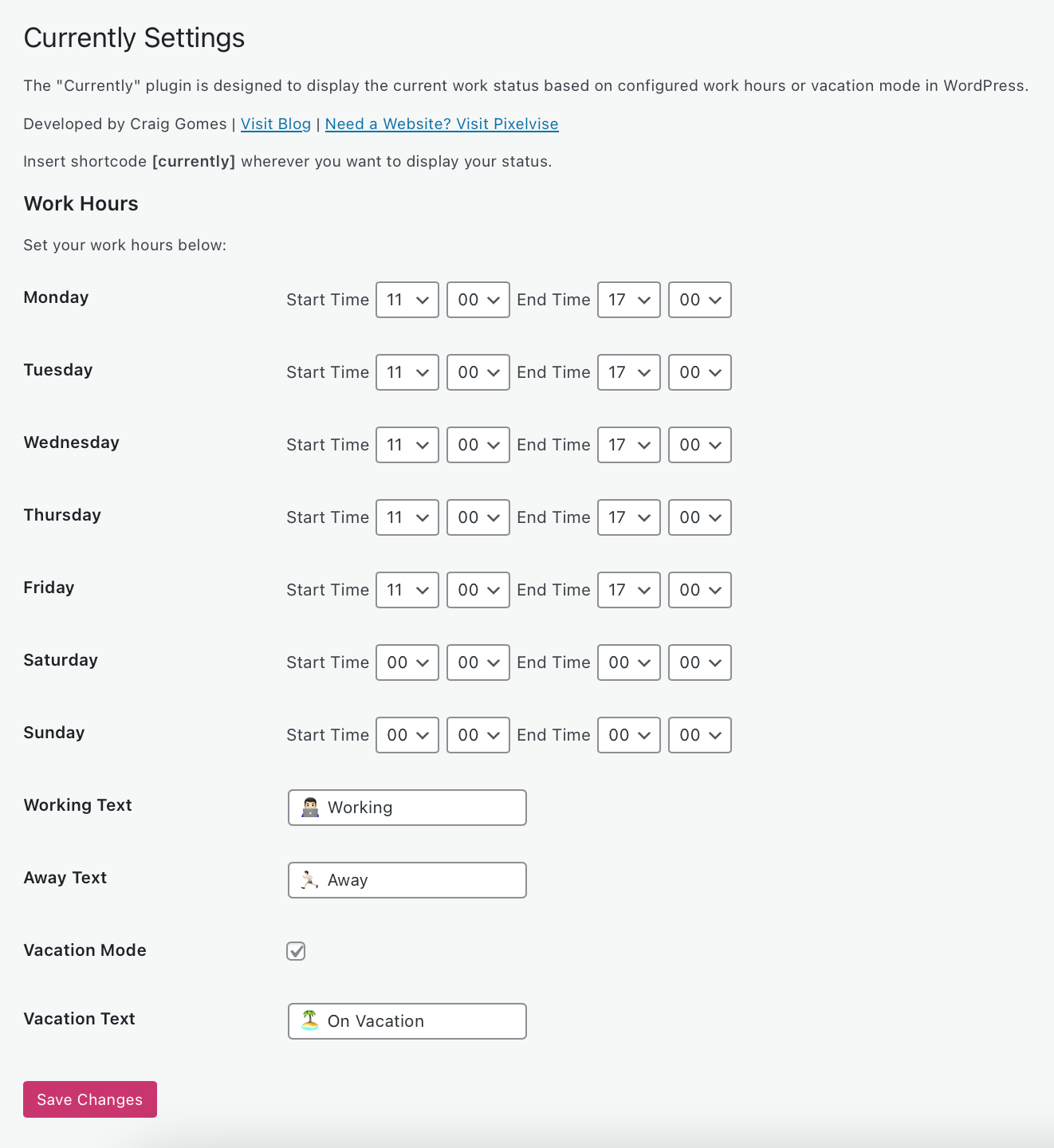
    Status update graphic with work and vacation indicators.WordPress powers over 40% of all websites on the internet. Yesterday, on WP Weekly, I read that Craig Gomes released a new open-source WordPress extension. A seasoned web designer and developer who has recently introduced the Currently Plugin for WordPress.
    This project emerges from Gomes’ decade-long dedication to website craftsmanship. It represents a significant departure into theme design, an area he has enriched with his expertise over the past seven years. His initiative, WabiPress, a minimalistic and efficient WordPress theme, now finds a companion in the Currently Plugin, designed under a GPL license to enhance the user publishing experience.

    This WordPress status plugin is Gomes’ latest contribution to a vibrant community, offering an elegant solution to status management on the world’s leading content management system.

    Key Takeaways

    • Craig Gomes leverages his extensive experience in website design to venture into theme design with WabiPress.
    • The Currently Plugin for WordPress signifies a fresh, user-centric approach to status management on websites.
    • Emphasizing simplicity and effectiveness, the plugin is built to complement Gomes’ WabiPress theme.
    • Gomes ensures key plugin compatibility with major tools, focusing on a seamless, feed-like content structure.
    • Adhering to the GPL license, the open-source WordPress extension is freely available, aiming to support the dynamic needs of the WordPress community.
    • This WordPress status plugin is a strategic addition to WordPress.org’s Theme Store, catering to users’ quest for resource-light and scalable solutions.

    Introducing the Currently WordPress Plugin by Craig Gomes

    In an era where digital efficiency is paramount, Craig Gomes has elevated the user experience on WordPress with the launch of the Currently WordPress Plugin. This innovative tool is crafted to harmonize with Pixelvise’s newly rebranded vision, offering businesses of all scales a streamlined approach to indicating work status display, real-time status updates, and user availability notification.

    The Currently plugin emerges as a vital element in transforming how professionals manage their digital presence. With the ability to update one’s status in real time, the plugin stands as an indispensable tool for improving communication and ensuring seamless interaction within the digital workspace.

    • Provides immediate work status display for enhanced communication.
    • Enable real-time status updates to reflect user’s current engagements.
    • Sends out user availability notifications, improving team coordination.

    As Pixelvise unfolds its rebranded identity, the Currently WordPress Plugin is the embodiment of Craig Gomes’ pledge to simplifying the complexities of online business operations. The feature-rich plugin is a milestone in the digital journey, offering intuitive solutions for a dynamic web environment.

    Craig Gomes released Currently Plugin for WordPress

    The digital landscape for entrepreneurs and content creators continues to evolve, and with the introduction of the Currently Plugin for WordPress by Craig Gomes, website management becomes more personal and dynamic. This revolutionary plugin carves out a niche for those desiring customizable status messages on their platforms. Gomes, a respected developer in the WordPress community, delivers an essential tool that empowers users to convey their real-time availability with style and simplicity.

    Understanding the vital role communication plays in today’s fast-paced online environments, the Currently plugin steps in as an indispensable asset for shortcode integration, offering effortless updates. Whether you are a busy freelancer juggling multiple projects or a business owner stepping away for a break, this plugin ensures that your audience stays informed about your availability without the need for constant manual updates.

    • Effortlessly activate vacation mode for websites to announce extended leave.
    • Use shortcodes to update the website status in a few clicks from anywhere on your WordPress site.
    • Customize messages with unique flairs that resonate with your personal brand or company’s image.

    As remote work and digital nomadism surge in popularity, the ability to maintain clear communication lines with clients and colleagues becomes paramount. The Currently Plugin not only enhances productivity but also enriches the user experience by integrating an intuitive system for status alerts. Unveiled by Craig Gomes, a luminary in the technical sphere of website development, this plugin ensures your website is always communicating effectively, even when you’re not.

    WordPress plugin settings page for work hours configuration.Customization at Your Fingertips: Exploring the Customizable Status Messages
    For WordPress users looking to bring a higher level of personalization to their websites, the Currently Plugin by Craig Gomes offers a suite of options designed to tailor your online presence with precision. This open-source WordPress extension enables seamless updates to your work status, encapsulating both the flexibility and immediacy that dynamic web environments require.

    Personalize Your Work Status: Vacation Mode, Busy Indicator and More

    The wordpress status plugin goes beyond static updates; it affords a degree of customization that conveys your availability or current activity in a more authentic manner. Whether you are temporarily stepping away and need a “busy” indicator or are heading off for a well-deserved break and require a “vacation mode,” these customizable status messages offer the gamut of personalization. This feature is particularly valuable for professionals and businesses aiming to maintain clear communication channels with their audience without the complexity of traditional coding.

    Shortcode Integration: Simplified Insertion Across Your WordPress Site

    The beauty of the Currently Plugin lies in its shortcode integration, a tool that effortlessly embeds real-time status updates anywhere on your site. With a simple line of shortcode, users can update their status in a matter of seconds—streamlining the process of conveying real-time information to site visitors. This function stands out for its user-friendliness, eliminating the often tedious need to navigate the back end of WordPress to make updates. Craig Gomes has ensured that whether you’re updating from desktop or mobile, these status changes are quick and straightforward to implement.

    • Vacation Mode: Indicate your out-of-office status with ease.
    • Busy Indicator: Let visitors know when you’re not immediately available.
    • Meeting Status: Share when you’re in a meeting and when you’ll be free.
    • Lunch Break Alert: Temporarily signal your away time for a break.

    By leveraging these tools, WordPress site owners can build a rapport with their visitors based on transparency and up-to-the-minute communication, thanks to the real-time status updates facilitated by this robust open-source wordpress extension.

    Conclusion

    The unveiling of the Currently Plugin for WordPress by Craig Gomes marks a significant advancement for digital professionals seeking enhanced communication capabilities on their websites. The commitment to open-source software and adherence to the GPL license underscore Gomes’ dedication to the WordPress community, offering a tool that resonates with the principles of collaboration and accessibility. The incorporation of features like vacation mode for websites and flexible work status display ensures that users across various industries can maintain clarity regarding their availability.

    This open-source WordPress extension is more than just a technical achievement; it represents an understanding of the evolving workspace and the need for real-time status updates. Whether for handling customer inquiries, coordinating with team members, or managing personal workflow, the Currently Plugin brings a new level of efficiency and user-friendliness to the WordPress ecosystem.

    As Craig Gomes continues to innovate within the digital arena, the Currently Plugin stands as a beacon of progress, simplifying the way we manage our online presence. For freelancers, entrepreneurs, and businesses alike, this plugin is poised to become an indispensable resource in achieving seamless communication with audiences and associates alike.

    FAQ

    Who is Craig Gomes?

    Craig Gomes is a website designer and developer with over a decade of experience in the industry. He has recently expanded his expertise into theme design, creating the WabiPress WordPress theme, and has developed the Currently WordPress Plugin to enhance user interactions on websites.

    What is the Currently Plugin for WordPress?

    The Currently Plugin for WordPress is an open-source WordPress extension designed by Craig Gomes that allows users to display customizable status messages on their website, indicating their real-time work status and availability.

    Is the Currently Plugin available for free?

    Yes, the Currently Plugin adheres to the GPL license, making it an open-source WordPress extension that is available for free. It complements the ethos of WordPress as a platform that supports and encourages community contributions.

    How does the Currently Plugin improve user availability notification?

    The plugin provides a seamless work status display that users can update in real-time. It helps inform website visitors, clients, and colleagues about the user’s current availability, fostering clear and immediate communication.

    Can the Currently Plugin be customized?

    Absolutely. The Currently Plugin offers customization features, such as the ability to set a vacation mode for your website or indicate when you are busy. These customizable status messages help users tailor their presence to accurately reflect their current activity to visitors.

    How does shortcode integration work with the Currently Plugin?

    The Currently Plugin uses shortcode integration to allow users to effortlessly embed their work status updates across different sections of their WordPress site. The plugin provides a shortcode that can be easily inserted into posts, pages, or widgets for quick and easy updates.

    Is technical knowledge required to use the Currently Plugin?

    No, one of the core benefits of the Currently Plugin is its user-friendly design. The shortcode integration means that even those without technical knowledge can update their status on their WordPress site without any coding.

    Can the plugin be used by businesses of all sizes?

    Yes, the Currently Plugin is designed for individuals, freelancers, solopreneurs, and businesses of all sizes. It’s a flexible tool meant to simplify digital interactions and communications for a wide range of users.

    Where can I download the Currently Plugin?

    The Currently Plugin will be avlible for downloaded from the WordPress.org Plugin Directory after it’s reviewed. Until then, you can get it from the Craig Gomes Website.

  • Optimize Your Site with LiteSpeed Webserver & Plugin

    Optimize Your Site with LiteSpeed Webserver & Plugin

    As a website owner aiming to thrive in the competitive digital arena, I’ve learned that speed is not just a luxury; it’s a requirement for success. Imagine delivering content at lightning-fast speeds, reducing those dreaded bounce rates, and climbing the SEO ranks – it’s all possible with LiteSpeed Webserver and LiteSpeed Plugin technology. I’ve witnessed firsthand how implementing LiteSpeed caching can transform the user experience, turning a sluggish site into a high-performance engine. LiteSpeed’s innovative solutions, ranging from event-driven architecture to advanced caching, cater to the needs of various hosting environments, ensuring scalability and reliability for my web projects.

    LiteSpeed technology has revolutionized how I manage traffic spikes, resource distribution, and loading times, making it the backbone of my site optimization strategy. Join me in exploring LiteSpeed’s myriad benefits, as we gear up to harness its full potential for any online platform.

    Key Takeaways

    • LiteSpeed Webserver dramatically enhances website performance with its cutting-edge caching solutions.
    • Adopting LiteSpeed Plugin accelerates WordPress sites, improving user experience and SEO results.
    • The compatibility of LiteSpeed technology with various hosting control panels facilitates easy integration and management.
    • Pre-installed LiteSpeed Cache plugin simplifies the optimization process for website owners.
    • LiteSpeed’s event-driven architecture manages high traffic efficiently, reducing the need for excessive resources.
    • Through advanced caching functionality, LiteSpeed delivers dynamic content swiftly and effectively.

    The Importance of Website Speed and How LiteSpeed Enhances SEO

    Website speed is intrinsic to the SEO ranking of modern websites. It impacts SEO rankings and users’ first impressions of a site’s credibility and quality. As a copywriting journalist, I understand the critical role of a swift and responsive website in retaining visitor attention and converting clicks into customers. In this regard, the LiteSpeed WordPress plugin and the LiteSpeed cache plugin emerge as pivotal tools that significantly amplify website performance and refine the overall user experience.

    Understanding Website Performance and User Engagement

    A seamless digital experience is what every user seeks when they visit a website. High-performance websites engage users better and encourage them to interact with your content, whether multimedia resources or e-commerce platforms. It’s about ensuring prompt webpage loading, which, in effect, preserves the users’ interest and encourages prolonged interaction with your site. Caching is a splendid technique that the LiteSpeed plugin leverages, which effectively minimizes load times and keeps users engaged.

    Direct Impact of LiteSpeed on Website Loading Times and Bounce Rates

    I’ve observed numerous websites transform their user retention metrics by implementing the LiteSpeed cache plugin. Sites that lag during peak traffic not only disrupt the user experience but also lead to increased bounce rates. LiteSpeed technology trims these critical loading times, reducing visitor abandonment and potentially increasing dwell time and engagement—critical metrics that search engines interpret favorably.

    Correlation Between Page Speed, Traffic, and Conversions

    The correlation between page speed, traffic, and conversions is undeniable. Faster page loads are directly linked to better conversion rates. It’s the very foundation of an optimized online presence. This is where LiteSpeed’s prowess shines. Sites leveraging this technology boost their SEO ranking potential, elevating their visibility and incoming traffic and laying the groundwork for a higher conversion rate.

    • Quick page responses enhance user satisfaction.
    • Improved SEO rankings lead to increased organic traffic.
    • More significant traffic and outstanding performance naturally foster a higher conversion potential.

    Here’s a concise illustration of the benefits LiteSpeed technology offers to your website:

    Feature Benefits
    Cache Management Reduces server load, improving response times.
    Image Optimization Accelerates loading times via efficient image compression.
    CDN Integration Ensures global content delivery with minimal latency.
    CSS/JS Modification Enhances frontend loading speed and browser rendering performance.

    In my professional experience, optimizing with the LiteSpeed WordPress plugin isn’t just about speed—it’s an investment in creating an optimal digital environment that fosters business growth and a steadfast user base. Thus, the LiteSpeed cache plugin becomes indispensable for any WordPress site aiming to excel in user experience and organic search performance.

    Introducing LiteSpeed Webserver and Its Event-Driven Architecture

    In the competitive realm of web hosting, the LiteSpeed server has emerged as a top-tier solution primarily due to its sophisticated event-driven architecture. Unlike traditional web servers that rely on a process-driven or thread-based structure, LiteSpeed uses an event-driven approach that significantly reduces resource consumption and enhances scalability. It’s particularly effective under high-traffic loads, positioning LiteSpeed as an industry leader in efficiency and performance.

    Beyond Apache: The Advantages of LiteSpeed’s Built-in Apache Replacement

    Transitioning to LiteSpeed Web server presents a compelling case for those accustomed to Apache. Not only does this powerhouse server incorporate a high-speed, event-driven architecture, but it also offers seamless compatibility. With its native .htaccess support, organizations can effortlessly switch to LiteSpeed without modifying their existing Apache configurations, thus guaranteeing a drop-in replacement with an immediate performance boost.

    LiteSpeed Web Server Editions: Enterprise and OpenLiteSpeed

    LiteSpeed is available in two distinct editions, each designed to cater to different web hosting environments’ unique needs. LiteSpeed Enterprise is the go-to choice for commercial hosting that supports multiple websites, automating tasks like .htaccess file adjustment without restarting the server—crucial for uninterrupted service. Conversely, OpenLiteSpeed offers an open-source alternative for more minor or singular site installations, though it requires a restart for .htaccess changes. Both editions harness the robust capabilities of LiteSpeed’s event-driven architecture to deliver unmatched performance.

    Whether it’s the open-source flexibility of OpenLiteSpeed or the robust, comprehensive feature set of LiteSpeed Enterprise, my in-depth exploration showcases each solution’s strengths. As a web server engineered to handle the dense and diverse traffic patterns of the modern web, LiteSpeed stands tall with an exceptional ability to process hundreds of thousands of connections efficiently, driving industry standards ever higher. It’s no wonder why the LiteSpeed server has swiftly risen to prominence in the hosting world.

    Unlocking the Full Potential of LiteSpeed Cache for Dynamic Content

    My exploration of LiteSpeed Technologies delves into a remarkable feature of their offering – LiteSpeed Cache. As a powerhouse for dynamic content optimization, LiteSpeed Cache stands as an exceptional server-level cache mechanism. It captivates with its ability to expedite web page loading, a critical component for modern websites that crave speed and efficiency. Who wouldn’t want their content delivered at lightning speeds, enhancing user experiences and potentially elevating search engine rankings?

    LiteSpeed’s unique server-level cache capabilities ensure a seamless and rapid content delivery mechanism. This is exceptionally tailored for dynamic sites where content changes frequently and requires an intelligent cache solution that can intelligently invalidate and update itself. LiteSpeed Cache fits this role perfectly, demonstrating a keen understanding of the balance between performance and freshness of content.

    Here’s an introspective look at how LiteSpeed Cache finesse incredible page speeds:

    • It serves previously cached content instantaneously, reducing the wait time for information retrieval.
    • Cache management is crafted exquisitely within the LiteSpeed server environment, optimizing resources most effectively.
    • Dynamic content is optimized without compromising on interactivity, thanks to the exemplary engineering by LiteSpeed Technologies.

    In my examination, I’ve found that the efficacy of LiteSpeed’s caching solution becomes even more pronounced when dealing with high-traffic sites. The impact of LiteSpeed Cache on such websites is not just improvement in loading times; it manifests in the robustness of the site during peak loads and in enhancing the overall user experience.

    Feature Description Benefit
    Server-Level Full-Page Cache Caches the entire webpage at the server level Significantly reduces time to first byte (TTFB)
    Edge Side Includes (ESI) Allows for partial caching of webpages Dynamic features remain interactive while still benefiting from cache
    Tag-Based Smart Purge Automatically purges cache for updated content Keeps content fresh without manual intervention
    Private Cache for Logged-in Users Personalized caching for individual users Enhances user experience in membership sites and forums

    Through my research, LiteSpeed Cache isn’t just about accelerating websites; it’s a robust ecosystem tailored for dynamic content optimization. In this busy digital age, every second matters, and LiteSpeed Cache offers the advantage of time on the web.

    LiteSpeed Cache is a pivotal tool for web admins and businesses to amplify their online presence. The transformative potential it unlocks for dynamic websites is awe-inspiring and warrants serious consideration.

    Implementing the LiteSpeed Cache Plugin on WordPress Platforms

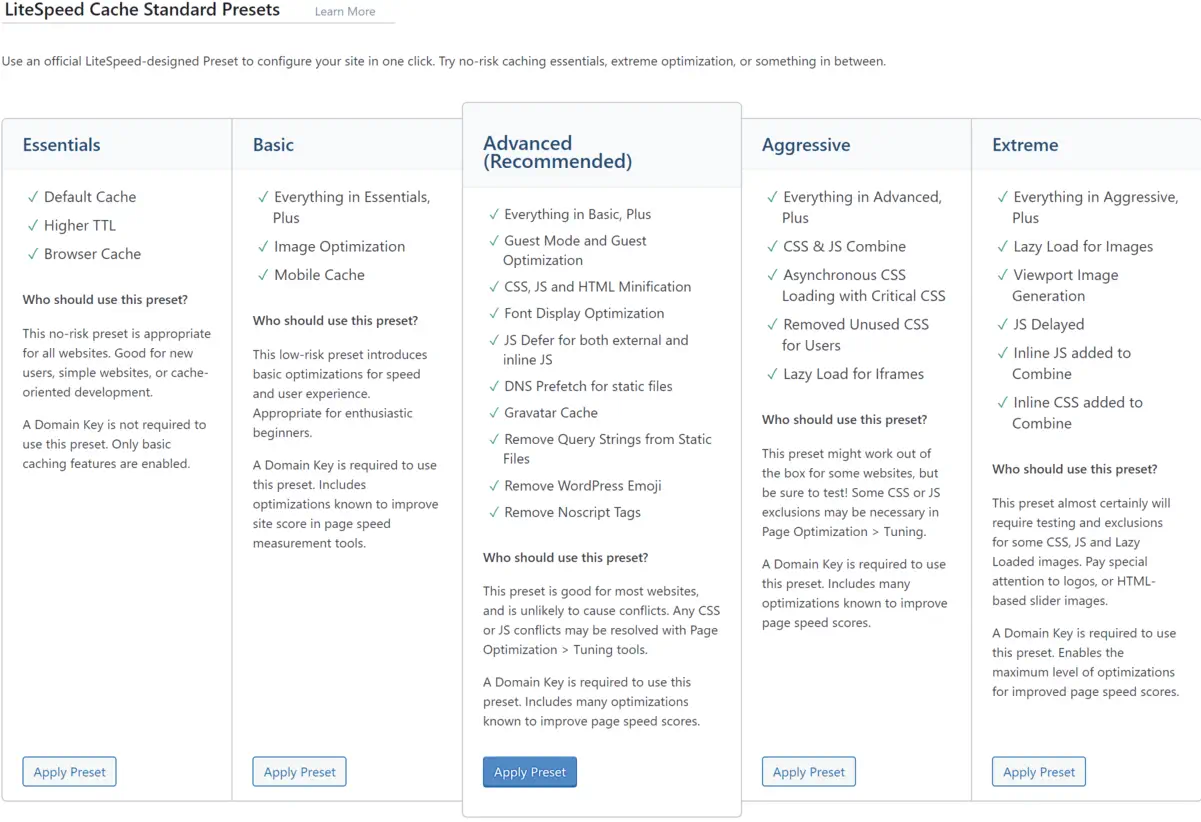
    Screenshot of LiteSpeed Cache preset options.

    When it comes to enhancing your WordPress site performance, installing and configuring the LiteSpeed cache plugin can be a game-changer. With LiteSpeed’s cutting-edge caching technology, fine-tuning your online presence for speed and efficiency is just a few steps away. I want to guide you through adding LiteSpeed’s power to your site.

    Simple Steps to Install LiteSpeed Cache Plugin for WordPress

    The journey to a faster WordPress begins with a straightforward LiteSpeed Cache plugin installation. After logging into the WordPress dashboard, navigate to the Plugins section—a quick search for ‘LiteSpeed Cache’ yields the desired plugin. With a single click on ‘Install Now’ followed by ‘Activate,’ the plugin is ready to contribute to your site’s excellent performance.

    Configuring LiteSpeed Plugin for Optimal Results

    The real power of the LiteSpeed cache for WordPress is unlocked through proper configuration. By ensuring that the plugin is set to update automatically, you are keeping your site equipped with the latest advancements from LiteSpeed. Adding a QUIC.cloud domain key can mark a considerable leap in cache synchronization with CDN services while enabling guest mode facilitates immediate access to the cached pages, reducing load times significantly. Tailoring these settings to align with your web content strategy can profoundly impact your site’s efficiency and speed.

    Testing and Comparing Performance on GTmetrix

    After configuring the LiteSpeed plugin for your WordPress site, the proof of improvement lies in performance testing. Utilizing platforms like GTmetrix, I’ve assessed the impact on LiteSpeed’s cache technology by comparing before and after results. The improvements are tangible, with GTmetrix reporting enhanced loading times and better scores across various performance matrices. These changes testify to the LiteSpeed plugin’s potency in elevating WordPress site performance.

    Advanced Optimization Features of the LiteSpeed Plugin

    Optimizing web performance is a multifaceted endeavor where every millisecond counts. I gravitate towards LiteSpeed optimization for its sophisticated capabilities that take website efficiency to the next level. In this section, we’ll dive into the nuanced features of the LiteSpeed Cache plugin that provides comprehensive optimization strategies to web developers and site owners looking to excel in site performance and user experience.

    Discussion on Image, CSS, and JS Optimization

    Initiating with image optimization, this feature compresses images without compromising quality. I have discovered that such compression significantly reduces page load times, enhancing the user experience, particularly for those with slower internet connections. The CSS and JS optimization process also lends itself to a sleeker content delivery. By minimizing these files, pages render faster, reducing user wait time and contributing positively to SEO metrics.

    Moving further into the intricacies, CSS optimization involves the removal of unnecessary spaces, comments, and line breaks from CSS files, condensing them without changing the functionality. Similarly, JS optimization reduces the size of JavaScript files through techniques like minification and combining multiple files into one. These granular details turn an ordinary online encounter into an immersive digital journey.

    Incorporating CDN Integration for Enhanced Global Delivery

    Another cornerstone of LiteSpeed optimization is its CDN integration. Employing a CDN is akin to establishing a global expressway for your content. Data is stored in multiple locations around the globe, ensuring that regardless of a user’s location, the content is delivered from the nearest server. This accelerates content delivery and can decrease server load and save bandwidth.

    For my part, I’ve noticed CDN integration’s tangible impact on international traffic; the enhanced reachability has a ripple effect, expanding audience engagement and retention.

    Customizing Cache Settings for Targeted Performance Gains

    Finally, the meticulous customization of cache settings within LiteSpeed tailors to the intricacies of a website’s unique needs. By adjusting these settings, I can pinpoint specific performance bottlenecks, ensuring that each web page is optimized for its intended purpose. Whether e-commerce, blogging, or multimedia showcases, tailored cache settings guarantee a vibrant and responsive user interface.

    Indeed, each of these advanced features—image, CSS, and JS optimization, CDN integration, and customized cache settings—put LiteSpeed optimization in a league of its own.

    LiteSpeed Technology: The Leading Edge in Webserver Optimization

    My experience as a web developer has allowed me to see firsthand the transformative effects of LiteSpeed web server optimization. By implementing LiteSpeed technology, I’ve consistently witnessed performance tuning take websites to new heights, ensuring they operate flawlessly even during peak traffic periods. Let me take you through some tangible benefits that LiteSpeed offers regarding webserver performance tuning.

    • Caching Capabilities: LiteSpeed’s technology is second to none, offering dynamic content caching that turns your website into a high-speed expressway.
    • Traffic Management: With LiteSpeed, your webserver can withstand the digital equivalent of rush hour without breaking a sweat. More resources for processing means less worry about site performance.
    • Alleviating Load: When complex tasks like heavy MySQL queries or resource-hungry plugins slow down your site, LiteSpeed technology balances the load and keeps things running smoothly.

    These key features prevent the typical bottlenecks experienced with other servers and guarantee a sturdy platform for web properties to grow. Outlined below is a comparative look highlighting the efficiency of LiteSpeed technology:

    Feature LiteSpeed Benefit Traditional Webserver
    Response Time Substantially reduced Often variable
    High Traffic Handling Exceptional performance Could be compromised
    Resource Usage Optimized efficiency Higher consumption
    Resource-Hungry Tasks Streamlined processing Potential for slowing
    Dynamic Content Delivery Accelerated loading Typically slower

    I’ve observed that websites optimized with LiteSpeed consistently deliver content faster, respond to user interactions without delay, and handle simultaneous visitors gracefully. It’s not just about keeping pace; it’s about setting the pace in a competitive online ecosystem.

    With LiteSpeed technology, I’m confident that the ceiling for webserver performance has been raised, allowing me and my clients to aim for and achieve unprecedented levels of web efficiency.

    Conclusion

    As we conclude, I want to emphasize the substantial benefits brought forth by LiteSpeed technologies within the realm of WordPress hosting. At the heart of modern-day site optimization, integrating the LiteSpeed server and LiteSpeed WordPress plugin has proven pivotal, boosting site performance and ensuring exceptional resource efficiency. In my evaluation, this harmonious blend of technologies facilitates significantly reduced loading times, propels SEO rankings, and fosters a superior user experience.

    Summarizing the Benefits of LiteSpeed Technologies for WordPress Hosting

    Throughout this exploration, the capabilities of LiteSpeed technology have reshaped my perspective on site fidelity and performance. Its aptitude in effortlessly serving up web pages and managing surging traffic while keeping resource use in check establishes it as an indispensable asset for WordPress hosting. The benefits of LiteSpeed, ranging from amplified server response times to improved SEO outcomes, have provided site administrators with the tools needed for fostering thriving, agile online spaces.

    Final Thoughts on the Importance of Site Optimization and Upcoming Trends

    Looking ahead, ongoing site optimization will continue to be a cornerstone of digital success. With emerging trends and evolving user expectations, the foresight in adopting LiteSpeed technologies could not be more timely. As we navigate the dynamic digital landscape, leveraging LiteSpeed server and plugin offerings is not just a strategic move but a vital one, ensuring WordPress sites remain resilient and ahead of the curve in a fiercely competitive market.

    FAQ

    What is LiteSpeed Webserver, and how does it benefit my WordPress site?

    LiteSpeed Webserver is a high-performance, event-driven web server that offers significant advantages in terms of speed and scalability for WordPress sites. Its optimized use of server resources helps minimize loading times, thereby improving user experience and SEO rankings.

    How does LiteSpeed Cache improve website performance?

    LiteSpeed Cache, a feature of LiteSpeed technology, enhances website performance by storing static snapshots of dynamic content and serving them to visitors at a much quicker rate than can be achieved by generating pages on the fly. This reduces server load and speeds up page delivery.

    Can LiteSpeed Cache and Plugins replace Apache, and are they compatible?

    Yes, LiteSpeed is designed to seamlessly replace Apache without changing the existing .htaccess configuration, making it fully compatible with Apache hosting environments. This ensures an easy transition to LiteSpeed for improved performance without compromising compatibility.

    What editions of LiteSpeed Web Server are available?

    There are two main editions of LiteSpeed Web Server: the Enterprise version, designed for hosting multiple websites with automatic .htaccess file management, and OpenLiteSpeed, which is the open-source version for individual sites and requires a server restart for .htaccess changes.

    What is dynamic content optimization, and how does LiteSpeed Cache handle it?

    Dynamic content optimization refers to the process of improving the loading and serving of web pages that are dynamically generated. LiteSpeed Cache handles this by caching the dynamic pages, thereby reducing the load on the server and quickly rendering pages to visitors.

    How do I install the LiteSpeed Cache Plugin on my WordPress site?

    You can install the LiteSpeed Cache Plugin by logging into your WordPress dashboard, navigating to Plugins, searching for LiteSpeed Cache, and installing and activating the plugin. Configuration settings can be adjusted to customize the caching and optimization features.

    What key performance metrics should improve after configuring LiteSpeed Cache?

    After adequately configuring LiteSpeed Cache, you should see improvement in key performance metrics such as load times, server response times, Time to First Byte (TTFB), and overall scores in performance testing tools like GTmetrix and Google PageSpeed Insights.

    Does the LiteSpeed Cache Plugin offer features beyond page caching?

    Yes, the LiteSpeed Cache Plugin offers advanced optimization features such as CDN integration, image optimization, and CSS/JS optimization, which go beyond standard page caching to enhance website performance further.

    Is CDN integration part of the LiteSpeed Cache solutions?

    Yes, CDN integration is a part of LiteSpeed’s caching solutions, which helps deliver content more efficiently to users worldwide by reducing geographical latency and offloading bandwidth from the origin server.

    How does LiteSpeed handle resource-intensive plugins or heavy MySQL queries?

    LiteSpeed technology helps optimize the handling of resource-intensive plugins or heavy MySQL queries by efficiently managing server resources. This streamlining enables the server to allocate more processing power to those demanding tasks, thus maintaining performance even under strain.

    Source Links

  • Exploring the Future with Headless WordPress

    Exploring the Future with Headless WordPress

    As we navigate the digital landscapes, our quest for dynamic, future-proof websites has led us to embrace the pioneering realm of Headless WordPress. This powerful iteration of the well-established content management system (CMS) is revolutionizing how we think about website development, carving out a new frontier for creators and developers alike. By decoupling the WordPress backend via its robust API, we’re not just keeping pace with technological advancements but setting the stage for them.

    Our journey into this new paradigm is charged with the promise of limitless creativity and performance. The traditional boundaries that once confined our online experiences are now dissolved, giving rise to a CMS for headless websites that redefine what is possible. With Headless WordPress, we wield the tools to craft unparalleled digital narratives, all while ensuring that the foundational power of WordPress propels us forward.

    In recognizing the shift towards this decoupled architecture, we’ve committed ourselves to fully leveraging the WordPress backend API, ensuring our websites are not only built for today but are primed for the developments of tomorrow. Through this lens, we invite you to discover the potential that Headless WordPress holds—for us, for you, and for the future of web presence.

    Key Takeaways

    • Headless WordPress fosters future-proof websites poised for technological evolution.
    • Decoupled WordPress architecture invites innovation and superior user engagement.
    • Utilizing the WordPress backend API enhances our capability to build robust digital experiences.
    • Embracing CMS for headless websites ensures scalability and creative freedom.
    • Our commitment to headless solutions marks the dawn of a new era in web development.

    Defining Headless WordPress and Its Core Advantages

    As the digital landscape evolves, developers seek solutions that break away from traditional limits, embracing systems like headless CMS for WordPress. The headless approach offers new dimensions of flexibility and security, benefitting developers and content creators alike. Let’s delve into what makes headless WordPress an innovative shift in content management strategy.

    What Is Headless WordPress?

    Headless WordPress is a content management system that operates without a frontend, delegating the presentation layer to external applications. This approach utilizes the WordPress REST API, enabling the backend to serve content to many different frontends, from mobile apps to high-performance websites. Using WordPress as a headless CMS, developers can harness the power of popular frameworks like React or Vue.js to deliver enhanced user experiences.

    The Flexibility and Scalability of Headless Solutions

    The architecture of a headless CMS development inherently supports expansion and innovation. Decoupled WordPress systems separate concerns between the content repository and the presentation layer, offering the maneuverability needed to craft unique frontend experiences. Scalability is readily achieved, as headless setups can effortlessly handle increased demand, propelling businesses toward new heights without compromising performance or aesthetic coherence.

    Enhancing Security with a Decoupled System

    Regarding digital security, the enhanced security offered by headless approaches is not trivial. A decoupled WordPress architecture significantly reduces the risk associated with front-end attacks. Since the content delivery and management are separated, vulnerabilities typically exposed in more traditional WordPress setups are diminished, providing an extra layer of security and peace of mind for businesses and developers alike.

    Technical Insights: Implementing Headless WordPress

    Headless WordPress API Integration

    When approaching a headless WordPress setup, we begin with a foundational installation of WordPress to harness its backend’s robust content management capabilities. The journey to a fully operational headless environment relies heavily on the WordPress REST API, which facilitates a seamless bond between the backend and the chosen frontend landscape.

    Enabling the WordPress backend API is crucial. It acts as a dispatcher, conveying content to many frontends—web, mobile, or any other application interfacing with WordPress. This API-driven architecture demands a strategic, thoughtful implementation to ensure smooth retrieval and display of content, molded to fit the unique requirements of each digital experience we craft.

    By leveraging the REST API, WordPress evolves into a decoupled powerhouse, allowing us to dictate the frontend experience from any technological platform, unfettered by traditional WordPress theme constraints.

    Below is an outline of the critical steps in our process:

    1. Installation and setup of a clean WordPress instance.
    2. Activate and configure the WordPress REST API.
    3. Selection and preparation of the frontend technology stack.
    4. Ongoing development and integration of RESTful API calls.
    5. Iterative testing and customization phases to refine user interactions.

    Ahead of the curve, this configuration frees us from the trappings of monolithic architectures and places us squarely on the cutting edge of web development.

    In the table below, we compare the traditional WordPress flow with our headless WordPress approach:

    Traditional WordPress Headless WordPress
    Frontend tightly linked with the backend Backend and frontend are completely separated
    Limited to PHP and WordPress themes for frontend Freedom to use any frontend technology stack
    Content served directly from WordPress Content delivered through REST API calls
    Plugin-dependent extensions API-driven interactions allow for scalable extensions

    We’ve entered a new realm of possibilities with our headless approach, pushing the boundaries of what we can achieve with WordPress as a backend. It’s more than a mere trend; it is a resilient framework for future-proof digital platforms that call for agile, secure, and innovative solutions.

    The Future-Proof Benefits of a Decoupled CMS

    Performance optimization in a decoupled CMS

    The evolution of content management systems into decoupled architectures has marked a new era in web development. Not only do these systems offer enhanced agility, but they also pave the way for significant improvements in website maintenance and future scalability. Weaving in the principles of performance optimization and faster loading times, they serve as the backbone for creating a tailored user experience that can readily evolve with technology adaptation, ultimately future-proofing web entities against the ever-changing digital landscape.

    Speed and Performance Optimization

    A decoupled CMS infrastructure streamlines the user experience with rapid content delivery. With a focus on performance optimization, it eliminates unnecessary bulk, narrowing down front-end components to those essential for functionality and faster loading times. This refined approach ensures that users enjoy a seamless interaction with web applications, even during peak traffic conditions.

    Creating a Tailored User Experience

    By liberating the front-end development from a fixed presentation layer, we leverage the freedom to design custom interactions unique to our brand. This level of tailored user experience meets specific visitor needs and fosters a deeper connection with our audience. Our imaginative capabilities are boundless through headless WordPress, shaping experiences as bespoke as our vision.

    Staying Ahead with Technology Adaptation

    As innovators in the digital space, we recognize the importance of keeping pace with emerging technologies. The modular nature of a decoupled CMS facilitates technology adaptation, allowing us to swiftly incorporate cutting-edge features such as AI, AR, and IoT. This adaptability is not just about staying current; it’s about future-proofing our digital offerings to ensure longevity and relevance in a competitive market.

    Feature Benefit Impact on User Experience
    Performance Optimization Enhanced loading times and efficiency Reduced wait times, increased satisfaction
    Custom Interactions Unique branding opportunities Memorable, personalized engagement
    Technology Adaptation Integration of new digital innovations Continually evolving and dynamic content

    Real-World Applications of Headless WordPress

    At the core of modern web development, Headless WordPress stands as a testament to flexibility and performance across a broad spectrum of applications. Its most notable real-world implementations offer transformative outcomes for businesses and users alike. From robust e-commerce with headless WordPress platforms that provide finely-tuned shopping experiences to streamlined content management for mobile apps and dedicated interfaces for membership sites, the practical examples of Headless WordPress are as diverse as they are effective.

    Below, we’ve curated a selection of headless WordPress examples to showcase its potential in live environments:

    • E-Commerce Platforms: The flexibility of decoupled WordPress is revolutionizing the e-commerce sector, offering highly customizable shopper journeys and interactive UI elements, all tailored to enhance customer engagement.
    • Mobile Applications: For applications on the go, headless architecture provides a consistent and efficient system for content delivery, unifying user experience across diverse mobile ecosystems.
    • Membership Sites: Membership portals leverage headless setups to empower users with personalized dashboards, specialized content access, and seamless user account management.

    These examples showcase not just versatility but the strategic value of adopting a headless approach:

    Industry Benefits of Headless WordPress
    E-Commerce Custom shopping experiences, dynamic product displays, and enhanced performance during sales or high-traffic events.
    Mobile Apps Uniform content distribution, faster load times, and the ability to push updates without app store approvals.
    Membership Sites Personalized content based on user roles, secure data handling, and greater control over member interaction.

    Our understanding deepens when we consider these applications in context. Each sector harnesses the inherent strengths of Headless WordPress—speed, security, and scalability—to meet specific needs that standard WordPress configurations may not sufficiently address. The result? Sophisticated solutions that continue to push the boundaries of what’s possible in the digital realm.

    Conclusion

    In pursuing innovative CMS solutions, the momentum has decisively shifted towards Headless WordPress, charting a decoupled web development roadmap that promises to redefine how we conceive and deploy web content. This freedom allows us to innovate and tailor digital experiences that meet and exceed expectations for speed, performance, and engagement.

    Our commitment to harnessing headless WordPress is rooted in its capacity to deliver a genuinely future-proof foundation for web development. As we embrace its potential, we acknowledge the challenges inherent in adopting this approach; there is a learning curve, and complexities arise. Yet, the benefits far outweigh the initial hurdles. We are now empowered to create performance-driven sites and applications that are responsive and singular in their interaction and design.

    As we look toward the horizon of web technologies, it’s evident that the flexibility and robustness bestowed by Headless WordPress position us to adapt swiftly and effectively. The digital landscape is perpetually evolving, and through this advanced CMS, our digital platforms are well-equipped to grow alongside it, ensuring that our presence online remains cutting-edge and resolute in the face of perpetual change.

    FAQ

    What Is Headless WordPress?

    Headless WordPress refers to a content management system (CMS) configuration where a website’s front end, or the presentation layer, is decoupled from the WordPress back end. This allows developers to use WordPress as a headless CMS, managing content through the back end and delivering it to any front end via the WordPress REST API. It provides greater flexibility in designing the user experience across different digital platforms.

    What are the Core Advantages of Using WordPress as a Headless CMS?

    WordPress as a headless CMS offers several advantages, such as enhanced flexibility and scalability, better security, and the ability to create a tailored user experience. It also allows for performance optimization, with faster loading times, and facilitates the adoption of emerging technologies and future-proofing digital platforms.

    How Does a Decoupled System Enhance Security?

    A decoupled or headless system enhances security by reducing the potential attack surface. Since the front end is separate from the back end, potential vulnerabilities in themes or front-end plugins don’t affect the content management and storage systems, thereby minimizing the risk of security breaches.

    What Are the Flexibility and Scalability Benefits of Headless WordPress?

    Headless WordPress offers unprecedented flexibility and scalability for web applications, enabling developers to use any front-end technology stack. This means they can build fast, responsive interfaces that can be scaled up easily as user traffic grows. Additionally, it allows for creating custom experiences for different devices or platforms without altering the back-end infrastructure.

    How is Performance Optimized in a Decoupled WordPress Architecture?

    Performance is optimized in a decoupled WordPress architecture because the front end is purpose-built and streamlined for efficiency. Without the overhead of traditional theme rendering, decoupled front ends can serve content faster, cache more efficiently, and provide a better user experience, especially when dealing with high traffic.

    What Does Creating a Tailored User Experience Entail in the Context of Headless WordPress?

    Creating a tailored user experience in the context of headless WordPress involves customizing the front-end presentation independent of the back end. Designers have more control over how the content is displayed, which allows them to design unique user interfaces and interactions that align with specific brand standards or customer expectations.

    How Does Technology Adaptation Contribute to Future-Proofing with Decoupled CMS?

    Technology adaptation contributes to future-proofing in a decoupled CMS scenario by allowing developers to quickly and easily incorporate new technologies and tools, such as AI, AR, and IoT, into their front end. This agility ensures the digital experience stays current with web trends, offering enhanced functionality and engagement without overhauling the back-end content system.

    What Are Some Real-World Applications of Headless WordPress?

    Real-world applications of headless WordPress are diverse and include e-commerce platforms that require personalized shopping experiences, mobile applications benefiting from consistent content delivery, and membership sites featuring custom-tailored dashboards. These varied uses demonstrate the versatility and adaptability of headless WordPress in fulfilling specific digital needs across a broad range of industries.

  • Duplicate a Page in WordPress Easily & Quickly

    Duplicate a Page in WordPress Easily & Quickly

    Creating website
    Creating website

    Duplicating a page in WordPress can be a time-saving technique that helps streamline your content creation workflow. Whether you want to create a replica page for A/B testing, save design time for large sites, or maintain consistency in your pages, duplicating a page can be helpful.

    In this article, we will discuss the need to duplicate WordPress pages, how to copy a page in WordPress, and provide tips and best practices for page duplication.

    Key Takeaways:

    • Duplicating a page in WordPress can save you time and effort in content creation.
    • It can be used for A/B testing, design efficiency, and brand consistency.
    • You can duplicate a page in WordPress using built-in features or plugins.
    • Selecting the right plugin and configuring settings are essential for optimal duplication.
    • Modifying and personalizing duplicated pages allows customization according to your needs.

    Understanding the Need for Duplicating WordPress Pages

    Duplicating WordPress pages plays a crucial role in efficient content management. By duplicating pages, users can quickly create similar pages for various purposes, ensuring a seamless workflow and consistent branding. Understanding the need for page duplication allows users to make informed decisions and maximize the benefits of this feature while avoiding duplicate content issues.

    The Role of Page Duplication in Content Management

    Page duplication serves as a valuable asset in content management for WordPress websites. It offers a hassle-free way to create replica pages, allowing users to:

    • Conduct A/B testing: Duplicating pages enables users to test different versions of a webpage to determine which performs better in conversion, engagement, or user experience.
    • Enhance design process efficiency: By duplicating existing pages, users can save time and effort in designing new pages from scratch, especially in cases where consistent design elements are required.
    • Maintain consistent branding: Duplicating pages ensures that the branding elements, layout, and structure remain consistent across multiple pages, aligning with the overall brand identity and user experience.

    Scenarios That Require the Duplication of a WordPress Page

    Several scenarios necessitate the duplication of WordPress pages. These include:

    • Create landing pages for different campaigns: Duplicating pages allows users to quickly generate multiple landing pages tailored to specific marketing campaigns or target audiences.
    • Replicate template pages: Users can duplicate them to maintain a consistent structure and design across various sections or categories within their website.
    • Localize content: Duplicating pages can be beneficial when translating content into different languages or tailoring it for specific regions while keeping the original page intact.

    Avoiding Duplicate Content Issues During Duplication

    Although duplicating pages offers numerous advantages, it is essential to be aware of potential duplicate content issues that may arise. To avoid these issues, consider the following:

    • Modify page content: Ensure that the duplicated pages have unique and relevant content, avoiding the use of duplicate text or images.
    • Set canonical URLs: Configure canonical tags to inform search engines about the original page, preventing indexing of duplicate pages and potential penalties for the same content.
    • Utilize 301 redirects: If necessary, redirect duplicate pages to their original counterparts using 301 redirects, indicating to search engines the preferred page to crawl and index.

    How to Duplicate a Page in WordPress

    Duplicating a page in WordPress can be done using different methods and plugins. One approach is to use the built-in page duplication feature in WordPress. This can be accessed through the dashboard by selecting the desired page, clicking on the ellipses menu, and choosing the “Copy page” option.

    Another method is to use plugins designed explicitly for duplicating pages, such as the Duplicate Page plugin or the Divi Builder. These plugins provide additional functionality and customization options when duplicating pages.

    Utilizing these methods and plugins allows you to duplicate pages in WordPress quickly and efficiently, saving time and effort in your content creation process.

    Tips and Best Practices for Page Duplication in WordPress

    Selecting the Right Plugin for Duplicating Pages

    Selecting the right plugin can make all the difference when duplicating pages in WordPress. With numerous options available, it is essential to consider factors such as compatibility, functionality, and user reviews. A reliable plugin seamlessly integrates with WordPress, ensuring a smooth and efficient duplication process.

    Here are a few popular plugins to consider:

    • Duplicate Page: This plugin allows you to duplicate pages with a single click. It is lightweight, user-friendly, and compatible with most WordPress themes.
    • Yoast Duplicate Post: This plugin enables page duplication and allows the option to draft pages for future publishing. It is a versatile tool that offers advanced customization features.
    • Divi Builder: This plugin is an excellent choice if you use the Divi theme. It offers extensive customization options, including duplicating entire layouts and sections.

    Configuring Duplicate Page Settings Optimally

    Once you have selected a plugin, it is crucial to configure the duplicate page settings optimally. This ensures that the duplicated pages are created according to your specific requirements, saving you time and effort in the long run. Some key settings to consider include:

    1. Naming Convention: Choose a naming convention that is clear and identifiable. This could include adding a prefix or suffix to the page title, such as “Copy of” or “- Duplicate”.
    2. Permalinks: Decide whether you want the duplicate pages to have the same permalinks as the original or prefer custom permalinks for each duplicate.
    3. Include/Exclude Content: Determine whether you want to include all content elements from the original page or selectively exclude certain sections, such as comments or meta information.

    How to Modify and Personalize Duplicated Pages

    Once the pages have been duplicated, you can modify and personalize them according to your needs. This allows you to customize the content, design, and settings to create unique pages without starting from scratch. Here are a few tips for modifying and personalizing duplicated pages:

    • Update Content: Review the duplicated page’s content and make any necessary changes or updates to ensure relevance and accuracy.
    • Customize Design: Modify the layout, color scheme, and typography to align with your branding or specific design preferences.
    • Adjust Settings: Tailor the settings of the duplicated page, such as SEO elements, page attributes, and featured images, to meet your specific requirements.

    By following these tips and best practices, you can make the most of page duplication in WordPress and leverage its power to streamline your content creation process.

    Conclusion

    In conclusion, duplicating a page in WordPress can be a valuable tool for content creators and website managers. It provides an efficient way to create similar pages, streamline workflows, and maintain consistent branding. By understanding the need for page duplication, learning how to duplicate pages effectively, and following best practices, users can significantly enhance their WordPress experience.

    Duplicating pages in WordPress offers numerous benefits. Firstly, it saves time by allowing users to replicate existing pages instead of starting from scratch. This is particularly useful for large sites or when A/B testing is required. Secondly, it ensures consistency in design and branding, making maintaining a unified look throughout the website accessible.

    To duplicate a page in WordPress, users can either utilize the built-in page duplication feature or opt for plugins specifically designed for this purpose, such as the Duplicate Page plugin or the Divi Builder. These plugins offer additional functionality and customization options, allowing users to tailor duplicated pages to their unique requirements.

    To optimize the page duplication process, it is essential to select the right plugin that aligns with your needs, configure duplicate page settings optimally, and modify duplicated pages as required. By following these tips and best practices, users can harness the power of page duplication and improve their WordPress workflow.

    FAQ

    What is the purpose of duplicating a page in WordPress?

    Duplicating a page in WordPress serves various purposes, including A/B testing, design efficiency, and maintaining consistent branding.

    How can I duplicate a page in WordPress?

    There are multiple ways to duplicate a page in WordPress. You can use the built-in duplication feature in WordPress or opt for plugins like Duplicate Page or Divi Builder.

    What do you think I should consider when duplicating pages in WordPress?

    When duplicating pages in WordPress, choosing the right plugin is essential, as configuring duplicate page settings optimally and modifying the duplicated pages to meet your requirements.

    Are there any potential issues with duplicate content when duplicating pages in WordPress?

    Yes, duplicate content can be a concern when duplicating pages. However, you can avoid these issues by following best practices and making necessary modifications.

    How can duplicating pages benefit content creators and website managers?

    Duplicating pages in WordPress offers a quick and efficient way to create similar pages, streamline workflows, and maintain consistent branding, ultimately improving the overall WordPress experience.

  • The Importance of Local Web Design: Why Southern Oregon Businesses Need Local Expertise

    The Importance of Local Web Design: Why Southern Oregon Businesses Need Local Expertise

    Why Southern Oregon Businesses Need Local Website Design Expertise

    For businesses in Southern Oregon, tapping into local website design expertise is not just beneficial; it’s a strategic necessity. Local designers bring a nuanced understanding of the regional market, which is vital for creating websites that appeal directly to the Southern Oregon audience. Their services are highly personalized, ensuring that each website reflects the unique identity of the business it represents. Beyond technical skills, these designers have a genuine connection to the community, often resulting in work that’s done with more passion and dedication. Furthermore, they are well-versed in local SEO practices, giving businesses a competitive edge in local search rankings. Opting for local talent also means contributing to the regional economy, fostering growth and prosperity within the community. Additionally, the proximity of these designers ensures readily available support and quick resolution of any issues, a significant advantage over distant providers. In essence, local website design expertise is a cornerstone for businesses looking to establish a strong online presence in Southern Oregon, marrying regional insights with technical know-how.

    Graphic promoting website design for Southern Oregon businesses.

    A website is more than just an online space; it embodies the core identity of a Southern Oregon business. At Popproxx, we understand how crucial it is to ensure a website’s features closely match the local language and style. For us, the website design for Southern Oregon businesses is an artistic endeavor, with the region’s culture as our inspiration. We focus on crafting websites that are so deeply connected to Southern Oregon that they transform from mere web pages into digital landmarks, symbolic of the area’s unique essence.

    Key Takeaways

    • Local expertise from website designers in Southern Oregon ensures an authentic digital representation of businesses.
    • Understanding Southern Oregon user habits leads to deeply resonant user experiences.
    • Popproxx’s local roots in website design amplify a business’s digital presence within the community.
    • Working with Popproxx aligns Southern Oregon businesses with local website design services that grasp the unique market.
    • An effective online presence tailored by Popproxx can enhance customer engagement and regional relevance.
    • Partnering with local experts is integral for a website that not only attracts but also retains the attention of the Southern Oregon demographic.

    The Importance of Understanding the Local Market for Southern Oregon Businesses

    When it comes to Southern Oregon website development, having an intimate knowledge of the local market is not just beneficial; it’s essential. My work with Popproxx has underscored the undeniable value that such insights bring to the table—especially for small business website design. This deep market understanding translates into websites that not only captivate but also convert, aligning perfectly with the unique consumer behaviors found in Southern Oregon.

    Our professional website design services are tailored to encapsulate the spirit of the region seamlessly. We dive into the fabric of the local community to ensure that each design reflects the nuances that make Southern Oregon distinctive.

    As a local web designer, I recognize that a ‘one-size-fits-all’ approach does not suffice. Each project is a new canvas, painted with the colors of our client’s brand and the culture of their target audience.

    From initial concept through to final design, our grasp of the Southern Oregon market is evident. Below is an illustration of how Popproxx’s insights into regional preferences have successfully guided web development strategies:

    Aspect Traditional Design Popproxx Customized Design
    Color Palette Generic Corporate Colors Vibrant Shades Reflecting Local Landscapes
    Imagery Stock Photos Authentic Local Imagery
    Content Standardized Copy Copy With Local Vernacular and References
    Functionality Basic User Interface Custom Tools Relevant to Local Users
    User Experience Uniform For All Markets Personalized For Southern Oregon Consumers

    My commitment to small business website design in Southern Oregon has not just been about crafting sites that look good, but those that perform well and resonate with a specific audience. Integrating professional website design services with regional insights is not just an advantage—it is the cornerstone of successful online business strategies in this vibrant community.

    Southern Oregon Businesses Local Website Design: Personalized Service Touch

    As the digital landscape becomes more crowded, a personalized service is the hallmark of an exceptional local web design agency. My experience with Popproxx validates that here in Southern Oregon, the infusion of local culture in our web design is vital to crafting an online presence with a personal touch.

    Face-to-Face Interaction and Clear Communication

    I have found that face-to-face meetings allow for clear and direct communication, ensuring that a website’s design conveys the nuances of Southern Oregon’s local culture. This personalized approach by the team at Popproxx transcends the quality offered by larger, more detached design firms.

    Mountain road scenery promoting local web design services.

    Localization of Web Design that Resonates with Regional Culture

    It is a different experience altogether when your web designers not only know the area but also live and breathe the regional ethos. My role in facilitating this localization of web design aims to mirror the vibrant community spirit that makes Southern Oregon so unique.

    Feature Benefits
    Customized Aesthetics Tailored to reflect Southern Oregon’s local beauty and charm
    Cultural Relevance Engages local audience with familiar cues and landmarks
    Community Engagement Encourages interaction by highlighting local events and news

    Teaming up with Popproxx, a local web design agency, I am reminded of their stellar capability to deliver tailored solutions that solidify a business’s roots in this magnificent region of Oregon. Their approach isn’t just about constructing websites; it is about building community pillars in the digital space.

    Local SEO Insights Specific to Southern Oregon

    As a dedicated professional at Popproxx, I have come to understand the importance of mastering local SEO insights for businesses within Southern Oregon. It’s not just about being seen; it’s about creating a meaningful connection with the community through highly targeted content and using localized keywords. We aim to magnify our website design that draws in local traffic and speaks to the heart of what it means to be a part of this vibrant region.

    Leveraging Localized Keywords and Phrases

    At Popproxx, our approach incorporates localized keywords and phrases deeply rooted in Southern Oregon’s local culture. We identify key phrases, notable landmarks, and significant local events familiar to the community, and weave these elements into our clients’ websites. This strategy extends beyond standard SEO practices, aiming to ensure that each brand we collaborate with connects genuinely and effectively with its target audience.

    Connecting with the Community through Targeted Content

    In Southern Oregon, building a relationship with the community goes beyond simple business transactions. At Popproxx, we create targeted content that not only tells a story but also mirrors the community’s values and deeply engages customers. Each article, blog post, and feature is meticulously designed to capture the essence of the region, promoting a feeling of connection and cultivating loyalty among local customers.

    Local SEO tips illustration for entrepreneurs

    My experience has taught me that the future of search engine optimization (SEO) lies in hyper-localization. A seo-friendly website design, which capitalizes on local insights, provides a unique edge in the digital market, especially in a community-centric place like Southern Oregon. By focusing on local relevance, we enable Southern Oregon businesses to excel online and add value to the region’s vibrant digital landscape.

    Benefits of Quick Response Times from Southern Oregon Website Designers

    As someone working with Southern Oregon website designers, Popproxx, in particular, has cemented its reputation for providing impressively quick response times to client needs. It’s clear why local businesses are choosing proximity to their web designers as a savvy strategy for web success.

    Graphic for Southern Oregon Web Design services.

    Local designers offer a level of prompt service that larger, remote firms often need help to compete with. Quick solutions are essential, not just convenient, in the rapid digital world, where any downtime can mean lost business. Popproxx excels in providing swift responses to technical problems or updates, showcasing our dedication to minimizing disruptions.

    Furthermore, the significance of mobile responsive website design must be balanced in our current mobile-first world. The proficiency of Southern Oregon designers in this realm ensures that your website is not only accessible but also optimized for any device. This mobile readiness is critical for maintaining an edge in a competitive market.

    • Quicker turnaround for website maintenance and updates
    • Enhanced communication channels leading to a clear understanding of your business needs
    • Local expertise translates into web designs that reflect the community’s pulse
    • Immediate troubleshooting reduces business downtime significantly

    Choosing a Southern Oregon website design agency translates into a smart business continuity plan. By partnering with Popproxx, companies rest assured that their online presence is entrusted to quick-thinking professionals who deliver time-sensitive solutions with a personal touch, positioning them well above the competition.

    Conclusion

    Reflecting on the synergy between digital presence and regional growth, I’m reminded of the power vested in local collaboration. My advocacy for partnerships with community-centric firms like Popproxx stems from a shared passion for igniting Southern Oregon’s economic development. It’s a relationship that does more than create visually stunning websites; it fuels a robust economy rooted in unity and shared success.

    Investing in Southern Oregon’s Economic Development through Local Collaboration

    Opting to harness the skills of a homegrown entity such as Popproxx translates directly into tangible benefits for our local economy. It’s an affordable website design solution in Southern Oregon that operates beyond mere transactions to contribute to a broader scope—fortifying the economic scaffold by pooling resources and talents within our community. This local collaboration is a conscious investment in our collective future, bolstered by the prowess of Popproxx’s exemplary services.

    Why Popproxx is the Optimal Choice for Local Web Design Expertise

    When I think about custom web design, Popproxx stands out for its reliability and professionalism. They don’t just offer services; they create experiences that reflect the spirit of Southern Oregon. This makes Popproxx the go-to choice for those who want more than just skill – they offer a deep understanding of the local area, leading to top-notch web design here.

    FAQ

    Why do Southern Oregon businesses need local website design expertise?

    Southern Oregon businesses require local website design expertise because a website that understands the specific market enhances digital user experiences and connects more effectively with the local demographic. A local web design agency, such as Popproxx, offers expertise and in-depth knowledge of Southern Oregon user habits, preferences, and expectations, leading to more engaging and successful online presences for these businesses.

    What is the importance of understanding the local market for website development in Southern Oregon?

    Understanding the local market is critical for website development in Southern Oregon because it leads to the creation of compelling websites that align with local consumer behavior. A local web design agency, equipped with insights into the regional market, can deliver designs that offer genuine value and enhance the ability of local businesses to reach and connect with their audience, such as the professional website design services provided by Popproxx.

    How does local website design offer a personalized service touch to Southern Oregon businesses?

    Local website design offers a personalized service touch through face-to-face interaction and clear communication, ensuring the web design truly reflects the Southern Oregon culture. Agencies like Popproxx use direct meetings and close client collaboration to create websites that not only meet individual business needs but also embody the regional ethos and authentically engage with the local community.

    How does leveraging localized keywords and phrases benefit Southern Oregon businesses?

    Leveraging localized keywords and phrases greatly benefits Southern Oregon businesses as it helps tailor their SEO to target their specific geographic area effectively. Popproxx specializes in identifying and integrating such local elements into websites. This ensures the business is not only visible but also resonates with the community, driving targeted traffic and increasing local relevance and visibility.

    Why is local SEO knowledge vital for Southern Oregon website design?

    Local SEO knowledge is vital because it enables Southern Oregon businesses to connect with their community through targeted content that attracts potential clients from the area. By understanding and implementing SEO-friendly website design that features local SEO insights, businesses can ensure the right audience sees them and strengthen their presence in the local online marketplace.

    What are the benefits of quick response times from Southern Oregon website designers?

    Southern Oregon website designers provide the advantage of quick response times, resulting in faster solutions to website issues. This proximity means that any technical challenges can be addressed swiftly, minimizing potential downtime or business interruption, and making it a practical choice for businesses that want to maintain a responsive and reliable online presence.

    How does investing in local web design contribute to Southern Oregon’s economic development?

    Investing in local web design contributes to Southern Oregon’s economic development by supporting the local economy and fostering a sense of collaborative community. Businesses like Popproxx not only provide affordable website design Southern Oregon services but also spur economic growth by creating a network of mutual support, enriching the local business landscape and ensuring that the financial benefits circulate within the region.

    Why is Popproxx the optimal choice for local web design expertise in Southern Oregon?

    Popproxx is the optimal choice for local web design expertise in Southern Oregon because it offers a combination of professional, affordable, and specialized web design services that are specifically tailored for the Southern Oregon market. With their in-depth understanding of the local consumer behavior and culture, as well as their commitment to local collaboration and economic development, Popproxx stands out as a partner that can drive business success in the digital age.

  • Link Whisper vs Internal Link Juicer: Best Pick for WordPress SEO?

    Link Whisper vs Internal Link Juicer: Best Pick for WordPress SEO?

    Cat with sunglasses, comparing Internal Link Juicer and Link Whisper.

    As a professional focused on optimizing WordPress sites, I’m always on the lookout for tools that can improve WordPress SEO performance. Lately, I’ve been particularly interested in two internal linking plugins that stand out for boosting website SEO: Link Whisper and Internal Link Juicer. These plugins are excellent for enhancing and managing internal links, which are crucial for the structure of a site and significantly impact search engine rankings. Each of them brings its own set of unique features to the table, making the process of internal linking more efficient.

    Key Takeaways

    • Internal Link Whisper and Juicer cater to WordPress SEO needs with divergent strategies.
    • Understanding each plugin’s strengths is key to improving website SEO through internal linking.
    • Link Whisper uses AI to generate link suggestions, aiming for ease of use.
    • Internal Link Juicer relies on keyword associations for tailored internal link creation.
    • Choosing the right internal linking plugin depends on one’s SEO goals and website structure.

    Understanding the Significance of Internal Linking for SEO

    As someone deeply involved in SEO, I understand how crucial website navigation and connectivity are. Internal linking goes beyond merely providing shortcuts for visitors; it forms a strategic framework that plays a key role in how search engines perceive and evaluate your site’s relevance and organization. This approach doesn’t just boost website traffic; it also forms the backbone of your site’s structure, linking your content in a coherent and strategic manner.

    Defining Internal Links and Their SEO Impact

    Internal links are the navigational threads that bind the pages of your website, creating a coherent map that users and search engines can easily traverse. By connecting these links to your content, search engines can efficiently crawl and index the site, amplifying the relevance and authority of your website. This practice is one of the essential Google SEO best practices.

    Automated Internal Linking Advantages

    Automatic internal linking plugins are a vital tool for SEO. Picture this: a tool that intelligently identifies linking opportunities within your content, optimizing your website’s SEO as it grows. This automation is a game-changer, liberating you from the manual tedium and endowing you with the precision only algorithms can provide. Whether you’re looking to enhance content discoverability or weave an intricate network of thematic relevance, the benefits of effective internal linking via automation are manifold.

    How Internal Linking Tools Enhance WordPress SEO

    By incorporate advanced internal linking tools into my WordPress toolkit. These tools meticulously analyze your content, identifying neglected pages in need of links, and offer recommendations that align with your story. With a primary focus on boosting website traffic, these tools are in sync with Google’s SEO best practices, paving the way for organic online visibility and engagement.

    SEO Factor Without Internal Linking Tools With Internal Linking Tools
    Indexing Efficiency Potential oversight of valuable content Faster and more comprehensive content discovery
    Link Relevance Manually configured, higher risk of error Algorithmically optimized for maximum relevance
    SEO Scalability Stagnates as manual effort increases with content Grows dynamically with content, minimizing manual labor
    Time Investment Significant due to manual link placement Reduces as automation streamlines the process
    Overall Traffic Potential Limited due to potential suboptimal linking Enhanced with strategic, data-driven link placement

    These tools are more than mere conveniences; they are the vessels through which the lifeblood of your site—its content—flows freely and effectively, reaching every corner of its digital existence. The automatic internal linking feature, a stalwart of these tools, deftly functions in the background, uniting pages in a cohesive whole that not only satisfies the algorithmic cravings of search engines but captivates your audience with a curated journey through your offerings.

    The Core Features and Capabilities of Link Whisper

    Website link analytics dashboard with pie chart and domains.

    My in-depth exploration of Link Whisper has revealed a suite of Link Whisper features that stand out in the realm of WordPress plugins for internal linking. One of the most commendable is automatic linking, which seamlessly integrates with the Links Report dashboard. This capability goes beyond just providing static reports; it proactively suggests relevant connections to content within your site, an especially crucial feature for mitigating the issue of orphaned articles.

    Another standout feature deserving mention is the link suggestions component. When drafting content, I’m met with AI-powered link recommendations that take into context both the article at hand and the broader content landscape of the site—an impeccable blend of innovation and user convenience.

    The comprehensive reporting dashboard further elevates the user experience by offering a clear overview of the internal link landscape. Such visibility is invaluable, as it includes metrics that could potentially influence both rankings and user engagement through effective internal link strategies.

    Lastly, the internal link audit feature deserves recognition. With a quick scan, Link Whisper facilitates the identification and resolution of broken internal links, thus ensuring the robustness and reliability of my website’s internal structure. These integral tools collectively enhance my SEO workflow efficiency and efficacy. Below I’ve articulated how each feature of Link Whisper contributes to a streamlined SEO process:

    • Automatic linking injects efficiency into building internal connections.
    • Intelligent link suggestions via AI minimizes manual effort.
    • A detailed reporting dashboard aids in strategic planning.
    • An automated internal link audit ensures the health of the site’s link architecture.

    The benefits of deploying Link Whisper are manifold; it not only saves time by automating tedious processes but also aids in crafting a well-knitted content tapestry that search engines love to crawl.

    The Competing Tactics of Internal Link Juicer

    While exploring Internal Link Juicer, I’ve discovered a suite of functions that distinctly mark it as a proactive tool in the world of WordPress SEO. Its features emphasize a meticulous internal linking strategy that relies on keyword associations, enabling far-reaching control over how links are distributed throughout a website’s content. This particular emphasis gives users the power to execute proactive linking with refinement and precision.

    Keyword Associations and Proactive Linking

    Incorporating Internal Link Juicer features into my internal linking protocol, I’ve observed how keyword associations drive its engine. The plugin’s proactive linking ensures that relevant internal links are generated, not at random, but rooted deeply in content relevance and strategic keyword placement. Such capabilities reflect a thoughtful approach to connecting content meaningfully.

    Customization and Control Over Internal Linking Strategy

    Having the ability for customization and control in an internal linking strategy is something I prize. Internal Link Juicer respects that philosophy by providing a set of user-defined rules and parameters that govern how internal links are orchestrated across the website’s landscape. It is this granular level of control that caters to an enhanced user experience, as well as SEO buoyancy.

    A comparison of customization features between standard and advanced settings in Internal Link Juicer showcases the extensiveness of control available:

    Feature Standard Settings Advanced Settings
    Keyword Assignation Limited Unlimited
    Link Occurrences per Page Fixed Limit Customizable
    Anchor Text Variation None Keyword Gaps
    User-defined Linking Rules Basic Options Extensive Rule-sets
    Content Priority Standard Algorithm User-driven Prioritization

    The level of adjustment available goes a long way to ensure that your internal links behave in line with your vision, rather than adhering to a one-size-fits-all linking pattern. A meticulously crafted internal linking strategy is at the heart of what makes Internal Link Juicer an adept tool for those seeking to enhance their WordPress site’s SEO capabilities.

    Comparative Analysis: Link Whisper VS Internal Link Juicer

    SEO link statistics dashboard screenshot.

    As a professional in the WordPress ecosystem, I frequently explore tools that can amplify the SEO potential of websites. Today, I dive into an in-depth comparison of two highly talked-about plugins: Link Whisper and Internal Link Juicer. Both claim to be among the best internal linking tools available, but they approach the challenge of internal linking from different angles.

    Link Whisper operates on an AI-powered engine that simplifies creating interlinking within content. It automatically suggests links, which can save considerable time and aligns with my preference for efficiency. Internal Link Juicer empowers users to define keyword-based strategies, offering a hands-on experience that can be more tailored to specific content goals.

    Feature Link Whisper Internal Link Juicer
    Methodology AI-driven automated suggestions Keyword association for links
    User Engagement Low – automation handles the bulk High – requires active participation
    Orphaned Content Linking Yes – highlights and connects orphaned content No – focuses on active content
    Customization Limited – AI decides on best links High – full control over linking keywords

    Drawing from my WordPress plugin comparison research, it’s clear that the decision between Link Whisper and Internal Link Juicer isn’t about which tool is superior. Instead, it’s about aligning a tool’s capabilities with my SEO strategy and workflow. Those who prefer a set-and-forget style may gravitate towards Link Whisper. At the same time, professionals who desire granular control will find Internal Link Juicer’s approach compelling.

    In the face-off of Link Whisper vs Internal Link Juicer, it’s important to consider the features and how these tools blend into the overall SEO plan. An effective strategy hinges on more than just the tools; it’s about how seamlessly they integrate into your process to strengthen your website’s internal link structure and SEO performance.

    Evaluating User Experience: Ease of Use and Interface

    When selecting the right WordPress plugin for SEO, particularly concerning internal linking, my focus invariably shifts towards the ease of use and the user interface offered by the options. As a WordPress Agency owner, I am committed to providing transparent insight into the usability of Link Whisper and Internal Link Juicer, two leading contenders in the market.

    Installation and Setup

    Beginning with installation and setup, both Link Whisper and Internal Link Juicer introduce a user-friendly process that’s relatively straightforward. Link Whisper is especially notable for its effortless activation and initial configuration, directing users into its sleek dashboard. On the other hand, Internal Link Juicer’s setup is also intuitive, with a simplicity that welcomes users of all proficiency levels.

    Analyzing Dashboard Usability and Reporting Features

    Looking at dashboard usability and report features, Link Whisper’s dashboard is more elegant, with a streamlined design that emphasizes automation and ease of navigation. Its reporting tools are not only accessible but also rich in data, simplifying the complex task of link management. Conversely, Internal Link Juicer offers a pragmatic interface that, while not as automated in suggesting links, compels admiration for its adaptability and straightforward display of actionable insights.

    Feature Link Whisper Internal Link Juicer
    Setup Simplicity User-friendly with quick start Intuitive with simple customization
    Automation Highly automated link suggestions Keyword-driven proactive linking
    Dashboard Design Clean and intuitive Functional with essential controls
    Data Reporting Comprehensive and insightful Transparent and easy to interpret

    The user interface and dashboard usability are essential in the WordPress plugin comparison. Link Whisper and Internal Link Juicer demonstrate strengths in these areas, albeit with differing approaches catering to diverse user preferences. Focusing on ease of use, selecting between these plugins comes down to matching their interface sophistication with one’s unique SEO workflow and expertise. Conclusively, Link Whisper stands out with a superior dashboard and interface that feels more modern and up-to-date and boasts an intuitive design, enabling users to get started and benefit from its features more quickly.

    Financials: Pricing Models of Link Whisper and Internal Link Juicer

    When it comes to enhancing WordPress SEO, considering the financial considerations of WordPress plugins is crucial. With Link Whisper pricing details and Internal Link Juicer pricing, comparing their models to help you make an informed decision based on your budget and needs.

    Link Whisper Yearly Pricing Internal Link Juicer Yearly Pricing
    • Free Version: Basic features for introductory purposes
    • Single Site: $97, full access to all features
    • 3 Sites: $137, best for small blog networks or agencies
    • 10 Sites: $187, best for Medium businesses or agencies
    • 50 Sites: $367,  ideal for larger agencies with many clients
    • Free Version: Basic features for introductory purposes
    • Single Site: $69.99, full access to all features
    • 5 Sites: $149.99, best for small blog networks or agencies
    • 10 Sites: $189.99, best for Medium businesses or agencies
    • Unlimited: $1299.00,  ideal for larger agencies with many clients

    Other than the single site license, Link Whisper and Internal Link Juicer pricing is competitive. Link Whisper doesn’t offer an unlimited site plan, but 50 sites will usually cover most use cases, and the unlimited license from Internal Link Juicer is absurd; I had to double-check that it wasn’t for a lifetime license.

    Strategic Insights: Boosting Traffic with Effective Internal Linking

    One key strategy that often gets overlooked for effective website optimization is internal linking. Many focus solely on external links to drive traffic, but neglecting internal links can be a missed opportunity to improve website SEO. Internal linking refers to linking between different pages within your website. By strategically incorporating internal links throughout your website, you can enhance the user experience, improve search engine rankings, and boost traffic.

    To improve website SEO with internal linking, it’s important to keep a few key strategies in mind. First, focus on using descriptive anchor text that accurately reflects the content of the linked page. This helps both users and search engines understand what they can expect when they click on the link. Additionally, consider the relevance and context of the links you create. Linking to related content reinforces the topic and can help search engines establish the authority and credibility of your website.

    Link Building Strategies and Best Practices

    Creating successful link-building strategies requires developing a network of links that mimic a neatly planned roadmap. This strategy focuses on the quantity and quality of links, aiming to provide users with meaningful connections while offering search engines clear indicators of the site’s structure. The best method involves leveraging tools such as Link Whisper and Internal Link Juicer, which streamline the intricate task of creating these important internal links.

    Improving Site Navigation and Content Discoverability

    One significant benefit of internal linking is improved navigation for users. Adding relevant internal links helps visitors explore and discover more content on your website. This not only keeps them engaged and increases their time on site, but it also provides them with a better overall experience. When users can easily find what they’re looking for, they are more likely to stay on your website and become repeat visitors.

    Another advantage of internal linking is its boost to search engine optimization. Internal links help search engines crawl and index your website more effectively. When you link from one page to another, search engines can follow these links to discover and understand the structure of your website. This improves the visibility of your content in search results and increases the chances of attracting organic traffic.

    Screenshot of a website SEO linking tool interface.

    Real-world SEO: Case Studies and Success Stories

    SEO success stories and real-world case studies provide an eye-opening perspective on the efficacy of innovative SEO tools. As I’ve monitored various WordPress sites, I’ve documented significant enhancements in site structure and search ranking efforts due to proficient internal linking—clearly correlating with WordPress SEO improvement.

    An exemplary display of this comes from a wellness blog that integrated Link Whisper into its SEO strategy. Through smart, AI-driven internal linking, this site saw a lift in user engagement, with visitors staying longer and exploring more pages. Similarly, a tech review platform leveraged Internal Link Juicer’s keyword association capability, which led to a notable rise in organic traffic and an improved crawl rate. These instances not only show real-world SEO examples but also highlight the critical role internal linking plays in a content-rich website.

    Likewise, another series of case studies concentrated on e-commerce sites where the application of these plugins steered a substantive increase in sales. It was remarkable to see how strategic internal linking could funnel potential customers through a sales-oriented journey, encouraging more in-depth interactions with product pages and increasing conversions. Without a doubt, these outcomes serve to underscore the edge that targeted SEO strategies contribute to an online business’s success.

    • Improved site navigation and usability
    • Enhanced visibility and organic reach
    • Better user engagement and reduced bounce rates
    • Increased number of indexed pages

    Conclusion

    After delving deep into the functionalities and advantages of Link Whisper and Internal Link Juicer, my analysis underscores unique attributes tailored for various SEO necessities and preferences. In this WordPress plugin comparison, we’ve seen how Link Whisper excels with AI-driven suggestions, providing a primarily automated experience geared towards users who value sophisticated reporting and ease of use. On the other hand, Internal Link Juicer focused on keyword-based linking, offering granular control for those who prioritize a hands-on approach to their optimal internal linking strategy.

    Final Recommendation Based on Comprehensive Plugin Comparison

    As I wrap up this comparison, my final recommendation must consider the specific goals and skills of the SEO professional or team. If you’re looking for a solution that diminishes the labor-intensive aspects of SEO, Link Whisper may be your ideal internal linking plugin. However, if your strategy depends on keyword associations, Internal Link Juicer’s customization abilities could be better. Every robust SEO strategy requires tools that align with intended outcomes, and these plugins offer ways to improve your website’s internal linking framework.

    FAQ

    What are the main differences between Link Whisper and Internal Link Juicer?

    Link Whisper offers AI-powered automatic linking and suggestions for orphaned content, focusing on ease and automation. Internal Link Juicer is centered around keyword associations for manual, proactive linking within the content creation process, with more customization options.

    How does internal linking impact SEO on a WordPress site?

    Internal linking on a WordPress site helps establish content hierarchy, improves navigation, and allows search engines to better index pages, directly affecting a site’s SEO by indicating which pages are most valuable and influencing user engagement and traffic.

    Can Internal Link Juicer and Link Whisper improve website traffic?

    Yes, both plugins aim to improve website traffic by optimizing the internal linking structure, thus enhancing the user experience and making content more discoverable, which aligns with Google SEO best practices and can result in better search rankings.

    Which plugin is more user-friendly for beginners in WordPress SEO?

    Link Whisper is often considered more user-friendly for beginners due to its AI-driven automatic suggestions and an intuitive dashboard which simplifies the internal linking process.

    Can these internal linking plugins help with Google SEO best practices?

    Absolutely, both Link Whisper and Internal Link Juicer are designed to facilitate effective internal linking, which is a key aspect of Google SEO best practices, helping to structure content in a way that’s favorable to search algorithms.

    What are the pricing models for Link Whisper and Internal Link Juicer?

    Link Whisper offers three annual pricing tiers aimed at different levels of site usage and a free version for basic features. Internal Link Juicer provides a free version with core capabilities and a premium version that includes advanced features and options.

    Are the dashboards for Link Whisper and Internal Link Juicer suitable for detailed reporting?

    Yes, both platforms have dashboards that provide reporting features. Link Whisper’s dashboard features comprehensive internal link stats, while Internal Link Juicer offers insights that can be useful for a more controlled and strategic approach.

    How do keyword associations work in Internal Link Juicer?

    In Internal Link Juicer, users can assign specific keywords to their posts, and the plugin will automatically suggest or create internal links when these keywords appear in the content, allowing for a proactive and targeted internal linking strategy.

    Does automatic linking provided by these plugins align with effective internal linking strategies?

    Yes, automatic linking from plugins like Link Whisper and Internal Link Juicer can align with effective internal linking strategies by simplifying the process of link creation, which helps improve site structure and user experience while adhering to SEO best practices.

    How do you decide which internal linking plugin is the best choice for your WordPress site?

    Choosing an internal linking plugin should be based on your site’s specific needs, your SEO strategy, and whether you prefer more automated solutions like Link Whisper or more control over link placement and keyword strategy, which Internal Link Juicer offers.

    Source Links

  • SEOwriting.ai 1-Click Blog Post Creation

    SEOwriting.ai 1-Click Blog Post Creation

    SEOwriting.ai 1-click blog post technology represents a new chapter in content creation. As a professional content producer, I’ve witnessed how this blog writing tool speeds up the process of creating great content. The power to generate and automate blog posts with precision and speed streamlines my workflow and enhances the published material’s SEO strength.

    AI-powered blog post generation tool interface.

    Integrating SEO tools into my routine is critical for maintaining a competitive edge. SEO content generators like SEOwriting.ai have been nothing short of revolutionary.

    Unveiling the Power of Automated SEO Content with SEOwriting.ai

    content marketing has undergone a transformative shift with the advent of advanced AI tools. For someone who manages multiple aspects of a digital presence, the capability to quickly produce content that adheres to the rigors of SEO optimization is nothing short of a revolution. My firsthand experience with SEOwriting.ai has convinced me of the importance of leveraging AI to amplify my content strategy.

    Intuitive Interface and 1-Click Post to WordPress

    Navigating the SEOwriting.ai platform is a breeze, thanks to an intuitive interface and SEO writer. I can quickly generate an online blog post and then rewrite it for better clarity and my personal touch. A standout feature for me has consistently been the WordPress autopost function. It saves precious time and maintains a seamless workflow, transforming my posts from conception to live on my WordPress site in a single click.

    Mastering Keyword Optimization with SEOwriting.ai

    Regarding keyword optimization, SEOwriting.ai stands as a powerful blog post tool. Inputting my targeted keywords into the system, I align my content with SEO best practices, pushing for a high-quality SEO score that reflects a meticulously executed SEO strategy. The built-in checker feature is an indispensable asset, as it consistently tracks my writing progress and keyword distribution, ensuring the final product is primed for optimal search engine performance.

    A Picture is Worth a Thousand Words: AI Image Generation

    The visual appeal of a blog post cannot be underrated, and with SEOwriting.ai’s AI image generation, each post I publish commands attention. This feature automatically introduces high-quality, relevant images that complement the article’s narrative, satisfying SEO content generator objectives and user engagement metrics. Enhancing not just the aesthetic but also the functional aspect of the blog, these AI-generated images are instrumental in improving search rankings and enriching the overall reader experience. Some of the images are great, and others could be better. I can regenerate a new image with SEOwriting.ai, which uses OpenAI’s Dall-e, or use a tool like MidJourney or one of my many stock art sites. Having great images is important, and I will usually make the first ‘featured image’ in Adobe Express. This step helps with my workflow because, using Adobe Express, I can quickly push my blog post to my social media accounts.

    Creating High-Quality Long-Form Content Effortlessly

    SEOwriting.ai has unlocked my potential to produce high-quality, long-form content that captivates readers and ranks well in SEO. This innovative tool has refined my approach to SEO writing, allowing me to draft elaborate and sophisticated blog posts that could span up to 3000 words effortlessly, even though I keep my blog posts below 2000 words unless the content really warrants it.

    The strength of SEOwriting.ai lies in its dynamic capability to cater to a wide array of content needs. Whether it’s an in-depth how-to guide, a comprehensive review, or a detailed product roundup, each piece is meticulously crafted, ensuring maximum reader engagement and conversion potential. Pairing this SEOwriting.ai with Grammarly has allowed me to create better content than I was able to create before, even including hiring professional blog writers. As writers, we would often stray from the outline and break key SEO fundamentals without the structured approach we use today with AI.

    With SEOwriting.ai, content creation becomes not a task but a creative journey with a powerful, intuitive ally to get started with.

    The Checker tool is, without a doubt, a standout feature. It meticulously analyzes my content’s SEO as I write, providing real-time feedback to ensure every article is primed for the best search engine performance. This tool acts as my structure, keeping my articles in line with SEO fundamentals.

    Effortless High-Quality Long-Form Content Creation

    Image generated with Dall-E in SEOwriting.ai

    Beyond the drafting process, SEOwriting.ai offers support by suggesting enhancements and fine-tuning elements to elevate my content’s readability and search relevance.

    1. Analyzing keyword density for optimal search engine visibility.
    2. Structuring content with the right balance of headings and paragraphs.
    3. Incorporating targeted SEO strategies to foster organic growth.

    This approach not only simplifies content creation but also infuses a sense of confidence, knowing each article is fortified with SEO best practices and is worthy of the high standards my audience expects.

    SEOwriting.ai Feature Benefits
    1-click Long-form Content Ease of creating detailed content
    Checker Tool Real-time SEO optimization
    Diverse Content Capabilities Adaptability to various topics and styles
    Engagement and Conversion Content primed for audience interaction

    In conclusion, SEOwriting.ai has revolutionized how I approach long-form content, offering an unrivaled blend of efficiency and effectiveness in SEO-driven digital storytelling—a vital component in today’s content-competitive landscape.

    SEOwriting.ai 1-Click Blog Post: Revolutionizing Blog Writing

    The emergence of SEOwriting.ai marks a pivotal shift in my writing process, offering a suite of powerful AI-driven tools designed for SEO-optimized blog content. Creating personalized content that simultaneously caters to audience interests and ensures search engine visibility is a cornerstone of my content strategy. SEOwriting.ai’s innovative SEO content generator is my go-to solution for crafting tailored and effective posts with advanced technology integration. It’s not just about writing; it’s about creating with precision and authority as an internet content creator.

    Screenshot of an SEO content creation dashboard.

    Embracing SEO Excellence with Personalized Content Creation

    My approach to crafting outstanding content begins with a clear vision. It involves researching topics and keywords with low competition yet strongly resonates with the audience and performs well in SEO rankings. Utilizing SEOwriting.ai, I implement a custom 7-step method for SEO writing that operates as follows:

    1. Topic research with Ahrefs
    2. 1-Click blog creation with SEOwriting.ai
    3. Rewriting, plagiarism checks, and correcting with Grammarly
    4. Creating images in Dall-e, Midjourney, Stock Art, and Adobe Express
    5. Build keywords with ChatGPT and Ahrefs
    6. Push the post to WordPress with SEOwriting
    7. Push the post from Adobe Express to Social media

    From Product Reviews to Inspiring Blog Posts: Content Diversity at its Best

    The breadth of content diversity attainable through SEOwriting.ai is impressive. Whether I’m compiling in-depth product reviews or crafting inspiring narratives, the platform’s versatile AI blog writing tool adapts to various needs and formats. This adaptability is critical, allowing me to seamlessly pivot between topics and content types, ensuring that each blog post reflects quality and expertise.

    Advanced Technology Integration: The Role of GPT-3 and GPT-4

    At the heart of SEOwriting.ai lies the integration of cutting-edge technologies like GPT-3 and GPT-4. These advanced algorithms drive the platform’s capability to generate high-quality, contextually relevant content across a wide array of subject matter. This powerful combination of GPT-3 and GPT-4 makes it the exemplary SEO content generator, pushing the boundaries of what’s possible in automated, intelligent blog post creation.

    Feature Benefit to SEOwriting.ai Users Technology Utilized
    Personalized SEO Content High engagement and conversion rates GPT-3, Proprietary AI
    Automated Blog Posts Efficient publishing cycle GPT-4, Machine Learning
    Diverse Content Types Appeal to a broad audience spectrum Advanced Content Analysis
    SEO Optimization Improved search engine rankings SEO Performance Algorithms

    Why You Need To Add SEOwriting.ai To Your Content Creation Tool Kit

    Visit the SEOwriting.ai pricing page here and create your account (website with official pricing)Unlock the power of optimized content creation with SEOwritingAI and enjoy a special offer: use coupon code POPPROXX2024 to save 25% on your subscription. Sign up today and enhance your SEO efforts with cutting-edge AI tools!

    In digital marketing, creating and optimizing content can be a significant challenge—yet it’s one that I have managed to navigate efficiently, thanks to SEOwriting.ai. This sophisticated SEO tool is more than just a blog post tool; it’s a multifaceted companion in crafting compelling narratives that capture readers’ attention and excel in search engine rankings. By leveraging its 1-click blog post capabilities, I’ve transformed my writing process into a streamlined, automated operation, ensuring SEO optimization without sacrificing content quality.

    The effectiveness and utility of SEOwriting.ai as a content creation tool are undeniable. Its seamless integration with WordPress streamlines my workflow by automating the posting process, thereby removing the hassle of manual uploads. As someone who values high-quality content, witnessing the AI generate pertinent images that visually enhance the post is genuinely a cool feature. Furthermore, the blend of GPT-3 and GPT-4 LLMs in the platform gives me confidence that the content is unique and crafted with a level of sophistication that only ChatGPT can achieve.

    Any content creator who is serious about leaving a digital footprint must notice the marriage between human creativity and AI efficiency. With SEOwriting.ai as the cornerstone of my automated blog post production, I am assured of maintaining a competitive edge in an increasingly saturated online space. Embracing such an innovative tool into your content strategy is advantageous and a strategic imperative for success in today’s AI-dominated SEO landscape.

    Source Links

  • Elementor Launches Image Optimizer Early Access

    Elementor Launches Image Optimizer Early Access

    Screenshot of Image Optimizer software settings.

    This is a screenshot of the setting in Elementor Image Optimizer

    My first impression

    In recent years, Elementor has faced criticism for its slow performance and bloated code. The team has been diligently working to resolve these issues, and I believe their new Image Optimization Plugin is a strategic move in this direction. Although it doesn’t directly address the codebase, it’s a significant step towards enhancing overall performance.

    At first, I was really exicited when I saw the blog post that Elementor released a new image optimizer plugin (still in beta). I thought I would give it a try. After getting everything set up on a test WordPress website, I clicked the optimize button in the media library, and it was taking a while. I was like this is not good. So, maybe it is still a little early to use this plugin, but I am sure they will get it working. So, for now, I will continue using my offline WebP compressor on the desktop. Anyways, here are the plugin’s features so we can get excited as they get the plugin closer to release. 

    Effortlessly Enhance Your Website’s Performance

    Your website’s design and appearance have a considerable impact and value. The necessity of keeping your website’s speed and performance at an optimal level is not a question. Your efforts have been put into creating a stunning site, only to discover that your site needs to be better with loading speed and causing visitors to wander away. Don’t fret – there’s a solution that is designed specifically for web designers that is now available! Prepare to change how you manage images for your site. The new plugin developed by Elementor, Image Optimizer, offers powerful compression and optimization tools and seamless integration and performance improvements.

    Start a Free Trial

    Visit the Elementor Hosting pricing page here and create your account (website with official pricing)

    The Role of Image Optimization

    Images are the primary visual element of your WordPress website, bringing aesthetic appeal and narrative depth. However, even the most innocent pictures can lead to slow loading times and poor performance. Most likely to be the culprit? Size of the image. Images that are large cause slow loading. This is a concern we’ll tackle in greater detail later.

    Knowing the root cause of websites that load slowly is essential. Speed tests play a role in helping you understand the root of your site’s performance concerns.

    A deep dive into Image Optimizer developed by Elementor

    Larger images, though visually appealing, can be an issue for slow loading speeds, affecting user experience. Use Image Optimizer by Elementor Image Optimizer from Elementor to effortlessly combine captivating images with maximum performance.

    The extensive capabilities of Elementor’s design tools allow users to display images often without consideration about their size.
    This easy-to-use WordPress plugin makes it easier to manage the process of compressing, scaling, or optimizing images. Supporting the most popular formats such as JPEG, PNG, WebP and GIF The plugin will ensure that the visuals on your site are of top quality and significantly reduces the size of your files.

    Set and Forget With the Default Settings

    After installation, the plug-in has default settings that are perfectly designed for all websites. It doesn’t end after that point. From then onwards it is possible to let the Image Optimizer can work seamlessly as a background process. You can say goodbye to worries regarding image size, install, connect, and let the optimizer perform its job.

    Bulk or Single Image Optimization: Tailoring to Your Needs

    The plugin allows flexibility when it comes to managing media assets. It allows optimizing by one image at a given time or in a series of. Set the plugin up to increase or decrease the size of images at a time or immediately upon upload. If you already have a library of images that are optimized for bulk, this feature allows for rapid resizing and compression to ensure that your site’s performance stays at the top of its game.

    Two beverage cans on colorful background.

    It errors out!

    It might be wise to wait before installing the plugin. I’m not certain about the cause of the failure, but I’m hopeful it’ll be resolved in the upcoming update. I’ll review my settings or perhaps give it another try tomorrow, as it’s already past 8pm and I’m still blogging on a Sunday night. Meanwhile, let’s return to exploring the features.

    Optimizing Images: Various Techniques

    1. Compressing Images:

    The use of compression techniques can achieve the delicate balance between decreasing the size of the files and preserving maximum image quality. Two different types of compression techniques ensure the perfect balance of image quality and compression quality.

    Lossless compression: Reduces the size of images but without altering the quality or integrity of the images. The method eliminates unnecessary or redundant data, guaranteeing that the most important aspects are lost in the process. In the end, you’ll see the reduction of file size and still preserve the original high-quality of your photo.

    Lossy Compression: Maximizes compression to create lighter images, with smaller size files. This method reduces size by eliminating image information, which is usually invisible to the naked eye, which means there is no compromise to the quality of images. It results in a smaller dimension of the image without any noticeable distinctions, perfect to maximize storage capacity and enhance the performance of websites.

    2. Resize Larger Images:

    The process of resizing large images is to adjust the size or dimensions of the images that exceed set thresholds. This process is especially relevant to bigger images, which can burden servers or contribute to slow loading speeds on websites. You can set the maximum size of pixels for the image to avoid overloading servers. The default is set at 1920 pixels.

    The ability to select the maximum width in pixels that is available in the Image Optimizer from Elementor allows users to customize image sizes according to specific requirements or requirements for their website.

    3. Convert to WebP for Even Better Optimization:

    Convert to WebP is the process of converting images into WebP format. WebP format. It is an advanced and effective format for compressing images that Google developed. WebP uses advanced compression techniques that significantly reduce the file size but maintain a high-quality image. One of the main advantages of WebP is the ability to give substantial savings in size when compared with standard formats such as JPEG and PNG. This means that WebP can speed up website load times, resulting in a more pleasant customer experience and better website performance.

    4. EXIF Metadata:

    EXIF (Exchangeable Image Format for Files) metadata is a collection of data contained within the image file, which contains information about the camera’s settings, the conditions, and other technical details present when the picture was captured. It contains essential information, including the time and date of the photo’s capture, the camera model and shutter speed aperture ISO, and geolocation information, providing a complete overview of the conditions that led to the making of the picture. Although EXIF metadata can be helpful to enthusiasts and photographers when it comes to analyzing and gaining knowledge from their photos, it also plays an essential part in optimizing websites. For optimizing images, eliminating EXIF metadata may further shrink the size of files without degrading image quality. This can lead to an increase in speed and shorter loading speeds.

    5. Image Thumbnails:

    Resize all sizes of pictures as default. It also allows users to pick specific sizes according to WordPress-registered thumbnail dimensions. The plugin defaults to automatically adjust all size images, such as thumbnails, to maximize their size. This setting will ensure that your site benefits from an improved visual appearance, resulting in faster page loading times and a better overall user experience.

    6. Other Features for Enhanced Workflow and Abilities:

    • Backup original images and selectively delete backups to make the most efficient use of space.
    • Restore original images to selected media files if needed.

    Start a Free Trial

    Visit the Elementor Pro pricing page here and create your account (website with official pricing)

    Image Optimization: A Game-Changer for Performance and SEO

    Are you still unsure about the transformational effects of the optimization of images? Let’s explore the many benefits of this seemingly insignificant but important change

    1. Faster Loading Times:

    Optimized images allow speedy page loading times, providing a superior user experience.

    2. Improved Google PageSpeed Score:

    A well-designed, optimized site will improve your Google PageSpeed score. This indicates to search engines the efficacy and usability of your online domain.

    3. Enhanced Search Engine Rankings:

    Google prefers optimized sites with more search engine rank, increasing your website’s visibility and exposure.

    4. Reduced Bounce Rate:

    Speedier loading pages result in low bounce rates and entice visitors to stay longer and browse your site.

    5. Efficiency in Resource Usage:

    Optimized photos require less server storage, reducing resource requirements and resulting in bigger savings in the long run.

    6. Cost Savings on Mobile Data:

    A lower consumption of optimized image data can mean price savings for both you and the users on data plans for mobile devices.

    Make Your Website Faster With Image Optimization

    The Image Optimizer tool from Elementor looks to be an effective and straightforward solution that tackles optimization. From selecting the format to compression and resizing, this tool allows users to build websites that function unmatched efficiently while increasing search engines’ speed and ranking. 

    Start a Free Trial

    Elementor Product Starting Price Learn More
    Elementor Hosting $9.99/mo. Visit Pricing
    Elementor Plugin $59.00/yr. Visit Pricing