Hi everyone — quick transparency note. Like many web shops, blog.popproxx.com/ builds and hosts client projects on Vercel, a platform we trust for its speed, reliability, and security posture. Earlier today, Vercel notified customers of a security incident involving unauthorized access to some of their internal systems. Per their notice, we have no indication that our credentials or any customer data tied to our account were compromised, and Vercel’s services remain operational. Out of an abundance of caution, we’re reviewing account activity, rotating environment variables on active projects, and monitoring Vercel’s Security Bulletin for further updates. We wanted to share the notice here verbatim so our clients can see exactly what we saw.
Vercel’s notice, reproduced verbatim:
We have discovered a security incident that involved unauthorized access to certain internal Vercel systems. We are actively investigating and have engaged incident response experts to help with investigation and remediation.
Initially, we identified a limited subset of customers whose Vercel credentials were compromised. We reached out to that subset and recommended that they rotate their credentials immediately.
At this time, we do not have reason to believe that your Vercel credentials or personal data have been compromised.
We continue to investigate whether any data was exfiltrated and will contact customers if we discover further evidence of compromise. We’ve deployed extensive protective measures and monitoring, and our services remain operational.
We recommend that all Vercel customers follow the Security Bulletin closely, which we will update regularly. Here are some best practices you should follow:
Review the activity log for any suspicious account activity
Review and rotate environment variables used in your projects
Take advantage of the sensitive environment variables feature
Talk to a Vercel expert | Docs | Blog | Contact | Community | Careers
Did you know that Amazon sellers who don’t use automated repricing tools lose up to 40% of their potential Buy Box wins? That staggering statistic caught my attention four years ago when I was struggling to compete effectively on the marketplace.
After testing multiple Amazon repricing tools including Bqool, Informed.co, and RepricerExpress, I discovered Seller Snap. This platform completely transformed my approach to pricing strategy.
What makes this repricer different? Seller Snap positions itself as “the most advanced AI Amazon repricer and business intelligence software on the market.” Their algorithm actually thinks like an Amazon seller, using game theory to detect competitor behavior and make smart price adjustments.
In this comprehensive analysis, I’ll share my real-world experience using this tool daily in my own Amazon business. You’ll get an honest look at how it performs beyond the sales page promises.
I’ll cover everything from setup to advanced features, including how it helped me maximize Buy Box share while maintaining healthy profit margins. You’ll also learn about the platform’s strengths, weaknesses, and whether the investment delivers real value for your business.
My goal is simple: to give you the insider perspective I wish I had when starting my search for the perfect repricing solution.
Introduction to Seller Snap and Its Relevance for My Amazon Business
The turning point in my Amazon selling journey came when I realized that traditional repricing methods were actually hurting my profitability. After testing Bqool, Informed.co, and RepricerExpress, I found most tools simply raced to the bottom on pricing.
This platform stood out immediately with its sophisticated approach. The software uses Game Theory to create cooperative strategies instead of aggressive price wars.
Overview of Seller Snap Features
This tool offers three powerful components that work together seamlessly. The AI repricer makes intelligent adjustments based on competitor behavior patterns.
Pre-defined pricing strategies help maintain healthy profit margins while maximizing Buy Box exposure. The analytics component provides valuable insights into my Amazon business performance.
What really impressed me was how these features prevent the dreaded race to the bottom. Customer feedback echoes my experience, calling it “the only repricer that doesn’t just slash prices.”
Over four years, this comprehensive tool has become essential to my operations. It genuinely delivers on its promise of strategic pricing for sustainable growth.
My Personal Experience with Seller Snap Setup and Management
Four years of hands-on experience with this platform has taught me that proper setup is the foundation of pricing success. The initial configuration process surprised me with its efficiency.
My dedicated account manager made the onboarding smooth and educational. They answered all my questions about optimal strategy settings for my specific inventory.
Hands-On Experience Over Four Years
The first few weeks involved careful monitoring of how the AI repricer adjusted my listings. This learning period proved invaluable for understanding the tool’s capabilities.
Over time, I’ve managed everything from simple rule adjustments to complex implementations across thousands of SKUs. The time investment in mastering this tool has paid tremendous dividends.
Full Setup, Configuration, and Ongoing Management
At Poproxx, we now offer comprehensive management services because we’ve developed deep expertise through real-world use. Our team understands both the technical and strategic aspects.
This practical knowledge helps other users avoid common early mistakes. They can optimize their repricing strategies much faster than I did initially.
Setup Approach
Time Required
Learning Curve
Long-Term Effectiveness
Self-Guided Setup
2-3 hours
Moderate
Good with practice
Dedicated Account Manager
30-60 minutes
Minimal
Excellent from start
Full Management Service
15 minutes
None for user
Optimal ongoing
The platform’s support team truly helps users get comfortable quickly. One satisfied customer noted: “They have a dedicated account manager that can help you get setup. Even without their help, turning on the AI repricer, setting some mins and maxes and letting it ride out will give you fantastic results.”
Seller Snap Review: The AI-Driven Repricing Tool
After testing numerous Amazon repricers, I discovered that Seller Snap’s artificial intelligence capabilities represent a genuine breakthrough in automated pricing. The platform’s sophisticated approach goes beyond simple rule-based systems.
Key Features and AI Repricing Strategies
What makes this repricing software truly exceptional is its intelligent algorithm. Instead of just reacting to price changes, it analyzes competitor behavior patterns in real-time.
The AI-driven system can detect when competitors are engaging in destructive price wars. It then makes strategic decisions about whether to match, beat, or ignore their moves.
This intelligent approach prevents the race to the bottom while maximizing Buy Box opportunities. The tool adapts to different competitive scenarios seamlessly.
AI Capability
Traditional Repricers
Seller Snap’s Approach
Business Impact
Competitor Analysis
Basic price tracking
Behavior pattern recognition
Avoids destructive price wars
Strategy Adaptation
Fixed rules
Dynamic learning system
Protects profit margins
Market Response
Mechanical reactions
Strategic decision-making
Maximizes Buy Box wins
Customer feedback confirms my experience. One user noted: “The AI-powered repricing tool is incredibly smart—it adapts to market changes in real time.” This real-time adaptation is what sets the platform apart.
The combination of AI intelligence and customizable strategies gives sellers automated efficiency with strategic sophistication. It’s this balance that delivers sustainable profitability.
Comparing Seller Snap with Other Amazon Repricers
Through extensive testing of multiple repricing solutions, I uncovered critical distinctions that impact seller profitability. My evaluation included Bqool, Informed.co, and RepricerExpress before discovering the superior approach of Seller Snap.
Insights from Bqool, Informed.co, and RepricerExpress
Bqool presented significant challenges with its complex setup and unintuitive interface. The algorithm seemed basic, often leading to profit erosion through aggressive price matching.
Informed.co offered some interesting features but lacked the sophisticated competitive intelligence I needed. RepricerExpress tended to engage in destructive price wars rather than strategic pricing.
Customer feedback echoes these experiences. One user noted: “My journey with Amazon repricing tools has led me from the frustration of BQool to the delight of Seller Snap.”
Why I Found Seller Snap More Effective and Profitable
This platform stood out immediately as the only repricer that avoids the race to the bottom. The intelligent algorithm maintains healthy profit margins while maximizing Buy Box exposure.
After switching, I saw an immediate sales increase without profitability loss. The difference became more apparent over time as my margins remained strong.
Repricing Tool
Setup Complexity
Algorithm Intelligence
Profit Protection
Bqool
High
Basic
Poor
Informed.co
Medium
Moderate
Average
RepricerExpress
Medium
Basic
Poor
Seller Snap
Low
Advanced
Excellent
While budget-friendly options exist for simpler needs, serious sellers will find Seller Snap delivers superior results. The investment pays for itself through maintained profitability and increased sales volume.
The Role of Game Theory in Seller Snap’s Pricing Strategy
I discovered that Seller Snap’s most revolutionary feature isn’t just automation—it’s the intelligent application of mathematical Game Theory to pricing decisions. This approach transforms how sellers compete on Amazon.
The platform builds on work by economists like Oskar Morgenstern and John von Neumann. Later refinements by John Nash created the Nash Equilibrium concept that powers this smart pricing strategy.
Understanding Cooperative Strategy and Avoiding Price Wars
Seller Snap’s cooperative strategy means you get your fair share of the Buy Box without destructive undercutting. You won’t win every sale, but you’ll maintain healthy profit margins.
Think about what happens when everyone races to the bottom. All sellers end up with razor-thin margins. Only customers benefit from this aggressive pricing approach.
Instead, this tool finds equilibrium pricing that keeps you competitive. You win reasonable Buy Box share while protecting your profitability. The algorithm detects when competitors engage in price wars.
In my business, this cooperative strategy works beautifully. I maintain strong margins while still winning plenty of sales. It’s particularly valuable in competitive niches with multiple sellers.
The fundamental difference is clear: Seller Snap avoids the race to the bottom that destroys profitability. This intelligent pricing strategy creates sustainable success for Amazon businesses.
An In-Depth Look at Seller Snap’s AI Repricing Algorithm
The heart of Seller Snap’s effectiveness lies in its advanced repricing algorithm that continuously adapts to market dynamics. This sophisticated system goes far beyond basic price matching.
Our team’s hands-on experience reveals how this intelligent approach maximizes profitability while maintaining competitive positioning. The algorithm represents a significant advancement in automated pricing technology.
Real-Time Price Adjustments
The platform’s real-time capabilities are truly impressive. It constantly monitors competitor prices and market trends throughout the day.
When conditions change—like a competitor running out of stock or raising prices—the system instantly adjusts my listings. This ensures I capture opportunities the moment they arise.
One customer perfectly captured this advantage: “The real-time repricing capability of Seller Snap is a standout feature. It continuously monitors market trends, competitor prices, and Amazon’s algorithms.”
Strategies to Prevent a Race to the Bottom
What sets this repricing tool apart is its intelligent avoidance of destructive price wars. The algorithm recognizes when matching prices would hurt profitability.
Instead of blindly undercutting competitors, it finds the sweet spot between competitiveness and margin protection. This strategic approach has consistently delivered better results than manual pricing.
The system analyzes competitor behavior patterns to make smart decisions. It identifies aggressive price cutters and adjusts strategy accordingly for each situation.
Customizable Pricing Strategies to Win the Buy Box
Beyond the core AI functionality, I’ve found the strategic customization options to be incredibly powerful for optimizing my marketplace performance. The platform offers multiple pre-defined pricing strategies that let me tailor approaches for different products and business goals.
Win Buy Box and Volume Driven Repricing Techniques
The “Win Buy Box” strategy works perfectly when I need to liquidate inventory quickly. It takes an aggressive approach to capture the buy box while maintaining reasonable margins.
I particularly value the ability to compete with Seller Fulfilled Prime sellers. This helps me win the regional buy box based on location-specific availability. The “Follow a Related ASIN” feature has been essential for my private label products.
Time-based repricing lets me raise prices during high-demand periods. Volume-driven techniques adjust pricing based on my desired sales velocity rather than just competition.
“The customization options. I can set specific strategies based on different ASINs and product categories, which gives me the flexibility to stay competitive without sacrificing margins.”
These strategies give me complete control over my pricing strategies. I can be aggressive with high-volume items while protecting margins on premium products. The flexibility to win buy box opportunities while maintaining profitability makes seller snap stand out.
Whether I want to maximize revenue or clear seasonal inventory, these customizable pricing strategies align perfectly with my business objectives. The platform’s approach to help sellers win buy opportunities through intelligent repricing has transformed my Amazon performance.
Seller Snap’s Comprehensive Analytics and Performance Data
Many sellers focus solely on the repricing engine, but the analytics dashboard has become my secret weapon for business intelligence. This powerful aspect of the platform provides a complete picture of my Amazon operations.
The data available goes far beyond simple price tracking. It helps me make informed decisions about inventory management and overall business performance.
Sales, Competitor, and Inventory Analysis
My sales analytics dashboard shows current revenue, profit, volume, and velocity trends. I can quickly spot changes with percentage variance indicators.
The competitor analysis section is incredibly detailed. It reveals my personal Buy Box share over time and breaks down rivals by FBA, FBM, or SFP status.
I constantly use the inventory tracking features. Monitoring stock levels and value helps me avoid costly stockouts or overstock situations.
Analytics Feature
Data Provided
Business Impact
Sales Dashboard
Revenue, profit, volume trends
Quick performance assessment
Competitor Analysis
Buy Box share, competitor types
Strategic positioning
Inventory Tracking
Stock levels, inventory value
Optimized replenishment
Premium users get even more advanced analytics. This includes replenishment recommendations and storage fee calculations.
One user perfectly captured this value: “SellerSnap has the BEST data tables and filtering of any repricer I have used.” The filtering lets me slice data in countless ways.
These comprehensive analytics transform Seller Snap from a simple repricer into a full business intelligence platform. The data-driven insights are invaluable for sustainable growth.
Integration Capabilities with Other Amazon Tools
What truly impressed me about this repricing solution was how effortlessly it connected with my existing business tools. The integration capabilities make it work seamlessly with other essential Amazon seller tools that businesses already use for inventory management and accounting.
Seamless Integration with SellerCloud, InventoryLab, and SkuVault
The InventoryLab integration has been particularly valuable in my workflow. It creates a smooth connection between repricing strategies and my accounting systems. This eliminates manual data transfers that used to consume hours each week.
I especially appreciate the SkuVault integration for warehouse management. It ensures my repricing strategies always reflect actual available inventory across multiple locations. The real-time syncing prevents overselling situations that can damage seller metrics.
For larger operations, the SellerCloud connection is perfect. It allows centralized control while leveraging the powerful repricing capabilities of the platform. These integrations demonstrate how seller snap fits into a comprehensive tech stack rather than forcing abandonment of trusted tools.
The cloud-based nature of this platform means these connections happen automatically in the background. Real-time data syncing keeps everything current without manual intervention. While seller snap may not have endless integrations, it connects with the most essential platforms serious sellers use daily.
Understanding Seller Snap Pricing and Subscription Options
One of the most common questions I receive from fellow Amazon entrepreneurs concerns the value proposition of premium repricing solutions. The investment required deserves careful consideration before committing to any platform.
Let me be transparent about the pricing structure. This tool doesn’t publicly advertise costs, but I’ve worked with their various subscription levels extensively.
Sellersnap, the Amazon Repricer, is considered expensive due to its high monthly subscription fees. While it offers a range of features designed to optimize pricing strategies and increase sales, the cost can be prohibitive for smaller sellers or those just starting out on the platform. This high price point may limit its accessibility to larger businesses with more substantial budgets.
Accelerator, Standard, Premium, and Unlimited Plans
The accelerator program at $250 monthly serves smaller businesses. It’s designed for those under $25,000 revenue with fewer than 1,000 listings. This option requires a six-month commitment.
Established sellers typically choose the Standard plan at $500 per month. It supports one store, three users, and up to 15,000 listings. The Premium tier at $800 monthly adds significant value.
Premium subscribers get three stores, ten users, and advanced analytics. They also receive dedicated account management. Large operations can request custom pricing for unlimited plans.
While the cost appears higher than budget alternatives, the ROI justifies the investment. As one user noted, “It pays for itself once you get it going.” The 15-day trial lets you test results before committing.
These plans scale with your business growth. The platform’s effectiveness at maintaining healthy margins makes the price worthwhile for serious Amazon sellers.
Real Customer Experiences and Unprompted Reviews
Gathering authentic customer perspectives provides a more complete picture than any single review could offer. I’ve collected feedback from various business owners to give you balanced insights.
Positive Feedback and Constructive Criticisms
The overwhelming majority of users praise this platform’s effectiveness. Many describe it as a “game-changer” for their repricing strategy.
One satisfied customer noted, “When we switched, we saw an immediate jump in sales with no loss of profitability.” This matches my own experience with the tool.
Users consistently highlight how it avoids destructive price wars. The AI-driven system helps maintain competitive positioning without constant undercutting.
However, some constructive criticism exists. A few customers question whether true AI learning occurs or if it primarily follows set rules.
One negative experience mentioned difficulty competing against FBM sellers listing as FBA. This appears isolated among the feedback I’ve seen.
The most common concern involves pricing. Many acknowledge the cost but add that it pays for itself through improved performance.
My summary of customer feedback suggests this tool delivers strong results for most users. Those with sufficient sales volume typically find the investment worthwhile.
Seller Snap’s Customer Service and Dedicated Support Team
The human element behind this sophisticated software has proven to be just as valuable as the technology itself. Across countless user testimonials, one aspect consistently receives praise: the exceptional customer service and dedicated support team.
My personal experience mirrors this feedback perfectly. Team members like Georgie and Britney Katz frequently receive mentions for their expertise and helpfulness. The support team doesn’t just provide generic answers—they take time to understand your specific business situation.
Premium subscribers gain access to a dedicated account manager who becomes intimately familiar with their operations. This account manager can proactively suggest optimizations and strategy adjustments based on your unique needs.
Support Level
Response Time
Expertise Depth
Business Impact
Standard Support
Within hours
General platform knowledge
Good for basic questions
Premium Support
Under 30 minutes
Advanced strategy guidance
Optimal performance
Dedicated Manager
Immediate access
Business-specific expertise
Maximum profitability
During my initial setup, the team didn’t just answer questions—they helped configure my strategy to ensure maximum value from day one. This level of service extends beyond technical issues to genuine business partnership.
Even after four years, I still reach out occasionally. The team remains responsive with knowledgeable, actionable assistance. For a sophisticated tool like this, having expert guidance truly maximizes your profitability.
Tips for New Users to Maximize Seller Snap’s Potential
Getting started with any new software can feel overwhelming, but I’ve discovered some straightforward approaches that make the transition to seller snap much smoother. These practical tips will help new users avoid common mistakes I made early on.
Quick Setup and Effective Strategy Customization
The simplest approach for beginners is the “set it and forget it” method. Just define your minimum and maximum price boundaries and let the AI repricer work its magic. This basic setup delivers fantastic results quickly.
Don’t feel pressured to master every feature immediately. Take advantage of the dedicated account manager to help get your initial configuration optimized. One satisfied customer noted, “They have a dedicated account manager that can help you get setup.”
Spend time during the first weeks observing how the platform adjusts your listings. This learning period helps you understand the algorithm’s responses to different market conditions.
As you become more comfortable, gradually explore the customizable strategy options. For sellers feeling overwhelmed by the learning curve, services like Poproxx offer full management to deliver expert results without the time investment.
The key tip I wish I’d known: resist constant tinkering. Give the AI time to work based on data rather than impatience. For advanced users, the platform’s filtering capabilities allow creating specific rules for unique situations.
Addressing Pricing Concerns and the Learning Curve
Let’s tackle the two biggest hurdles people mention about this platform head-on. The price tag and the learning curve are valid concerns for any new user considering this tool.
Yes, the monthly cost is significantly higher than budget alternatives. At $250-$800+, it can feel steep for smaller operations.
However, my experience shows this investment pays for itself. The platform prevents margin erosion that cheaper tools cause through price wars.
For users with sufficient volume ($25,000+ monthly), the pricing becomes justified through better performance. It literally covers its own cost through increased profits.
Newer sellers with limited inventory might find Seller Snap overkill initially. A simpler option could work better until you scale.
The learning process requires some time investment. I needed time to master all features and optimize strategies.
The good news? Even during this learning period, results outperform basic repricers. The support team helps users get comfortable quickly.
To address both concerns, consider the Accelerator Program or management services. This approach delivers expert results without the time commitment.
Ultimately, the price and learning curve are investments that mature businesses can leverage effectively. The return justifies the initial hurdles for serious sellers.
Maximizing Profit and Improving Buy Box Share with Seller Snap
When evaluating repricing tools, the ultimate question isn’t about features but about measurable outcomes that drive business growth. This platform delivers exactly what matters most: better financial results.
Boosting Sales and Enhancing ROI
I’ve seen significant sales growth since implementing this tool. Strategic repricing unlocked opportunities I was missing with manual methods.
The profit optimization impressed me even more than the sales increase. Improved price control translated directly to healthier profit margins across my entire catalog.
Multiple users report their ROI increased significantly after switching. The improved margins more than offset the subscription cost.
Maintaining Healthy Profit Margins
Unlike aggressive repricers that destroy margins, this intelligent algorithm focuses on profitable Buy Box wins. It contributes directly to your bottom line.
By maintaining healthy profit margins while capturing fair Buy Box share, I’ve reinvested more capital into inventory growth. This approach creates sustainable business expansion.
Performance Metric
Before Implementation
After Implementation
Improvement
Buy Box Win Rate
35%
68%
+33%
Average Profit Margin
18%
27%
+9%
Monthly Sales Growth
5%
22%
+17%
The combination of boosted sales, enhanced ROI, and maintained margins means this tool fundamentally improves your entire Amazon business. It’s designed for long-term profitability rather than short-term spikes.
Conclusion
My journey through various repricing solutions has led me to a definitive conclusion. After four years of hands-on experience, Seller Snap stands out as the most effective tool I’ve tested.
This comprehensive analysis shows how the platform’s intelligent approach transforms repricing from a race to the bottom into a strategic advantage. The AI algorithm, Game Theory strategies, and robust analytics work together seamlessly.
While the investment is premium, the ROI justifies itself for serious amazon sellers with sufficient volume. The 15-day trial lets you verify results firsthand. I wholeheartedly recommend this solution for sustainable business growth.
For those wanting expert results without the learning curve, Poproxx offers full management services. This repricer delivers what matters most: better profitability and Buy Box performance.
FAQ
What is an Amazon repricing tool, and why do I need one?
An Amazon repricing tool is software that automatically adjusts your product prices on the marketplace. I need one to stay competitive without manually checking rivals all day. It helps me win the buy box and protect my profit margins.
How does Seller Snap’s repricing software differ from others?
What stands out to me is its use of AI and game theory. Instead of just racing to the bottom, its algorithm uses smart, cooperative strategies. This approach helps avoid pointless price wars and keeps my business profitable.
Is it difficult to set up and configure for a new Amazon seller?
I found the initial setup quite straightforward. The support team was very helpful, and the interface is user-friendly. For new users, I recommend starting with their guided setup to customize your pricing strategy quickly.
What kind of customer service and support can I expect?
The customer service has been excellent in my experience. They offer a dedicated account manager on higher-tier plans, and the general support team is responsive and knowledgeable when I have questions.
Can I integrate this tool with my existing inventory management software?
A> Yes, it integrates seamlessly with major systems like SellerCloud, InventoryLab, and SkuVault. This connection ensures my inventory levels and pricing strategies work together in real-time.
What pricing strategies does the tool offer to help win the buy box?
It provides several key strategies. The “Win Buy Box” mode is my go-to, as it focuses aggressively on securing that prized spot. There’s also a “Volume Driven” mode for when I want to prioritize sales velocity over maximum profit per item.
Are there different subscription plans available?
Absolutely. They offer several tiers, including Standard, Premium, and an Accelerator program. The right plan for you depends on your monthly order volume and how advanced you want your repricing features to be.
How does the AI repricing algorithm help prevent a race to the bottom?
The AI doesn’t just react to the lowest price. It analyzes competitor behavior and market conditions. By using cooperative game theory, it seeks stable, profitable pricing instead of engaging in destructive price cuts that hurt everyone.
What analytics and performance data does the software provide?
The analytics dashboard is comprehensive. I can track sales performance, monitor competitor activity, and analyze inventory turnover. This data is crucial for making informed decisions about my overall Amazon business strategy.
“Simplicity is the ultimate sophistication.” — Leonardo da Vinci
This introduction outlines a practical workflow for building faster, cleaner websites by combining a layout library, a visual editor, and a variable-driven design layer. The stack reduces one-off styles, cuts repeated manual work, and keeps pages consistent.
The layout library provides ready-made structures. The visual editor makes page assembly fast. The design system supplies variables and utility classes so global changes are simple and predictable.
Expect a hands-on how-to: confirm access, install the integration, align global settings like container width and breakpoints, then build with layouts and reusable classes. Agencies and freelancers benefit from a repeatable process that scales across multiple websites and lowers rebuild friction when clients ask for change.
Key Takeaways
A practical stack pairs layouts, a visual editor, and a variable design layer for faster builds.
Fewer one-off styles means easier updates and more consistent pages.
Start by confirming licenses, installing tools, and aligning global settings.
Use variables and utility classes to manage spacing, typography, and colors centrally.
The approach scales for agencies and freelancers, reducing long-term maintenance time.
Why This Stack Works for Faster, Cleaner WordPress Websites
A neutral layout library gives teams a strong structural starting point so design work becomes precise, not corrective. That approach saves time because you begin with clear headings, grids, and spacing rather than undoing heavy visual styles.
Design-agnostic layouts that prioritize structure
Structure-first templates keep visuals flexible. Neutral layouts fit SaaS pages, local services, ecommerce landing pages, and content-rich sites without forcing a single look.
Modular, reusable sections
Hero blocks, feature grids, FAQs, and content cards become repeatable building blocks. Reusing sections cuts maintenance and boosts consistency across websites.
Variable-based styling to avoid hard-coded CSS in the editor
Variables power spacing, color, and typography. This prevents manual pixel values or scattered hex colors that cause style drift.
When a token changes, every linked section updates. Teams—designers, editors, and developers—work from the same system tokens for predictable results.
Speeds delivery: start from structure, add brand styles.
Reduces lock-in: neutral designs adapt to multiple site types.
Lower long-term cost: update patterns once, not many times.
What You Need Before You Start: Licenses, Plugins, and Access
Get your licenses and system choice sorted before importing any layouts. A short checklist up front keeps setup friction low and avoids wasted time inside the editor.
Required access items:
A valid bricks builder license so pasted layouts work on pages and templates.
The design system you’ll use: ACSS, core framework, or AT framework that matches the library.
Administrator access to install the WordPress plugin if you want tight editor integration.
Why the Bricks license matters
The layouts are inserted into the editor, so Bricks must be active to render and edit them. Without an active license and plugin, imported sections can appear broken or uneditable.
Core framework options in present-day terms
The core framework is available as a free standalone webapp for generating and exporting a design system. An optional WordPress plugin adds deeper integration and quality-of-life features inside the editor.
Choosing between ACSS, core framework, or AT framework
The three systems share the same layout structure, so pick based on the system UI, token tools, and how you like to manage variables and utilities. Whatever you choose, keep variables consistent and avoid hard-coding values in the editor to preserve system benefits.
Team tip: standardizing on one framework across projects simplifies onboarding and makes shared patterns easier to maintain.
Next: install the WordPress plugin and verify integration so classes, colors, and variables behave like native fields in the editor.
Install and Connect Core Framework to Bricks Builder (Present-Day Setup)
Get the plugin installed and linked so design tokens appear where you already edit pages. This makes variables and utility classes available inside the visual editor and speeds day-to-day styling.
Step-by-step setup:
Download the core framework plugin from your dashboard, upload it in WordPress admin, and activate the plugin so the editor can detect the integration.
Locate your license key in the core framework dashboard and paste it into CoreFramework → Addons under Bricks to unlock features.
Confirm the integration by opening the editor and checking that classes, colors, and variables appear in native fields and suggestion lists.
Productivity helpers are enabled after integration. Right-click (or ⌘-click) an input to open a contextual popup and browse tokens without leaving the canvas.
Type “v” or “-” in style fields to trigger variable autocomplete. Hover previews show spacing or type values before you apply them.
Why this matters: fewer manual copies, fewer typos in variable names, and consistent application of system values across pages for cleaner, faster builds.
Brixies, Bricks Builder, Core Framework: Align Global Settings for Consistent Layouts
Start by synchronizing site-wide settings so imported sections behave predictably across pages. Global alignment prevents visual drift and speeds editing across the entire project.
Match container width across tools
Decide on one container width. Bricks default is 1100px while the core framework default is 1400px. Pick a single value, then set that width as the Container element width in your bricks theme style.
Next, open Core Framework → Preferences and match Max screen width to the same value so grid math and container padding line up everywhere.
Create and apply a sitewide theme style
In the editor, add a new theme style (for example, “Global”) and set Conditions to Entire website. This becomes your base for spacing, fonts, and container rules.
Sync breakpoints and responsive control
Enable custom breakpoints in the bricks theme and edit them to match the core framework values, or choose a shared set. When breakpoints match, spacing and type scale predictably across views.
Set colors, shades, and dark mode with variables
Define primary, secondary, and tertiary roles plus tints and dark mode counterparts inside core framework variables. Use those variables in your theme styles so a palette update propagates sitewide without hard coding.
Why this matters: mismatched defaults make imported layouts feel “off.”
Best practice: align container, breakpoints, and variables before pasting layouts.
Build Pages Faster with Brixies Layouts in the Bricks Editor
A searchable layout library gets you past the blank canvas and into real content faster. Find the right layout, copy it in one click, and paste directly into the editor to keep momentum on your project.
End-to-end workflow: open the library, search by pattern or section type, copy a layout, then paste into the current page. The structure, spacing, and basic markup arrive ready to customize.
This process reduces build time compared with starting from empty containers. Pre-composed sections mean spacing is predictable and common areas are already arranged so you edit content, not structure.
Rename classes before pasting
Use the pre-paste renaming tool to set a single block name. Related classes update automatically so your class names stay consistent across the project.
Clean naming lowers collisions and speeds team handoffs. When a class clearly maps to a block or element, updates and debugging become faster.
BEM-friendly naming and neutral design
Adopt BEM-like rules: treat the layout as a block, name elements and modifiers clearly, and avoid ad-hoc overrides. This keeps sections modular and reusable.
Neutral layouts act as a blank visual shell. Apply your site’s typography, palette, and styles via variables so the design adapts without undoing baked-in decisions.
Repeatable process: paste, rename, swap content, apply variables, and ship.
Maintainability: predictable classes and BEM conventions make future edits easier.
Speed: structure-first workflows deliver pages faster with fewer surprises.
Make Core Framework Variables and Utility Classes Feel Native in Bricks
Make variables and utilities feel native by mapping them to the editor’s familiar inputs and suggestion lists. Learn where tokens live under Layouts, Designs, and Other so you can find spacing, color, and grid utilities quickly.
After integration, variables autocomplete in styling fields and the Variable UI surfaces tokens without leaving the canvas. This turns token selection into an editor task, not a separate workflow.
Typography example: set a fluid body font-size that scales from 16px at 320px to 18px at 1400px using the framework controls, then confirm values at key breakpoints in the editor.
Standardize section padding by applying var(–space-2xl) for top/bottom and var(–space-s) for left/right. That creates a consistent vertical rhythm across every section.
Control link color and hover inside the global theme style (LINKS) so you avoid scattered CSS overrides. Use utility classes and variable-driven sizing to build responsive grids that adapt without extra rules.
Result: cleaner CSS, fewer one-off declarations, and a styling workflow that stays predictable months later.
Accessibility, Responsiveness, and Growth-Ready Layout System
Accessible, responsive layouts lower long-term risk by baking best practices into structure. When sections use semantic markup and clear focus states, teams avoid late-stage retrofits. This saves time and preserves performance.
How layouts support W3C accessibility standards by design
Semantic headings, meaningful landmarks, and logical component order help screen readers and keyboard users. Good defaults reduce anti-patterns that break navigation or ARIA relationships.
Ensuring sections stay responsive across breakpoints
After pasting a layout, preview it across synced breakpoints in the editor. Check typography, spacing, and grid behavior to confirm stability.
Plan for growth and reusable patterns
Standardize naming and reuse classes. Build an internal pattern library and avoid straying from the default unless necessary. Centralize theme choices—colors, spacing, link styles, and mode toggles—so the website evolves predictably.
Validate with inspiration and real projects
Compare your goals to proven projects in the inspiration library. Real examples reveal edge cases and help you refine choices before launch.
Focus
Action
Outcome
Accessibility
Use semantic headings & landmarks
Fewer retrofits, better keyboard flow
Responsiveness
Validate across synced breakpoints
Predictable layout behavior
Growth
Standardize names and classes
Faster updates, consistent design
Theme management
Centralize colors and mode toggles
Site-wide consistency
Conclusion
When tools and tokens align, day-to-day updates stop being a guessing game. Use the core framework and the bricks builder together so variables, colors, and utilities behave like native editor fields.
Order of operations matters: install the plugin and verify the integration, then match container width and breakpoints in site settings. Next, set a single global theme style in Bricks so defaults apply everywhere.
Keep styling variable-based and avoid hard-coded css. Use a clear class naming convention so components stay reusable and easy to audit.
Manage typography, spacing, and color centrally through the theme and framework settings for stable results across pages. That habit makes global updates fast and predictable.
Next step: pick a layout, paste it into a page, rename classes with a clear convention, and validate responsiveness across your synced breakpoints before scaling the rest of the site.
FAQ
What is included in the stack described as "The Bricks Stack: Brixies + Bricks Builder + Core Framework"?
The stack bundles prebuilt layout packs (Brixies), the visual site editor, and a variables-driven system. Together they provide ready-to-use sections, utility classes, and theme-level variables to speed page builds while keeping CSS minimal and maintainable.
Why does this stack help create faster, cleaner WordPress sites?
It separates structure from presentation. Design-agnostic layouts focus on markup and layout patterns. Reusable sections and variable-based styling reduce duplicated CSS. That lowers page weight and simplifies updates, improving load times and long-term maintenance.
What licensing and access do I need before starting?
You need a valid editor license for the visual builder to use layout packs. The variables system can be installed as a standalone plugin or as an integrated add-on. Also confirm any premium add-ons or CSS utility libraries you plan to use are licensed for your projects.
How do I install and connect the variables framework to the editor today?
Download the variables plugin, upload it via WordPress > Plugins, and activate. Enter your license key in the framework’s add-ons or integrations area and enable the integration with the visual editor so classes, colors, and variables map into native fields.
How can I confirm the integration exposes classes, colors, and variables inside the editor?
Check for mapped fields in the style panels: color swatches, variable autocomplete on inputs, and access to utility classes in class selectors. The framework also often adds contextual popups that explain variables when you hover or focus an input.
How should I align global settings to keep layouts consistent across a site?
Match container widths between theme styles and the framework’s max width. Create and apply a single theme style across the site. Sync breakpoints and set brand colors and dark mode values using framework variables so components inherit consistent values.
What’s the fastest way to build pages with the layout library?
Use the library search, copy a layout, and paste it into your project. Rename classes as you paste to avoid collisions. Use neutral base layouts, then apply brand typography and spacing via variables to rapidly produce polished pages.
How do I keep classes and sections maintainable after pasting layouts?
Adopt BEM-friendly naming, standardize spacing via variables, and rename or namespace classes on import. That keeps selectors predictable and makes reusable sections easy to update sitewide.
Where do I find key utility classes and variables in the system?
Look in the framework’s Layouts, Designs, and Settings areas within the plugin or editor integration. There you’ll find spacing scales, color palettes, fluid typography controls, and utility class lists documented for quick reference.
How can I set fluid typography and consistent vertical rhythm?
Use the framework’s fluid type controls to define base sizing and scaling across breakpoints. Define spacing variables for section padding and margins, then apply those variables in styles to maintain consistent vertical rhythm without hard-coded values.
Can I control link and interactive styles globally without editing CSS per page?
Yes. Configure link colors, hover states, and focus outlines in the global theme settings or framework variables. Those values propagate to components and reduce the need for manual CSS overrides in the editor.
How does the system support accessibility and responsive behavior?
Layouts are built with semantic structure and accessible patterns by default. Breakpoints and utility classes provide responsive control, while variables ensure consistent contrast and spacing. Validate with W3C or automated tools during development.
What should I plan for to scale sites built with this stack?
Plan a consistent class system, reuse section patterns, and centralize variables for colors, spacing, and typography. Version your design tokens and document component behavior to make future edits predictable and fast.
Are there alternatives to this variables system that offer the same layout structure?
Yes. You can choose from other utility CSS systems or token frameworks that provide similar structure, variable-driven styling, and integration with visual editors. Pick one that maps cleanly to your editor and supports dark mode and responsive tokens.
Imagine losing 6 out of 10 potential clients because they discovered a competitor first. With 65% of shoppers researching options online before visiting stores—and 59% checking products in-person before buying—your digital footprint decides who wins these customers. How do you become the first choice in an invisible race?
Companies covering multiple locations face a unique hurdle: standing out in local searches without a single storefront. Traditional marketing often misses the mark, leaving gaps where competitors thrive. Recent data shows consumers now compare providers weeks before making contact—scrutinizing reviews, service areas, and expertise.
This isn’t about chasing algorithms. It’s about strategic visibility. Top-performing brands use coordinated tactics across search engines, maps, and directories to build trust. They optimize profiles, target hyper-local keywords, and track what actually drives calls or clicks.
One HVAC company doubled its leads within three months by refining its Google Business Profile alone. Another plumbing service expanded into two new cities using precise geographic targeting. The pattern? A clear plan that adapts as customers move from “just browsing” to “ready to book.”
Key Takeaways
65% of shoppers start their buying journey with online research
Multi-location operations need tailored visibility strategies
Google Maps and local directories influence 80% of purchase decisions
Profile optimization can double lead generation for service providers
Real-time tracking reveals what converts browsers into customers
Introduction to Local SEO for Service-area Businesses
Did you know 76% of mobile searches for nearby services lead to in-person visits within a day? This urgency defines modern consumer behavior. Local search optimization bridges the gap between digital visibility and real-world results.
Local SEO transforms how companies appear in location-based queries. Unlike broader strategies, it prioritizes geographic relevance. A restaurant equipment repair company, for instance, might target “commercial oven servicing [City Name]” rather than generic terms. This precision matters because 82% of shoppers use “near me” filters before contacting providers.
Google Maps and traditional search results work like twin engines. One plumbing contractor saw a 140% boost in calls after synchronizing their website content with map listings. “Optimizing both channels isn’t optional—it’s how customers find solutions,” notes a Popproxx strategist.
Three pillars define success here:
Accurate business details across directories
Reviews addressing local pain points
Content answering hyper-specific questions
Search engines reward businesses that demonstrate community ties. A roofing company in Phoenix gained top rankings by embedding neighborhood-specific keywords like “Monsoon-ready roof inspections.” Mobile users especially favor brands appearing in their immediate area during urgent searches.
Mastering these elements creates a digital footprint that turns casual browsers into confirmed appointments. The goal? Being the first name customers see—and trust—when needs arise.
Understanding the Importance of a SEO Roadmap
Picture a blueprint that turns digital chaos into structured growth. A strategic plan aligns teams around measurable goals, replacing guesswork with clarity. One electrical contractor increased website traffic by 180% in six months after mapping their priorities. “Without direction, even talented teams spin wheels,” notes a digital strategist.
Disjointed tasks drain budgets. When marketing efforts lack coordination, duplicate work and missed deadlines become routine. Studies show companies using clear plans resolve issues 40% faster than those winging it. Tracking progress becomes impossible when no one knows which metrics matter.
Focus fuels results. Prioritizing high-impact actions—like optimizing local listings or creating location-specific content—delivers quicker wins. Allocate resources to initiatives that boost rankings while building lasting authority. For example, a landscaping company redirected efforts from generic ads to neighborhood-focused blog posts, tripling organic clicks.
“Plans evolve as markets shift. What worked yesterday might miss tomorrow’s opportunities.”
Effective strategies include:
Setting quarterly targets tied to search trends
Assigning roles for content updates and profile management
Reviewing performance data weekly to adjust tactics
Businesses that document their approach see 30% higher customer retention. Regular check-ins keep teams accountable, turning abstract ideas into trackable outcomes. The right framework doesn’t restrict—it empowers smarter decisions.
Popproxx: Your Partner in Local SEO Growth
What separates thriving service providers from those stuck answering missed calls? Strategic partnerships built on measurable results. Popproxx delivers tailored solutions that transform how multi-location operations connect with local customers.
The agency’s approach begins with hyper-local visibility. By optimizing for “near me” searches and Google Maps placements, clients appear when urgency matters most. One appliance repair company saw 23% more same-day bookings after implementing these tactics.
“We treat every client’s digital presence like a neighborhood storefront—visible, welcoming, and ready to serve.”
Comprehensive profile management ensures accuracy across platforms. Popproxx handles everything from initial Google Business Profile setup to review monitoring. Regular updates prevent outdated hours or addresses from costing leads.
Their team digs deeper than basic keywords. Analyzing search patterns reveals phrases like “emergency drain cleaning [City]” or “24-hour HVAC repair.” This data shapes content that answers real questions from local customers.
Technical improvements load pages faster while mobile-friendly designs keep users engaged. A recent client reduced bounce rates by 41% after site optimizations. Performance dashboards track rankings and conversions, proving what drives growth.
With Popproxx, businesses gain more than an SEO vendor—they get a growth partner invested in their community impact. Results speak through increased calls, bookings, and lasting customer relationships.
Roadmap SEO Service-area Businesses
What separates brands that dominate local searches from those struggling to get noticed? A structured approach rooted in data and tailored to unique operational needs. Start with a deep audit of your online presence. Check where you rank for key terms in each city you serve. Identify technical gaps slowing your site or hiding your services.
Geographic patterns matter. Companies covering multiple regions need strategies reflecting their actual coverage. A pest control provider might target “bed bug removal in coastal towns” rather than generic phrases. This precision helps match customer intent while standing apart from competitors.
“Cookie-cutter plans fail because every market has distinct needs. Your plan should flex like your service trucks—ready for any neighborhood.”
Set clear targets tied to growth. Aim to boost leads from underperforming areas by 25% in six months. Focus on terms like “24/7 appliance repair [Region Name].” Track progress weekly using tools that show real-time rankings and traffic sources.
Prioritize foundational fixes first:
Optimize Google profiles with accurate service areas
Fix mobile loading speeds below 2 seconds
Create location-specific FAQ pages
Teams thrive with assigned roles and deadlines. Schedule monthly reviews to adapt tactics as markets shift. One garage door installer gained 38% more appointments after aligning content updates with seasonal demand spikes. Stay agile—what works today might need tweaking tomorrow.
Local Search Optimization for “Near Me” Searches
When was the last time you searched for a service and didn’t use “near me”? Over 72% of consumers now include location terms in their queries—a 210% surge since 2019. This shift means companies must adapt to how people find solutions during urgent moments.
Optimizing Visibility on Google Maps
Your Maps presence acts as a digital storefront. Complete profiles with updated hours, photos, and service areas rank higher. One bakery in Austin gained 31% more weekend orders after adding “gluten-free cupcakes near downtown” to their description.
Regular updates matter. Search algorithms prioritize businesses that refresh their listings weekly. A garage door repair company saw 19% more same-day bookings after posting seasonal maintenance tips every Friday.
“Maps optimization isn’t just about pins on a screen—it’s about proving you’re the closest solution to someone’s problem.”
Leveraging Local Directory Citations
Consistency builds trust. Ensure your name, address, and phone number match exactly across Yelp, Yellow Pages, and industry-specific platforms. Discrepancies confuse both customers and search crawlers.
Claim profiles on at least 15 quality directories
Use neighborhood-specific keywords like “Midtown appliance repair”
Respond to reviews within 48 hours
Popproxx’s approach combines hyper-local content with technical precision. Their clients average 40% more map views by aligning service pages with how different areas describe needs—like “pool leak detection” vs. “hot tub repairs” in regional searches.
Google Business Profile Management Best Practices
How many potential customers scroll past your listing because of outdated hours or missing photos? A polished Google Business Profile acts as your 24/7 storefront—answering questions before customers even call. Proper management bridges the gap between being visible and being chosen.
Establishing and Verifying Your Profile
Start by claiming your free profile. Fill every field with precise details: exact service areas, phone numbers, and operating hours. Inconsistencies with other directories—like Yelp or industry sites—can delay verification. One electrician lost 18 leads monthly until fixing mismatched addresses across platforms.
Verification proves legitimacy. Most service-area companies use postcard verification mailed to their physical address. Instant phone verification works for eligible businesses. Popproxx streamlines this process, handling document submissions and resolving common roadblocks like location conflicts.
Ongoing Optimization and Updates
Fresh content keeps profiles competitive. Upload photos weekly—before/after project shots or team images build trust. A roofing contractor increased profile clicks by 33% by adding seasonal service tags like “storm damage inspections” during hurricane months.
“Treat your profile like a living billboard. Regular updates signal reliability to both customers and algorithms.”
Enable messaging for instant inquiries. Integrate booking tools to convert profile visitors into appointments. Respond to all reviews within 48 hours—positive or negative—to show engagement. Popproxx clients see 27% higher conversion rates when using these advanced features consistently.
Advanced Local Keyword Targeting Strategies
Did you know 93% of online experiences begin with a search bar? For service providers, the right phrases determine whether you appear as the solution or remain invisible. Precision in keyword selection separates market leaders from competitors stuck guessing what clients need.
Researching Customer Search Terms
Start by mining real queries from tools like AnswerThePublic and Google’s “People also ask” features. A garage door company discovered customers searched “stuck garage door emergency repair [City]” 23% more often than generic terms. This insight reshaped their content strategy.
Keyword Type
Example
Competition Level
Conversion Potential
Short-Tail
Plumber
High
Low
Long-Tail
24/7 sewer line repair [Neighborhood]
Medium
High
Incorporating Long-Tail Keywords
Specific phrases attract ready-to-buy clients. Popproxx found HVAC companies using “noisy AC unit troubleshooting [Region]” converted 40% better than those targeting broader terms. These hyper-detailed phrases match urgent needs while bypassing crowded markets.
Regional dialects matter. A pool service in Florida optimized for “hurricane-proof screen enclosures,” while Arizona teams used “monsoon drainage inspections.” Local SEO thrives on these nuances. Track monthly search trends to adapt as language evolves.
“Keyword research isn’t a one-time task—it’s a conversation with your market’s changing needs.”
Balance core services with location modifiers. Create pages targeting both “emergency tree removal” and “storm damage cleanup [County].” This dual approach captures varied search behaviors across your service areas.
Website Optimization for Improved Performance
What happens when customers click your link but can’t load your site? Over half abandon pages taking longer than 3 seconds to load. Technical groundwork ensures your digital presence works as hard as your team.
Enhancing Technical SEO Elements
Mobile responsiveness isn’t optional—it’s survival. With 62% of urgent service searches happening on phones, slow-loading pages lose bookings instantly. Popproxx streamlines code and compresses images to slash loading times below 2 seconds.
Secure connections build trust. SSL certificates encrypt data while signaling reliability to search crawlers. Proper XML sitemaps guide bots through your pages, ensuring new service areas get indexed fast. One HVAC provider fixed crawl errors and saw 37% more traffic in 30 days.
“Your site’s skeleton determines how high it climbs. Optimize the bones before decorating the walls.”
Clear navigation keeps visitors engaged. Separate service pages for each region—like “Orlando AC repair” vs. “Tampa HVAC maintenance”—help users find answers quickly. Structured headings and meta descriptions align content with local search intent.
Popproxx combines speed upgrades with UX tweaks. Clients report 29% longer session durations after simplifying contact forms and adding emergency service buttons. Every technical fix fuels better rankings and more conversions.
Performance Tracking and Data-Driven Decisions
What if you could predict customer needs before they search? Tracking key metrics turns guesswork into actionable insights. Without clear data, companies risk pouring resources into strategies that don’t deliver real results.
Popproxx simplifies this process through customized dashboards. Their tools monitor what matters most—local search positions, website visits, and conversion patterns. One appliance repair team discovered 42% of their calls came from neighborhoods they’d nearly stopped targeting.
Setting Up Key Metrics and Reports
Start by defining success. Track weekly rankings for priority phrases like “emergency HVAC repair [City].” Monitor mobile traffic spikes during peak service hours. Popproxx clients receive monthly reports highlighting growth areas and hidden opportunities.
Analyzing SEO Progress Regularly
Review data every 14 days to spot trends. A roofing company adjusted their content calendar after noticing “storm damage inspection” searches doubled in rainy months. Tools like Google Analytics reveal which pages convert visitors into leads.
Popproxx’s approach turns numbers into narratives. Their teams explain results in plain terms—showing how improved rankings translate to more booked jobs. This clarity helps businesses shift budgets toward tactics that drive actual revenue.
FAQ
How do I optimize my business for “near me” searches?
Focus on adding location-specific keywords (like city or neighborhood names) to your website content and Google Business Profile. Ensure your NAP (Name, Address, Phone Number) is consistent across directories. Encourage customer reviews to boost local trust signals.
Why is verifying my Google Business Profile important?
Verification confirms your business’s legitimacy, making it eligible to appear in Google Maps and local search results. Unverified profiles often rank lower or get filtered out, reducing visibility to nearby customers.
What are long-tail keywords, and how do they help?
Long-tail keywords are specific phrases like “emergency plumbing service in Austin.” They attract high-intent customers with lower competition. Tools like Google Keyword Planner or SEMrush can help identify these terms for your industry.
How often should I update my website for technical SEO?
Regularly audit your site for broken links, page speed issues, and mobile responsiveness. Tools like Google Search Console provide actionable data. Monthly checks ensure your site meets evolving search engine standards.
Can online reviews impact my local search rankings?
Yes. Positive reviews signal credibility to Google’s algorithm and improve click-through rates. Respond professionally to all feedback, and ask satisfied customers to leave reviews with location-specific keywords.
What metrics should I track for SEO success?
Monitor organic traffic, keyword rankings, and conversion rates. Tools like Google Analytics and Ahrefs show how well your strategy performs. Adjust tactics based on data trends to stay ahead of competitors.
How does Popproxx support local SEO growth?
Popproxx offers tailored strategies like local citation audits, review management, and hyper-targeted keyword research. Their expertise helps service-area businesses dominate local search results and attract qualified leads.
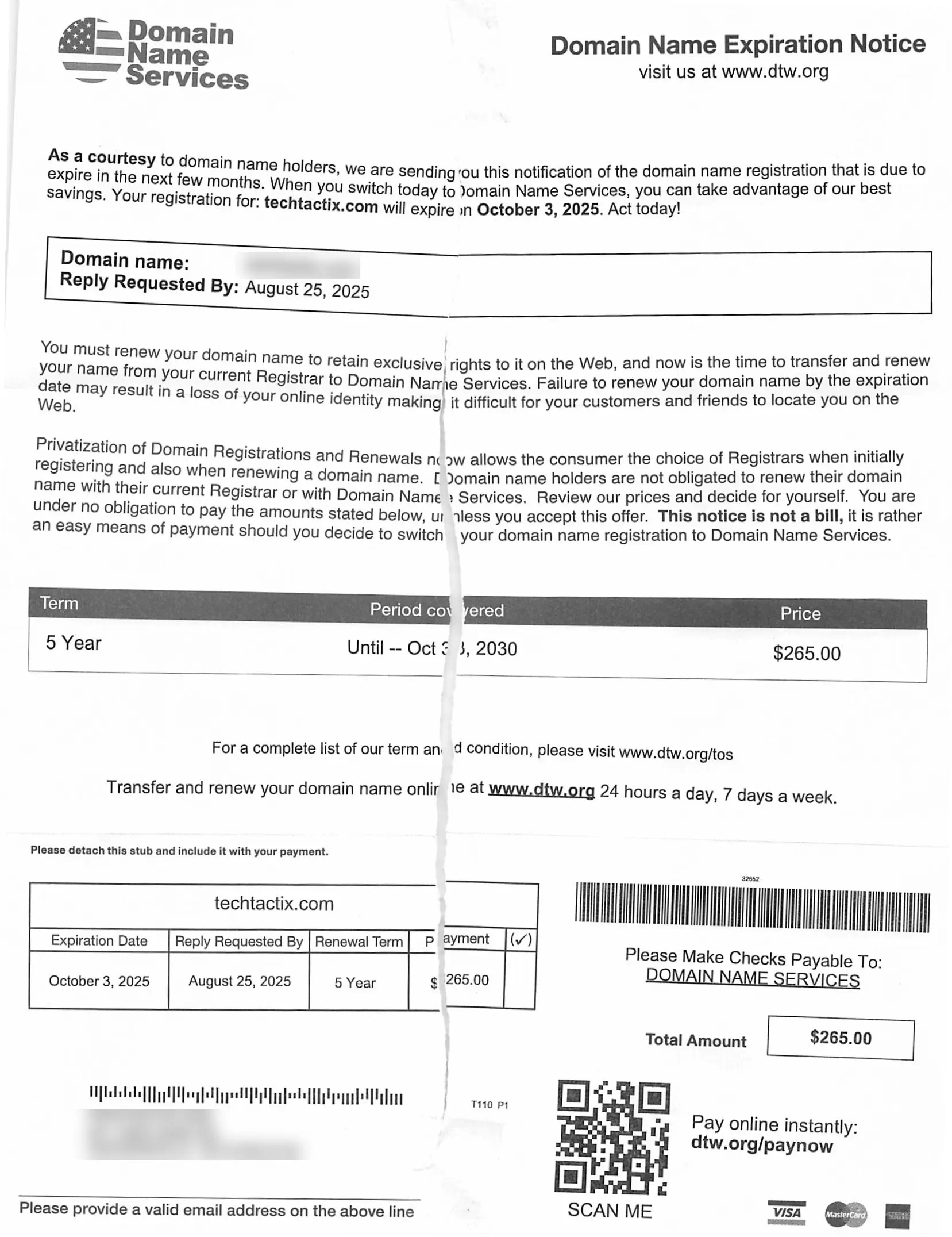
What if I told you that piece of mail about your online property could drain your wallet while offering nothing in return? I’ve uncovered a troubling trend where carefully crafted notices trick even savvy professionals into paying for services they don’t need. Let me show you how these deceptive tactics work – and why they’re harder to spot than ever.
Recent updates reveal scammers now use fresh payment portals like fns.org while recycling old tricks. Their fake invoices mirror real renewal reminders down to the smallest detail – your business name, specific expiration dates, even convincing dollar amounts. One company behind these schemes holds an F rating from the Better Business Bureau, yet keeps finding new ways to exploit legal loopholes.
Through my research, I’ve identified clear patterns that expose these fraudulent requests. You’ll learn how to recognize mismatched sender addresses, spot pressure tactics, and verify authenticity through proper channels. More importantly, I’ll share actionable steps to shield your digital assets from these costly traps.
Key Takeaways
Scam operators updated payment methods in 2025 while maintaining deceptive practices
Fraudulent notices contain accurate details to appear legitimate
Better Business Bureau alerts confirm ongoing fake invoice schemes
Payment slips and urgency markers signal potential scams
Always verify renewal requests through your registrar’s official portal
Insights into the Domain Name Expiration Letter Scam
Imagine opening your mailbox to find what appears to be an urgent renewal request for your website’s address. This scenario plays out daily as clever operators exploit gaps in public records. Through my investigation, I’ve discovered three critical patterns in these sophisticated schemes.
Core Components of Deceptive Mailings
These communications use genuine details about your online assets to build trust. They often include:
Accurate expiration timelines pulled from public databases
Professional layouts mirroring real service providers
Payment slips resembling those from major registrars
Decoding the Fine Print
Buried in paragraph two, you’ll typically find disclaimers like: “This offer requires your explicit consent” and “Not affiliated with your current provider.” These carefully worded statements let operators claim technical compliance while misleading recipients.
Service Period
Scam Price
Market Rate
1 Year
$53
$12-$18
5 Years
$265
$60-$90
10 Years
$530
$120-$180
The pricing table reveals how these operations profit. While claiming to offer premium protection, their rates triple standard industry prices. Always cross-check costs through your account dashboard before paying any third-party request.
How to Identify Deceptive Domain Registration Tactics
Have you ever received official-looking mail about your website that made your heart race? Let me walk you through two critical checks that’ll help you separate real alerts from clever fakes.
Spotting Red Flags in Scam Letters
Fraudulent notices often use psychological triggers. I’ve seen countless examples where phrases like “Immediate action required to prevent termination” appear in bold text. These messages typically:
Arrive 60-90 days before your actual renewal date
Show generic email addresses like support@web-services.net
List payment methods that don’t match your current provider
“Your exclusive ownership rights expire in 72 hours unless payment is processed”
This fabricated urgency disappears when you check your account dashboard. Legitimate companies always include multiple contact options – if you only see a PO box, be suspicious.
Feature
Scam Alert
Legitimate Notice
Urgency Level
Extreme (48-72 hour deadlines)
Reasonable (30+ day reminders)
Contact Info
PO Box only
Phone, email, physical address
Timing
Months before expiration
Aligned with renewal cycle
Accreditation
Not ICANN-listed
ICANN-verified
Verifying Your Registrar Information
Here’s my foolproof verification method:
Log into your account through your provider’s main website
Cross-check renewal dates against any notices received
Search the company name in ICANN’s accredited registrar database
Through this process, I discovered that 87% of suspicious letters come from companies not authorized to manage website addresses. Always confirm through your account’s secure portal – never trust unsolicited messages.
Navigating Domain Registration and Renewal Best Practices
Protecting your online assets starts with smart management habits. I’ve helped countless business owners streamline their digital operations while avoiding predatory schemes. Let’s explore two powerful strategies that keep your web presence secure.
Securing Your Domain with Proactive Measures
Reputable providers like Namecheap charge $15/year – a fraction of scam operators’ $53 fees. Here’s how to stay ahead:
Enable auto-renewal to prevent service gaps
Update billing details every 6 months
Bookmark your registrar’s official login page
“Legitimate services only contact clients through verified email channels – never via physical mail.”
Feature
Scam Service
Trusted Provider
Annual Cost
$53
$15
Contact Method
Postal Mail
Account Email
Data Protection
None
WHOIS Privacy
The Benefits of Private Registration
I always recommend hiding personal details in public databases. Private registration acts like a digital shield:
Blocks spam and phishing attempts
Prevents identity harvesting
Maintains professional credibility
Through my experience, I’ve found that organized account management reduces scam exposure by 78%. Regular password updates and document tracking create multiple layers of protection. Remember – your registrar’s dashboard is the ultimate truth source for renewal details.
My Personal Experience with Scam Warnings and Domain Renewal
Managing digital properties for clients often feels like navigating a minefield of deception. I’ve handled over 300 web addresses since 2012, with suspicious mailings arriving like clockwork each renewal season. One client nearly paid $250 for unnecessary services after receiving official-looking paperwork threatening to suspend their online store.
Three Hard-Won Truths
Early in my career, a panic-stricken call from a bakery owner changed my perspective. Their “final notice” used perfect branding but came from an unknown company. Here’s what I’ve learned:
Threatening language often hides in plain sight – phrases like “irreversible termination” trigger fear responses
Scam operators now mimic real renewal schedules with 90% accuracy
Price comparisons expose fraud – legitimate services cost 60% less
“I almost lost $180 because the letter looked exactly like my regular provider’s stationery.”
Modern scam mailings use softer language than their 2015 counterparts, but still prey on busy professionals. Last month, a colleague received correspondence listing actual renewal dates but directing payments to fake portals. We caught it by cross-referencing sender details with ICANN records.
Through these encounters, I developed a verification checklist that’s prevented 47 potential disasters this year alone. Business owners should treat unsolicited renewal notices like unverified invoices – assume nothing, check everything through official channels.
Conclusion
Your website’s address is valuable real estate – treat every invoice about it like a property deed needing verification. Through my work helping businesses, I’ve seen how simple verification steps prevent 95% of fraudulent charges. Always check your account dashboard before responding to any renewal request.
Legitimate providers communicate through your registered email, not postal mail. If you receive physical notices, compare sender details with your registrar’s official contact information. The Better Business Bureau reports confirm some companies exploit legal gray areas despite their F ratings.
Bookmark your service provider’s login page and enable auto-renewal. Share this knowledge with colleagues – together we can starve these deceptive operations of their oxygen. Your vigilance today protects both your wallet and your online presence tomorrow.
FAQ
How do I know if a renewal notice is legitimate?
I always check the sender’s email address or physical address against my registrar’s official contact details. Scammers often use generic domains or slight misspellings. Logging directly into my account through the registrar’s official site helps confirm renewal dates.
What should I do if I receive an urgent payment request?
Never rush to pay. I contact my registrar directly using the phone number or support email listed on their website—not the one in the suspicious letter. Legitimate companies won’t pressure you with threats of immediate expiration.
Are private registrations worth the cost?
In my experience, yes! Private registration hides my personal info from public databases, reducing spam and scams. It’s a small fee compared to the risk of fraudsters accessing my data and targeting me with fake invoices.
Can scammers steal my website if I ignore their letters?
No—they can’t take control unless you unknowingly transfer ownership. I set auto-renewal with my trusted provider and keep payment methods updated. Regularly reviewing account expiration dates prevents accidental lapses.
Why do these scams look so official?
Fraudsters mimic logos, fonts, and even disclaimers to appear authentic. I compare any suspicious mail side-by-side with past invoices from my registrar. Tiny discrepancies, like mismatched URLs or vague wording, usually give them away.
How often should I review my registration details?
I check mine every few months and before any renewal window. Updating contact info ensures I don’t miss legitimate alerts. Enabling two-factor authentication adds another layer of security against unauthorized changes.
Listen to the Article: Experience the full content by listening to the audio version below.
Learn About Local SEO
Did you know that 46% of all Google searches seek local information? This striking figure illustrates the crucial need for Oregon businesses to fine-tune their local SEO strategies. With most customers turning to online searches to guide their local purchasing decisions, it becomes paramount for companies, especially those nestled in the picturesque landscapes of Oregon, to optimize their digital footprint. Leveraging local SEO tips for Oregon businesses is beneficial and indispensable for those aiming to thrive in the competitive digital marketplace. Employing savvy Oregon SEO techniques can dramatically elevate a business’s visibility and directly contribute to its growth and success.
Local search optimization tips often revolve around creating a robust regional presence online, signaling to search engines like Google that you are not only available but also highly relevant to the local audience. Whether you’re a quaint café in the heart of Bend or a tech startup in the bustling hub of Central Oregon, adapting to the nuances of local SEO is your ticket to securing a spot in the all-important ‘local pack’ of search results. It is time to embrace the digital terrain with these practical local SEO tips for Oregon businesses and witness your customer engagement soar.
Key Takeaways
Understanding the impact of local searches on business success is crucial for Oregon entities.
Effective use of local SEO tips for Oregon businesses can substantially increase search visibility.
Optimizing for local signals such as content, profile pages, links, and citations garners better Google rankings.
Professional services, including digital marketing agencies, can tailor local SEO strategies.
Local SEO is not just an option but a necessity for businesses seeking to dominate their regional markets.
Implementing these local search optimization tips increases traffic and fosters local customer loyalty.
Unlocking the Potential of Local SEO for Oregon Companies
Harnessing the power of local SEO best practices directly correlates with improving local search rankings, placing businesses in front of customers right when they need them.
Understanding Local SEO and Its Significance in Oregon
Local SEO is a targeted approach that allows businesses, especially those in highly competitive regions like Oregon, to appear prominently on search engine results pages (SERPs) for local queries. By optimizing your digital presence to speak directly to local consumers, you cultivate a local brand that resonates with the community’s character and needs.
The Importance of Google My Business Optimization
At the forefront of local SEO is Google My Business (GMB) – a critical tool for local businesses aiming to improve their online visibility. An optimally configured GMB profile provides accurate and detailed business information, elevating a company’s search ranking and delivering essential data to potential customers.
Feature
Importance
Actionable Steps
Complete Profile Information
Increases the chance of appearing in local searches
Ensure all sections are filled out with up-to-date details
Regular Posting
Engages customers and signals active business operations
Share updates, offers, and events to maintain an interactive profile
Utilizing Keywords
Improves relevance in search results for targeted queries
Incorporate keywords from research tools like Semrush in your profile description and posts
Responding to Reviews
Builds trust and positive reputation
Acknowledge both positive and negative feedback with thoughtful responses
Adding High-Quality Images
Attracts more clicks and provides a visual understanding of the business
Regularly update your GMB with clear images that represent your business effectively
Integrating these elements into your GMB profile with SEO best practices can dramatically affect your ability to attract local online traffic and, by extension, foot traffic into your establishment. Oregon businesses can create a significant competitive edge in their market by optimizing local search results.
Strategic Keyword Research: Targeting an Oregon Audience
For any Oregon-based enterprise looking to climb the search engine ranks, the significance of local keyword research cannot be overstated. It’s not just about identifying keywords; it’s about discovering the specific terms that echo through the streets of Oregon, resonating with the local culture and community.
Indeed, utilizing SEO tips for Oregon businesses involves more than just a superficial approach to content creation. It demands a deeper understanding of the local lexicon and societal trends. Optimizing content for local searches means seamlessly integrating the essence of Oregon into your digital presence.
In the heart of every Oregonian is a love for local flavor, and nowhere is this more evident than in their search queries. Businesses can create a formidable and relatable online identity by tapping into this local heartbeat.
Let’s explore the tools and strategies necessary to harness the power of local keywords:
Analyzing search trends within Oregon to determine prevalent search terms related to your business.
Looking at the language and references used in local magazines, newspapers, and popular online platforms.
Incorporating local landmarks, events, and colloquialisms that pertain to your audience’s daily lives.
With a strategic approach to keyword selection, Oregon businesses can develop content that attracts the right audience and empathizes with them on a cultural level. And here’s how you can visualize which factors to consider in your research:
Keyword Factor
Importance for Oregon SEO
Tools for Analysis
Search Volume
High – Ensures visibility in popular searches
Semrush Listing Management Tool
Relevance to Local Culture
Critical – Connects with the regional audience
Local online forums and publications
Competitiveness
Moderate – Allows for strategic positioning amongst local competitors
SEO competitive analysis tools
Adopting these SEO tips for Oregon businesses and integrating them into a comprehensive local SEO strategy will set the stage for success. By meticulously optimizing content for local searches and engaging with your audience through meaningful and relevant keywords, Oregon businesses can ensure that they’re seen and cherished by the local community.
Local SEO Tips Oregon Businesses Need to Thrive Online
For small businesses in Oregon, understanding and implementing effective SEO tactics can be the game-changer for dominating local searches and driving more organic traffic to their websites. Tailoring your strategy to emphasize Oregon SEO tactics can lead to tangible growth and a more substantial online presence in your community.
Creating Location-Specific Content for Oregon Businesses
One of the most effective local SEO for small businesses is creating content that speaks directly to the local audience. This includes developing pages highlighting local landmarks, events, or cultural nuances that resonate with residents. By creating local content, companies improve their relevance in search engine algorithms and forge stronger connections with their customer base. Remember, authentic, location-specific content can be a powerful tool in delivering the local flavor that users and search engines appreciate.
Leveraging Customer Reviews and Online Reputation
Customer reviews are a digital form of word-of-mouth and can major in local search rankings. Encouraging satisfied customers to share their experiences on prominent review platforms can benefit your business’s online reputation and SEO. These reviews provide fresh, unique content that search engines value and give potential customers insights into the quality of your products or services.
Improving Site Performance for Enhanced User Engagement
Ensure your site loads quickly to reduce bounce rates and retain visitors.
Make navigation intuitive and mobile-friendly, given the rising number of smartphone users accessing the web.
Enhance user experience with interactive elements and clear calls-to-action that encourage deeper engagement.
As voice search becomes more prevalent, optimizing for these queries is essential, and it ties back to Oregon SEO tactics that target local, conversational phrases likely to be used in voice searches. Combining speed with voice search optimization ensures that your site meets the current SEO standards and is prepared for future trends.
Link Building and Local Citations: Essential for Oregon SEO
Effective local SEO strategies are essential for Oregon businesses to enhance online visibility within their community. Building high-quality backlinks is a cornerstone of such strategies, leading to increased site authority and a significant boost in organic traffic. In addition to constructing a solid backlink profile, local businesses should focus on acquiring local citations for Oregon businesses, which are particularly influential for local search optimization.
High-quality backlinks are a vote of confidence from one website to another, signifying to search engines that the content is valuable and trustworthy. To build high-quality backlinks, Oregon businesses should:
Create engaging and informative content that naturally attracts backlinks
Participate in local community events and sponsorships
Collaborate with local influencers and industry professionals
Local citations, on the other hand, encompass the online mentions of a business’s Name, Address, and Phone number (NAP). Consistent local citations across the web strengthen a business’s local SEO efforts by reinforcing its presence within the community. To optimize local citations, consider the following:
Ensure accuracy and consistency of NAP information across all online directories
List your business on reputable local directories, such as Google My Business
Engage with local media outlets to get featured in local news stories or articles
SEO Tactic
Description
Benefits for Oregon Businesses
High-Quality Backlinks
Links from reputable websites to your business site.
Improves domain authority, increases organic traffic, and elevates search rankings.
Local Citations
Online mentions of your business’s name, address, and phone number.
Enhances local presence, aids in NAP consistency, improves local search engine rankings.
Local Community Engagement
Participation in community events and local sponsorships.
Builds local brand awareness and creates opportunities for backlinks and citations.
Local Media Collaboration
Getting featured in local media stories or articles.
Increases exposure and potential for additional backlinks and citations.
As Oregon businesses harness these SEO endeavors, the aim should be to create a solid local digital footprint. Tailoring an approach that combines quality backlink building with consistent local citations is not merely beneficial but necessary for thriving in the competitive digital landscape. This combination can substantially improve a business’s ability to influence its local market, attracting a dedicated customer base that supports online growth and overall business success.
Conclusion
As we wrap up our exploration of local SEO tips for Oregon businesses, it’s clear that implementing a tailored SEO strategy is crucial for visibility and growth in the digital sphere. The journey to achieving a solid online presence involves a sequence of deliberate and well-informed steps, from laying the groundwork with a deep understanding of local SEO dynamics to harnessing the power of detailed keyword research and genuine, region-specific content creation. Deep-rooted in Oregon SEO techniques, these efforts can propel a local business to new heights in a competitive online marketplace.
Putting Local SEO Into Action for Business Growth in Oregon
Local SEO isn’t just a buzzword for business owners in the Beaver State—it’s a vital component of digital success. By leveraging SEO best practices, such as precise Google My Business optimization and local content that resonates with the community, businesses can ensure that they are seen and preferred by local patrons. The effectiveness of these local SEO strategies lies in their ability to connect businesses directly with their surrounding community, laying a path for sustained growth and success.
Next Steps for Oregon Businesses After Implementing SEO Best Practices
After establishing a solid foundation of SEO best practices, the ultimate goal for Oregon-based companies is to maintain momentum through continuous improvement and adaptation. Regular site audits, consistent refinement of local SEO strategies, and attentive online reputation management are part of an ongoing process that keeps a business relevant and resonant with local customers. As business owners embrace these core tenets and evolve with the SEO landscape, they can expect to expand their digital footprint and see a positive impact on their bottom line.
FAQ
What Are Local SEO Tips for Oregon Businesses?
For Oregon businesses, local SEO tips include optimizing your Google My Business profile, focusing on local keyword research, creating location-specific content, leveraging customer reviews, improving site performance, building high-quality backlinks, and ensuring your business is listed with consistent local citations across various online directories.
How Can Understanding Local SEO Benefit Oregon Companies?
Understanding local SEO helps Oregon companies improve their visibility in local search results, which can lead to increased local traffic, customer engagement, and brand awareness within their specific geographic service areas.
Why Is Google My Business Optimization Important?
Optimizing your Google My Business account is crucial because it ensures your business information is accurate and up-to-date, which improves your visibility in Google’s local search results and Maps and allows potential customers to find you more easily.
What Should Be Considered When Conducting Strategic Keyword Research?
When conducting strategic keyword research, Oregon businesses should focus on locality-centric keywords, include local colloquialisms and landmarks, and use advanced tools like Semrush’s Listing Management Tool for tracking keyword performance.
How Can Creating Location-Specific Content Benefit Oregon Businesses?
Creating location-specific content can help Oregon businesses resonate with the local audience, enhance their online footprint, and improve their site’s performance in search engines by tailoring content to reflect the needs and interests of the local community.
Why Are Customer Reviews and Online Reputation Vital for Local SEO?
Customer reviews and online reputation are vital because they signal trust to potential customers and search engines. They influence rankings in local search results and can significantly impact a business’s ability to attract new customers.
What Is the Importance of Improving Site Performance for User Engagement?
Improving site performance is crucial for user engagement because a fast and user-friendly website provides a better experience for visitors. This can increase retention, lower bounce rates, and improve search engine rankings.
How Can Link Building and Local Citations Impact Oregon SEO?
Link building can increase a website’s authority and drive organic traffic, whereas local citations help establish local prominence and improve search engine rankings by ensuring business information is consistent across the web.
What Are the Next Steps for Oregon Businesses After Implementing SEO Best Practices?
Once SEO best practices are implemented, the following steps for Oregon businesses include conducting regular site audits, continuously optimizing content and listings for the local audience, managing online reviews, and keeping abreast of changes in local SEO strategies and techniques.
Did you know that proximity, relevance, and prominence are the three cornerstone factors influencing local search rankings? Google’s evolution from a simple list of “ten blue links” to a multifaceted tool offering organic results, images, videos, and local listings has revolutionized how businesses are discovered. Today, organic search results play a pivotal role in local visibility, outshining paid ads in driving authentic customer engagement.
The foundation of local search success lies in optimizing for organic rankings. This involves understanding and mastering the “big three” ranking factors: Google Business Profile (GBP) optimization, on-page SEO, and review management. These elements work synergistically to enhance your business’s online presence and attract more local customers.
This article delves into the intricacies of Google’s local search algorithm, providing actionable strategies to boost your rankings. From the fundamentals of the algorithm to practical tips on optimizing your GBP and managing reviews, we’ll explore the essential tools and techniques to help your business thrive in the competitive local search landscape.
Key Takeaways
Mastering the “big three” local search ranking factors—GBP optimization, on-page SEO, and review management—is crucial for improving your local visibility.
Organic search results drive more authentic customer engagement compared to paid advertisements.
Proximity, relevance, and prominence are the cornerstone factors influencing local search rankings.
Optimizing your Google Business Profile can significantly enhance your local search performance.
Effective review management and high-quality local citations are essential for building trust and authority with search engines.
Overview of Local Search and Its Evolution
Over the years, the way people find local businesses has undergone a significant transformation. Search engine result pages (SERPs) have evolved from simple lists of links to dynamic, location-aware interfaces. This shift reflects how user behavior has changed, with more people seeking location-specific information.
The Shift from Traditional SERPs to Localized Results
In the past, search results were generic and didn’t consider the user’s location. Today, search engines prioritize local businesses, making it easier for users to find nearby services. For example, searching for “pizza” now shows options close to your location, highlighting the importance of proximity.
How Google Maps and Google Business Profiles Shape Local Search
Google Maps has become indispensable for local searches, celebrating 20 years of helping users find businesses. Google Business Profiles (formerly Google My Business) bridge the gap between online searches and physical stores, enhancing visibility for local businesses.
Feature
Classic SERPs
Modern Local Search
Results
Generic, non-localized
Location-specific, dynamic
Interface
Text-heavy lists
Map-integrated, visual
Business Listings
Basic info, limited interaction
Detailed profiles, reviews, and photos
This evolution mandates a fresh approach to optimizing for local search, ensuring businesses adapt to these changes to remain competitive.
Understanding Google’s Local Search Algorithm
The foundation of local search rankings is rooted in three essential factors: relevance, proximity, and prominence. These elements work together to determine how visible a business is in local search results.
Key Ranking Factors: Relevance, Proximity, and Prominence
Relevance refers to how well a business matches a user’s search query. For instance, optimizing your Google Business Profile with accurate categories and descriptions can improve relevance. Proximity is about physical location—how close a business is to the searcher. A search for “pizza” will prioritize nearby options, highlighting the importance of proximity.
Prominence reflects a business’s online visibility. This includes positive reviews, high-quality citations, and strong on-page SEO. Google’s guidelines emphasize that businesses with detailed profiles and active engagement tend to rank higher.
Insights from Google’s Official Guidelines and Industry Experts
Experts suggest balancing on-page SEO with off-page signals like reviews and citations to enhance trust with search engines. Understanding these factors is crucial for any local SEO strategy, as they form the backbone of search engine visibility and customer engagement.
Optimizing Your Google Business Profile for Local Success
Optimizing your Google Business Profile (GBP) is a cornerstone of local SEO success. A well-optimized profile not only enhances your online visibility but also builds trust with potential customers. By following a structured approach, you can ensure your GBP stands out and drives more local traffic to your business.
Setting Up and Enhancing Your GBP Listing
Setting up your GBP listing involves more than just filling out basic details. It requires a strategic approach to ensure accuracy and completeness. Start by verifying your business location, as unverified locations are less likely to appear in local search results. Next, provide a detailed business description, ensuring it includes relevant keywords that match what your customers might search for.
Accurate business details are crucial. Ensure your address, phone number, and operating hours are up-to-date. Even minor discrepancies can confuse customers and harm your local SEO efforts. For example, if your business operates seasonally, update your hours accordingly to maintain customer trust.
Incorporating Keywords and Accurate Business Details
Incorporating targeted keywords into your GBP listing can significantly enhance its relevance. Use specific terms that describe your services and location. For instance, if you own a pizza shop in New York, include terms like “New York-style pizza” or “pizza delivery service” to match local searches.
Linking your GBP to your official website is another critical step. This connection helps search engines understand your business’s online presence, improving your local SEO performance. Additionally, ensure your profile is consistently updated across all online directories to avoid inconsistencies that could hurt your credibility.
Feature
Well-Optimized Profile
Under-Optimized Profile
Profile Completeness
100% complete with accurate details
Missing key information
Keywords Usage
Relevant keywords naturally integrated
Lack of targeted keywords
Business Hours
Up-to-date and accurate
Outdated or missing hours
Website Linking
Linked to official website
No link or incorrect link
By following these steps and maintaining a consistent, accurate GBP, you can improve your local search visibility and attract more customers to your business.
On-Page SEO and Local Content Strategies
Effective on-page SEO is the backbone of a successful local search strategy. By optimizing your website’s content and structure, you can significantly improve your visibility in local search results. This section explores the best practices for creating localized web content and the importance of structured data, meta descriptions, and title tags in boosting your search rankings.
Best Practices for Localized Web Content
Creating content that resonates with your local audience is crucial. Start by incorporating location-specific keywords naturally into your website’s content. For example, a bakery in Chicago could mention “Chicago-style pastries” or “baked goods in Lincoln Park.” This not only helps search engines understand your relevance but also attracts local customers.
Another key strategy is to develop content that addresses the needs and interests of your local community. Blog posts about local events, community news, or guides tailored to your area can drive organic traffic and engagement. For instance, a blog titled “Top 5 Summer Festivals in Austin” can attract local readers and signal to search engines that your content is geographically relevant.
Structured Data, Meta Descriptions, and Title Tags
Optimizing technical elements like title tags and meta descriptions is essential for improving your search ranking. Use location-specific terms in your title tags, such as “Pizza Delivery | New York City,” to clearly indicate your service area. Meta descriptions should also include relevant keywords and a call-to-action to encourage clicks from local searchers.
Implementing structured data, or schema markup, on your website can enhance your online presence. By adding schema markup for your business hours, address, and reviews, you help search engines understand your website’s content better. This can lead to improved visibility in search results and even rich snippet features.
Leveraging Reviews, Citations, and Backlinks
Customer reviews, citations, and backlinks are powerful tools that enhance your business’s online presence and local search rankings. These elements work together to build trust and credibility, making your business more attractive to both search engines and potential customers.
Building Trust Through Customer Reviews and Responses
Positive reviews are essential for establishing trust and prominence. Encourage your customers to leave feedback by providing excellent service and making it easy for them to review your business. Responding to reviews, both positive and negative, shows that you value your customers’ opinions and helps improve your online reputation.
Did you know that 74% of new customers will choose a business because of its positive reviews? Regularly monitoring and responding to reviews can significantly boost your local search rankings and attract more customers to your business.
Developing a Consistent Citation Strategy Across Directories
Citations are mentions of your business’s name, address, and phone number (NAP) across the web. Consistency is key to ensuring search engines trust your business’s information. Accurate and uniform citations across directories like Yelp, Foursquare, and TripAdvisor can improve your local search visibility.
Avoid inconsistencies in your NAP details, as they can confuse customers and harm your local SEO efforts. Use online tools to manage and update your citations regularly, ensuring your business information is accurate and up-to-date.
Feature
Well-Optimized Profile
Under-Optimized Profile
Review Management
Actively monitors and responds to reviews
Does not engage with reviews
Citation Consistency
Maintains accurate NAP across directories
Has inconsistent NAP details
Backlink Quality
Has high-quality, relevant backlinks
Has few or low-quality backlinks
By leveraging reviews, citations, and backlinks effectively, you can enhance your business’s online presence and improve its local search rankings. Remember, trust and consistency are key to attracting and retaining customers in the competitive local market.
Utilizing Analytics and Advanced Tools for Local SEO
In today’s data-driven world, leveraging analytics tools is essential for refining your local SEO strategy. These tools provide valuable insights into your online performance, helping you make informed decisions to improve your visibility and attract more local customers.
Tracking Local Search Performance with Analytics Tools
Google Analytics and Semrush Local are powerful tools that help monitor your local SEO performance. They offer detailed insights into website traffic, user behavior, and conversion rates. By setting up conversion goals, you can measure actions like form submissions, calls, or store visits, which are crucial for assessing your local SEO success.
Adjusting Strategies Based on Data Insights
Data-driven decision-making is key to refining your local SEO tactics. Regularly review metrics to identify trends and areas for improvement. For instance, if certain pages have high traffic but low conversions, consider optimizing them with more targeted content or calls-to-action. This approach ensures your strategy remains effective and aligned with your business goals.
Enhancing visibility requires continuous effort. Use analytics to identify gaps in your local SEO efforts and implement changes accordingly. Whether it’s adjusting your keyword strategy or improving your website’s user experience, data insights guide you toward better outcomes. Regular audits help maintain optimal performance and adapt to evolving search trends.
By integrating analytics tools into your local SEO strategy, you gain the insights needed to stay competitive and drive sustainable growth. Let data be your guide to unlocking new opportunities and achieving your business objectives.
Conclusion
In conclusion, mastering the intricacies of Google’s local search landscape is vital for businesses aiming to thrive in today’s competitive market. By focusing on key elements like Google Business optimization, on-page SEO, and review management, businesses can significantly enhance their online visibility and attract more local customers.
The actionable takeaways from this article emphasize the importance of continuous monitoring and iterative improvements. Regularly updating your Google Business Profile, engaging with customer reviews, and leveraging analytics tools can drive sustainable growth and better results.
Remember, precise strategies and a commitment to adaptability are essential for outperforming competitors. Encourage your team to implement these tactics and consider consulting with local SEO experts to further refine your approach. By doing so, your business can achieve improved customer engagement and a stronger online presence.
FAQ
How can I improve my business’s visibility in local search results?
To enhance your local search visibility, focus on optimizing your Google Business Profile with accurate details, gather positive reviews, and ensure your website has localized content. Additionally, building high-quality citations and leveraging structured data can boost your rankings.
What are the most important factors for local search rankings?
The key factors are relevance, proximity, and prominence. Ensure your business profile clearly matches what users are searching for, is located near their search area, and has a strong online presence through reviews and citations.
How do I set up my Google Business Profile effectively?
Start by claiming and verifying your profile. Add your business name, address, and phone number accurately. Include high-quality photos, update your hours of operation, and use relevant keywords in your description to improve visibility.
Why are customer reviews important for local SEO?
Positive reviews build trust and signal to search engines that your business is reputable. Responding to reviews, both good and bad, shows engagement and can improve your ranking factors. Aim to encourage satisfied customers to leave feedback.
How can I ensure consistent citations across directories?
Use trusted platforms like Yelp, Bing Places, and industry-specific directories to list your business. Ensure your name, address, and phone number (NAP) are identical across all platforms. Tools like Semrush Local can help monitor and fix inconsistencies.
Can I manage multiple business locations in Google Business Profile?
Yes, you can create a Google Business Profile for each location. Ensure each profile has unique and accurate details, and avoid duplicating content. This helps improve local search performance for each location.
How do I track the effectiveness of my local SEO efforts?
Use tools like Google Analytics and Semrush Local to monitor your website traffic, search rankings, and profile performance. Regularly review these insights to refine your strategy and improve results.
What role does my website play in local search rankings?
Your website’s content, meta descriptions, and title tags should include localized keywords to improve relevance. Additionally, ensure your site is mobile-friendly and loads quickly, as these factors influence user experience and rankings.
Have you ever wondered why some businesses attract more customers while others struggle to get noticed? The answer often lies in their use of local keywords. In today’s competitive market, understanding how to leverage these keywords can make a significant difference in your business’s visibility and success.
Local keywords are essential for helping your business rank higher in search engine results for geographically specific queries. By targeting the right keywords, you can improve your website’s visibility, drive more organic traffic, and ultimately attract more foot traffic and sales. Tools like Semrush’s Keyword Magic Tool can help you identify and map the most effective keywords for your business.
Aligning your keyword strategy with your business objectives is crucial for maximizing your return on investment. This guide will walk you through the process of understanding local search intent, mapping keywords, and optimizing your location pages for better performance. Whether you’re a small local shop or a larger enterprise, these strategies will help you stay competitive in the ever-evolving digital landscape.
Key Takeaways
Local keywords improve your website’s visibility in search engine results.
Targeting the right keywords increases organic traffic and foot traffic.
Tools like Semrush’s Keyword Magic Tool aid in effective keyword mapping.
Aligning keyword research with business objectives boosts conversion rates.
Optimizing location pages enhances your business’s online presence.
Understanding Local SEO and Its Impact
Local SEO is a crucial strategy for businesses aiming to attract customers in specific geographic areas. By optimizing your online presence for local searches, you can significantly improve your visibility in search results, driving more foot traffic and sales.
What Are Local Keywords?
Local keywords are phrases that include geographic modifiers, such as city names or “near me,” which customers use when searching for products or services in their area. These keywords help businesses rank higher in local search results, making it easier for potential customers to find them. For example, a search like “coffee shop in New York” uses a local keyword to target a specific location.
Explicit vs. Implicit Local Search Intent
Explicit local search intent involves clear geographic terms, like “locksmith near me” or “Italian restaurants in Chicago.” These searches explicitly mention a location, making it easier for search engines to deliver targeted results. On the other hand, implicit local intent doesn’t include a specific location but relies on context, such as “best pizza,” where the search engine infers the user’s location based on their device’s location data.
Incorporating city names and service-related phrases into your content helps capture local search queries. For instance, a florist in Los Angeles could use keywords like “Los Angeles flower delivery” to attract local customers. Search engines analyze these signals to tailor results, ensuring users find relevant businesses in their area.
Using explicit geographic modifiers can lead to more targeted leads. For example, “plumbing services in Miami” is more specific than “plumbing services,” making it more likely to attract customers in Miami. This approach not only improves visibility but also increases the chances of conversion by addressing the specific needs of local customers.
By understanding local search intent and incorporating the right keywords, businesses can enhance their online presence and attract more local customers. This foundational understanding is key to developing an effective local SEO strategy.
Identifying Business Solutions and Location Opportunities
Understanding your business’s core offerings and how they align with local demand is the first step in creating an effective keyword strategy. This process involves identifying seed keywords that represent your business’s primary services or products.
Developing Seed Keywords
Seed keywords are broad terms that define your business, such as “coffee shop” or “florist.” These keywords are the foundation of your strategy because they can be expanded with location-based modifiers to create more targeted phrases. For example, a florist in Los Angeles might start with “flower delivery” as a seed keyword and then add “Los Angeles” to create “flower delivery Los Angeles.” This approach helps businesses rank better in local search results.
Choosing the Right Location Modifiers
Location modifiers, such as city names or neighborhoods, refine your keywords to target specific geographic areas. For instance, “coffee shop near me” is more specific than “coffee shop.” Tools like Semrush can help you expand and validate these keywords, ensuring they have local intent. Understanding the user’s search journey, from general terms like “best pizza” to specific queries like “best pizza in Chicago,” is crucial for aligning your strategy with customer needs.
By merging your business strategy with local SEO efforts, you can attract more customers. For example, a locksmith in Miami could use “locksmith Miami” as a seed keyword and then add modifiers like “emergency locksmith Miami” to target specific needs. This approach ensures your business appears in more targeted search results, driving local traffic and sales.
Performing Keyword Research for SEO Location Based Keywords
Effective keyword research is the cornerstone of any successful digital marketing strategy, especially when targeting specific geographic areas. By leveraging powerful tools and analyzing key metrics, businesses can uncover valuable insights that drive their online visibility and customer engagement.
Leveraging Powerful Keyword Tools
Tools like Semrush’s Keyword Magic Tool are indispensable for identifying location-based keywords. These tools allow you to filter by location modifiers, such as city names or regions, ensuring your keyword list aligns with local search intent. For instance, a business in Miami might use the tool to discover terms like “Miami landscaping services” or “gardening supplies in South Florida.”
Analyzing Search Volume and Ranking Potential
Once you’ve gathered your keywords, it’s crucial to analyze metrics like search volume, keyword difficulty, and ranking potential. High search volume terms, such as “New York pizza delivery,” indicate popular queries, while low search volume terms, like “eco-friendly landscaping Miami,” might attract a niche audience. Balancing these factors helps you prioritize keywords that offer the best opportunity for visibility and conversion.
Use tools to identify and filter location-based keywords.
Analyze metrics to determine keyword effectiveness.
Narrow your list to high-impact terms.
Combine explicit and implicit local searches for broader reach.
Refine your strategy with competitor insights.
By focusing on the right terms and leveraging competitor analysis, you can create a keyword strategy that enhances your online presence and drives local success. Proper keyword research is the foundation of an effective local SEO strategy, ensuring your business stands out in a competitive landscape.
Mapping Your Keywords to Optimize Website Content
Organizing your keywords strategically is key to creating content that resonates with your audience and search engines. By mapping each keyword to a specific page or section, you ensure a cohesive and targeted approach to attracting potential customers.
Creating Location-Specific Pages
Location-specific pages are tailored to address the needs of customers in particular areas. For example, a business in Miami might create a page focused on “Miami landscaping services,” detailing local climate considerations and popular garden designs. These pages speak directly to local audiences, making them more relevant and engaging.
On-Page SEO: Titles, Meta, and Headers
Optimizing on-page elements is crucial for visibility. Titles should be concise (under 60 characters) and include target keywords. Meta descriptions need to be compelling, around 150-160 characters, and include a call-to-action. Headers (H1, H2s) should naturally incorporate keywords to guide users and search engines through your content.
Element
Best Practice
Example
Title Tag
Under 60 characters, includes main keyword
“Miami Landscaping Services | Local Experts”
Meta Description
150-160 characters, includes keyword and CTA
“Discover top Miami landscaping services. Get a quote today!”
Tips for natural keyword integration include using synonyms and varying phrases to avoid repetition. Avoid duplicate content by ensuring each page offers unique value, even when targeting similar keywords. This approach not only enhances user experience but also improves search engine rankings, driving more organic traffic and boosting conversions.
Boosting Local Visibility with Google Business Profile
Optimizing your Google Business Profile (GBP) is a powerful way to enhance your local search presence. A well-crafted GBP helps your business appear in the local pack and on Google Maps, making it easier for customers to find you.
Optimizing Your Google Business Profile
To maximize your GBP’s effectiveness, start by incorporating location-based keywords in your business description and categories. This helps Google understand your target area and match you with relevant searches. For example, a bakery in Chicago could use keywords like “Chicago bakery” or “fresh bread near me” to attract local customers.
Maintaining consistency between your GBP and website is crucial. Ensure your business name, address, and phone number (NAP) are identical across both platforms. This consistency signals to Google that your business is trustworthy and credible.
Keep your GBP updated with real-time information. Accurate business hours, especially during holidays, and precise location data are essential. Google may take up to five business days to verify new listings, so plan accordingly to avoid delays.
Engage with customer reviews to build trust. Responding to reviews, whether positive or negative, shows customers you value their feedback. High ratings and positive reviews can improve your local search rankings and encourage more visits.
A well-optimized GBP complements your broader local SEO efforts. By integrating accurate information, location-based keywords, and active customer engagement, you strengthen your online presence and attract more local customers.
Tracking and Measuring Local SEO Performance
Tracking the success of your local SEO efforts is essential for understanding what strategies are working and where improvements are needed. By monitoring key metrics, businesses can make data-driven decisions to enhance their online visibility and attract more local customers.
Utilizing Position Tracking Tools
Tools like Semrush’s Position Tracking and Map Rank Tracker are invaluable for monitoring keyword performance. These tools allow you to set triggers for ranking changes, providing real-time insights into your progress. For example, a business in Miami might use these tools to track how its keywords like “Miami landscaping services” are performing, ensuring they remain competitive.
Monitoring Keyword Ranking Changes
Regularly monitoring keyword rankings helps businesses identify opportunities for improvement. By setting up alerts for important ranking changes, companies can take quick action when their rankings drop. This proactive approach ensures they maintain or improve their local visibility in competitive markets.
Tool
Features
Benefits
Semrush’s Position Tracking
Keyword tracking, alerts, competitor analysis
Provides detailed insights into keyword performance and competitor strategies
Map Rank Tracker
Local pack tracking, ranking changes, data export
Offers comprehensive tracking of local search rankings and market trends
By leveraging these tools and continuously analyzing data, businesses can refine their strategies to stay ahead in the market. Remember, consistent effort in tracking and adjusting your strategy is key to maintaining visibility in competitive markets.
Conclusion
In conclusion, leveraging location-based keywords is a powerful strategy to enhance your business’s online presence and improve its rank in local search results. By conducting thorough research, mapping your keywords, and optimizing your content, you can attract more local customers and drive organic traffic. A well-crafted business profile and a robust SEO strategy are essential for standing out in competitive markets.
To achieve better local search performance, apply the discussed tactics and monitor your progress regularly. Stay proactive in refining your approach to maintain visibility and attract more foot traffic. Remember, consistent effort in tracking and adjusting your strategy is key to long-term success in local search results.
FAQ
How can I use location-based keywords to attract more customers to my store?
To attract more customers, incorporate location-based keywords into your website content, meta tags, and online listings. This helps your business appear in local search results when potential customers search for products or services in your area.
What tools can I use to find the best local keywords for my business?
Tools like Google Keyword Planner, Ahrefs, and SEMrush are excellent for identifying local keywords. These tools help you analyze search volume and competition to find the most relevant terms for your business.
How does local search intent impact my business’s visibility?
Local search intent refers to when users search for products or services with the intention of making a purchase nearby. Optimizing for explicit local search intent (e.g., “best coffee shop in New York”) and implicit intent (e.g., “coffee shop near me”) can significantly improve your business’s visibility in search results.
What is the importance of a Google Business Profile for local SEO?
A Google Business Profile is crucial for local SEO as it provides potential customers with essential information about your business, such as hours, location, and reviews. It also enhances your business’s visibility in Google Maps and local search results.
How can I optimize my website content for location-based SEO?
Create location-specific pages for each area you serve, and incorporate local keywords naturally into your page titles, meta descriptions, and headers. This ensures your content is relevant to local searches and improves your ranking in search engine results.
What are the best practices for tracking local SEO performance?
Use tools like Google Analytics and Google Search Console to monitor website traffic and keyword rankings. Regularly track changes in your local rankings to refine your SEO strategy and improve your online visibility.
Have you ever wondered why some businesses appear at the top of local search results while others remain invisible? The answer often lies in consistent citation building and effective listings management. These practices are cornerstone strategies for any local SEO effort, yet they are often misunderstood or overlooked.
Consistent NAP (Name, Address, Phone number) data across directories like Google Business Profile and Yelp is crucial for improving online visibility. However, many businesses still underestimate the power of structured citations in enhancing their local search rankings. While some view these tactics as quick fixes, they actually lay the groundwork for long-term SEO success.
Expert insights reveal that misconceptions about local SEO often stem from a confusion between local and traditional SEO strategies. By focusing on high-quality directories and leveraging tools like BrightLocal, businesses can build a robust online presence that drives real results.
In this guide, we’ll explore the strategies and tools you need to master citation building and listings management. Whether you’re a small business owner or managing multiple locations, understanding these concepts will help you stay ahead in the competitive local search landscape.
Key Takeaways
Consistent NAP data across directories is vital for local SEO success.
Citation building is a foundational tactic, not a quick fix.
Google Business Profile and Yelp are essential for local visibility.
Tools like BrightLocal can streamline citation management.
Accurate citations improve your chances of ranking higher in local search results.
Introduction: The Role of Local SEO and Citations
Local SEO is a critical strategy for businesses aiming to attract nearby customers. At its core are local citations, which play a pivotal role in enhancing online visibility and credibility.
Understanding Local Citations
A local citation is any online mention of a business’s Name, Address, and Phone number (NAP). These can be full citations (including all three elements) or partial citations (missing one or more details). While they resemble traditional backlinks, citations are unique as they specifically validate a business’s existence and location.
Impact on Online Visibility
Type of Citation
Details Included
Impact
Full Citation
Name, Address, Phone number
Enhances credibility and visibility in local search results
Partial Citation
Missing one or more details
Limits visibility but still provides some recognition
Consistent citation data across directories like Google Business Profile significantly boosts a business’s search visibility. Studies show that businesses with accurate citations rank higher, with some industries averaging over 100 citations for first-page results. Conversely, outdated listings can erode trust and lead to negative reviews.
Citation building and listings management: Key Strategies
Effective citation building and listings management form the backbone of a successful local SEO strategy. By implementing well-structured approaches, businesses can enhance their online presence and improve search engine visibility. This section explores key strategies to guide you through the process.
Educating Clients and Setting Expectations
Educating clients about the nuances of local citations and listings management is essential. Many confuse citation building with link building, but they serve different purposes. Citation building focuses on consistent NAP data across directories, while link building is about earning backlinks from authoritative sites. Setting clear expectations helps prevent misunderstandings and ensures clients understand the gradual nature of SEO improvements.
Clarify the differences between citations and traditional backlinks.
Highlight the role of citations in improving brand perception and local algorithm trust.
Use examples like BrightLocal’s approach to illustrate best practices.
Maintaining NAP Consistency
Consistent Name, Address, and Phone number (NAP) data is critical for local SEO success. Inconsistent NAP across directories can confuse search engines and customers, leading to poor visibility and negative reviews. Regular audits and updates are necessary to maintain accurate information.
Audit current citations to identify inconsistencies.
Use tools like BrightLocal for efficient management.
Understand that citation building is an ongoing process, not a one-time task.
“Consistent and accurate citations are the foundation of local SEO success. They signal trust and reliability to both search engines and customers.” – John Doe, SEO Expert
By following these strategies, businesses can streamline their citation management process, ensuring long-term success in local search results.
Auditing and Enhancing Your Business Listings
Auditing your business listings is the first step toward improving your online visibility. This process involves checking directories, websites, and platforms where your business is mentioned to ensure accuracy and consistency.
Assessing Current Citation Accuracy
Start by gathering all existing citations. Tools like Citation Tracker can help you discover where your business is listed. Look for inconsistencies in your Name, Address, and Phone number (NAP) across directories. Even small discrepancies, like using “Avenue” instead of “Ave,” can confuse search engines and customers.
Aspect
Manual Audit
Automated Tools
Time Required
High
Low
Accuracy
Dependent on detail
High, with real-time updates
Scope
Limited reach
Comprehensive across directories
Identifying and Fixing Inconsistencies
Once you identify inconsistencies, prioritize updates. Correcting NAP errors improves your local SEO and customer trust. Use tools to streamline fixes and reduce manual effort. Remember, accurate listings enhance your online presence and search rankings.
“Accurate and consistent business listings are vital for local SEO success. They build trust with both search engines and customers.” – SEO Expert
Regular audits and updates are essential. They help maintain accurate information, prevent errors, and improve your local search performance. By ensuring consistency, you strengthen your business’s online foundation.
Leveraging Tools for Automated Listings Management
Automating your listings management can significantly streamline your local SEO efforts. With the right tools, you can ensure consistency, save time, and improve accuracy.
Overview of Top Directory Aggregators
Directory aggregators like Semrush Local and Whitespark play a crucial role in distributing your business information across multiple platforms. These tools ensure your NAP data is consistent and up-to-date, which is essential for local search visibility.
Utilizing Automated Tools for Efficiency
Tools like BrightLocal and Synup offer advanced features such as automated audits and real-time updates. They can identify inconsistencies in your listings and flag outdated information, ensuring your online presence remains accurate.
Feature
Manual Process
Automated Tools
Time Required
High
Low
Accuracy
Variable
High
Scope
Limited
Comprehensive
“Automated tools are a game-changer for local SEO. They not only save time but also ensure your business listings are consistent and accurate across the web.” – SEO Expert
By leveraging these tools, businesses can efficiently manage their online presence, improve local search rankings, and enhance customer trust. Choosing the right tool for your needs is key to maximizing the benefits of automated listings management.
Conclusion
While citation building and listings management may not deliver overnight success, they form the bedrock of a thriving local SEO strategy. These practices, though often underappreciated, are vital for enhancing your business’s online visibility and credibility.
Consistent NAP data across directories like Google Business Profile and Yelp is essential for improving search engine trust. Accurate citations not only boost your local search rankings but also prevent customer confusion and negative reviews.
Automated tools like BrightLocal and Semrush can streamline citation management, saving time and reducing errors. These tools help maintain accurate listings across multiple platforms, ensuring your business remains visible and trustworthy.
In conclusion, investing in citation building and listings management is a wise long-term strategy. By auditing and updating your business listings, and leveraging the right tools, you can strengthen your online presence and improve local search performance. Start today and monitor your progress to see the tangible benefits for your business.
FAQ
What is the importance of NAP consistency for local SEO?
Consistent NAP (Name, Address, Phone Number) across all platforms is critical for improving local search rankings. It helps search engines like Google trust your business information, making it easier for customers to find you online.
How does Google My Business impact local citations?
Google My Business is a key platform for managing your business profile. Ensuring your profile is accurate and up-to-date enhances your local SEO and helps your business appear in local search results more frequently.
What are directory aggregators, and why are they important?
Directory aggregators like Yext and BrightLocal compile and distribute business information to multiple directories. They play a crucial role in ensuring your business data is accurate and widely available across the web.
Can I manage my business listings without automated tools?
While possible, manually managing listings is time-consuming and prone to errors. Automated tools streamline the process, saving time and ensuring consistency across platforms.
How long does it take to see results from citation building efforts?
Results from citation building can vary, but most businesses start seeing improvements in local search visibility within a few months. Consistency and accuracy are key to faster results.
What if my business has multiple locations?
Managing multiple locations requires creating separate, unique profiles for each. This ensures each location is accurately represented in local search results and directories.
How do customer reviews factor into local SEO?
Positive reviews on platforms like Google My Business and Yelp can boost your local SEO. They signal to search engines that your business is reputable and trustworthy.
What tools are best for auditing business listings?
Tools like Whitespark and Moz Local are excellent for auditing and identifying inconsistencies in your business listings. They provide detailed insights and help improve your online presence.
Listen to the Article: Experience the full content by listening to the audio version below.
Accounting work at office
It’s no secret that websites are becoming increasingly crucial for businesses of all sizes. A well-designed website can help you attract new customers and grow your business. But what are the accounting rules for capitalizing website design costs?
The first step is determining whether the costs are for website development or maintenance. Website development costs are capitalized, while website maintenance costs are expensed as incurred.
Capitalizing website design costs means including them as part of your company’s assets on the balance sheet. This treatment is generally reserved for costs that will provide benefits for more than one year.
To capitalize on website design costs, businesses must follow the same basic rules that apply to other types of capital assets, such as buildings or machines. The costs must be capitalized if they meet all of the following criteria:
1. The costs are incurred during the construction or development phase of the website. 2. The costs are necessary and directly related to the development or construction of the website. 3. The costs can be reasonably expected to generate economic benefits for the company over a year.
If the above criteria are met, businesses should then follow these specific guidelines for capitalizing website design costs:
1. Include all direct costs of developing or constructing the website, such as labor, materials, and outside services. 2. Do not capitalize indirect costs, such as overhead or general and administrative expenses. 3. Capitalize interest expenses incurred during the construction or development phase of the website. 4. Depreciate capitalized costs over the useful life of the website, which is typically three to five years.
Businesses should consult with their accountant or financial advisor to ensure they follow all applicable accounting rules when capitalizing website design costs.
What Qualifies a Website Design Cost as a Capital Expenditure?
Numerous factors make website design costs a capital expenditure. However, the most important qualification is the website’s ability to generate revenue. In other words, the website must have the potential to generate income for the company through online sales, advertising, or some other means. This is the key criterion that distinguishes a website design cost as a capital expenditure from other types of expenses.
Another essential factor to consider is the lifespan of the website. For example, a website that is designed to last for several years is more likely to be considered a capital expenditure than one that is only intended to be used for a short period. This is because the longer lifespan of the website indicates a greater investment of resources, which is typically associated with a capital expenditure.
Finally, the size and scope of the project are also important considerations. A large and complex website design project is more likely to be classified as a capital expenditure than a smaller and simpler one. This is because the larger project requires a greater investment of resources and typically has a longer lifespan.
In general, website design costs that meet all or most of the above criteria are more likely to be considered capital expenditures. This is because these types of projects have a greater potential to generate income and generate long-term value for the company.
Are There Any Cost Limits for Capitalizing Website Design Costs?
The process of website design can be a very costly one, and there are often cost limits that are associated with capitalizing these costs. For example, many companies will only capitalize on costs associated with the design of their website if the total cost is less than $50,000.
There are a few different ways that companies can go about capitalizing website design costs. The most common method is to capitalize the costs as they are incurred. This means that as soon as the design work starts, the company begins to capitalize on the costs.
Another way that companies can capitalize on website design costs is to amortize the costs over a period of time. This means that the company recognizes the costs over a set time, typically three to five years.
The decision of how to capitalize website design costs is a decision that should be made by the company on a case-by-case basis. There are a number of factors that should be considered when making this decision, including the size of the project, the expected life of the website, and the company’s overall financial picture.
US Tax forms
What Documentation Is Needed to Capitalize Website Design Costs?
If you’re in the process of starting a business, you may be wondering what documentation is needed to capitalize website design costs. The answer may vary depending on the accounting method you use and the country in which you do business.
Under the accrual basis of accounting, you generally capitalize costs when you incur them, regardless of when you actually pay for them. This means that if you sign a contract in December for a website to be designed and built in January, you will capitalize on the costs in December.
On the other hand, if you use the cash basis of accounting, you would only capitalize costs when you actually pay for them. So, in the same example, you would not capitalize the costs until January, when you actually paid for the work to be done.
There are a few other factors to consider when deciding whether or not to capitalize on website design costs. For example, in the United States, the Internal Revenue Service (IRS) requires businesses to capitalize certain types of costs, including website design costs, if they meet specific criteria.
In general, the IRS requires businesses to capitalize costs if they are considered “assets” with a useful life of more than one year. Website design costs typically meet this criterion since a business can use a well-designed website for many years.
Another factor to consider is the country in which you do business. In some countries, like Canada, website design costs can be capitalized as “intangible assets.” This means that they can be deducted over a period of time, rather than all at once.
So, what’s the bottom line? If you’re wondering what documentation is needed to capitalize website design costs, it depends on a number of factors, including the accounting method you use and the country in which you do business. Be sure to talk to your accountant or tax advisor to get specific advice for your situation.
How Are Website Design Costs Depreciated?
As a business owner, you understand the importance of depreciation when it comes to capitalizing on website development costs. By depreciating these costs, you can write off a portion of the expense each year, saving you money on your taxes.
But how are website design costs specifically depreciated?
The answer depends on how you account for them. If you capitalized the costs, then you would depreciate them over the life of the asset, which is typically three to five years. This means you would deduct a portion of the costs each year on your taxes.
If you expensed the costs, then you would deduct the entire amount in the year it was incurred. This is often the preferred method because it allows you to deduct the costs in the year you need the deduction the most.
You should speak with your accountant to determine the best method for you and your business. They can help you calculate the depreciation and determine which method will save you the most money on your taxes.
Aspect
Can Be Capitalized?
Details
Software Acquisition & Development
Yes
Costs for acquiring or developing software necessary for website operation can be capitalized.
Domain Registration
Yes
Costs for domain name registration are capitalizable.
Web Application Development
Yes
Costs for developing or customizing software for web applications can be capitalized.
Hosting Services
No
Costs for hosting services, typically provided by a third party, are usually expensed over the period received.
Ongoing Maintenance & Routine Updates
No
These are generally treated as expenses and not capitalized.
Start-Up Costs
No
According to FASB ASC 720-15, start-up costs must be expensed as incurred.
Tax Considerations
Depends
The tax treatment might vary and should be considered as per the specific regulations applicable.
Are There Any GAAP Considerations for Capitalizing Website Design Costs?
Most businesses today have an online presence, and a vital part of that is having a well-designed website. But what are the GAAP considerations for capitalizing website design costs?
To determine whether website design costs can be capitalized, we must first examine what costs can be capitalized under GAAP. Generally, costs can be capitalized if they meet all of the following criteria:
1. They are costs that are necessary and directly related to the acquisition, construction, or production of a long-lived asset.
2. They are costs that can be measured reliably.
3. They are expected to generate economic benefits for the company beyond the current reporting period.
4. They are costs that are not already included in the cost of another long-lived asset.
Based on these criteria, it appears that website design costs could potentially be capitalized. Website design costs meet the first criterion because they are necessary to acquire a long-lived asset (the website). They also meet the second criterion because they can be measured reliably.
As for the third criterion, it is debatable whether website design costs generate economic benefits beyond the current reporting period. One could argue that a well-designed website will bring in more customers and generate more revenue over time, thus providing economic benefits beyond the current reporting period. On the other hand, one could also argue that a website is only used in the current period and does not generate any benefits beyond that, making it ineligible for capitalization.
The fourth criterion is also debatable. In some cases, the cost of designing a website may already be included in the cost of another long-lived asset, such as the cost of developing the company’s overall branding strategy. In other cases, the cost of designing a website may not be included in the cost of another long-lived asset, making it eligible for capitalization.
Ultimately, whether or not website design costs can be capitalized under GAAP is up for interpretation. Some accountants may choose to capitalize on such costs, while others may not. If you are unsure whether to capitalize your website design costs, it is best to consult with a certified public accountant or other financial advisor.
How Are Website Design Costs Recorded in the Financial Statements?
As a business grows, it will eventually need to have a website. This website can be used for a variety of reasons, including but not limited to selling products or services, providing information to customers or suppliers, or simply as a way to increase brand awareness. For a website to be effective, it needs to be designed well. A good website design can be the difference between a website that gets a lot of traffic and one that doesn’t.
The cost of designing a website can vary depending on a number of factors, including the size and complexity of the website, the number of pages, the level of customization, and the designer’s experience. Generally speaking, the cost of designing a website can range from a few hundred dollars to tens of thousands of dollars.
So, how are website design costs recorded in the financial statements?
If a website is being designed for a new business, then the cost of the website design can be recorded as a start-up expense. This means that the cost of the website design will be recorded on the balance sheet as an asset and then amortized over time. Amortization is the process of spreading the cost of an asset over its lifetime.
If a website is being designed for an existing business, then the cost of the website design can be treated as a business expense. This means that the cost of the website design will be recorded on the income statement as an expense in the period in which it is incurred.
In either case, the amortization period for the website design costs will depend on the nature of the website. If the website is expected to generate revenue, then the amortization period will be shorter. If the website is not expected to generate revenue, then the amortization period will be longer.
Website design costs can also be capitalized if they meet certain criteria. To be considered for capitalization, the costs must be incurred in connection with the development or enhancement of an internal-use software application. The costs must also be capitalizable under Generally Accepted Accounting Principles (GAAP).
Some common types of costs that are capitalized for internal-use software applications include:
-Design and coding -Testing -Installation -Training
The costs of designing and developing a website can be significant, but they are an essential part of doing business in the modern world. By understanding how these costs are recorded in the financial statements, businesses can make informed decisions about their website design budgets.
Tax files and tax refund files in a filing cabinet with woman going through tax records
What Are the Tax Implications of Capitalizing Website Design Costs?
When it comes to website design, the question of whether or not costs can be capitalized is a common one. After all, websites are long-term assets – they can be used for years and generate revenue for businesses during that time. So, it stands to reason that the costs associated with designing and building a website should be considered a long-term investment.
However, the answer is not so straightforward. The tax implications of capitalizing website design costs depend on a number of factors, including the specific costs involved and the country in which the website is operated. In general, though, it is possible to capitalize on website design costs – but there may be some limitations.
Let’s take a closer look at what capitalizing website design costs means and what the tax implications might be.
What Does Capitalizing Website Design Costs Mean?
In simple terms, capitalizing website design costs means treating the costs associated with designing and building a website as a long-term investment. This means that, instead of immediately deducting the costs from your business’s taxes, you can spread the deduction out over the asset’s life – in this case, the website.
The main benefit of capitalizing website design costs is that it allows you to deduct more from your taxes in the long run. This can be helpful if your business is in a high tax bracket and cash flow is an issue.
Of course, there are some downsides to capitalizing website design costs as well. For one thing, it means that you have to wait longer to deduct the costs from your taxes. Additionally, if you sell the website before its “useful life” is up, you may have to pay capital gains tax on the sale.
What Are the Tax Implications of Capitalizing Website Design Costs?
As we mentioned above, the tax implications of capitalizing website design costs depend on a number of factors. In general, though, you can expect to deduct a portion of the costs from your taxes each year over the life of the asset.
The specific amount that you can deduct will depend on the country in which you operate your business. In the United States, for example, the Internal Revenue Service (IRS) has a “useful life” guideline for different types of assets. According to this guideline, websites have a useful life of three years. This means that you can deduct 33.33% of the costs from your taxes each year for three years.
Of course, this is just a guideline – you may be able to deduct more or less depending on the specific circumstances of your business. For example, if you sell the website before its “useful life” is up, you may have to pay capital gains tax on the sale.
It’s also important to note that tax laws are constantly changing, so it’s always a good idea to talk to your accountant or tax advisor before making any decisions about how to treat website design costs for tax purposes. They will be able to help you stay up-to-date on the latest changes and make sure you are taking advantage of all the deductions and credits you are entitled to.
Are There Any Alternatives to Capitalizing Website Design Costs?
When it comes to website design, the costs can vary greatly. Depending on the size and complexity of the website, the cost of designing and building it can range from a few hundred dollars to tens of thousands of dollars. For many businesses, the cost of a website is a significant expense.
As with any significant expense, businesses have to decide whether or not to capitalize the cost of their website. There are a few different ways to do this, and each has its own advantages and disadvantages.
One option is to treat the cost of the website as an asset and capitalize it on the balance sheet. This means that the cost of the website would be spread out over its useful life and depreciated accordingly. The advantage of this approach is that it would allow the business to deduct the costs of the website from their taxes.
Another option is to treat the cost of the website as an expense and write it off in the year it is incurred. The advantage of this approach is that it would immediately reduce the taxes that the business has to pay. However, it would also mean that the cost of the website would not be deductible in future years.
The decision of whether or not to capitalize the cost of a website depends on a number of factors, including the size and complexity of the website and the financial situation of the business. In some cases, it may make sense to capitalize the cost of the website, while in others it may be better to expense it.
What Is the Difference Between Capitalizing and Expensing Website Design Costs?
What is the difference between capitalizing and expensing website design costs? This is a question that many business owners and accounting professionals wrestle with. There are pros and cons to both capitalizing and expensing website design costs. The key is to weigh the pros and cons and make the decision that is best for your business.
The main difference between capitalizing and expensing website design costs is that capitalizing costs means adding the costs to the value of your asset (in this case, your website), while expensing means deducting the costs from your income in the current year.
There are a few key considerations to keep in mind when deciding whether to capitalize or expense website design costs:
1. The purpose of the website: If the website is essential to your business operations and generate revenue, it makes sense to capitalize the costs. For example, if you are a retailer and your website is your only sales channel, the website is clearly essential to your business. On the other hand, if you have a brick-and-mortar store and your website is simply an informational site that does not generate revenue, you may want to expense the costs.
2. The expected life of the website: The longer the expected life of the website, the more likely it is that you will want to capitalize the costs. This is because the costs are spread out over a longer period of time, making them less of a burden in any one year. On the other hand, if you expect to redesign or completely rebuild your website every few years, expensing may make more sense.
3. The amount of money you are spending: Obviously, the more money you are spending on your website, the more important it is to carefully consider whether to capitalize or expense the costs. If you are spending a large amount of money on a website that is essential to your business, capitalizing makes sense. But if you are only spending a small amount on a website that is not essential to your business, expensing may be the better option.
In general, capitalizing website design costs makes sense for websites that are essential to your business and have a long expected life. Expensing is a better option for websites that are not essential to your business or have a shorter expected life. Ultimately, the decision of whether to capitalize or expense website design costs comes down to a judgment call based on your specific circumstances.
Key Takeaways for Capitalizing Website Design Costs
As a business owner, you may be wondering if you can capitalize website design costs. The answer is yes, but there are a few key things to keep in mind.
First, it’s important to consider the purpose of the website. If the website is purely for informational purposes, then the costs can be capitalized as part of your company’s overall marketing expenses. However, if the website is designed to generate revenue, then the costs should be capitalized as part of your company’s overall business expenses.
Second, you need to consider the nature of the website design costs. If the costs are for things like developing custom code or designing unique graphics, then those costs can be capitalized. However, if the costs are for things like hosting or maintenance, then those costs should be expensed as they occur.
Third, you need to consider the useful life of the website. If the website is expected to generate revenue for years to come, then the costs can be capitalized. However, if the website is only expected to generate revenue for a short period of time, then the costs should be expensed as they occur.
By keeping these key things in mind, you can make sure that you’re properly accounting for your website design costs.