Category: Tips & Tricks

  • Local SEO Tips for Oregon Businesses

    Local SEO Tips for Oregon Businesses

    Listen to the Article: Experience the full content by listening to the audio version below.

    Learn About Local SEO

    Did you know that 46% of all Google searches seek local information? This striking figure illustrates the crucial need for Oregon businesses to fine-tune their local SEO strategies. With most customers turning to online searches to guide their local purchasing decisions, it becomes paramount for companies, especially those nestled in the picturesque landscapes of Oregon, to optimize their digital footprint. Leveraging local SEO tips for Oregon businesses is beneficial and indispensable for those aiming to thrive in the competitive digital marketplace. Employing savvy Oregon SEO techniques can dramatically elevate a business’s visibility and directly contribute to its growth and success.

    Local search optimization tips often revolve around creating a robust regional presence online, signaling to search engines like Google that you are not only available but also highly relevant to the local audience. Whether you’re a quaint café in the heart of Bend or a tech startup in the bustling hub of Central Oregon, adapting to the nuances of local SEO is your ticket to securing a spot in the all-important ‘local pack’ of search results. It is time to embrace the digital terrain with these practical local SEO tips for Oregon businesses and witness your customer engagement soar.
    Graphic with SEO tips for Oregon businesses.

    Key Takeaways

    • Understanding the impact of local searches on business success is crucial for Oregon entities.
    • Effective use of local SEO tips for Oregon businesses can substantially increase search visibility.
    • Optimizing for local signals such as content, profile pages, links, and citations garners better Google rankings.
    • Professional services, including digital marketing agencies, can tailor local SEO strategies.
    • Local SEO is not just an option but a necessity for businesses seeking to dominate their regional markets.
    • Implementing these local search optimization tips increases traffic and fosters local customer loyalty.

    Unlocking the Potential of Local SEO for Oregon Companies

    Harnessing the power of local SEO best practices directly correlates with improving local search rankings, placing businesses in front of customers right when they need them.

    Scenic Crater Lake panorama with SEO text overlay in Oregon.

    Understanding Local SEO and Its Significance in Oregon

    Local SEO is a targeted approach that allows businesses, especially those in highly competitive regions like Oregon, to appear prominently on search engine results pages (SERPs) for local queries. By optimizing your digital presence to speak directly to local consumers, you cultivate a local brand that resonates with the community’s character and needs.

    The Importance of Google My Business Optimization

    At the forefront of local SEO is Google My Business (GMB) – a critical tool for local businesses aiming to improve their online visibility. An optimally configured GMB profile provides accurate and detailed business information, elevating a company’s search ranking and delivering essential data to potential customers.

    Feature Importance Actionable Steps
    Complete Profile Information Increases the chance of appearing in local searches Ensure all sections are filled out with up-to-date details
    Regular Posting Engages customers and signals active business operations Share updates, offers, and events to maintain an interactive profile
    Utilizing Keywords Improves relevance in search results for targeted queries Incorporate keywords from research tools like Semrush in your profile description and posts
    Responding to Reviews Builds trust and positive reputation Acknowledge both positive and negative feedback with thoughtful responses
    Adding High-Quality Images Attracts more clicks and provides a visual understanding of the business Regularly update your GMB with clear images that represent your business effectively

    Integrating these elements into your GMB profile with SEO best practices can dramatically affect your ability to attract local online traffic and, by extension, foot traffic into your establishment. Oregon businesses can create a significant competitive edge in their market by optimizing local search results.

    Strategic Keyword Research: Targeting an Oregon Audience

    Illuminated Portland, Oregon sign at night with traffic blur.

    For any Oregon-based enterprise looking to climb the search engine ranks, the significance of local keyword research cannot be overstated. It’s not just about identifying keywords; it’s about discovering the specific terms that echo through the streets of Oregon, resonating with the local culture and community.

    Indeed, utilizing SEO tips for Oregon businesses involves more than just a superficial approach to content creation. It demands a deeper understanding of the local lexicon and societal trends. Optimizing content for local searches means seamlessly integrating the essence of Oregon into your digital presence.

    In the heart of every Oregonian is a love for local flavor, and nowhere is this more evident than in their search queries. Businesses can create a formidable and relatable online identity by tapping into this local heartbeat.

    Let’s explore the tools and strategies necessary to harness the power of local keywords:

    • Analyzing search trends within Oregon to determine prevalent search terms related to your business.
    • Looking at the language and references used in local magazines, newspapers, and popular online platforms.
    • Incorporating local landmarks, events, and colloquialisms that pertain to your audience’s daily lives.

    With a strategic approach to keyword selection, Oregon businesses can develop content that attracts the right audience and empathizes with them on a cultural level. And here’s how you can visualize which factors to consider in your research:

    Keyword Factor Importance for Oregon SEO Tools for Analysis
    Search Volume High – Ensures visibility in popular searches Semrush Listing Management Tool
    Relevance to Local Culture Critical – Connects with the regional audience Local online forums and publications
    Competitiveness Moderate – Allows for strategic positioning amongst local competitors SEO competitive analysis tools

    Adopting these SEO tips for Oregon businesses and integrating them into a comprehensive local SEO strategy will set the stage for success. By meticulously optimizing content for local searches and engaging with your audience through meaningful and relevant keywords, Oregon businesses can ensure that they’re seen and cherished by the local community.

    Local SEO Tips Oregon Businesses Need to Thrive Online

    Wine glasses, bottles, grapes with SEO tips overlay.

    For small businesses in Oregon, understanding and implementing effective SEO tactics can be the game-changer for dominating local searches and driving more organic traffic to their websites. Tailoring your strategy to emphasize Oregon SEO tactics can lead to tangible growth and a more substantial online presence in your community.

    Creating Location-Specific Content for Oregon Businesses

    One of the most effective local SEO for small businesses is creating content that speaks directly to the local audience. This includes developing pages highlighting local landmarks, events, or cultural nuances that resonate with residents. By creating local content, companies improve their relevance in search engine algorithms and forge stronger connections with their customer base. Remember, authentic, location-specific content can be a powerful tool in delivering the local flavor that users and search engines appreciate.

    Leveraging Customer Reviews and Online Reputation

    Customer reviews are a digital form of word-of-mouth and can major in local search rankings. Encouraging satisfied customers to share their experiences on prominent review platforms can benefit your business’s online reputation and SEO. These reviews provide fresh, unique content that search engines value and give potential customers insights into the quality of your products or services.

    Improving Site Performance for Enhanced User Engagement

    • Ensure your site loads quickly to reduce bounce rates and retain visitors.
    • Make navigation intuitive and mobile-friendly, given the rising number of smartphone users accessing the web.
    • Enhance user experience with interactive elements and clear calls-to-action that encourage deeper engagement.

    As voice search becomes more prevalent, optimizing for these queries is essential, and it ties back to Oregon SEO tactics that target local, conversational phrases likely to be used in voice searches. Combining speed with voice search optimization ensures that your site meets the current SEO standards and is prepared for future trends.

    Support local business sign, SEO tips for Oregon.

    Link Building and Local Citations: Essential for Oregon SEO

    Effective local SEO strategies are essential for Oregon businesses to enhance online visibility within their community. Building high-quality backlinks is a cornerstone of such strategies, leading to increased site authority and a significant boost in organic traffic. In addition to constructing a solid backlink profile, local businesses should focus on acquiring local citations for Oregon businesses, which are particularly influential for local search optimization.

    High-quality backlinks are a vote of confidence from one website to another, signifying to search engines that the content is valuable and trustworthy. To build high-quality backlinks, Oregon businesses should:

    • Create engaging and informative content that naturally attracts backlinks
    • Participate in local community events and sponsorships
    • Collaborate with local influencers and industry professionals

    Local citations, on the other hand, encompass the online mentions of a business’s Name, Address, and Phone number (NAP). Consistent local citations across the web strengthen a business’s local SEO efforts by reinforcing its presence within the community. To optimize local citations, consider the following:

    1. Ensure accuracy and consistency of NAP information across all online directories
    2. List your business on reputable local directories, such as Google My Business
    3. Engage with local media outlets to get featured in local news stories or articles
    SEO Tactic Description Benefits for Oregon Businesses
    High-Quality Backlinks Links from reputable websites to your business site. Improves domain authority, increases organic traffic, and elevates search rankings.
    Local Citations Online mentions of your business’s name, address, and phone number. Enhances local presence, aids in NAP consistency, improves local search engine rankings.
    Local Community Engagement Participation in community events and local sponsorships. Builds local brand awareness and creates opportunities for backlinks and citations.
    Local Media Collaboration Getting featured in local media stories or articles. Increases exposure and potential for additional backlinks and citations.

    As Oregon businesses harness these SEO endeavors, the aim should be to create a solid local digital footprint. Tailoring an approach that combines quality backlink building with consistent local citations is not merely beneficial but necessary for thriving in the competitive digital landscape. This combination can substantially improve a business’s ability to influence its local market, attracting a dedicated customer base that supports online growth and overall business success.

    Conclusion

    As we wrap up our exploration of local SEO tips for Oregon businesses, it’s clear that implementing a tailored SEO strategy is crucial for visibility and growth in the digital sphere. The journey to achieving a solid online presence involves a sequence of deliberate and well-informed steps, from laying the groundwork with a deep understanding of local SEO dynamics to harnessing the power of detailed keyword research and genuine, region-specific content creation. Deep-rooted in Oregon SEO techniques, these efforts can propel a local business to new heights in a competitive online marketplace.

    Putting Local SEO Into Action for Business Growth in Oregon

    Local SEO isn’t just a buzzword for business owners in the Beaver State—it’s a vital component of digital success. By leveraging SEO best practices, such as precise Google My Business optimization and local content that resonates with the community, businesses can ensure that they are seen and preferred by local patrons. The effectiveness of these local SEO strategies lies in their ability to connect businesses directly with their surrounding community, laying a path for sustained growth and success.

    Next Steps for Oregon Businesses After Implementing SEO Best Practices

    After establishing a solid foundation of SEO best practices, the ultimate goal for Oregon-based companies is to maintain momentum through continuous improvement and adaptation. Regular site audits, consistent refinement of local SEO strategies, and attentive online reputation management are part of an ongoing process that keeps a business relevant and resonant with local customers. As business owners embrace these core tenets and evolve with the SEO landscape, they can expect to expand their digital footprint and see a positive impact on their bottom line.

    FAQ

    What Are Local SEO Tips for Oregon Businesses?

    For Oregon businesses, local SEO tips include optimizing your Google My Business profile, focusing on local keyword research, creating location-specific content, leveraging customer reviews, improving site performance, building high-quality backlinks, and ensuring your business is listed with consistent local citations across various online directories.

    How Can Understanding Local SEO Benefit Oregon Companies?

    Understanding local SEO helps Oregon companies improve their visibility in local search results, which can lead to increased local traffic, customer engagement, and brand awareness within their specific geographic service areas.

    Why Is Google My Business Optimization Important?

    Optimizing your Google My Business account is crucial because it ensures your business information is accurate and up-to-date, which improves your visibility in Google’s local search results and Maps and allows potential customers to find you more easily.

    What Should Be Considered When Conducting Strategic Keyword Research?

    When conducting strategic keyword research, Oregon businesses should focus on locality-centric keywords, include local colloquialisms and landmarks, and use advanced tools like Semrush’s Listing Management Tool for tracking keyword performance.

    How Can Creating Location-Specific Content Benefit Oregon Businesses?

    Creating location-specific content can help Oregon businesses resonate with the local audience, enhance their online footprint, and improve their site’s performance in search engines by tailoring content to reflect the needs and interests of the local community.

    Why Are Customer Reviews and Online Reputation Vital for Local SEO?

    Customer reviews and online reputation are vital because they signal trust to potential customers and search engines. They influence rankings in local search results and can significantly impact a business’s ability to attract new customers.

    What Is the Importance of Improving Site Performance for User Engagement?

    Improving site performance is crucial for user engagement because a fast and user-friendly website provides a better experience for visitors. This can increase retention, lower bounce rates, and improve search engine rankings.

    How Can Link Building and Local Citations Impact Oregon SEO?

    Link building can increase a website’s authority and drive organic traffic, whereas local citations help establish local prominence and improve search engine rankings by ensuring business information is consistent across the web.

    What Are the Next Steps for Oregon Businesses After Implementing SEO Best Practices?

    Once SEO best practices are implemented, the following steps for Oregon businesses include conducting regular site audits, continuously optimizing content and listings for the local audience, managing online reviews, and keeping abreast of changes in local SEO strategies and techniques.


  • Effective Call to Action Tips for Websites

    Effective Call to Action Tips for Websites

    High traffic on your website is a huge win for your SEO goals. But getting people there is just the start. Think about shopping at Amazon. Your cart is full, but there’s no clear way to check out. It’s frustrating. This is why Calls to Action (CTAs) are important. They guide visitors to become leads or customers.

    CTAs act as friendly pointers, encouraging visitors to take action. This could be signing up for news, downloading a guide, or making a purchase. When CTAs are well-designed and in the right place, they can boost your success. How do you make CTAs that work? Let’s look at some essential tips.Array

    Key Takeaways

    • Effective CTAs are essential for converting website traffic into leads or customers.
    • CTAs guide visitors towards desired actions such as signing up, downloading, or purchasing.
    • Crafting powerful CTAs involves strategic writing, designing, and positioning.
    • Thoughtful CTAs significantly enhance click-through rates and boost sales.
    • Continuous experimentation and refinement of CTAs can maximize their conversion potential.

    Understanding the Importance of CTAs

    A Call to Action (CTA) is crucial in digital marketing. It helps engage users and boost conversion rates. Understanding its role can greatly affect your success.

    What is a Call to Action (CTA)?

    A Call to Action, or CTA, sparks an immediate user response. Commonly seen as buttons or links, CTAs guide users deeper into the marketing process. These can be as simple as “Download now” or “Join today.”

    Why CTAs are Crucial for Website Success

    CTAs are key in getting users to take desired actions on your site. They help turn visitors into customers. Using CTAs effectively boosts interaction and conversion rates.

    How CTAs Influence User Behavior

    CTAs transform visitors into customers by guiding their actions. They use clear and concise language to encourage users. By resonating with user needs, CTAs are more effective in increasing conversion rates.

    Designing Visible and Eye-Catching CTAs

    Creating effective CTAs is all about design. They should catch the eye and prompt action quickly. The color of the CTA and its placement are key to this.

    The Role of Color Contrast

    Choosing the right colors can really make a CTA pop. Using bright, bold colors that stand out from the rest of the page is important. These colors need to look good on any device to make sure everyone sees them well.

    Importance of CTA Button Size and Position

    The size and where you put the CTA button also matter a lot. It should be big enough to see right away but not so big it’s all you can see. Putting CTAs in the right spots on your page can really grab people’s attention when they’re ready to act.

    So, choosing colors wisely, picking the right size, and placing your CTA well can do a lot for your site. These steps can help make your CTAs get noticed and drive more sales or sign-ups.

    Crafting Compelling and Persuasive Copy

    To make your CTA strategies work, your text must connect with your readers. Use words that push people to act. Make them feel like they must act now. Also, tailor your CTA text to each user to draw them in even more.

    Using Action-Oriented Language

    Choose words in your CTA that make people want to act right away. Words like “Buy,” “Subscribe,” or “Register now” have a big effect. They move people to take the action you want quickly and firmly.

    Creating a Sense of Urgency

    Add urgency to your CTAs to get quicker responses. Lines like “Offer ends today” or “Limited time only” make people want to decide now. This method turns interest into action faster.

    Personalizing Your CTA Text

    According to HubSpot, customized CTAs can increase conversion rates by 202%. By creating CTAs that speak to your audience’s specific needs, you can engage them better. This strategy helps users feel like you understand and care about them.

    Tips for an Effective Call to Action

    Putting strong and actionable Call to Actions (CTAs) on your site can change a simple visit into something more. By mastering good CTA strategies, you can make more people act and engage better with your content.

    Keep Your CTAs Clear and Concise

    Making your CTAs clear and to the point is key. Use simple and easy to understand words that tell people what to do. Phrases like “Subscribe Now” or “Download Free Guide” leave no room for doubt.

    [object Object]

    Aligning CTAs with User Intent

    Matching your CTAs with why people are visiting your site is vital. When you know what they’re looking for, you can focus your CTAs to meet those needs. This will make them more likely to take action.

    A/B Testing Your CTAs

    Testing different versions of your CTAs with A/B testing is key to finding what works best. By changing texts, designs, or positions, you can see what calls to your audience more. Doing this regularly ensures your CTAs are always at their peak.

    Placement Strategies for CTAs

    Effective CTA placement is key for engaging users and making CTAs more visible. Where you put a CTA on a webpage can really impact its success. It guides users clearly towards actions you want them to take.

    Above the Fold vs. Below the Fold

    Putting CTAs above the fold means users see them right away, no scrolling needed. This is good for visitors who might not look at everything on the page.
    Below the fold placement, on the other hand, targets more interested users. They may be more ready to commit when they finally see the CTA. Each way to place a CTA has its own strengths, depending on user habits and page content.

    Using Multiple CTAs on Long Pages

    On long pages, having multiple CTAs is smart. This helps fit users’ different reading speeds and keeps them interested.
    Placing several CTAs at various spots can draw users back in and boost chances of them acting at different times.

    CTA Placement in Blogs and Articles

    Adding CTAs within blogs and articles can boost engagement with the right context. Inserting CTAs in content’s flow or at the end feels natural for already interested readers.
    This method makes following the CTA the next logical step, which can up user engagement and conversions.

    Best Practices for CTA Design

    To create user-friendly CTAs, start with an attractive button design. Combine shapes, colors, and fonts that match your brand while standing out. Be sure the button has enough space for easy clicking and clear text for users to understand the action.

    Make all your CTAs look similar to boost the user’s experience. This way, users know what to expect while finding each CTA special. Your CTA design should also blend well with your website’s look, making the user’s journey smooth and inviting.

    Below is a quick-reference table summarizing key aspects of CTA button design:

    Aspect Best Practice
    Shapes Rounded edges often perform well as they appear more clickable.
    Colors High contrast with the background color, often using brand colors.
    Fonts Clear and legible, aligned with overall brand typography.
    Padding Ample enough to ensure easy clickability and visual appeal.
    Consistency Uniform styling of user-friendly CTAs throughout the site.

    It’s crucial to understand how users move through the website and adjust your CTA button design accordingly. Doing so will help your CTAs support the site’s goals, driving more interaction and conversions.

    Examples of High-Converting CTAs

    Looking at successful CTAs shows us how they work well. Evernote, Buffer, and HubSpot are great examples. They create CTAs that win clicks because they understand what users want.

    Case Study: Evernote

    Evernote knows the power of ‘free’ in their CTAs. They use a bright color that comes out against their site’s design. This catches the eye right away. By offering something for free, they lower the barrier for users. This approach boosts clicks and user engagement.

    Case Study: Buffer

    Buffer’s CTAs clearly show the benefits to users. They talk about how Buffers can make life easier or better on social media. This approach entices users who are looking for helpful tools. Buffer connects their CTA to improving the user’s life, increasing their success with these prompts.

    Case Study: HubSpot

    HubSpot uses different types of CTAs to suit various users. They offer free resources or trials to attract clicks. This mix of CTAs and freebies reaches more users, pulling them in with what’s useful or interesting to them.

    Brand CTA Strategy Key Elements
    Evernote Use of bold colors and “free” offerings Bold color, Attractive wording
    Buffer Contextual benefits before CTAs Benefit communication, User-centric
    HubSpot Multiple CTA formats and free offerings Varied formats, Free trials

    Use of Social Proof to Increase CTA Effectiveness

    By adding social proof to your CTAs, you can make them much more effective. Testimonials and success stories help build trust. They show your audience that others have found value in your product or service.

    [object Object]

    Incorporating Testimonials and Reviews

    Testimonials and reviews are key in proving your CTA’s credibility. They allow potential customers to see the positive experiences of others. This sharing can make them more confident in taking action. Always pick authentic reviews that clearly show the benefits of what you offer.

    “Using this service has transformed our business. The results were immediate and impressive!” – Jane Smith, CEO of Digital Solutions

    Using Case Studies and Success Stories

    Case studies and success stories provide detailed proof of your product’s value. They share how you’ve helped others. By showcasing these alongside your CTAs, you provide concrete evidence of what you can do.

    1. A brief overview of the problem the client faced
    2. The solution your product or service provided
    3. Quantifiable results and benefits experienced

    Testimonials, reviews, and detailed success stories all build a strong case. This approach doesn’t just help your CTAs work better. It also shows your users that you’re trustworthy and reliable.

    Supporting Text and Context for CTAs

    Compelling CTAs go beyond a simple directive button. They need enticing supporting text that resonates with user needs. It’s crucial to connect user interests and pain points effectively with the action you want them to complete.

    Imagine reading a piece on time management. A CTA for a free, helpful time-tracking tool should come next. It would be introduced by enticing supporting text that points out how it helps busy professionals. This makes users more likely to respond to the CTA.

    It’s key to focus on specific benefits to further this strategy. Highlight how the tool saves time or share testimonials about its effectiveness. Doing so creates a stronger story. This approach makes the CTA feel like the next logical and beneficial step.

    A contextual CTA strategy also involves telling problem-solution stories. Clearly laying out a user’s issue and showcasing your CTA as the answer does the trick. This method deepens the CTA’s impact and raises the chance of user action.

    In summary, well-thought-out supporting text can greatly improve your CTAs’ performance. Using a strategic story not only urges action but also makes the transition from reading to acting smoother for users.

    Common CTA Mistakes to Avoid

    It’s really important to think through your Calls to Action (CTAs) well. Steer clear of usual errors to make them really work. You’ll notice improvements in how many people follow through on the action you ask them to take.

    Overloading Pages with Too Many CTAs

    Filling pages with too many CTAs is a classic mistake. It confuses and frustrates visitors. Keep it simple and focused to avoid confusing people. Making each CTA clear and distinct usually works better.

    Using Vague or Generic Language

    Giving CTAs clear CTA language is key to their success. Avoid using words like “Click Here” or “Submit”, they’re just too vague. Instead, use phrases that tell clearly what the user will get or do, like “Download Our Free Guide” or “Start Your Free Trial.” Being specific helps people understand what’s in it for them.

    Ignoring Mobile Optimization

    Today, a lot of web visitors come from phones. So, mobile-responsive CTAs are a must. CTAs should be easy to tap and clear, just like on bigger screens. Forgetting to make them mobile-friendly could mean losing out on potential actions from your audience.

    To get people more interested and clicking, keep your CTAs simple, clear, and easy to use. This way, you’ll be more likely to achieve what you want from your audience.

    Conclusion

    Converting website visitors into leads or customers is key. This is done through effective Calls to Action (CTAs). It is crucial to make CTAs visible, compelling, and well-placed. The way they look and what they say is very important. It grabs users’ attention and gets them to act.

    From just a visitor to someone involved, the journey is marked by effective CTAs. They must be catchy and give a clear direction. Using the right strategies, businesses can make user progress easy. This includes writing persuasive copy and putting CTAs in the right spots. Also, it means avoiding things like too much on a page or unclear directions.

    Testing and refining are ongoing processes. They should be based on what users say and how CTAs perform. This step is critical for better success with CTAs. By mastering these basics, companies can see more success. Well-made CTAs in the right places can turn passive users into active ones. This boosts growth and improves user involvement.

    FAQ

    What is a Call to Action (CTA)?

    A Call to Action (CTA) is a way to get a response quickly. It can be a button or a link, like “Download now” or “Join today.” This helps move people forward in marketing.

    Why are CTAs crucial for website success?

    CTAs are key for getting people to do what you want, like signing up for news or buying things. They help turn visitors into leads or customers, boosting sales.

    How do CTAs influence user behavior?

    CTAs tell users what to do clearly. They match a user’s needs or emotions, making them more likely to act.

    What’s the role of color contrast in designing CTAs?

    Color contrast makes a CTA visible. Bright colors stand out and make people want to click. This grabs attention without being too much.

    Why is the size and position of CTA buttons important?

    The size and where you put CTAs on a page matter a lot. They should pop and be in the right spots. This helps get people interested without making them frustrated.

    How can using action-oriented language improve CTA performance?

    Words like “Buy,” “Subscribe,” or “Register now” push people to act. Using these words makes the message more direct. It gets more people involved.

    How does creating a sense of urgency in a CTA work?

    Urgency, like “Offer ends today,” makes people act fast. It plays on the fear of missing something. This gets folks to move quickly.

    Why is personalizing your CTA text effective?

    Customizing CTAs for the audience can boost results. For instance, HubSpot saw a big jump in sign-ups by talking directly to people’s needs and problems.

    What are the best practices for keeping CTAs clear and concise?

    Good CTAs are short and say what to do clearly in five words or less. This avoids confusion. Users know what to do and what they’ll get.

    How do you align CTAs with user intent?

    To align CTAs with what users want, you need to understand their needs. This makes the CTA more relevant. It improves the chances of them doing what you want.

    Why is A/B testing important for CTAs?

    A/B testing shows what works best in CTAs, like the wording or where to place them. It’s key for making better CTAs by learning from what works.

    Should CTAs be placed above the fold or below the fold?

    CTAs above the fold get seen right away. Yet, putting some below appeals to deeper readers. A mix of both often works best.

    When should you use multiple CTAs on a long page?

    Long pages need different CTAs for different reader types. This way, everyone has a chance to take action at various points while reading.

    How should CTAs be placed in blogs and articles?

    In articles, place CTAs where they feel natural, like in the flow of the content or at the end. They should guide the reader to the next step.

    How do design elements impact CTA effectiveness?

    Good CTA design is a mix of looking good and working well. It should fit your brand, be eye-catching, and give a clear message. This keeps the user experience smooth.

    What are some examples of high-converting CTAs?

    Evernote uses a vibrant color and “free.” Buffer shows what’s in it for users. HubSpot uses several CTAs that suit different tastes to attract users with different preferences.

    How can social proof increase CTA effectiveness?

    Adding testimonials near CTAs increases trust. Real stories and good reviews show the value truthfully. This wins more people over.

    How should supporting text for CTAs be crafted?

    Text next to a CTA should show why it’s worth taking action or solve a problem. It smoothly leads to the CTA, making the choice clear.

    What common CTA mistakes should be avoided?

    Too many CTAs can confuse visitors. Also, avoid unclear wording. Make sure CTAs are easy to tap on phones for a better user experience.

    Source Links

  • Understanding IP Addresses: Definition, How They Work, and Examples

    Understanding IP Addresses: Definition, How They Work, and Examples

    Educational IP address guide with smiling man holding laptop.How IP Addresses Work

    An IP (Internet Protocol) address is a unique numerical label assigned to each device connected to a computer network that uses the Internet Protocol for communication. Think of an IP address as a unique number that helps devices talk to each other on the internet. Each device has its own unique IP address, like an ID, so that it can send and receive information online. This isn’t just a bunch of random numbers – it’s crucial to ensure devices can communicate properly over the internet.

    It serves two primary functions: it identifies the host or network interface and provides the location of the host in the network, thus facilitating the routing of data packets between devices. IP addresses are an essential part of the internet’s infrastructure, allowing devices to communicate with each other over a network.

    Key Takeaways

    • The essence of an IP address lies in its role as a unique identifier for devices on a network.
    • Understanding how IP addresses work is fundamental to navigating and troubleshooting network communication.
    • Knowledge about IP addresses underpins sound network management and the use of the internet protocol.

    Exploring the Basics of IP Addresses

    An IP address, short for Internet Protocol address, is like a home address for your device on the Internet. It ensures that the information you send and receive online goes to the right place. As we increasingly use the internet, it’s essential to understand IP addresses.

    There are two main types of IP addresses: IPv4 and the newer IPv6. IPv4 has been around for a while, but because we have so many devices now, we started using IPv6, which has many more addresses available. Both kinds of IP addresses have important roles in making sure our devices can talk to each other over the internet.

    What is an Internet Protocol Address?

    At its core, an Internet protocol address is a unique, numerical label assigned to individual devices—a smartphone, printer, or web server—communicating over a network using the Internet Protocol. This address is more than just a random assortment of digits; it embodies the type of IP address, which can be public or private, dynamic or static, signifying the device’s identity and location within the greater network infrastructure.

    The Role of IP in Network Communication

    IP addresses are essential for two primary reasons: identification and location. Every time a device joins a network, it’s given an IP, a bit like a postal address, that ensures data sent across the internet arrives accurately to its endpoint. Whether it’s a simple web page request or a complex cloud service, IP addresses facilitate this exchange; non-routable IP addresses play a significant role within internal networks, ensuring secure and local communications.

    IPv4 vs. IPv6: Understanding the Standards

    With the original IPv4 address space becoming saturated due to the abundance of internet-connected devices, the need for a more expansive address space was apparent. Enter IPv6, with a considerably larger pool of addresses to accommodate the ever-growing internet, ensuring that we have enough for the foreseeable future.

    Aspect IPv4 IPv6
    Address Size 32-bit (4.3 billion addresses) 128-bit (340 undecillion addresses)
    Address Format Numerical, dotted decimal Alphanumeric, colon-separated hexadecimals
    Auto-Configuration Limited Improved with stateless address autoconfiguration (SLAAC)
    Address Types Broadcast addresses No broadcast addresses; uses multicast

    While IPv4 laid the foundation for modern internet protocol design, IPv6 represents the evolution of the protocol that meets the current and future demands of network communication. Whether it’s an IPv4 broadcast address or an IPv6 multicast address, both formats sustain a critical aspect of networking: the ability to send data to multiple recipients efficiently. Even though they’re different, both IPv4 and IPv6 are vital for keeping the internet connected. They both help make sure that devices can talk to each other and share information online.

    Abstract network connections with digital nodes and IP addresses.Let’s talk about IP Address Assignments and Structure

    The internet is a web of networks where every device needs an exclusive identifier to communicate effectively. This process of identifier assignment is critical for functional and secure network operations. Within this system, two distinct methods are predominantly used to assign an IP address—either through the automation of the Dynamic Host Configuration Protocol (DHCP) or the manual configuration of a static IP address.

    The Hierarchical System of IP Address Allocation

    IP address allocations follow a multi-tiered structure. At the apex of this hierarchy is the Internet Assigned Numbers Authority (IANA), responsible for the global coordination of the DNS Root, IP addressing, and other internet protocol resources. IANA allocation is a crucial step in the distribution process, supplying large blocks of addresses to five Regional Internet Registries (RIRs) demarcated by geographical regions, each managing the assignment delegations within their respective areas.

    Internet Assigned Numbers Authority (IANA) and Regional Internet Registries (RIRs)

    The interrelationship between IANA and RIRs exemplifies a distributed management approach ensuring efficient and context-appropriate IP address generation. Each Regional Internet Registry engages with local organizations, including internet service providers, to assign and administer IP addresses in line with regional protocol and needs—a model of hierarchical IP address generation that blends global oversight with regional application.

    Dynamic Host Configuration Protocol (DHCP) and Static Address Assignment

    Dynamic IP addresses are assigned by network servers using DHCP, a protocol that alleviates the need for a network administrator to assign an IP address to every device. A DHCP-assigned IP address can change over time—a dynamic IP address. This flexibility aids in efficient use of the limited IPv4 space and enhances security. Conversely, a static IP address remains consistent and requires manual setup. Servers and other critical equipment often use static IPs to ensure reliable and uninterrupted services.

    Comparison of Static vs. Dynamic IP Address Assignments:

    Criteria Static IP Address Dynamic IP Address
    Assignment Method Manually configured Automatically assigned via DHCP
    Change Frequency Remains the same unless altered manually Can change at the end of the lease time or upon reconnection
    Common Uses Servers, network printers, and other permanent network fixtures Consumer devices, such as desktops, laptops, and mobile phones
    Security and Management More vulnerable to targeted attacks, easier to manage once set up Better for privacy and reduces the risk of long-term network attacks
    Allocation Efficiency Can lead to inefficient use of IP addresses if not managed properly More efficient, particularly within large networks with many temporary devices

    Illustration of trucks and IP addresses sign on highway.Types and Classes of IP Addresses

    In the world of internet networking, knowing about IP addresses is important for both personal and work reasons. IP addresses are key for online communication. Each IP address belongs to certain types and classes, which helps make internet connections smoother and more organized.

    Private vs. Public IP Addresses: A Comparative Analysis

    Every device within a local network is assigned a private IP address by the network’s DHCP server, allowing for internal communication without exposure to the external internet. These address blocks, typically starting with ‘192.168’ for Class C or ’10’ for Class A, remain unique within the private network. Conversely, public IP addresses are designated to the network by an Internet Service Provider (ISP), acting as the primary identifier for the network on the global internet. The distinction between private and public IPs is foundational for network security and efficient management of IP address space.

    Static and Dynamic IP Addresses: Benefits and Challenges

    Both private and public IP addresses can be static or dynamic. A static IP address is a constant number assigned to a device, providing reliable and consistent connectivity ideal for hosting servers or services. In contrast, a dynamic IP address is allocated for only a certain period or until the network configuration changes, enhancing security through its transient nature.

    Network Address Translation (NAT) helps in this environment by allowing multiple devices on a local network to share a single public IP address, conserving addresses and adding a security layer by hiding individual device addresses, though it can complicate network setups.

    Unique Characteristics of Address Blocks and Subnets

    Address blocks are segments of IP addresses that serve specific purposes or are reserved for particular types of networks and hosts. For instance, the Class D block is dedicated to multicast addresses, enabling the dissemination of information to multiple devices simultaneously. Private (RFC 1918) address blocks facilitate internal network efficiency, differentiating the network infrastructure and allowing consistent operation. By subdividing these blocks into subnets, network administrators can further partition networks, reflecting the complexity and scalability of modern network design.

    Explainer illustration on how IP addresses function.How IP Addresses Work

    At the heart of network communication lies the essential function of IP addresses, which are integral in their role to connect devices across networks. Every device, upon connecting to the internet, is allocated an IP address, which is akin to a postal address for digital data, distinctly guiding each data packet to its proper destination.

    Allocating IP addresses is a structured process and varies depending on whether an IP is static or dynamic. Here’s an overview of how these different IP addresses play a pivotal role in seamless Internet protocol functions and robust network communication:

    • Dynamic IP addresses are assigned automatically and can change with each connection to the network – a feature that enhances security and optimizes available address space. They are commonly used for residential internet connections.
    • Static IP addresses, on the other hand, remain consistent across sessions and are typically used by servers that host websites or provide email services, ensuring that external devices can reliably connect to them.

    Internet Service Providers (ISPs) and network administrators must allocate IP addresses judiciously to ensure everything works well on large networks. Each unique IP address is important because when duplicate IP addresses exist on the same network, it leads to an IP address conflict, causing several network issues, including intermittent connectivity problems, error messages indicating a conflict, and potential packet loss due to confusion in data routing.

    Network administrators must identify and disconnect one of the conflicting devices to address this conflict and then reassign a unique IP address to prevent further packet loss and connectivity issues.

    Type of IP Address Usage Advantages Common Application
    Dynamic IP Address Automatically assigned and may change with each new session. Gives a degree of anonymity, reduces security risks, and makes optimal use of limited IP address resources. Most residential and consumer devices, smart home gadgets.
    Static IP Address Permanently assigned to a device or network. Provides reliable connectivity for services requiring constant access, like DNS or hosting. Web, email, and DNS servers, large organization networks.

    Conclusion

    In conclusion, IP addresses are fundamental to the functioning of networks, acting as unique identifiers for devices and facilitating their communication over the Internet. They come in two primary forms: static IP addresses, which are permanent and useful for stable services but require careful management, and dynamic IP addresses, which are temporary and efficiently allocate limited IP resources while enhancing security.

    The introduction of Network Address Translation (NAT) has further optimized the use of IP addresses by allowing multiple devices on a local network to share a single public IP, enhancing security and conserving the limited IPv4 addresses. Understanding how IP addresses work, including their allocation and potential conflicts like duplicate addresses, is crucial for maintaining a stable and secure network environment.

    Future Trends and IPv6 Adoption

    Looking ahead, the growing use of IPv6 marks a significant change in internet protocol. IPv6, with its strong design, is ready to support the growing number of devices connected to the internet. It offers so many addresses that it can easily handle the vast increase in smart devices, the Internet of Things (IoT), and other digital communication technologies. This big step in network infrastructure isn’t just a small change; it’s something we really need. It helps our digital world keep up with the needs of a world that’s more and more connected.

    FAQ

    What is an Internet Protocol Address?

    An Internet Protocol Address, commonly known as an IP address, is a numerical label assigned to each device connected to a computer network that uses the Internet Protocol for communication. It serves as a device identifier and is essential for network communication.

    How do IP addresses work?

    IP addresses enable devices to communicate over a network by providing unique identifiers for each device. When data is sent from one device to another over the Internet, the IP address is used to determine where to deliver the information, ensuring it reaches the correct destination.

    What is the difference between IPv4 and IPv6?

    IPv4 and IPv6 are two different versions of the Internet Protocol. IPv4 uses a 32-bit address space, which allows for about 4.3 billion unique addresses, while IPv6 uses a 128-bit address space, providing a virtually unlimited supply of IP addresses to accommodate future growth of the Internet.

    What are private and public IP addresses?

    Private IP addresses are used within a private network and aren’t routable on the internet, meaning they can’t be reached from outside the network. Public IP addresses are routable on the internet and are used to identify devices globally, allowing them to communicate with other networks worldwide.

    What is the role of IANA and RIRs in IP address allocation?

    The Internet Assigned Numbers Authority (IANA) allocates blocks of IP addresses to five Regional Internet Registries (RIRs) based on geographic region. RIRs then distribute IP addresses within their regions to Internet Service Providers (ISPs) and organizations.

    What is the DHCP and its role in IP assignment?

    The Dynamic Host Configuration Protocol (DHCP) is a network management protocol used to automate the process of configuring devices on IP networks. DHCP enables devices to be dynamically assigned IP addresses, along with other network configuration parameters, facilitating smooth and flexible network operations.

    What are the benefits and challenges of static and dynamic IP addresses?

    Static IP addresses remain the same over time, providing a reliable address for hosting servers or services that need to remain consistently accessible on the internet. The challenge with static IPs is that they can be more vulnerable to security risks if not managed properly. Dynamic IP addresses change periodically, which can provide some level of security through IP address variability. However, they can be less stable for hosting services that rely on a fixed IP address.

    How are IP addresses structured in terms of blocks and subnets?

    IP addresses are structured into blocks based on their class and usage. Subnets are smaller parts carved out of these blocks to organize and divide networks. Subnetting allows networks to be segmented for better performance and security. Each subnet has a network address, a range of host addresses, and a broadcast address that is used to communicate with all devices on that subnet.

    Why do we need to understand IP addresses?

    Understanding IP addresses is crucial for anyone involved in network management, IT, or cybersecurity. It allows for properly administrating networks, troubleshooting connectivity issues, and securing networks against unauthorized access and other cyber threats.

    What does the future look like for IPv6 adoption?

    The future of IPv6 adoption looks promising as the number of internet-connected devices continues to grow and the available IPv4 addresses become scarce. IPv6 provides a much larger address space, accommodating the internet’s expansion and allowing for more devices and services to be connected. Its adoption is steadily increasing, with ISPs, businesses, and governments investing in transitioning to the IPv6 infrastructure.

  • Optimize Your Site with LiteSpeed Webserver & Plugin

    Optimize Your Site with LiteSpeed Webserver & Plugin

    As a website owner aiming to thrive in the competitive digital arena, I’ve learned that speed is not just a luxury; it’s a requirement for success. Imagine delivering content at lightning-fast speeds, reducing those dreaded bounce rates, and climbing the SEO ranks – it’s all possible with LiteSpeed Webserver and LiteSpeed Plugin technology. I’ve witnessed firsthand how implementing LiteSpeed caching can transform the user experience, turning a sluggish site into a high-performance engine. LiteSpeed’s innovative solutions, ranging from event-driven architecture to advanced caching, cater to the needs of various hosting environments, ensuring scalability and reliability for my web projects.

    LiteSpeed technology has revolutionized how I manage traffic spikes, resource distribution, and loading times, making it the backbone of my site optimization strategy. Join me in exploring LiteSpeed’s myriad benefits, as we gear up to harness its full potential for any online platform.

    Key Takeaways

    • LiteSpeed Webserver dramatically enhances website performance with its cutting-edge caching solutions.
    • Adopting LiteSpeed Plugin accelerates WordPress sites, improving user experience and SEO results.
    • The compatibility of LiteSpeed technology with various hosting control panels facilitates easy integration and management.
    • Pre-installed LiteSpeed Cache plugin simplifies the optimization process for website owners.
    • LiteSpeed’s event-driven architecture manages high traffic efficiently, reducing the need for excessive resources.
    • Through advanced caching functionality, LiteSpeed delivers dynamic content swiftly and effectively.

    The Importance of Website Speed and How LiteSpeed Enhances SEO

    Website speed is intrinsic to the SEO ranking of modern websites. It impacts SEO rankings and users’ first impressions of a site’s credibility and quality. As a copywriting journalist, I understand the critical role of a swift and responsive website in retaining visitor attention and converting clicks into customers. In this regard, the LiteSpeed WordPress plugin and the LiteSpeed cache plugin emerge as pivotal tools that significantly amplify website performance and refine the overall user experience.

    Understanding Website Performance and User Engagement

    A seamless digital experience is what every user seeks when they visit a website. High-performance websites engage users better and encourage them to interact with your content, whether multimedia resources or e-commerce platforms. It’s about ensuring prompt webpage loading, which, in effect, preserves the users’ interest and encourages prolonged interaction with your site. Caching is a splendid technique that the LiteSpeed plugin leverages, which effectively minimizes load times and keeps users engaged.

    Direct Impact of LiteSpeed on Website Loading Times and Bounce Rates

    I’ve observed numerous websites transform their user retention metrics by implementing the LiteSpeed cache plugin. Sites that lag during peak traffic not only disrupt the user experience but also lead to increased bounce rates. LiteSpeed technology trims these critical loading times, reducing visitor abandonment and potentially increasing dwell time and engagement—critical metrics that search engines interpret favorably.

    Correlation Between Page Speed, Traffic, and Conversions

    The correlation between page speed, traffic, and conversions is undeniable. Faster page loads are directly linked to better conversion rates. It’s the very foundation of an optimized online presence. This is where LiteSpeed’s prowess shines. Sites leveraging this technology boost their SEO ranking potential, elevating their visibility and incoming traffic and laying the groundwork for a higher conversion rate.

    • Quick page responses enhance user satisfaction.
    • Improved SEO rankings lead to increased organic traffic.
    • More significant traffic and outstanding performance naturally foster a higher conversion potential.

    Here’s a concise illustration of the benefits LiteSpeed technology offers to your website:

    Feature Benefits
    Cache Management Reduces server load, improving response times.
    Image Optimization Accelerates loading times via efficient image compression.
    CDN Integration Ensures global content delivery with minimal latency.
    CSS/JS Modification Enhances frontend loading speed and browser rendering performance.

    In my professional experience, optimizing with the LiteSpeed WordPress plugin isn’t just about speed—it’s an investment in creating an optimal digital environment that fosters business growth and a steadfast user base. Thus, the LiteSpeed cache plugin becomes indispensable for any WordPress site aiming to excel in user experience and organic search performance.

    Introducing LiteSpeed Webserver and Its Event-Driven Architecture

    In the competitive realm of web hosting, the LiteSpeed server has emerged as a top-tier solution primarily due to its sophisticated event-driven architecture. Unlike traditional web servers that rely on a process-driven or thread-based structure, LiteSpeed uses an event-driven approach that significantly reduces resource consumption and enhances scalability. It’s particularly effective under high-traffic loads, positioning LiteSpeed as an industry leader in efficiency and performance.

    Beyond Apache: The Advantages of LiteSpeed’s Built-in Apache Replacement

    Transitioning to LiteSpeed Web server presents a compelling case for those accustomed to Apache. Not only does this powerhouse server incorporate a high-speed, event-driven architecture, but it also offers seamless compatibility. With its native .htaccess support, organizations can effortlessly switch to LiteSpeed without modifying their existing Apache configurations, thus guaranteeing a drop-in replacement with an immediate performance boost.

    LiteSpeed Web Server Editions: Enterprise and OpenLiteSpeed

    LiteSpeed is available in two distinct editions, each designed to cater to different web hosting environments’ unique needs. LiteSpeed Enterprise is the go-to choice for commercial hosting that supports multiple websites, automating tasks like .htaccess file adjustment without restarting the server—crucial for uninterrupted service. Conversely, OpenLiteSpeed offers an open-source alternative for more minor or singular site installations, though it requires a restart for .htaccess changes. Both editions harness the robust capabilities of LiteSpeed’s event-driven architecture to deliver unmatched performance.

    Whether it’s the open-source flexibility of OpenLiteSpeed or the robust, comprehensive feature set of LiteSpeed Enterprise, my in-depth exploration showcases each solution’s strengths. As a web server engineered to handle the dense and diverse traffic patterns of the modern web, LiteSpeed stands tall with an exceptional ability to process hundreds of thousands of connections efficiently, driving industry standards ever higher. It’s no wonder why the LiteSpeed server has swiftly risen to prominence in the hosting world.

    Unlocking the Full Potential of LiteSpeed Cache for Dynamic Content

    My exploration of LiteSpeed Technologies delves into a remarkable feature of their offering – LiteSpeed Cache. As a powerhouse for dynamic content optimization, LiteSpeed Cache stands as an exceptional server-level cache mechanism. It captivates with its ability to expedite web page loading, a critical component for modern websites that crave speed and efficiency. Who wouldn’t want their content delivered at lightning speeds, enhancing user experiences and potentially elevating search engine rankings?

    LiteSpeed’s unique server-level cache capabilities ensure a seamless and rapid content delivery mechanism. This is exceptionally tailored for dynamic sites where content changes frequently and requires an intelligent cache solution that can intelligently invalidate and update itself. LiteSpeed Cache fits this role perfectly, demonstrating a keen understanding of the balance between performance and freshness of content.

    Here’s an introspective look at how LiteSpeed Cache finesse incredible page speeds:

    • It serves previously cached content instantaneously, reducing the wait time for information retrieval.
    • Cache management is crafted exquisitely within the LiteSpeed server environment, optimizing resources most effectively.
    • Dynamic content is optimized without compromising on interactivity, thanks to the exemplary engineering by LiteSpeed Technologies.

    In my examination, I’ve found that the efficacy of LiteSpeed’s caching solution becomes even more pronounced when dealing with high-traffic sites. The impact of LiteSpeed Cache on such websites is not just improvement in loading times; it manifests in the robustness of the site during peak loads and in enhancing the overall user experience.

    Feature Description Benefit
    Server-Level Full-Page Cache Caches the entire webpage at the server level Significantly reduces time to first byte (TTFB)
    Edge Side Includes (ESI) Allows for partial caching of webpages Dynamic features remain interactive while still benefiting from cache
    Tag-Based Smart Purge Automatically purges cache for updated content Keeps content fresh without manual intervention
    Private Cache for Logged-in Users Personalized caching for individual users Enhances user experience in membership sites and forums

    Through my research, LiteSpeed Cache isn’t just about accelerating websites; it’s a robust ecosystem tailored for dynamic content optimization. In this busy digital age, every second matters, and LiteSpeed Cache offers the advantage of time on the web.

    LiteSpeed Cache is a pivotal tool for web admins and businesses to amplify their online presence. The transformative potential it unlocks for dynamic websites is awe-inspiring and warrants serious consideration.

    Implementing the LiteSpeed Cache Plugin on WordPress Platforms

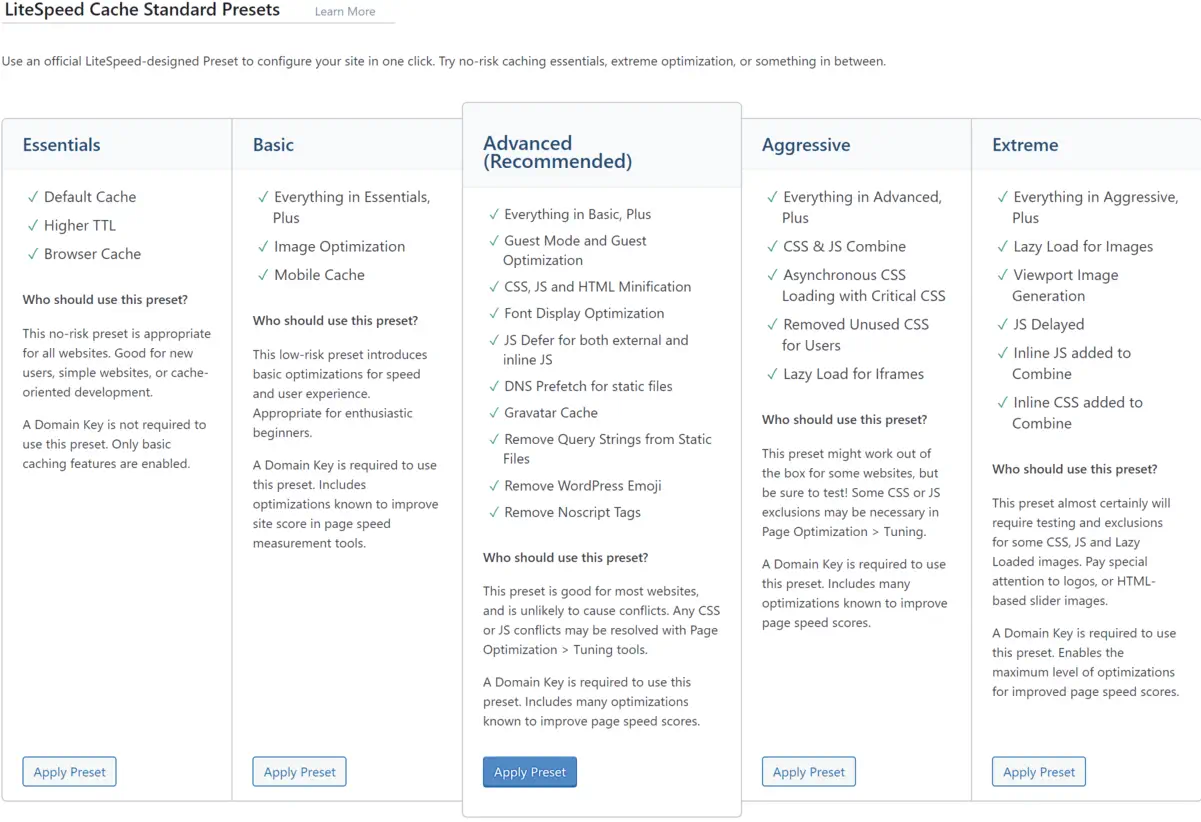
    Screenshot of LiteSpeed Cache preset options.

    When it comes to enhancing your WordPress site performance, installing and configuring the LiteSpeed cache plugin can be a game-changer. With LiteSpeed’s cutting-edge caching technology, fine-tuning your online presence for speed and efficiency is just a few steps away. I want to guide you through adding LiteSpeed’s power to your site.

    Simple Steps to Install LiteSpeed Cache Plugin for WordPress

    The journey to a faster WordPress begins with a straightforward LiteSpeed Cache plugin installation. After logging into the WordPress dashboard, navigate to the Plugins section—a quick search for ‘LiteSpeed Cache’ yields the desired plugin. With a single click on ‘Install Now’ followed by ‘Activate,’ the plugin is ready to contribute to your site’s excellent performance.

    Configuring LiteSpeed Plugin for Optimal Results

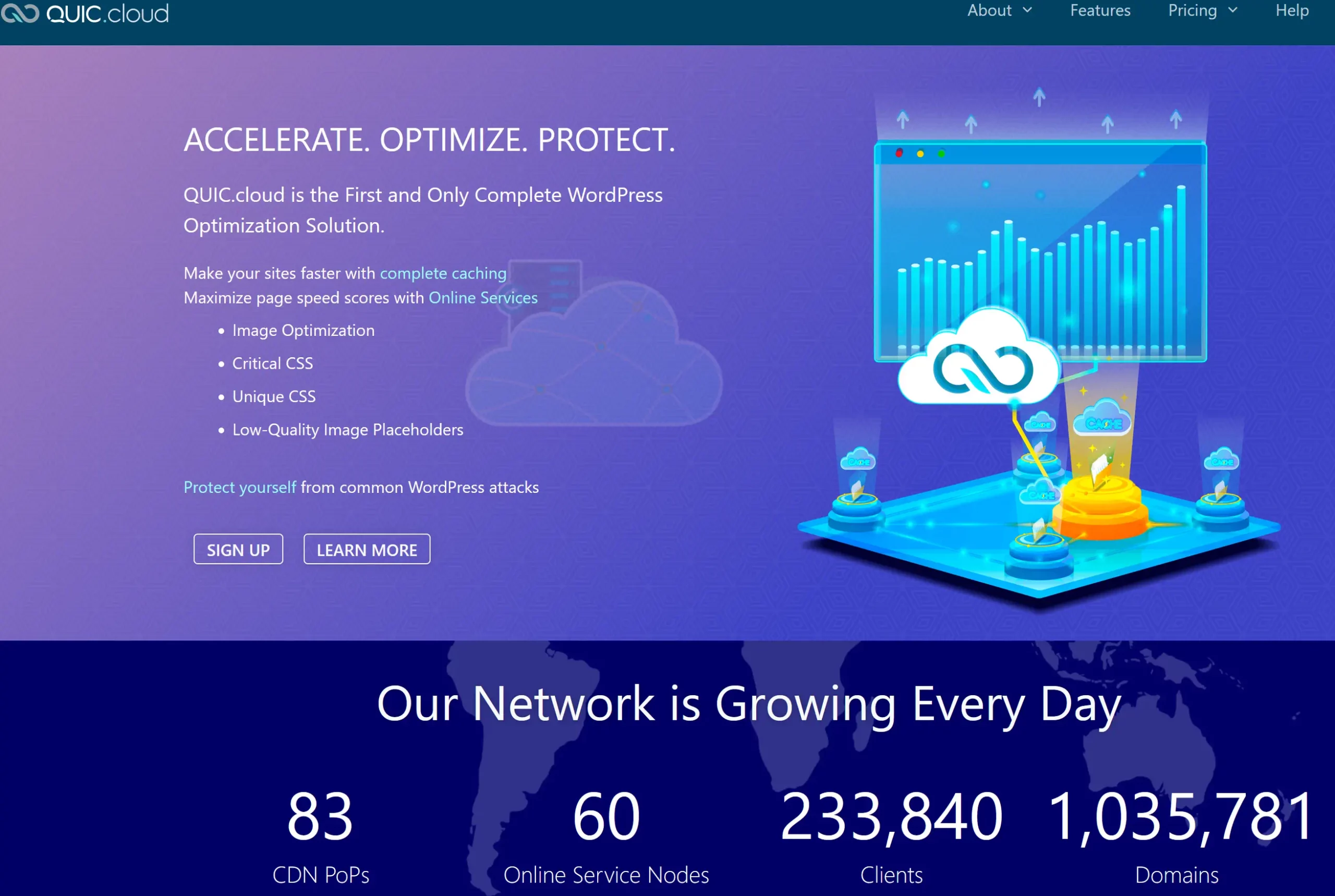
    The real power of the LiteSpeed cache for WordPress is unlocked through proper configuration. By ensuring that the plugin is set to update automatically, you are keeping your site equipped with the latest advancements from LiteSpeed. Adding a QUIC.cloud domain key can mark a considerable leap in cache synchronization with CDN services while enabling guest mode facilitates immediate access to the cached pages, reducing load times significantly. Tailoring these settings to align with your web content strategy can profoundly impact your site’s efficiency and speed.

    Testing and Comparing Performance on GTmetrix

    After configuring the LiteSpeed plugin for your WordPress site, the proof of improvement lies in performance testing. Utilizing platforms like GTmetrix, I’ve assessed the impact on LiteSpeed’s cache technology by comparing before and after results. The improvements are tangible, with GTmetrix reporting enhanced loading times and better scores across various performance matrices. These changes testify to the LiteSpeed plugin’s potency in elevating WordPress site performance.

    Advanced Optimization Features of the LiteSpeed Plugin

    Optimizing web performance is a multifaceted endeavor where every millisecond counts. I gravitate towards LiteSpeed optimization for its sophisticated capabilities that take website efficiency to the next level. In this section, we’ll dive into the nuanced features of the LiteSpeed Cache plugin that provides comprehensive optimization strategies to web developers and site owners looking to excel in site performance and user experience.

    Discussion on Image, CSS, and JS Optimization

    Initiating with image optimization, this feature compresses images without compromising quality. I have discovered that such compression significantly reduces page load times, enhancing the user experience, particularly for those with slower internet connections. The CSS and JS optimization process also lends itself to a sleeker content delivery. By minimizing these files, pages render faster, reducing user wait time and contributing positively to SEO metrics.

    Moving further into the intricacies, CSS optimization involves the removal of unnecessary spaces, comments, and line breaks from CSS files, condensing them without changing the functionality. Similarly, JS optimization reduces the size of JavaScript files through techniques like minification and combining multiple files into one. These granular details turn an ordinary online encounter into an immersive digital journey.

    Incorporating CDN Integration for Enhanced Global Delivery

    Another cornerstone of LiteSpeed optimization is its CDN integration. Employing a CDN is akin to establishing a global expressway for your content. Data is stored in multiple locations around the globe, ensuring that regardless of a user’s location, the content is delivered from the nearest server. This accelerates content delivery and can decrease server load and save bandwidth.

    For my part, I’ve noticed CDN integration’s tangible impact on international traffic; the enhanced reachability has a ripple effect, expanding audience engagement and retention.

    Customizing Cache Settings for Targeted Performance Gains

    Finally, the meticulous customization of cache settings within LiteSpeed tailors to the intricacies of a website’s unique needs. By adjusting these settings, I can pinpoint specific performance bottlenecks, ensuring that each web page is optimized for its intended purpose. Whether e-commerce, blogging, or multimedia showcases, tailored cache settings guarantee a vibrant and responsive user interface.

    Indeed, each of these advanced features—image, CSS, and JS optimization, CDN integration, and customized cache settings—put LiteSpeed optimization in a league of its own.

    LiteSpeed Technology: The Leading Edge in Webserver Optimization

    My experience as a web developer has allowed me to see firsthand the transformative effects of LiteSpeed web server optimization. By implementing LiteSpeed technology, I’ve consistently witnessed performance tuning take websites to new heights, ensuring they operate flawlessly even during peak traffic periods. Let me take you through some tangible benefits that LiteSpeed offers regarding webserver performance tuning.

    • Caching Capabilities: LiteSpeed’s technology is second to none, offering dynamic content caching that turns your website into a high-speed expressway.
    • Traffic Management: With LiteSpeed, your webserver can withstand the digital equivalent of rush hour without breaking a sweat. More resources for processing means less worry about site performance.
    • Alleviating Load: When complex tasks like heavy MySQL queries or resource-hungry plugins slow down your site, LiteSpeed technology balances the load and keeps things running smoothly.

    These key features prevent the typical bottlenecks experienced with other servers and guarantee a sturdy platform for web properties to grow. Outlined below is a comparative look highlighting the efficiency of LiteSpeed technology:

    Feature LiteSpeed Benefit Traditional Webserver
    Response Time Substantially reduced Often variable
    High Traffic Handling Exceptional performance Could be compromised
    Resource Usage Optimized efficiency Higher consumption
    Resource-Hungry Tasks Streamlined processing Potential for slowing
    Dynamic Content Delivery Accelerated loading Typically slower

    I’ve observed that websites optimized with LiteSpeed consistently deliver content faster, respond to user interactions without delay, and handle simultaneous visitors gracefully. It’s not just about keeping pace; it’s about setting the pace in a competitive online ecosystem.

    With LiteSpeed technology, I’m confident that the ceiling for webserver performance has been raised, allowing me and my clients to aim for and achieve unprecedented levels of web efficiency.

    Conclusion

    As we conclude, I want to emphasize the substantial benefits brought forth by LiteSpeed technologies within the realm of WordPress hosting. At the heart of modern-day site optimization, integrating the LiteSpeed server and LiteSpeed WordPress plugin has proven pivotal, boosting site performance and ensuring exceptional resource efficiency. In my evaluation, this harmonious blend of technologies facilitates significantly reduced loading times, propels SEO rankings, and fosters a superior user experience.

    Summarizing the Benefits of LiteSpeed Technologies for WordPress Hosting

    Throughout this exploration, the capabilities of LiteSpeed technology have reshaped my perspective on site fidelity and performance. Its aptitude in effortlessly serving up web pages and managing surging traffic while keeping resource use in check establishes it as an indispensable asset for WordPress hosting. The benefits of LiteSpeed, ranging from amplified server response times to improved SEO outcomes, have provided site administrators with the tools needed for fostering thriving, agile online spaces.

    Final Thoughts on the Importance of Site Optimization and Upcoming Trends

    Looking ahead, ongoing site optimization will continue to be a cornerstone of digital success. With emerging trends and evolving user expectations, the foresight in adopting LiteSpeed technologies could not be more timely. As we navigate the dynamic digital landscape, leveraging LiteSpeed server and plugin offerings is not just a strategic move but a vital one, ensuring WordPress sites remain resilient and ahead of the curve in a fiercely competitive market.

    FAQ

    What is LiteSpeed Webserver, and how does it benefit my WordPress site?

    LiteSpeed Webserver is a high-performance, event-driven web server that offers significant advantages in terms of speed and scalability for WordPress sites. Its optimized use of server resources helps minimize loading times, thereby improving user experience and SEO rankings.

    How does LiteSpeed Cache improve website performance?

    LiteSpeed Cache, a feature of LiteSpeed technology, enhances website performance by storing static snapshots of dynamic content and serving them to visitors at a much quicker rate than can be achieved by generating pages on the fly. This reduces server load and speeds up page delivery.

    Can LiteSpeed Cache and Plugins replace Apache, and are they compatible?

    Yes, LiteSpeed is designed to seamlessly replace Apache without changing the existing .htaccess configuration, making it fully compatible with Apache hosting environments. This ensures an easy transition to LiteSpeed for improved performance without compromising compatibility.

    What editions of LiteSpeed Web Server are available?

    There are two main editions of LiteSpeed Web Server: the Enterprise version, designed for hosting multiple websites with automatic .htaccess file management, and OpenLiteSpeed, which is the open-source version for individual sites and requires a server restart for .htaccess changes.

    What is dynamic content optimization, and how does LiteSpeed Cache handle it?

    Dynamic content optimization refers to the process of improving the loading and serving of web pages that are dynamically generated. LiteSpeed Cache handles this by caching the dynamic pages, thereby reducing the load on the server and quickly rendering pages to visitors.

    How do I install the LiteSpeed Cache Plugin on my WordPress site?

    You can install the LiteSpeed Cache Plugin by logging into your WordPress dashboard, navigating to Plugins, searching for LiteSpeed Cache, and installing and activating the plugin. Configuration settings can be adjusted to customize the caching and optimization features.

    What key performance metrics should improve after configuring LiteSpeed Cache?

    After adequately configuring LiteSpeed Cache, you should see improvement in key performance metrics such as load times, server response times, Time to First Byte (TTFB), and overall scores in performance testing tools like GTmetrix and Google PageSpeed Insights.

    Does the LiteSpeed Cache Plugin offer features beyond page caching?

    Yes, the LiteSpeed Cache Plugin offers advanced optimization features such as CDN integration, image optimization, and CSS/JS optimization, which go beyond standard page caching to enhance website performance further.

    Is CDN integration part of the LiteSpeed Cache solutions?

    Yes, CDN integration is a part of LiteSpeed’s caching solutions, which helps deliver content more efficiently to users worldwide by reducing geographical latency and offloading bandwidth from the origin server.

    How does LiteSpeed handle resource-intensive plugins or heavy MySQL queries?

    LiteSpeed technology helps optimize the handling of resource-intensive plugins or heavy MySQL queries by efficiently managing server resources. This streamlining enables the server to allocate more processing power to those demanding tasks, thus maintaining performance even under strain.

    Source Links

  • Exploring the Future with Headless WordPress

    Exploring the Future with Headless WordPress

    As we navigate the digital landscapes, our quest for dynamic, future-proof websites has led us to embrace the pioneering realm of Headless WordPress. This powerful iteration of the well-established content management system (CMS) is revolutionizing how we think about website development, carving out a new frontier for creators and developers alike. By decoupling the WordPress backend via its robust API, we’re not just keeping pace with technological advancements but setting the stage for them.

    Our journey into this new paradigm is charged with the promise of limitless creativity and performance. The traditional boundaries that once confined our online experiences are now dissolved, giving rise to a CMS for headless websites that redefine what is possible. With Headless WordPress, we wield the tools to craft unparalleled digital narratives, all while ensuring that the foundational power of WordPress propels us forward.

    In recognizing the shift towards this decoupled architecture, we’ve committed ourselves to fully leveraging the WordPress backend API, ensuring our websites are not only built for today but are primed for the developments of tomorrow. Through this lens, we invite you to discover the potential that Headless WordPress holds—for us, for you, and for the future of web presence.

    Key Takeaways

    • Headless WordPress fosters future-proof websites poised for technological evolution.
    • Decoupled WordPress architecture invites innovation and superior user engagement.
    • Utilizing the WordPress backend API enhances our capability to build robust digital experiences.
    • Embracing CMS for headless websites ensures scalability and creative freedom.
    • Our commitment to headless solutions marks the dawn of a new era in web development.

    Defining Headless WordPress and Its Core Advantages

    As the digital landscape evolves, developers seek solutions that break away from traditional limits, embracing systems like headless CMS for WordPress. The headless approach offers new dimensions of flexibility and security, benefitting developers and content creators alike. Let’s delve into what makes headless WordPress an innovative shift in content management strategy.

    What Is Headless WordPress?

    Headless WordPress is a content management system that operates without a frontend, delegating the presentation layer to external applications. This approach utilizes the WordPress REST API, enabling the backend to serve content to many different frontends, from mobile apps to high-performance websites. Using WordPress as a headless CMS, developers can harness the power of popular frameworks like React or Vue.js to deliver enhanced user experiences.

    The Flexibility and Scalability of Headless Solutions

    The architecture of a headless CMS development inherently supports expansion and innovation. Decoupled WordPress systems separate concerns between the content repository and the presentation layer, offering the maneuverability needed to craft unique frontend experiences. Scalability is readily achieved, as headless setups can effortlessly handle increased demand, propelling businesses toward new heights without compromising performance or aesthetic coherence.

    Enhancing Security with a Decoupled System

    Regarding digital security, the enhanced security offered by headless approaches is not trivial. A decoupled WordPress architecture significantly reduces the risk associated with front-end attacks. Since the content delivery and management are separated, vulnerabilities typically exposed in more traditional WordPress setups are diminished, providing an extra layer of security and peace of mind for businesses and developers alike.

    Technical Insights: Implementing Headless WordPress

    Headless WordPress API Integration

    When approaching a headless WordPress setup, we begin with a foundational installation of WordPress to harness its backend’s robust content management capabilities. The journey to a fully operational headless environment relies heavily on the WordPress REST API, which facilitates a seamless bond between the backend and the chosen frontend landscape.

    Enabling the WordPress backend API is crucial. It acts as a dispatcher, conveying content to many frontends—web, mobile, or any other application interfacing with WordPress. This API-driven architecture demands a strategic, thoughtful implementation to ensure smooth retrieval and display of content, molded to fit the unique requirements of each digital experience we craft.

    By leveraging the REST API, WordPress evolves into a decoupled powerhouse, allowing us to dictate the frontend experience from any technological platform, unfettered by traditional WordPress theme constraints.

    Below is an outline of the critical steps in our process:

    1. Installation and setup of a clean WordPress instance.
    2. Activate and configure the WordPress REST API.
    3. Selection and preparation of the frontend technology stack.
    4. Ongoing development and integration of RESTful API calls.
    5. Iterative testing and customization phases to refine user interactions.

    Ahead of the curve, this configuration frees us from the trappings of monolithic architectures and places us squarely on the cutting edge of web development.

    In the table below, we compare the traditional WordPress flow with our headless WordPress approach:

    Traditional WordPress Headless WordPress
    Frontend tightly linked with the backend Backend and frontend are completely separated
    Limited to PHP and WordPress themes for frontend Freedom to use any frontend technology stack
    Content served directly from WordPress Content delivered through REST API calls
    Plugin-dependent extensions API-driven interactions allow for scalable extensions

    We’ve entered a new realm of possibilities with our headless approach, pushing the boundaries of what we can achieve with WordPress as a backend. It’s more than a mere trend; it is a resilient framework for future-proof digital platforms that call for agile, secure, and innovative solutions.

    The Future-Proof Benefits of a Decoupled CMS

    Performance optimization in a decoupled CMS

    The evolution of content management systems into decoupled architectures has marked a new era in web development. Not only do these systems offer enhanced agility, but they also pave the way for significant improvements in website maintenance and future scalability. Weaving in the principles of performance optimization and faster loading times, they serve as the backbone for creating a tailored user experience that can readily evolve with technology adaptation, ultimately future-proofing web entities against the ever-changing digital landscape.

    Speed and Performance Optimization

    A decoupled CMS infrastructure streamlines the user experience with rapid content delivery. With a focus on performance optimization, it eliminates unnecessary bulk, narrowing down front-end components to those essential for functionality and faster loading times. This refined approach ensures that users enjoy a seamless interaction with web applications, even during peak traffic conditions.

    Creating a Tailored User Experience

    By liberating the front-end development from a fixed presentation layer, we leverage the freedom to design custom interactions unique to our brand. This level of tailored user experience meets specific visitor needs and fosters a deeper connection with our audience. Our imaginative capabilities are boundless through headless WordPress, shaping experiences as bespoke as our vision.

    Staying Ahead with Technology Adaptation

    As innovators in the digital space, we recognize the importance of keeping pace with emerging technologies. The modular nature of a decoupled CMS facilitates technology adaptation, allowing us to swiftly incorporate cutting-edge features such as AI, AR, and IoT. This adaptability is not just about staying current; it’s about future-proofing our digital offerings to ensure longevity and relevance in a competitive market.

    Feature Benefit Impact on User Experience
    Performance Optimization Enhanced loading times and efficiency Reduced wait times, increased satisfaction
    Custom Interactions Unique branding opportunities Memorable, personalized engagement
    Technology Adaptation Integration of new digital innovations Continually evolving and dynamic content

    Real-World Applications of Headless WordPress

    At the core of modern web development, Headless WordPress stands as a testament to flexibility and performance across a broad spectrum of applications. Its most notable real-world implementations offer transformative outcomes for businesses and users alike. From robust e-commerce with headless WordPress platforms that provide finely-tuned shopping experiences to streamlined content management for mobile apps and dedicated interfaces for membership sites, the practical examples of Headless WordPress are as diverse as they are effective.

    Below, we’ve curated a selection of headless WordPress examples to showcase its potential in live environments:

    • E-Commerce Platforms: The flexibility of decoupled WordPress is revolutionizing the e-commerce sector, offering highly customizable shopper journeys and interactive UI elements, all tailored to enhance customer engagement.
    • Mobile Applications: For applications on the go, headless architecture provides a consistent and efficient system for content delivery, unifying user experience across diverse mobile ecosystems.
    • Membership Sites: Membership portals leverage headless setups to empower users with personalized dashboards, specialized content access, and seamless user account management.

    These examples showcase not just versatility but the strategic value of adopting a headless approach:

    Industry Benefits of Headless WordPress
    E-Commerce Custom shopping experiences, dynamic product displays, and enhanced performance during sales or high-traffic events.
    Mobile Apps Uniform content distribution, faster load times, and the ability to push updates without app store approvals.
    Membership Sites Personalized content based on user roles, secure data handling, and greater control over member interaction.

    Our understanding deepens when we consider these applications in context. Each sector harnesses the inherent strengths of Headless WordPress—speed, security, and scalability—to meet specific needs that standard WordPress configurations may not sufficiently address. The result? Sophisticated solutions that continue to push the boundaries of what’s possible in the digital realm.

    Conclusion

    In pursuing innovative CMS solutions, the momentum has decisively shifted towards Headless WordPress, charting a decoupled web development roadmap that promises to redefine how we conceive and deploy web content. This freedom allows us to innovate and tailor digital experiences that meet and exceed expectations for speed, performance, and engagement.

    Our commitment to harnessing headless WordPress is rooted in its capacity to deliver a genuinely future-proof foundation for web development. As we embrace its potential, we acknowledge the challenges inherent in adopting this approach; there is a learning curve, and complexities arise. Yet, the benefits far outweigh the initial hurdles. We are now empowered to create performance-driven sites and applications that are responsive and singular in their interaction and design.

    As we look toward the horizon of web technologies, it’s evident that the flexibility and robustness bestowed by Headless WordPress position us to adapt swiftly and effectively. The digital landscape is perpetually evolving, and through this advanced CMS, our digital platforms are well-equipped to grow alongside it, ensuring that our presence online remains cutting-edge and resolute in the face of perpetual change.

    FAQ

    What Is Headless WordPress?

    Headless WordPress refers to a content management system (CMS) configuration where a website’s front end, or the presentation layer, is decoupled from the WordPress back end. This allows developers to use WordPress as a headless CMS, managing content through the back end and delivering it to any front end via the WordPress REST API. It provides greater flexibility in designing the user experience across different digital platforms.

    What are the Core Advantages of Using WordPress as a Headless CMS?

    WordPress as a headless CMS offers several advantages, such as enhanced flexibility and scalability, better security, and the ability to create a tailored user experience. It also allows for performance optimization, with faster loading times, and facilitates the adoption of emerging technologies and future-proofing digital platforms.

    How Does a Decoupled System Enhance Security?

    A decoupled or headless system enhances security by reducing the potential attack surface. Since the front end is separate from the back end, potential vulnerabilities in themes or front-end plugins don’t affect the content management and storage systems, thereby minimizing the risk of security breaches.

    What Are the Flexibility and Scalability Benefits of Headless WordPress?

    Headless WordPress offers unprecedented flexibility and scalability for web applications, enabling developers to use any front-end technology stack. This means they can build fast, responsive interfaces that can be scaled up easily as user traffic grows. Additionally, it allows for creating custom experiences for different devices or platforms without altering the back-end infrastructure.

    How is Performance Optimized in a Decoupled WordPress Architecture?

    Performance is optimized in a decoupled WordPress architecture because the front end is purpose-built and streamlined for efficiency. Without the overhead of traditional theme rendering, decoupled front ends can serve content faster, cache more efficiently, and provide a better user experience, especially when dealing with high traffic.

    What Does Creating a Tailored User Experience Entail in the Context of Headless WordPress?

    Creating a tailored user experience in the context of headless WordPress involves customizing the front-end presentation independent of the back end. Designers have more control over how the content is displayed, which allows them to design unique user interfaces and interactions that align with specific brand standards or customer expectations.

    How Does Technology Adaptation Contribute to Future-Proofing with Decoupled CMS?

    Technology adaptation contributes to future-proofing in a decoupled CMS scenario by allowing developers to quickly and easily incorporate new technologies and tools, such as AI, AR, and IoT, into their front end. This agility ensures the digital experience stays current with web trends, offering enhanced functionality and engagement without overhauling the back-end content system.

    What Are Some Real-World Applications of Headless WordPress?

    Real-world applications of headless WordPress are diverse and include e-commerce platforms that require personalized shopping experiences, mobile applications benefiting from consistent content delivery, and membership sites featuring custom-tailored dashboards. These varied uses demonstrate the versatility and adaptability of headless WordPress in fulfilling specific digital needs across a broad range of industries.

  • Duplicate a Page in WordPress Easily & Quickly

    Duplicate a Page in WordPress Easily & Quickly

    Creating website
    Creating website

    Duplicating a page in WordPress can be a time-saving technique that helps streamline your content creation workflow. Whether you want to create a replica page for A/B testing, save design time for large sites, or maintain consistency in your pages, duplicating a page can be helpful.

    In this article, we will discuss the need to duplicate WordPress pages, how to copy a page in WordPress, and provide tips and best practices for page duplication.

    Key Takeaways:

    • Duplicating a page in WordPress can save you time and effort in content creation.
    • It can be used for A/B testing, design efficiency, and brand consistency.
    • You can duplicate a page in WordPress using built-in features or plugins.
    • Selecting the right plugin and configuring settings are essential for optimal duplication.
    • Modifying and personalizing duplicated pages allows customization according to your needs.

    Understanding the Need for Duplicating WordPress Pages

    Duplicating WordPress pages plays a crucial role in efficient content management. By duplicating pages, users can quickly create similar pages for various purposes, ensuring a seamless workflow and consistent branding. Understanding the need for page duplication allows users to make informed decisions and maximize the benefits of this feature while avoiding duplicate content issues.

    The Role of Page Duplication in Content Management

    Page duplication serves as a valuable asset in content management for WordPress websites. It offers a hassle-free way to create replica pages, allowing users to:

    • Conduct A/B testing: Duplicating pages enables users to test different versions of a webpage to determine which performs better in conversion, engagement, or user experience.
    • Enhance design process efficiency: By duplicating existing pages, users can save time and effort in designing new pages from scratch, especially in cases where consistent design elements are required.
    • Maintain consistent branding: Duplicating pages ensures that the branding elements, layout, and structure remain consistent across multiple pages, aligning with the overall brand identity and user experience.

    Scenarios That Require the Duplication of a WordPress Page

    Several scenarios necessitate the duplication of WordPress pages. These include:

    • Create landing pages for different campaigns: Duplicating pages allows users to quickly generate multiple landing pages tailored to specific marketing campaigns or target audiences.
    • Replicate template pages: Users can duplicate them to maintain a consistent structure and design across various sections or categories within their website.
    • Localize content: Duplicating pages can be beneficial when translating content into different languages or tailoring it for specific regions while keeping the original page intact.

    Avoiding Duplicate Content Issues During Duplication

    Although duplicating pages offers numerous advantages, it is essential to be aware of potential duplicate content issues that may arise. To avoid these issues, consider the following:

    • Modify page content: Ensure that the duplicated pages have unique and relevant content, avoiding the use of duplicate text or images.
    • Set canonical URLs: Configure canonical tags to inform search engines about the original page, preventing indexing of duplicate pages and potential penalties for the same content.
    • Utilize 301 redirects: If necessary, redirect duplicate pages to their original counterparts using 301 redirects, indicating to search engines the preferred page to crawl and index.

    How to Duplicate a Page in WordPress

    Duplicating a page in WordPress can be done using different methods and plugins. One approach is to use the built-in page duplication feature in WordPress. This can be accessed through the dashboard by selecting the desired page, clicking on the ellipses menu, and choosing the “Copy page” option.

    Another method is to use plugins designed explicitly for duplicating pages, such as the Duplicate Page plugin or the Divi Builder. These plugins provide additional functionality and customization options when duplicating pages.

    Utilizing these methods and plugins allows you to duplicate pages in WordPress quickly and efficiently, saving time and effort in your content creation process.

    Tips and Best Practices for Page Duplication in WordPress

    Selecting the Right Plugin for Duplicating Pages

    Selecting the right plugin can make all the difference when duplicating pages in WordPress. With numerous options available, it is essential to consider factors such as compatibility, functionality, and user reviews. A reliable plugin seamlessly integrates with WordPress, ensuring a smooth and efficient duplication process.

    Here are a few popular plugins to consider:

    • Duplicate Page: This plugin allows you to duplicate pages with a single click. It is lightweight, user-friendly, and compatible with most WordPress themes.
    • Yoast Duplicate Post: This plugin enables page duplication and allows the option to draft pages for future publishing. It is a versatile tool that offers advanced customization features.
    • Divi Builder: This plugin is an excellent choice if you use the Divi theme. It offers extensive customization options, including duplicating entire layouts and sections.

    Configuring Duplicate Page Settings Optimally

    Once you have selected a plugin, it is crucial to configure the duplicate page settings optimally. This ensures that the duplicated pages are created according to your specific requirements, saving you time and effort in the long run. Some key settings to consider include:

    1. Naming Convention: Choose a naming convention that is clear and identifiable. This could include adding a prefix or suffix to the page title, such as “Copy of” or “- Duplicate”.
    2. Permalinks: Decide whether you want the duplicate pages to have the same permalinks as the original or prefer custom permalinks for each duplicate.
    3. Include/Exclude Content: Determine whether you want to include all content elements from the original page or selectively exclude certain sections, such as comments or meta information.

    How to Modify and Personalize Duplicated Pages

    Once the pages have been duplicated, you can modify and personalize them according to your needs. This allows you to customize the content, design, and settings to create unique pages without starting from scratch. Here are a few tips for modifying and personalizing duplicated pages:

    • Update Content: Review the duplicated page’s content and make any necessary changes or updates to ensure relevance and accuracy.
    • Customize Design: Modify the layout, color scheme, and typography to align with your branding or specific design preferences.
    • Adjust Settings: Tailor the settings of the duplicated page, such as SEO elements, page attributes, and featured images, to meet your specific requirements.

    By following these tips and best practices, you can make the most of page duplication in WordPress and leverage its power to streamline your content creation process.

    Conclusion

    In conclusion, duplicating a page in WordPress can be a valuable tool for content creators and website managers. It provides an efficient way to create similar pages, streamline workflows, and maintain consistent branding. By understanding the need for page duplication, learning how to duplicate pages effectively, and following best practices, users can significantly enhance their WordPress experience.

    Duplicating pages in WordPress offers numerous benefits. Firstly, it saves time by allowing users to replicate existing pages instead of starting from scratch. This is particularly useful for large sites or when A/B testing is required. Secondly, it ensures consistency in design and branding, making maintaining a unified look throughout the website accessible.

    To duplicate a page in WordPress, users can either utilize the built-in page duplication feature or opt for plugins specifically designed for this purpose, such as the Duplicate Page plugin or the Divi Builder. These plugins offer additional functionality and customization options, allowing users to tailor duplicated pages to their unique requirements.

    To optimize the page duplication process, it is essential to select the right plugin that aligns with your needs, configure duplicate page settings optimally, and modify duplicated pages as required. By following these tips and best practices, users can harness the power of page duplication and improve their WordPress workflow.

    FAQ

    What is the purpose of duplicating a page in WordPress?

    Duplicating a page in WordPress serves various purposes, including A/B testing, design efficiency, and maintaining consistent branding.

    How can I duplicate a page in WordPress?

    There are multiple ways to duplicate a page in WordPress. You can use the built-in duplication feature in WordPress or opt for plugins like Duplicate Page or Divi Builder.

    What do you think I should consider when duplicating pages in WordPress?

    When duplicating pages in WordPress, choosing the right plugin is essential, as configuring duplicate page settings optimally and modifying the duplicated pages to meet your requirements.

    Are there any potential issues with duplicate content when duplicating pages in WordPress?

    Yes, duplicate content can be a concern when duplicating pages. However, you can avoid these issues by following best practices and making necessary modifications.

    How can duplicating pages benefit content creators and website managers?

    Duplicating pages in WordPress offers a quick and efficient way to create similar pages, streamline workflows, and maintain consistent branding, ultimately improving the overall WordPress experience.

  • Elementor Launches Image Optimizer Early Access

    Elementor Launches Image Optimizer Early Access

    Screenshot of Image Optimizer software settings.

    This is a screenshot of the setting in Elementor Image Optimizer

    My first impression

    In recent years, Elementor has faced criticism for its slow performance and bloated code. The team has been diligently working to resolve these issues, and I believe their new Image Optimization Plugin is a strategic move in this direction. Although it doesn’t directly address the codebase, it’s a significant step towards enhancing overall performance.

    At first, I was really exicited when I saw the blog post that Elementor released a new image optimizer plugin (still in beta). I thought I would give it a try. After getting everything set up on a test WordPress website, I clicked the optimize button in the media library, and it was taking a while. I was like this is not good. So, maybe it is still a little early to use this plugin, but I am sure they will get it working. So, for now, I will continue using my offline WebP compressor on the desktop. Anyways, here are the plugin’s features so we can get excited as they get the plugin closer to release. 

    Effortlessly Enhance Your Website’s Performance

    Your website’s design and appearance have a considerable impact and value. The necessity of keeping your website’s speed and performance at an optimal level is not a question. Your efforts have been put into creating a stunning site, only to discover that your site needs to be better with loading speed and causing visitors to wander away. Don’t fret – there’s a solution that is designed specifically for web designers that is now available! Prepare to change how you manage images for your site. The new plugin developed by Elementor, Image Optimizer, offers powerful compression and optimization tools and seamless integration and performance improvements.

    Start a Free Trial

    Visit the Elementor Hosting pricing page here and create your account (website with official pricing)

    The Role of Image Optimization

    Images are the primary visual element of your WordPress website, bringing aesthetic appeal and narrative depth. However, even the most innocent pictures can lead to slow loading times and poor performance. Most likely to be the culprit? Size of the image. Images that are large cause slow loading. This is a concern we’ll tackle in greater detail later.

    Knowing the root cause of websites that load slowly is essential. Speed tests play a role in helping you understand the root of your site’s performance concerns.

    A deep dive into Image Optimizer developed by Elementor

    Larger images, though visually appealing, can be an issue for slow loading speeds, affecting user experience. Use Image Optimizer by Elementor Image Optimizer from Elementor to effortlessly combine captivating images with maximum performance.

    The extensive capabilities of Elementor’s design tools allow users to display images often without consideration about their size.
    This easy-to-use WordPress plugin makes it easier to manage the process of compressing, scaling, or optimizing images. Supporting the most popular formats such as JPEG, PNG, WebP and GIF The plugin will ensure that the visuals on your site are of top quality and significantly reduces the size of your files.

    Set and Forget With the Default Settings

    After installation, the plug-in has default settings that are perfectly designed for all websites. It doesn’t end after that point. From then onwards it is possible to let the Image Optimizer can work seamlessly as a background process. You can say goodbye to worries regarding image size, install, connect, and let the optimizer perform its job.

    Bulk or Single Image Optimization: Tailoring to Your Needs

    The plugin allows flexibility when it comes to managing media assets. It allows optimizing by one image at a given time or in a series of. Set the plugin up to increase or decrease the size of images at a time or immediately upon upload. If you already have a library of images that are optimized for bulk, this feature allows for rapid resizing and compression to ensure that your site’s performance stays at the top of its game.

    Two beverage cans on colorful background.

    It errors out!

    It might be wise to wait before installing the plugin. I’m not certain about the cause of the failure, but I’m hopeful it’ll be resolved in the upcoming update. I’ll review my settings or perhaps give it another try tomorrow, as it’s already past 8pm and I’m still blogging on a Sunday night. Meanwhile, let’s return to exploring the features.

    Optimizing Images: Various Techniques

    1. Compressing Images:

    The use of compression techniques can achieve the delicate balance between decreasing the size of the files and preserving maximum image quality. Two different types of compression techniques ensure the perfect balance of image quality and compression quality.

    Lossless compression: Reduces the size of images but without altering the quality or integrity of the images. The method eliminates unnecessary or redundant data, guaranteeing that the most important aspects are lost in the process. In the end, you’ll see the reduction of file size and still preserve the original high-quality of your photo.

    Lossy Compression: Maximizes compression to create lighter images, with smaller size files. This method reduces size by eliminating image information, which is usually invisible to the naked eye, which means there is no compromise to the quality of images. It results in a smaller dimension of the image without any noticeable distinctions, perfect to maximize storage capacity and enhance the performance of websites.

    2. Resize Larger Images:

    The process of resizing large images is to adjust the size or dimensions of the images that exceed set thresholds. This process is especially relevant to bigger images, which can burden servers or contribute to slow loading speeds on websites. You can set the maximum size of pixels for the image to avoid overloading servers. The default is set at 1920 pixels.

    The ability to select the maximum width in pixels that is available in the Image Optimizer from Elementor allows users to customize image sizes according to specific requirements or requirements for their website.

    3. Convert to WebP for Even Better Optimization:

    Convert to WebP is the process of converting images into WebP format. WebP format. It is an advanced and effective format for compressing images that Google developed. WebP uses advanced compression techniques that significantly reduce the file size but maintain a high-quality image. One of the main advantages of WebP is the ability to give substantial savings in size when compared with standard formats such as JPEG and PNG. This means that WebP can speed up website load times, resulting in a more pleasant customer experience and better website performance.

    4. EXIF Metadata:

    EXIF (Exchangeable Image Format for Files) metadata is a collection of data contained within the image file, which contains information about the camera’s settings, the conditions, and other technical details present when the picture was captured. It contains essential information, including the time and date of the photo’s capture, the camera model and shutter speed aperture ISO, and geolocation information, providing a complete overview of the conditions that led to the making of the picture. Although EXIF metadata can be helpful to enthusiasts and photographers when it comes to analyzing and gaining knowledge from their photos, it also plays an essential part in optimizing websites. For optimizing images, eliminating EXIF metadata may further shrink the size of files without degrading image quality. This can lead to an increase in speed and shorter loading speeds.

    5. Image Thumbnails:

    Resize all sizes of pictures as default. It also allows users to pick specific sizes according to WordPress-registered thumbnail dimensions. The plugin defaults to automatically adjust all size images, such as thumbnails, to maximize their size. This setting will ensure that your site benefits from an improved visual appearance, resulting in faster page loading times and a better overall user experience.

    6. Other Features for Enhanced Workflow and Abilities:

    • Backup original images and selectively delete backups to make the most efficient use of space.
    • Restore original images to selected media files if needed.

    Start a Free Trial

    Visit the Elementor Pro pricing page here and create your account (website with official pricing)

    Image Optimization: A Game-Changer for Performance and SEO

    Are you still unsure about the transformational effects of the optimization of images? Let’s explore the many benefits of this seemingly insignificant but important change

    1. Faster Loading Times:

    Optimized images allow speedy page loading times, providing a superior user experience.

    2. Improved Google PageSpeed Score:

    A well-designed, optimized site will improve your Google PageSpeed score. This indicates to search engines the efficacy and usability of your online domain.

    3. Enhanced Search Engine Rankings:

    Google prefers optimized sites with more search engine rank, increasing your website’s visibility and exposure.

    4. Reduced Bounce Rate:

    Speedier loading pages result in low bounce rates and entice visitors to stay longer and browse your site.

    5. Efficiency in Resource Usage:

    Optimized photos require less server storage, reducing resource requirements and resulting in bigger savings in the long run.

    6. Cost Savings on Mobile Data:

    A lower consumption of optimized image data can mean price savings for both you and the users on data plans for mobile devices.

    Make Your Website Faster With Image Optimization

    The Image Optimizer tool from Elementor looks to be an effective and straightforward solution that tackles optimization. From selecting the format to compression and resizing, this tool allows users to build websites that function unmatched efficiently while increasing search engines’ speed and ranking. 

    Start a Free Trial

    Elementor Product Starting Price Learn More
    Elementor Hosting $9.99/mo. Visit Pricing
    Elementor Plugin $59.00/yr. Visit Pricing
  • Optimize Your Store with 5 Best Practices for WooCommerce

    Optimize Your Store with 5 Best Practices for WooCommerce

    Computer on desk displaying sunset through window.

    At the core of our endeavors, we pursue a singular goal: to empower WordPress ecommerce by sharing our profound insights into WooCommerce best practices. Our mission is to equip you with the tools and knowledge to optimize your WooCommerce shop for the ultimate customer experience and performance. We understand that in the age of digital retail, the difference between an average and outstanding online store hinges not just on what you sell but on how efficiently and engagingly you present it.

    In this rapidly evolving ecommerce sphere, optimizing your WooCommerce store is no longer optional. It’s imperative for success. Be it a startup or a well-established business, the digital storefront must function flawlessly – because if your online store isn’t up to par, customers have an abundance of alternatives just a click away. This is why we’ve invested our time and expertise to help you boost your WooCommerce store’s performance and, in turn, your sales.

    Key Takeaways

    • Implementing WooCommerce best practices is crucial for a lucrative WordPress ecommerce venture.
    • Optimizing your WooCommerce shop encompasses more than just aesthetic appeal – it includes technical enhancements for speed and efficiency.
    • A streamlined, optimized store significantly reduces the risk of losing customers to competitor sites due to slow load times or poor user experience.
    • Regular updates and mindful optimizations cater to evolving customer expectations and search engine requirements.
    • Critical aspects of WooCommerce optimization will be discussed, tackling settings, hosting, and performance strategies to cement your store’s presence in the competitive market.

    Understanding the Significance of WooCommerce Optimization

    As we delve into the realm of e-commerce, it is paramount to recognize that user experience (UX) forms the backbone of a successful online store. The quest to optimize WooCommerce shop operations goes hand-in-hand with providing customers with an environment that is visually appealing and functionally seamless. We understand that each second shaved off from load times can substantially improve customer satisfaction and, in turn, escalates conversion rates and profitability.

    A fully optimized WooCommerce store does more than merely display products; it engages with visitors, minimizes their effort, and ensures a delightful and smooth shopping journey. Amazon’s research on page speed underscores the critical nature of optimization, revealing the considerable influence of mere milliseconds on revenue streams. WooCommerce optimization tips extend beyond mere aesthetics, encompassing a comprehensive strategy to uplift every facet of the shopper’s experience—from the landing page to checkout.

    Every aspect of our WooCommerce optimization process is meticulously designed to foster trust, encourage interaction, and ultimately inspire action.

    • Improving load times for a swift browsing experience.
    • Enhancing site usability for effortless navigation and user interaction.
    • Implementing intuitive design elements that guide the buyer’s journey.
    • Ensuring responsive layouts for a consistent shopping experience across all devices.

    By aligning with these principles, we ensure a robust foundation for an optimized WooCommerce shop that not only attracts but retains customers, driving your business towards a trajectory of growth and success.

    Maximizing Efficiency with WooCommerce Settings

    Vibrant cafe interior with customers and plants illustration.

    As we delve into the capabilities of WordPress ecommerce, it is apparent that optimizing WooCommerce settings plays a pivotal role in streamlining the shopping experience. With a focus on improving operational efficiency, let’s explore essential adjustments within the WooCommerce settings that can enhance both speed and user interaction on your retail platform.

    Streamlining Add to Cart Behavior

    One of the first steps we take involves refining the ‘Add to Cart’ process through AJAX. By incorporating the AJAX Add to Cart feature on product archives, we reduce the number of server calls each time a customer adds a product to their cart. This not only minimizes loading times but also creates a smoother and more immediate interaction for users who wish to continue shopping without disruption.

    Effective Placeholder Image Use

    In our pursuit to optimize WooCommerce settings, we acknowledge the importance of image efficiency. Employing a unique identifier for placeholder images benefits us twofold: it conserves server space and accelerates content delivery by reducing file size. Smaller, optimized placeholder images mean quicker load times, essential for retaining customer interest and decreasing bounce rates.

    Managing Product Reviews and Ratings

    Product reviews and ratings can be a double-edged sword. While they foster trust and inform potential buyers, they also demand additional resources. For our smaller WordPress ecommerce sites, where numerous products lack reviews, disabling reviews can lead to a cleaner presentation and faster page loads. Similarly, turning off product ratings can streamline the user journey, eliminating the need for additional scripts associated with star-rating functionalities.

    Our commitment to refining your WordPress ecommerce venture does not end here. By focusing on these strategies to optimize WooCommerce settings, we foster a robust platform, ready to meet the expectations of the discerning online shopper. We continue to explore and implement innovative solutions for a seamless and efficient online store.

    Woman working on laptop at outdoor cafe evening.Choosing the Right Hosting for WooCommerce


    When we embark on the journey of operating a WooCommerce store, the bedrock of our success is not merely the products we offer or the UI/UX design we implement—it’s fundamentally the hosting that powers our WordPress ecommerce. Settling on WooCommerce optimized hosting is not just an option; it is an essential decision that profoundly influences the scalability, speed, and security of our online business.

    Recognizing the unique demands of an online store, we often recommend choosing a managed WordPress host that is tailored to cater to the high-performance requirements of WooCommerce. A stellar example in this domain includes hosting services from established providers like Liquid Web or Kinsta. These specialists in the field have fine-tuned their hosting environments to synergize with WooCommerce, thus allowing us store owners to focus on growth rather than getting bogged down by technicalities.

    Managed WooCommerce hosting solutions take the guesswork out of server management, providing optimized resources that adapt to the ebbs and flows of our ecommerce activities.

    • Optimization for WooCommerce features and updates
    • Robust security measures to protect customer data
    • Expert support tailored for WooCommerce retailers
    • Enhanced performance that scales with your store’s traffic

    Given these advantages, transitioning from a basic discount hosting service to a robust, WooCommerce optimized hosting plan can yield measurable enhancements in your store’s efficiency. In today’s competitive market, we can’t afford to compromise on uptime and page load speed—a reality that positions specialized WooCommerce hosting as a strategic investment for our ecommerce ambitions.

    We understand that every second counts in retaining customer interest and driving conversions. Thus, investing in the right hosting environment is a critical step toward securing a seamless shopping experience that customers anticipate and deserve. Let’s make the smart choice for our WooCommerce stores, ensuring our digital storefronts are always open, fast, and ready to welcome shoppers worldwide.Creative workspace with laptop, plants, camera, and coffee.

    5 Best Practices WooCommerce for Peak Performance

    To enhance WooCommerce performance effectively, there are five key strategies to implement. First, choosing a specialized WooCommerce hosting provider ensures optimized server resources and scalability to handle varying traffic volumes. Second, implementing caching solutions like Redis Object Cache or WordPress caching plugins significantly reduces server load and speeds up page loading. Third, optimizing images and media files through compression and implementing lazy loading techniques cuts down on page load times, improving overall site speed. Fourth, minimizing and combining CSS and JavaScript files reduces the number of HTTP requests, thus enhancing page loading efficiency. Lastly, regular database optimization by cleaning redundant data and optimizing tables ensures smooth and quick data retrieval, which is vital for maintaining a fast and responsive WooCommerce store. Each of these strategies contributes to a more efficient, user-friendly, and high-performing eCommerce site, ultimately leading to a better shopping experience for customers and higher conversion rates for businesses.

    1. Utilizing Global CDN Networks

    Embracing the power of content delivery networks (CDN), we partner with industry leaders like Cloudflare to establish a robust global presence. This strategic move ensures that images and content are delivered expeditiously to shoppers worldwide, regardless of their location, thereby reducing latency and improving site speed.

    2. Object Cache Like Redis

    Redis Object Cache significantly boosts WooCommerce performance by optimizing data retrieval. It caches database queries, allowing repeated queries to be served from the cache rather than the database, which reduces load and speeds up response times. It optimizes session storage by handling visitor sessions in memory, improving efficiency, and reducing database interactions. Unlike standard WordPress object caching, Redis’s persistent caching ensures data remains across multiple requests, enhancing page load speeds, particularly for repeated data access. This is crucial during high-traffic periods, as it allows for better handling of increased visitor volumes without compromising site responsiveness. Additionally, Redis reduces overall server load, offers scalability, and improves user experience with faster page loads and responsive interactions, which are essential for eCommerce success. This customization and flexibility in cache invalidation and data persistence allow WooCommerce sites to perform more efficiently, leading to smoother transactions and a better shopping experience.

    3. Focusing on Core Web Vitals

    Our adherence to Google’s Core Web Vitals underscores our commitment to user-centric performance metrics. We fine-tune code efficiency by minifying and deferring JavaScript, HTML, and CSS, dramatically enhancing loading times, interactivity, and visual stability. This meticulous attention to detail translates into a seamless shopping experience that customers can rely on.

    4. Compressing Images for Optimal Delivery

    Efficient image compression remains at the forefront of our optimization endeavors. Tools like Imagify have proven indispensable, seamlessly integrating with WordPress to support next-gen formats such as WEBP. We accelerate product page load times by reducing image file sizes without sacrificing quality, significantly enhancing customer engagement and satisfaction.

    5. Database Optimization

    Database optimization plays a pivotal role in enhancing the performance of a WooCommerce store. As an eCommerce platform, WooCommerce generates substantial data, including product details, customer information, order histories, and more. Over time, this accumulation can lead to database bloat, slowing down query processing and, consequently, website performance. Regularly cleaning the database by removing obsolete and redundant data such as expired transient options, outdated customer sessions, old order metadata, and spam comments can significantly streamline database efficiency. Additionally, optimizing database tables ensures data is stored and retrieved more effectively. Tools like WP-Optimize or plugins specifically designed for WooCommerce can automate this optimization process, handling tasks like database cleanup, image compression, and caching. This not only improves the speed and responsiveness of the WooCommerce site, enhancing user experience and search engine rankings but also ensures the database remains manageable and scalable as the store grows. Therefore, proper database maintenance and optimization are crucial for maintaining a fast, reliable, and efficient WooCommerce operation.

    WooCommerce Hosting SolutionsConclusion

    In wrapping up our discussion on optimizing a WooCommerce store, it’s essential to recognize that mastering the 5 best practices WooCommerce is not merely recommended, it’s imperative for thriving in today’s competitive WordPress ecommerce landscape. By implementing these strategic practices, you can fine-tune your WooCommerce settings and choose hosting solutions purpose-built for performance to ensure that your shop operates at peak efficiency.

    Implement caching mechanisms like Redis Object Cache, as mentioned earlier, or use WordPress caching plugins like W3 Total Cache or WP Rocket. Caching reduces server load by storing static copies of your content, decreasing the time it takes for pages to load.

    Leveraging CDN networks and image compression techniques not only enhance the speed and responsiveness of your store but also fortify the user experience. Moreover, adhering diligently to Core Web Vitals and regular updates enables your online store to align closely with user expectations and search engine benchmarks. It’s through these sustainable practices that we can optimize WooCommerce shops effectively, yielding significant improvements in conversion rates and revenue.

    Large images and media files can slow down your website. Use image optimization tools to compress and resize images without losing quality. Implement lazy loading, which loads images only as they come into the viewer’s screen, reducing initial page load time.

    Regularly cleaning and optimizing your WooCommerce database can boost performance. This includes removing unnecessary data like old revisions, spam comments, and transient options. Plugins like WP-Optimize can automate this process.

    At the heart of our efforts lies the commitment to a seamless shopping experience that proactively addresses the needs of our users while also meeting the technical rigor of search engines. With focused application of these WooCommerce optimization tips, we are setting the stage for increased shopper engagement, robust search engine visibility, and long-term success of our WooCommerce ventures. Remember, in the dynamic world of WordPress ecommerce, ongoing optimization is not just an option—it’s the cornerstone of enduring online retail success.

    FAQ

    Why is it important to optimize my WooCommerce store?

    Optimizing your WooCommerce store is essential for providing a superior user experience, achieving faster page speeds, and meeting customer expectations. This can help improve conversion rates and revenue, as online shoppers are likely to abandon a site that loads slowly or offers a cumbersome shopping experience. Companies such as Amazon have demonstrated that any delay can significantly impact finances, making optimization a critical aspect of ecommerce success.

    What are some WooCommerce best practices I should follow?

    Some best practices for optimizing your WooCommerce store include streamlining the ‘Add to Cart’ process with AJAX, optimizing placeholder images for reduced load times, managing product reviews and ratings, selecting a WooCommerce optimized hosting service, compressing and optimizing images for faster delivery, utilizing global CDN networks, and focusing on improving Core Web Vitals for better user experience and search engine performance.

    Can the choice of web hosting affect my WooCommerce store’s performance?

    Absolutely, the choice of web hosting significantly affects your WooCommerce store’s performance. Opting for a managed WordPress host that is specifically optimized for WooCommerce, like Liquid Web or Kinsta, can improve server-side stability, speed, and overall store efficiency. Such specialized hosting services cater to the unique requirements of WooCommerce shops, providing better support for features and updates.

    How can I effectively use placeholders in my WooCommerce store?

    To use placeholders effectively, it’s recommended to use a unique ID for a small, low file size image that minimizes the consumption of server space and loading time. This practice ensures that your store maintains a polished look without compromising on loading speeds, which are critical for user retention and conversion.

    How does compressing images and using a CDN network enhance my WooCommerce performance?

    Compressing images lessens file sizes, thereby reducing the loading time on product pages, which is crucial for keeping potential customers engaged. Using a global CDN network like Cloudflare ensures that images and other static content are delivered efficiently to users around the world, buffering the performance impact of geographical distance and reducing load on your primary server.

    What are Core Web Vitals and how do they affect my WooCommerce site?

    Core Web Vitals are a set of metrics by Google that measure real-world user experience for loading performance, interactivity, and visual stability of a webpage. They are particularly important for good SEO and user experience. Optimizing your WooCommerce site to improve Core Web Vitals involves techniques such as minifying and deferring JavaScript, HTML, and CSS. By focusing on these metrics, you can significantly enhance the shopping experience on your site and potentially improve search engine rankings.

    Should I disable product reviews and ratings to speed up my WooCommerce site?

    Whether or not you should disable product reviews and ratings depends on your specific context. For smaller sites with many unreviewed products, disabling reviews might make the site look more professional and load faster. However, reviews can build customer trust and influence purchase decisions. Therefore, it’s important to balance the feature’s impact on loading times with its benefit to the user experience.

    Is updating WooCommerce regularly necessary?

    Yes, it is crucial to keep WooCommerce and its extensions up to date. Regular updates ensure that you have the latest features, bug fixes, and security patches, which collectively improve the reliability, user experience, and performance of your store.