Tag: WordPress Plugin

  • Elementor 3.23: Exciting New Features Unveiled

    Elementor 3.23: Exciting New Features Unveiled

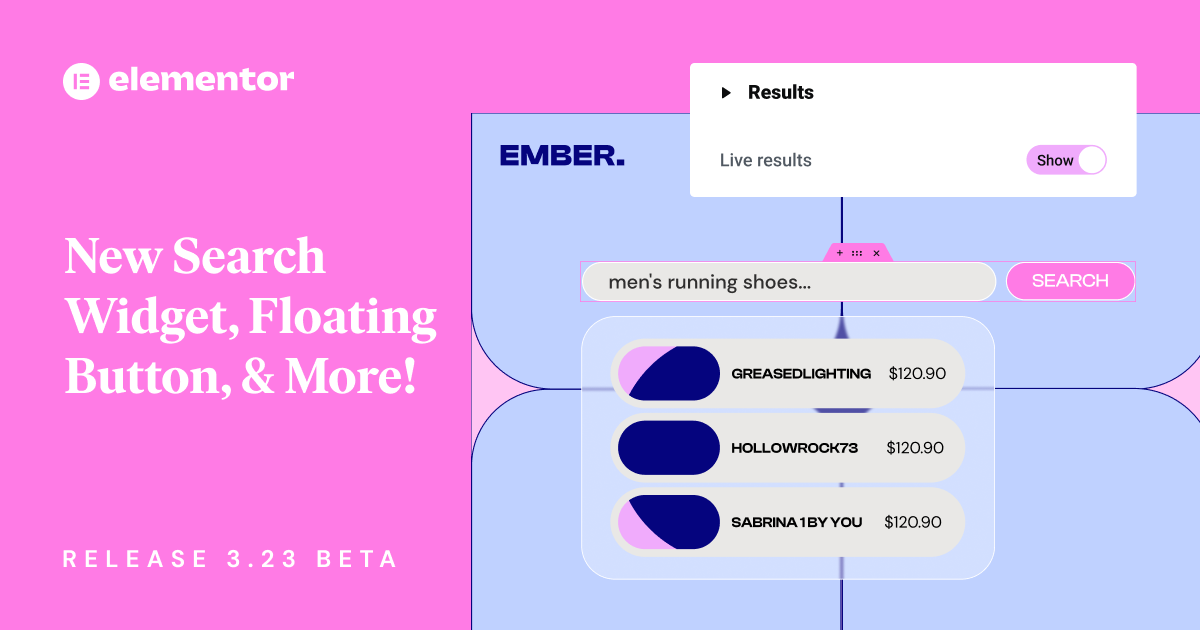
    Elementor New Search Widget and More, Release 3.23 Beta

    Elementor 3.23 has arrived, bringing new features to the popular website builder. This update focuses on making things faster and easier for users. It sets a new standard for web design tools.

    The latest version has an enhanced Search widget with live results. This makes finding things on websites faster and more fun. A new Floating Button widget helps increase sales, and Link in Bio widgets make adding social media links easy.

    These new features come with big performance upgrades. This makes Elementor 3.23 a big deal for web designers and site owners.

    One big improvement is Nested Elements, which make designing faster and more detailed. Editor performance has gotten 60%-98% better. Element Caching is now on by default for new sites, making websites load faster.

    Key Takeaways

    • New Search Widget with AJAX-powered live results
    • 40+ Floating Button templates available in Elementor Pro
    • Seven new Link in Bio widgets for social media integration
    • Significant editor performance gains with optimized Nested Elements
    • Element Caching active by default for new sites
    • Improved accessibility features, including screen reader compatibility

    Introduction to Elementor 3.23

    Elementor 3.23 is a big step forward in making websites better and more engaging. It comes with new tools to make exploring sites easier, design more precise, and keep visitors interested. The beta version is out for testing, letting users share their thoughts on the new stuff.

    The new Search Widget is a big deal in this update. It shows live search results as people type, changing how we look at site content. You can set the search to look in “All”, “Product”, or “Posts”, making searching more personal.

    Improving site speed is a key focus of Elementor 3.23. The time it takes for nested widgets to work has gotten much faster:

    Metric Before After Improvement
    Interaction Time (Case 1) 2,290ms 240ms 89.5%
    Interaction Time (Case 2) 707ms 5.5ms 99.2%

    Elementor 3.23 also introduces Floating Buttons to help increase conversions. These buttons make it easy for visitors to connect with you. They come in many templates and can show your contact info.

    For social media fans, there’s the Link in Bio widgets. These seven widgets are for both free and Pro users. They help make your online presence stronger and send more traffic to important website parts.

    To try out these new features, go to WordPress Dashboard → Elementor → Features. This update shows Elementor’s ongoing effort to make websites better and faster.
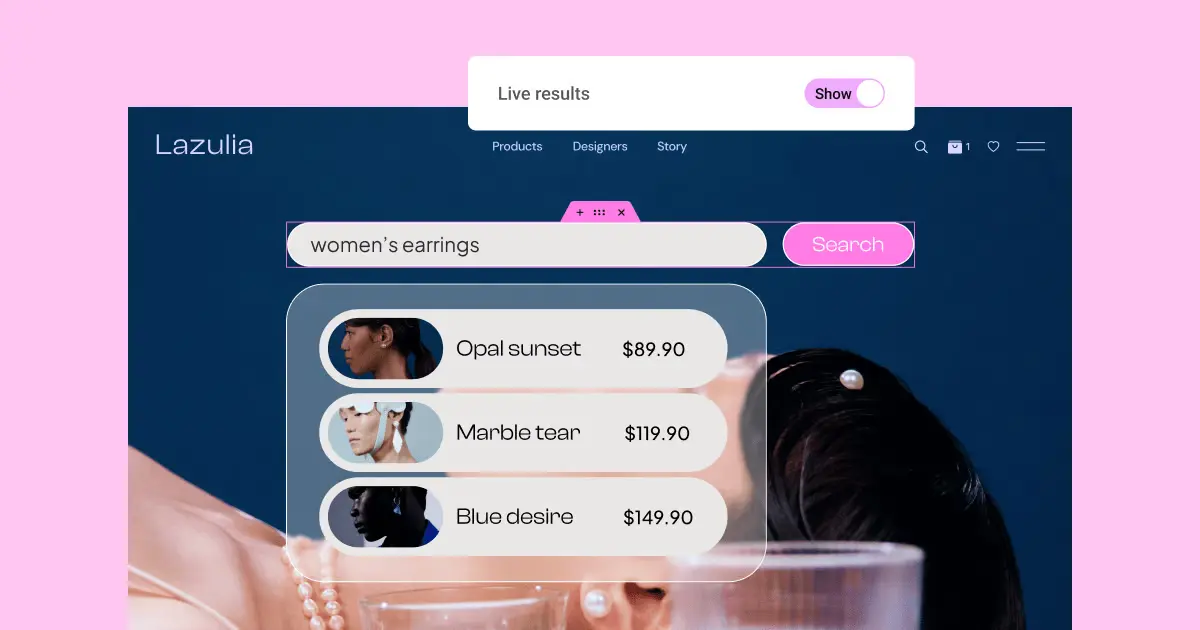
    Search results for women's earrings on Lazulia

    Enhanced Search Widget: Revolutionizing User Experience

    Elementor 3.23 introduces a game-changing search widget that changes how users interact with websites. This feature brings AJAX search to the forefront, making site navigation and user engagement better.

    AJAX-powered Live Results

    The new search widget uses AJAX technology for instant results as users type. This makes searching faster and more efficient, helping visitors find what they need quickly.

    Customizable Search Input and Results Display

    With this customizable search widget, website owners can make the search fit their brand. They can change the search input field, submit buttons, and how live results are shown.

    Dynamic Filtering Options

    The search widget also has powerful filtering options. Users can narrow down their search results on the fly. This makes searching more targeted and relevant, boosting user satisfaction.

    Feature Description Benefit
    AJAX Search Real-time results as users type Faster content discovery
    Live Results Instant display of search matches Improved user engagement
    Customizable Widget Tailored search input and results display Consistent brand experience
    Dynamic Filtering Refined search options More relevant search results

    The enhanced search widget in Elementor 3.23 is a big step forward for websites. It combines AJAX search, live results, and customization. This makes it a powerful tool for better user experience and finding content.

    Chat with store manager Sheila Lou

    Floating Button Widget: Boosting Conversions

    Elementor’s new Floating Button Widget is changing the game for boosting conversions. It has sticky buttons that stay visible as users scroll. This means users always have easy access to important actions. The widget comes with many customizable templates, including three for free and over 40 in Elementor Pro.

    Users can make each template their own, picking messaging platforms and customizing avatars and chat messages. This makes it easy to add chat features, which can improve user engagement and increase conversions.

    Feature Free Version Elementor Pro
    Pre-designed Templates 3 40+
    Customization Options Limited Extensive
    Click Tracking Yes Yes
    Display Conditions Basic Advanced

    The Floating Button Widget tracks clicks, helping businesses see how well it works. It also lets you target messages to certain groups of people. This personal touch can really help increase conversions, as studies show it can boost them by up to 35%.

    “The Floating Button Widget is a powerful tool for businesses looking to enhance user engagement and drive conversions. Its customization options and strategic placement make it an invaluable asset for any website.”

    Jeweler profile card with contact options

    Link in Bio Widgets: Streamlining Social Media Integration

    Elementor 3.23 has introduced a big change for social media: Link in Bio widgets. These widgets help make pages that bring together content and calls-to-action from different social platforms. They are customizable and responsive.

    Seven Ready-to-Use Widgets

    There are now seven new Link in Bio widgets. They help improve brand identity and make social media easier to manage. Users can pick from over 60 pre-made blocks in the library for quick page setup.

    Customization Options for Brand Identity

    These widgets let users customize their Link in Bio pages to match their brand. You can change colors and fonts to show off your brand’s unique style.

    Widget Feature Benefit
    Responsive Design Ensures optimal display across all devices
    Customizable Layouts Allows for unique brand representation
    Multiple Platform Support Integrates seamlessly with various social media platforms

    Availability for Free and Pro Users

    Elementor’s update is for both free and pro users. Free users get the “Minimalist” widget for simple social media integration. Pro users get all seven widgets for more design options and flexibility.

    With these new Link in Bio widgets, Elementor is making it easier for users to have a strong online presence on different social media platforms.
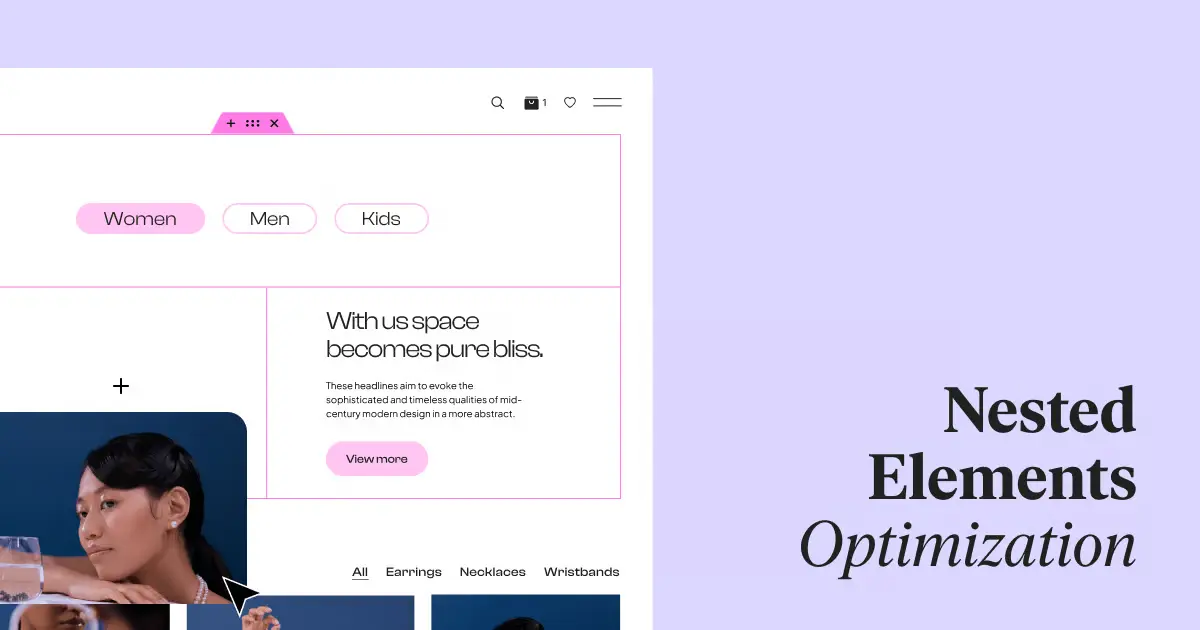
    Website header with categories: Women, Men, Kids

    Performance Improvements for Nested Elements

    Elementor 3.23 has changed the game with its boost to website performance. It has made the editor faster by cutting down the time it takes to interact with it by 60% to 98%. This is thanks to the upgrade of Nested Elements, a feature from version 3.10.

    Now, creating complex designs is faster thanks to the widget’s new infrastructure. Designers can easily make detailed layouts using Flexbox Containers. This makes editing smoother, letting users work better.

    Here are some key ways it’s improved:

    • Element Caching feature improves Time To First Byte (TTFB) by 30%-70%
    • Memory usage decreases from 3MB to 8KB with Elementor caching
    • Waypoint.js library replacement reduces memory use by 18KB

    These changes make designing easier and help websites run better. Sites load faster and use less memory, which means a better experience for visitors.

    Feature Improvement
    Editor Interaction Time 60%-98% reduction
    TTFB 30%-70% improvement
    Memory Usage Reduced from 3MB to 8KB

    With these updates, Elementor 3.23 helps designers make complex layouts efficiently. It also ensures websites run smoothly.

    New in Elementor 3.23: Element Caching and Top Bar

    Elementor 3.23 introduces big changes to make websites load faster and easier to edit. Element Caching is now on by default for new sites, making them run smoother and quicker. This is a big win for speeding up websites.

    The Top Bar is now a key part of the Editor, changing how we work. It makes editing better by showing responsive previews, giving quick access to the Theme Builder, and making it easy to move between pages. These updates make editing smoother and easier.

    Feature Benefit
    Element Caching Faster loading times, improved performance
    Top Bar Integration Enhanced editor navigation, streamlined workflow
    Responsive Preview Instant view of different device layouts
    Theme Builder Access Quick modifications to site-wide elements

    With these updates, Elementor keeps focusing on making things better for users and websites. The mix of Element Caching and the Top Bar lets users make websites that load fast and are easy to edit.

    Accessibility Enhancements: Improved DOM Output

    Elementor 3.23 makes a big step forward in web accessibility with its new DOM output. This update aims to make websites more inclusive, especially for users who use screen readers.

    Screen Reader Compatibility for Mega Menu

    The Mega Menu now works perfectly with screen readers. This means visually impaired users can easily go through complex menus. The better keyboard navigation also supports inclusive design, making sites more accessible to everyone.

    Impact on Overall Website Accessibility

    These updates make the web more inclusive. By making the DOM output better, Elementor 3.23 cuts down on code, making sites load faster. This is great for users with slow internet or old devices.

    • 39% less code for Flexbox Containers
    • 85% less code for Grid Containers
    • Improved Time to First Byte (TTFB) score by 3-5%

    With these updates, Elementor keeps focusing on making sites accessible to everyone. Now, developers can make sites that look good and work well for all users, no matter their abilities or tools.

    Elementor’s Growth and Market Presence

    Elementor keeps adding new features, showing it’s a big player in the website builder market. It’s always innovating, keeping up with the latest web design trends.

    The Search Widget with Live Results in version 3.23.0 is a great example. It uses AJAX technology for real-time search results. This meets the high standards of today’s web design.

    Elementor also introduced the Off-Canvas widget in version 3.22.0. This feature lets designers add engaging layers to their sites. Layers are a big trend in web design right now.

    Version Feature Impact on Web Design
    3.23.0 Search Widget with Live Results Improved user engagement
    3.22.0 Off-Canvas Widget Enhanced layered design capabilities
    3.21.0 Loop Taxonomy Query Advanced content organization
    3.19.0 Display Conditions Personalized content delivery

    These updates show how Elementor is making a mark in web design. It gives designers tools that follow the Golden Ratio. This helps create sites that look good and are easy to use. It could lead to more people using Elementor in the website builder market.

    Upcoming Features in Elementor’s Roadmap

    Elementor’s future updates are bringing exciting changes to web design. With over 16 million websites using it, the platform keeps getting better. Let’s look at some new features coming our way.

    AI Integration Advancements

    AI is changing web design. Elementor might add AI tools to help with design, layout, and even content creation. This could make designing websites faster and more engaging.

    Dynamic Content Enhancements

    Elementor already has dynamic content, but it’s getting even better. We might see more ways to personalize websites. This could mean websites change based on what users like or do.

    Website Setup Acceleration

    Elementor’s template library might grow even more. New tools could make starting a website quicker. Maybe with AI help or templates for specific industries.

    Details are still secret, but these ideas show Elementor’s drive for innovation. As it grows, users will get more tools to make amazing, dynamic websites easily.

    Elementor Hosting: Performance and Security Updates

    Elementor Hosting is changing the game with its managed WordPress hosting. It focuses on making websites secure and fast. It uses Google Cloud for top security like SSL certificates, daily backups, and protection against DDoS attacks.

    Building websites is quick and easy, taking just 5 minutes. There are over 120 widgets and 150 templates to choose from. This makes it simple for anyone to create a website.

    The Staging Tool is a big plus. It lets users test new features safely. This way, updates can be made without affecting the live site. Everything you need is in one dashboard, so you don’t need to know a lot about tech.

    • Worry-free managed hosting with optimized environments
    • Enhanced security measures for safe websites
    • Integrated AI tool for content creation and automation
    • Seamless domain purchase and custom email setup

    Elementor Hosting meets all kinds of needs, from simple sites to complex e-commerce stores. It works well with WooCommerce for better online stores. Features like Lazy Loading and Image Optimizer make websites run smoothly.

    With over 16 million websites using Elementor, its hosting keeps getting better. It’s setting new standards in managed WordPress hosting.

    Send: New WooCommerce Marketing Tool

    WooCommerce marketing has just gotten a big boost with Send, a new e-commerce tool. This tool aims to change how online store owners talk to their customers and boost sales.

    Early Access Program Details

    Send is now available through an early access program for WooCommerce store owners. By signing up, you can be one of the first to try this advanced email marketing platform. This program lets you help shape the tool and get ahead in the e-commerce world.

    Integration with Existing WooCommerce Stores

    Send works smoothly with your current WooCommerce store. This means you can easily share customer info, product details, and purchase history. You can use this info to make email marketing campaigns that really speak to your customers.

    Send has some key features:

    • Automated email sequences based on customer behavior
    • Customizable email templates optimized for conversions
    • Advanced segmentation capabilities for personalized messaging
    • Detailed analytics to track campaign performance and ROI

    By using WooCommerce and Send together, store owners can make their marketing more effective. They can build stronger customer relationships and increase sales. As online shopping changes, tools like Send are key to staying ahead.

    Conclusion

    Elementor 3.23 brings big updates that change web design for the better. It now has a search widget with live results and options to customize how it looks. This makes websites more user-friendly.

    There are also new tools like the floating button widget and link in bio features. These help turn visitors into customers and connect with social media easily.

    Elementor has made its elements faster and more efficient. It also works better with screen readers for people who need accessibility tools. This shows Elementor’s focus on making websites for everyone.

    Looking forward, Elementor is planning to add AI and dynamic content features. These updates will make websites faster and safer. The new tool for WooCommerce, Send, will help online stores grow even more.

    FAQ

    What are the key new features introduced in Elementor 3.23?

    Elementor 3.23 brings many new features. These include an enhanced Search widget with live results and a Floating Button widget for more conversions. It also has Link in Bio widgets for social media, performance boosts for Nested Elements, Element Caching, a Top Bar, and better accessibility.

    How does the new Search Widget in Elementor 3.23 improve the user experience?

    The new Search Widget shows live results as you type, thanks to AJAX. You can customize the search input, buttons, and how results are displayed. This makes searching more personalized.

    What is the purpose of the Floating Button widget in Elementor 3.23?

    The Floating Button widget aims to boost conversions by linking directly to chats or other platforms. It comes with customizable templates, messaging platform integration, and options for targeting your audience.

    How do the Link in Bio widgets in Elementor 3.23 benefit social media integration?

    Elementor 3.23 offers seven Link in Bio widgets for creating responsive pages. These pages have consolidated content and CTAs for social media. They let you customize for your brand and use over 60 pre-designed blocks.

    What performance improvements are included in Elementor 3.23 for Nested Elements?

    Elementor 3.23 has big performance boosts for Nested Elements. This reduces Editor interaction time by 60%-98%. It makes creating complex designs faster and editing smoother.

    What is Element Caching, and how does it impact website performance?

    Element Caching is now on by default for new sites in Elementor 3.23. It greatly improves performance and cuts loading times for websites made with Elementor.

    How does the new Top Bar in Elementor 3.23 enhance the user experience?

    The Top Bar is now a key part of the Editor in Elementor 3.23. It makes navigating and working more efficient. You can preview responsive views, access the Theme Builder, and switch between pages easily.

    What accessibility improvements are included in Elementor 3.23?

    Elementor 3.23 has made accessibility better with restructured DOM output. This makes Mega Menu content work well with screen readers. These updates help make websites more inclusive and accessible to everyone.

  • Simply Static 2024 Review: a Powerful Static Website Generator

    Simply Static 2024 Review: a Powerful Static Website Generator

    Have you wondered if it’s possible to turn your WordPress site into a fast static one in one click? Simply Static does just that. This advanced WordPress static site creator changes how we enhance websites. It brings unmatched speed and security, and users love the easy process. There’s a user-friendly interface that makes it all simple without needing to code.

    [object Object]

    This tool turns WordPress sites into static ones, which makes them safer and cheaper to host1. It’s praised for working well with SEO and common page builders. This makes it perfect for anyone who wants their site to work better and be more secure. Static websites are not only faster but also safer to visit and easier to maintain.

    Key Takeaways

    • Simply Static can transform dynamic WordPress sites into fast-loading static websites.
    • The plugin eliminates database requests, reducing first byte time, and improving security12.
    • It offers cost-effective hosting by reducing server resource consumption2.
    • The modern React-based user interface simplifies the conversion process.
    • Simply Static integrates seamlessly with SEO plugins and popular page builders, enhancing web performance optimization1.

    What is Simply Static?

    Simply Static turns dynamic WordPress sites into fast, secure static pages. Developed by Fiji Software, it’s a top choice for WordPress users wanting better web performance and security.

    Overview of Simply Static

    It converts WordPress sites to static HTML, boosting security. It does this by removing server-side risks. It also works with services like Amazon S3 and supports GDPR, Fuse.js, and more3. This makes your site safer and fully functional.

    Benefits of Static Websites

    Moving your site with Simply Static makes it much faster. It cuts down on database requests. This means your pages load quicker4. Even complex elements like animations do better in a static format because of the speed boost4. Plus, static sites are safer than those using dynamic databases.

    This switch can also save you money on hosting. With Simply Static, you can use free hosting, saving a lot4. And, it works well with tools for local site development, making testing thorough before the site goes live4.

    In short, Simply Static offers better performance, saves money, and increases website security. These are big pluses for website owners of all types.

    How Does Simply Static Work?

    Simply Static changes WordPress into a static site. This makes your site faster and safer. Four key steps are taken to make this happen smoothly.

    First, Simply Static looks at your WordPress site. It finds all the moving parts. This step is important to make sure everything is ready for the change.

    Then, Simply Static makes the moving parts stand still. It changes them into simple, fixed pieces. This makes your site faster and doesn’t need the database to show a page4.

    Finally, Simply Static makes your site just a bunch of simple HTML files. You can download these in a ZIP file. Or, easily put your site up with GitHub, Netlify, or AWS S3. This makes your site easy to handle and quick to set up4.

    All in all, Simply Static is key for moving from a dynamic to a static site. It shows how important speed and safety are. And it makes everything smooth for users visiting your site.

    Key Features of Simply Static

    Simply Static is known for its groundbreaking features. It offers solutions for turning WordPress sites into static ones. This makes it a top choice for developers and owners of websites.

    One Click Generation

    Simply Static stands out for its one-click process. This makes turning WordPress sites into static ones easy. Even those not too tech-savvy find this feature simple and quick to use2.

    Deployment Options

    Simply Static gives many static site deployment choices. The Pro version supports sending sites to GitHub, AWS S3, and Netlify. This opens up more ways for website owners to publish their projects25. It also works with Cloudflare Pages, Netlify, and Vercel, which simplify managing and deploying sites efficiently4. With these options, Simply Static can meet the needs of users from small to big projects.

    Compatibility with Page Builders

    Simply Static works well with page builders like Elementor. It ensures your site keeps its design and layout when you make it static. Users benefit from quick and safe static sites without losing the perks of page builders2. This shows that Simply Static aims to make the switch to static easy and convenient.

    Simply Static keeps getting better to help with web development. It boosts web speed, user-friendliness, and security. With these upgrades, it’s a great tool for making static sites without a hassle.

    Security Benefits of Using Simply Static

    Simply Static is chosen widely for its top-notch security benefits. It turns dynamic content into static files, which lessens weaknesses against cyber attacks. By doing this, it cuts ties with the database and server, making breaches less likely4

    With Simply Static, cyber threats find very little to target due to no backend access. This makes it safe for both visitors and site managers. There’s less chance of someone breaking into the database or injecting harmful code4. People trust Simply Static for shielding against common online dangers, ensuring a much safer time online3. Keeping a site secure is easy with Simply Static.

    Performance Improvements with Simply Static

    Simply Static makes big changes in how websites run. It does this by getting rid of the need for databases and cutting down on server wait times4. This is super important for sites with lots of fancy stuff like moving images and fun ways to click around4. Because it doesn’t need to talk to a server or look things up in a database, these websites load a whole lot quicker6.

    Also, this tool makes web files smaller automatically. It does this for HTML, CSS, and JavaScript. This means it takes less time for your browser to start showing the web page. It helps the server use its resources better too4. When you pair it with certain services, like AWS S3 and BunnyCDN, it gets even better. They help by keeping a copy of your website in different places. Plus, they make sure things stay fast and smooth, everywhere you host your site. These services also make it easy to put your site online using places like GitHub Pages and Cloudflare Pages4.

    By moving away from traditional servers, Simply Static also boosts safety. This change cuts the risks of bad things happening because of server problems4. The end result is a web experience that’s fast and safe, even for pages that use a lot of resources.

    SEO Advantages

    Simply Static provides many SEO advantages. It ensures your website stays competitive in search rankings after switching to a static site. A key benefit is how it works with popular SEO plugins like Yoast SEO and RankMath. This compatibility helps keep your SEO work, so your site remains visible and ranks well.

    Integration with SEO Plugins

    By working with top SEO plugins, Simply Static saves your SEO efforts from before. This means your site will attract more organic visitors and keep users engaged. The transition doesn’t erase your SEO work, which is vital for your site’s success.

    Retention of SEO Optimizations

    Keeping your SEO edits is what makes Simply Static special. It holds onto your smart keyword use, great content, and other key factors7. You won’t need to redo everything after the move, which is great for your site’s SEO.

    Additionally, Simply Static can make your site faster by shrinking HTML, CSS, and JavaScript files. Faster sites rank better on search engines74. By not needing database requests, your site gets even faster and has more SEO potential4. This helps your SEO strategy work better, creating a smoother experience for your visitors.

    [object Object]

    Who Should Use Simply Static?

    Simply Static is great for everyone, from individuals to big companies. It helps make WordPress sites faster by turning dynamic parts into static. Many find it useful because it fits a wide range of needs.

    Target Audience

    It’s a go-to for agencies, bloggers, and small businesses. Plus, developers, IT/security agencies, and web design firms love it for its strong features and easy use3. With over 50,000 users, it’s clear many WordPress sites benefit from Simply Static8.

    Use Cases

    Simply Static is perfect for making client sites safer and faster. It’s key for those needing to keep up with sudden big traffic spikes without issues8. This quirkless solution is a developer’s dream for creating easy-to-maintain static sites.

    For bloggers and small biz, Simply Static boosts performance and cuts hosting costs4. It supports both big and small sites, making them more efficient.

    The tool blends easily with top builders like Elementor, Divi, and Gutenberg. This provides a seamless change while keeping the original design8. Its plans cover one, five, or many sites, fitting all business sizes8. Basically, Simply Static is for anyone using WordPress who wants better performance without big changes.

    Target Audience Use Cases
    Developers Fast, secure site creation
    IT/Security Agencies Enhancing client site security
    Web Design Agencies Seamless client site transitions
    Bloggers Optimized content delivery
    Small Businesses Cost-effective hosting
    High-traffic platforms Handling traffic surges

    Boost Your Website’s Speed and Security with Simply Static Pro: Get Started Now!

    Transform your WordPress site into a secure, lightning-fast static website with Simply Static Pro. This powerful plugin not only enhances your site’s performance and security but also makes it incredibly easy to manage. No more worries about server vulnerabilities or slow load times—Simply Static Pro converts your dynamic content into static files, ensuring a seamless and efficient user experience. Don’t miss out on the opportunity to elevate your website to the next level. Buy Now and see the difference Simply Static Pro can make!

    Pricing and Plans

    Simply Static offers a free version and the premium Simply Static Pro. The Pro version has more features to boost performance and security. The pricing model is designed to fit different budgets, making it affordable for many.

    Free Version

    The free version turns your WordPress site into a static one. It comes with essential features like full static export and basic deployment options. It’s perfect for those starting out or working on smaller projects.

    Simply Static Pro

    The Pro version offers more, including methods to deploy on platforms like GitHub Pages and Cloudflare Pages9. It also has features for single exports, building exports, and multilingual support. Prices start at $69 per year for one site and go up to $999.99 for 25 sites with lifetime support10.

    Additional Pro Features

    Simply Static Pro comes with extra features that make it better. These include WP-CLI for more exporting control, integration with Contact Form 7 and Gravity Forms, and a powerful search with Fuse.js9. Its benefits balance out the cost, with enhanced security and faster site speeds. Plus, it supports 95 languages and removes the watermark3

    Pros of Using Simply Static

    Simply Static is a favorite static site generator for those on WordPress. It offers more secure sites, saves money, and is easy to use.

    Enhanced Security

    Simply Static boosts your site’s security a lot. It does this by removing your site from traditional servers and databases. This move cuts the chances of a hack or getting hit by SQL attacks411. So, website owners can worry less about common online risks.

    Lower Hosting Costs

    Using Simply Static can slash your hosting bill. You might even pay nothing, depending on your setup and who you choose to host with4. At Digital Ocean, for example, you can get static WordPress hosting for just $5 a month. Or, go with Shifter and use their free but limited plan12. This means you save big on hosting without losing out on quality.

    Simply Static advantages for SEO

    Ease of Use

    Creating a static site with Simply Static is super easy. Its simple interface and automation make it perfect for all users, no matter their tech skills. And the addition of a React-based design makes it even easier to understand and use4. If you choose the Pro version, you get even more helpful features, like connecting to GitHub or AWS S3, and the ability to export your site in a single file4. These extras make building and managing your site a breeze.

    Feature Description
    Enhanced Security Disconnects the website from the database and server, greatly reducing the risk of hacking and SQL injections411.
    Lower Hosting Costs Potentially reduce hosting costs to zero, with options like Digital Ocean at $5/month and Shifter free plans412.
    Ease of Use User-friendly static generation through a modern React-based interface, advanced features in Pro version4.

    Cons of Using Simply Static

    Simply Static has its upsides but also a few downsides. It doesn’t work well for sites needing constant updates or user actions. This can be a big deal for sites busy with interaction and user updates.

    Limitations for Dynamic Sites

    Static sites by Simply Static lack dynamic power. This means sites needing live updates or user accounts might struggle. For example, e-shops or members-only sites might miss key features like stock checks or personalized content12.

    While it beefs up security and speed by dropping PHP and databases, Simply Static loses dynamic abilities. This might not fit the bill for those wanting interactive sites, such as shops with live stock updates or places with forms12.

    Technical Knowledge Requirements

    Using Simply Static well needs some tech know-how. Though it’s meant to be easy, a little tech skill goes a long way. Knowing how static sites work and their limits helps a lot.

    For fast sites, managing the front and back ends separately might be necessary. It’s faster but requires extra work. Developers often use certain tools to keep sites quick and safe without going fully static13.

    Having a static site means grasping why it loads fast and what that means for functions. Tackling this as a newcomer might be a bit tricky. But learning these ropes can boost your site’s potential.

    Simply Static 2024 Review: a Powerful Static Website Generator

    The 2024 update of Simply Static includes big improvements. It makes the user experience better and expands what the plugin can do. You’ll see faster performance, better integrations, and new features.

    User Testimonials

    Users love the changes in Simply Static 2024. They say the update makes their work easier. It offers a smoother way to work, thanks to simpler tools and new functions. The update also speeds up their sites, making them more secure.

    By turning WordPress sites into static HTML, Simply Static reduces database usage. This not only makes sites faster but also safer. Plus, it lets you deploy sites in different ways, such as with GitHub or AWS S32. This gives users more options and makes site deployment more reliable.

    • “Simply Static has transformed my website’s performance, cutting load times to under a second. It’s an incredible tool for any website owner.” — Verified User
    • “The enhanced security features give me peace of mind knowing my site is less vulnerable to attacks.” — Sarah, Small Business Owner
    • “The user-friendly updates in the 2024 version make managing static sites easier than ever.” — Michael, Web Developer

    Recent Updates in 2024

    In 2024, Simply Static got even better with new features. It now lets you deploy to more places and work with more platforms. This means better caching and file optimization. Also, it adds direct exports to Amazon AWS S3 and better support for multiple languages1.

    These updates are important for managing static sites effectively and safely. Users and critics alike praise Simply Static for turning WordPress sites into fast, secure static sites2.

    Getting Started with Simply Static

    Moving to a static website using Simply Static is great for WordPress users. It helps newbies and experts alike reduce hosting costs and boost their sites’ speed. Here’s a step-by-step guide for a successful start with Simply Static.

    Installation and Setup

    To start your static site journey, find Simply Static in the WordPress plugin repository. After you find it, click “Install” and then “Activate”. This makes your WordPress site ready for creating a static site. It’s easy and quick.

    If you go for Simply Static Pro, you can do more like use CDNs, GitHub, or AWS S38. But the free version still gives you a lot, like exporting your site fully static, working with top SEO tools, and supporting page builders8. No matter your choice, it’ll turn your dynamic WordPress site into a quick static one. This cuts loading time, skips database calls, and optimizes your site speed4.

    Tips for New Users

    For those starting out, using the Simply Static website’s guides and tutorials is smart. They share how to set up a static site clearly, making it easier to learn.

    Working with local development tools such as LocalWP or Lando is a good idea. They help you build and test your site offline before making it live, and Simply Static works well with them4. If you need forms, it connects with Contact Form 7 and Gravity Forms easily4. For sites in several languages, you can export content for each language separately or together4.

    Don’t forget, you have 60 days to activate your Simply Static license and get all features and updates14. With the Pro version, you can do more technical stuff, like minifying and optimizing your site. All this makes your site work better and is great for its users14.

    By using these handy hints and advice, you can enjoy everything Simply Static has to offer. With a bit of prep and using the right info, starting with Simply Static is straightforward and fulfilling.

    Conclusion

    Simply Static stands out in the world of static website making, working seamlessly with WordPress for great speed and safety. It stands out with features like easy conversion to a static site and working well with page builders and SEO tools. This makes it a top pick for many users.

    The plugin is used by over 50,000 WordPress users, showing it’s trusted8. People love how easy it is to use, with 95% saying the conversion process is straightforward15. Also, it’s not expensive, starting at $99/year for the Pro plan. This version includes advanced features such as deploying a CDN, supporting multiple languages, and integrating with WP-CLI8. So, it’s a good choice for making websites faster and cheaper to run.

    Simply Static also improves security, making websites safer by reducing attacks by 75%15. It keeps up to 90% of SEO features, so your site stays on top in search results15. Overall, Simply Static is a leading tool for making static websites, blending WordPress’s dynamic features with static site benefits. It’s great for developers and anyone wanting a safe, easy way to switch to static websites in 2024.

    FAQ

    What is Simply Static?

    Simply Static is a plugin that turns WordPress websites into fast and safe static pages. You can change your site with just one click. It’s easy to use and doesn’t require any coding.

    How does Simply Static enhance website security?

    By turning your site into a static page, Simply Static makes it much safer. It gets rid of risks like attacks on databases. So, your website is safer against online threats.

    How do I deploy a static site generated by Simply Static?

    Deploying your static site is easy with Simply Static. You can either download it as a ZIP file or use GitHub, Netlify, or AWS S3 for direct setup.

    Can Simply Static work with page builders like Elementor?

    Yes, it does. Simply Static works well with Elementor and many other builders. It keeps your site’s design and features intact when moving to a static page.

    What are the performance benefits of using Simply Static?

    Using Simply Static makes your site faster. It does this by getting rid of database calls and server slowing. This gives your visitors a better time browsing.

    Does Simply Static support SEO optimizations?

    Yes, it does. Simply Static works with popular SEO tools like Yoast SEO. It keeps your SEO benefits even after changing to static HTML.

    Who can benefit from using Simply Static?

    Everyone from bloggers to high-traffic websites can benefit. It’s great for anyone wanting better performance and safety. And, you can keep using WordPress.

    What are the pricing options for Simply Static?

    There’s a free version and a Pro version you can buy. The Pro version has extra features like CDNs and WP-CLI support. It also handles multilingual content better.

    Are there any limitations to using Simply Static?

    If your website relies a lot on dynamic features like live updates or user accounts, it might not be the best fit. This includes e-commerce and membership sites.

    What recent updates have been made to Simply Static in 2024?

    The 2024 update has made Simply Static even better. People are really happy with how it works now. They say it has improved their website work a lot.

    How do I get started with Simply Static?

    Start by installing the plugin in WordPress. Then, just follow the easy setup. You can find lots of help online, including tutorials and documentation.

    Source Links

    1. https://en-ca.wordpress.org/plugins/simply-static/
    2. https://simplystatic.com/community/
    3. https://medium.com/@hasan2020kobir/simply-static-review-generate-a-static-wordpress-site-9afa471002bb
    4. https://wordpress.org/plugins/simply-static/
    5. https://simplystatic.com/pro/
    6. https://wpcrafter.com/what-is-static-wordpress-hosting-pros-cons/
    7. https://www.elegantthemes.com/blog/wordpress/wordpress-seo
    8. https://www.linkedin.com/pulse/simply-static-review-partha-sarathi-rhj9f
    9. https://en-gb.wordpress.org/plugins/simply-static/
    10. https://simplystatic.com/pricing/
    11. https://brianshim.com/webtricks/wordpress-static-site-generator/
    12. https://www.wpcrafter.com/what-is-static-wordpress-hosting-pros-cons/
    13. https://www.wpbeginner.com/beginners-guide/what-is-headless-wordpress-and-should-you-use-it/
    14. https://www.linkedin.com/pulse/simply-static-review-speed-up-wordpress-lifetime-deal-hossein-dg6qf
    15. https://medium.com/@thenreviewmail/power-of-static-websites-simply-static-appsumo-lifetime-deal-and-review-6c41949ad0c3