Category: WooCommerce

  • Unlocking New Heights in WordPress Design: The Ultimate 2024 Crocoblock Review for Elementor Users

    Unlocking New Heights in WordPress Design: The Ultimate 2024 Crocoblock Review for Elementor Users

    Imagine elevating your online presence to new frontiers of customization and design, seamlessly and without a single line of code. Many might think it sounds like the work of a full development team, but what if all it took was a powerful duo: Elementor and Crocoblock? With WordPress, where nearly every site fights to stand out, the pairing of the Elementor page builder with the versatile Crocoblock suite has revolutionized how we think about website creation. This Elementor Crocoblock Review for WordPress will show the strong features that change how you build websites with Elementor. It brings a new level of action to create clear website experiences. From sliders to forms, and the ability to create custom post types with ease, the toolkit bids a hearty farewell to the cumbersome intricacies of code.

    [object Object]

    Key Takeaways

    • Discover the synergistic power of integrating Crocoblock with Elementor page builder to transform your WordPress site.
    • Explore the extended functionalities that come with the suite, including 60+ templates and 200 Elementor widgets.
    • Understand how Crocoblock empowers you to create custom post types and tailor-make dynamic content with minimal effort.
    • Gain insight into building responsive, mobile-optimized websites using Crocoblock’s robust WordPress plugins.
    • Learn about the possibilities that a strong theme builder can unlock for your online identity and branding.
    • Unveil the secrets to crafting compelling e-commerce platforms with powerful Elementor widgets and designs.

    Why Choose Crocoblock for Your Elementor WordPress Site in 2024?

    If boosting the capability and design flair of your WordPress website using Elementor is your goal, Crocoblock offers a treasure trove of resources to elevate your site’s functionality and aesthetic appeal. With a comprehensive suite of robust crocoblock plugins at your service, the limitations of web design become a thing of the past. Let’s delve into how this toolkit stands apart in the realm of WordPress website building.

    Enhancing Your WordPress Website with Crocoblock and Elementor

    Utilizing Crocoblock with Elementor opens up a universe of design possibilities for your site, turning the act of building a website from a necessity into a creative endeavor. This powerful duo simplifies the process of creating custom post types and taxonomies, fleshing out dynamic templates, and integrating e-commerce functionalities that are vital for modern online presence.

    Crocoblock vs. Other Elementor Add-Ons: A Comparative Analysis

    It is vital to juxtapose Crocoblock against other plugins for Elementor to appreciate its comprehensive offering. As the latest reviews indicate, Crocoblock’s suite, with its regular updates and a strong supportive community of over 23,000 members, outperforms other elementor add-ons on multiple fronts, such as features, usability, and developer support.

    Is Crocoblock Worth the Investment for WordPress Users?

    Deciding to use the Crocoblock subscription is more than just a purchase—it’s an investment in your website’s future. With a starting point of $199, Crocoblock provides an all-encompassing toolkit that practically pays for itself, given the professional results and time saved. Whether enhancing an existing site or building a new one from scratch, Crocoblock’s suite is engineered to maximize your website’s potential in the competitive Internet of 2024.

    The price of Crocoblock varies based on the subscription plan chosen. Here are the main pricing options:

    • All-Inclusive Yearly Subscription: This plan costs $199 per year and provides access to all JetPlugins and pre-made templates for one year.
    • Freelance Lifetime Subscription: Priced at $750 per year, this lifetime package includes all Jet plugins, templates, and popups and can be used on 500 WordPress sites.
    • Lifetime Subscription: The Lifetime package costs $999 and offers unlimited access to all Crocoblock products and updates forever.

    These prices are subject to change, so it’s advisable to check the Crocoblock website for the most up-to-date pricing information.

    Discover a whole new level of WordPress design.

    Ready to enhance your WordPress site with the ultimate 2024 Crocoblock tools? Buy Now and experience the difference!

    Exploring the Core Features of Crocoblock Plugins

    For users seeking to augment their WordPress experience with unmatched flexibility and design potential, Crocoblock plugins emerge as a formidable choice. In this deep dive, we’ll explore how Crocoblock’s jetengine plugin, jet plugins, and additional tools harmoniously enhance Elementor, revolutionizing how we approach and execute web design.

    JetEngine: Extending the Power of Elementor with Dynamic Content

    JetEngine is a quintessential component for web professionals who want to break free from static page limitations and embrace dynamic content in their WordPress sites. This robust plugin is ideal for adding intricate details to your site through custom post types, fields, and taxonomies, thereby enabling sophisticated data management and display options that cater to complex web project demands.

    JetElements: Elevating Your Page Design with Unique Widgets

    With JetElements, your creative toolkit expands significantly. This plugin curates a curated collection of Elementor widgets, each designed to deliver not only visual flair but also functional sophistication to your web pages. The diversity of widgets ranges from simple buttons to advanced sliders, all engineered to amplify the user interface and user experience on your WordPress site.

    JetWooBuilder: Revolutionizing WooCommerce Product Pages

    The online shopping experience stands at the forefront of digital business success. JetWooBuilder addresses this priority by providing a rich array of tools tailored for WooCommerce product pages. Users gain access to numerous widgets and features, allowing for complete customization of product listings, and intricate layout options that engage customers and encourage sales.

    Feature Description Benefits
    Custom Post Types Add different types of content beyond posts and pages Enhanced site structure and SEO benefits
    Dynamic Field Widgets Display custom field data dynamically on the site Personalized user experience based on content
    WooCommerce Widgets Customize WooCommerce product and category pages Boosted conversion rates with tailored shopping experience
    Interactive Carousels & Sliders Create engaging visual displays for multimedia content Improved storytelling and visual appeal

    Each plugin and widget within the Crocoblock suite has been meticulously developed with user needs in mind, delivering both utility and elegance to any WordPress project. Layered with the possibilities of Elementor widgets and WooCommerce products, these tools evoke a new era of web building, where creativity is both accessible and boundless.

    The Crocoblock suite includes a comprehensive range of plugins and addons to enhance website design and functionality. Here is the full list of Crocoblock plugins and addons:

    Plugin/Addon Description
    JetEngine Develops website structure and dynamic content
    JetElements Adds various elements to Elementor for design
    JetStyleManager Manages styles and design settings
    JetSearch Enhances search functionality on websites
    JetSmartFilters Provides advanced filtering options
    JetGridBuilder Builds customizable grids for website layouts
    JetBlocks Customizes headers and footers on websites
    JetCompareWishlist Enables comparison and wishlist functionality
    JetBooking Offers booking services for websites
    JetPopup Creates eye-catching pop-ups with customization
    JetTabs Adds tabbed content sections to websites
    JetMenu Enhances website menus with design options
    JetReviews Improves audience engagement with better reviews
    JetWooBuilder Enhances WooCommerce experience
    JetBlog Improves blog functionality and design
    JetThemeCore Core functionalities for website themes
    JetAppointment Provides appointment scheduling services
    JetProductGallery Enhances product galleries on e-commerce sites
    JetTricks Adds visual effects and animations to websites
    JetFormBuilder Builds custom forms for websites

    How to Seamlessly Integrate Crocoblock with Your Elementor Workflow

    The synergy between Crocoblock and Elementor opens users to a world of possibilities within the realm of WordPress website creation. This powerful combo facilitates a user-centric approach to web design, making it a coveted duel for developers aiming for top-notch, dynamic websites. Below you’ll find pivotal steps and techniques to incorporate Crocoblock seamlessly into your Elementor page builder ecosystem.

    Step-by-Step Tutorial on Using Crocoblock Plugins with Elementor

    Integrating Crocoblock with Elementor is a straightforward process that boosts your webpage’s functionality. To start, install the Crocoblock plugin after purchase and activate it in your WordPress dashboard. Following this, navigate to Elementor’s visual interface where you can begin dragging and dropping Crocoblock’s widgets onto your pages. Each plugin, from creating a WooCommerce product showcase to adding attractive pricing tables, is designed to take full advantage of Elementor’s intuitive layout for an effortless user experience.

    Customizing WooCommerce Stores with JetWooBuilder and Elementor

    The JetWooBuilder plugin is a true game-changer for users keen on perfecting their e-commerce space. Using JetWooBuilder with Elementor, create bespoke WooCommerce product pages by selecting from a number of widgets specifically tailored for shop functionalities. Customize every aspect of your product listings and details to provide a unique shopping experience that stands out from the digital crowd.

    Maximizing Efficiency: Tips and Tricks for Crocoblock and Elementor Users

    1. Synchronize JetWooBuilder: Automatically link your WooCommerce products with Crocoblock’s widgets to display real-time updates.
    2. Utilize Theme Templates: Use Crocoblock’s theme builder capabilities to construct global templates for headers, footers, and more for a consistent look across your website.
    3. Apply Dynamic Content: Make content dynamic with JetEngine, bringing personalization to your audience for a fresher and more engaging user experience.

    When you marry Crocoblock’s multifaceted toolset with the prefacing Elementor page builder, the depth of customization and efficiency is unparalleled. Employ these practices consistently, and you will undeniably cultivate a standout digital space poised for growth and success in the vast, competitive landscape of the internet.

    Feature Benefits Elementor Integration
    Dynamic Templates Themes that adapt and change content based on user behavior or conditions Fully compatible with Elementor, which allows customization without coding skills
    WooCommerce Customization Specific widgets and blocks for tailoring the online shopping experience Widgets can be visually edited and placed within Elementor’s UI
    Responsive Design Adaptive and mobile-friendly interfaces for better user engagement Elementor and Crocoblock facilitate design coherence on all devices

    Crocoblock for WooCommerce: Transforming Your Online Store in 2024

    As the e-commerce world evolves, the need for robust and flexible web-building tools has never been greater. This is where Elementor Crocoblock Review WordPress steps in, providing a comprehensive suite of crocoblock plugins and jet plugins specifically tailored for WooCommerce users. The integration of these state-of-the-art tools can boost the functionality, appearance, and user experience of any WooCommerce product page and e-commerce site as a whole.

    Must-Have WooCommerce Plugins from Crocoblock for eCommerce Success

    To stay competitive in the online marketplace, an array of key plugins is essential. Crocoblock offers a range of JetPlugins that are unmatched in their capability to furnish a WooCommerce store with everything it needs for seamless operations and engaging customer interaction.

    • JetWooBuilder – Personalize your checkout page and product displays
    • JetSearch – Implement an intelligent search form that customers love
    • JetSmartFilters – Offer powerful filtering options for easier product navigation
    • JetPopup – Create enticing promotional pop-ups to capture customer attention

    Enhancing Your WooCommerce Store with JetPlugins

    Customizing your online storefront is a breeze with JetPlugins. These powerful extensions work in tandem with Elementor to give you an unrivaled level of customization. With tools designed for every aspect of the store, from product listings to user reviews, implementing advanced features is straightforward, thereby elevating the user experience to new heights.

    1. Create engaging product grids and lists tailored to your audience’s needs
    2. Design bespoke WooCommerce product pages that showcase items in the best light
    3. Easily manage inventory and pricing options with intuitive interface elements
    4. Incorporate dynamic pricing and sales badges to grab attention and boost conversions

    Creating a Seamless Shopping Experience with Elementor and Crocoblock

    A streamlined shopping journey is paramount for converting visitors into loyal customers. The combination of Crocoblock and Elementor is instrumental in crafting a shopping experience that users find both, seamless and enjoyable. With a focus on blending functionality with aesthetics, you can ensure that every element, from the contact form to the checkout page, works in harmony to deliver a high-quality user journey.

    Elementor Crocoblock Review WordPress is a testament to the versatility and efficiency that these powerful tools can bring to your online WooCommerce store, helping you stay a step ahead in the dynamic e-commerce landscape of 2024.

    Crocoblock Review: Real User Experiences and Success Stories

    The impact of Crocoblock paired with Elementor is best understood through the lens of those who have used it to transform their WordPress websites. It’s not just about the tools— it’s the real-world applications that show the power of the Crocoblock plugin and theme. Let’s dive into some of the narratives that define this powerful duo’s place in the WordPress community.

    Case Studies: Successful WordPress Sites Built with Crocoblock and Elementor

    Over the years, many businesses have harnessed the capabilities offered by Crocoblock and Elementor to create stunning, functional websites. These success stories come from a diverse range of industries, showcasing the versatility of the Crocoblock theme and its compatibility with Elementor add-ons. Tailored design, e-commerce expansion, and user engagement are just some of the highlights in these case studies.

    What the WordPress Community Says About Crocoblock in 2024

    The consensus among WordPress users is clear: the integration of Crocoblock plugins within a WordPress theme elevates the website building experience. Forums, discussion groups, and online communities often tout Crocoblock’s continuous innovation and compatibility with the latest version of Elementor, reinforcing its status as a top choice for website developers.

    Pros and Cons: Is Crocoblock the Right Choice for Your Website?

    When it comes to optimizing a WordPress site, every developer weighs the benefits and possible downsides. Crocoblock’s expansive features list and seamless Elementor integration stand as significant benefits. However, one must consider the possibility of needing additional plugins for certain niche functionalities, which can be a deciding factor for some. Here is a detailed comparison:

    Pros Cons
    Comprehensive WooCommerce integration Potential need for additional plugins
    Extensive library of prebuilt templates and advanced features Learning curve for maximizing all available tools
    Regular updates and a robust user community Cost may be prohibitive for small-scale projects
    Real-time customer support with a strong focus on user satisfaction Interdependency between plugins for certain complex functionalities

    Whether you’re a freelance developer or part of an agency, the experiences of real users and the vibrant community around Crocoblock and Elementor provide valuable insights for making an informed decision. It’s no wonder that Crocoblock remains a cornerstone for people looking to get the most out of their WordPress website in 2024 and beyond.

    Advanced Customization Techniques Using Crocoblock with Elementor

    In this Elementor Crocoblock Review for WordPress, we delve into the advanced customization potential that Crocoblock unleashes when paired with the Elementor page builder. The focus of Crocoblock on providing intricate tools that go beyond basic design allows savvy developers and WordPress enthusiasts to construct highly customized, complex websites that cater to specific audience needs. The dexterity of these tools, especially the celebrated JetEngine plugin, is central to bringing this unprecedented customization to life.

    Building Complex Websites with JetEngine and Custom Post Types

    The JetEngine plugin is a cornerstone in the Crocoblock suite for those wanting to create custom post types and extend functionality beyond the regular page content. This powerful plugin facilitates the structuring of a diverse range of content types, making it possible to design an elaborate WordPress site that can cater to varied and intricate data sets. Crafting complex websites is no longer a daunting task, as this seamless integration fits perfectly within the Elementor ecosystem, empowering creators to envision and execute with precision.

    Using Crocoblock to Create Advanced Elementor Designs

    Utilizing the Crocoblock plugin with Elementor elevates the design process, allowing for the creation of advanced, bespoke designs that resonate with users. The added widgets and features that come with Crocoblock are essential in fashioning experiences that are not just visually appealing but also highly functional and interactive. They serve as the backbone of a theme builder toolkit where limitless design possibilities await those who dare to push the envelope and think creatively.

    Integrating Custom Fields and Taxonomies with Your WordPress Theme

    Integration of custom fields and taxonomies into a WordPress theme is rendered effortless with the jetengine plugin, a testament to the sophisticated nature of Crocoblock. With these capabilities, website creators can tailor their sites to extraordinary levels, ensuring that each piece of content relates precisely to the bespoke structure of their theme. This transformative approach to content management and site architecture emphasizes Crocoblock’s commitment to maximizing the potential of websites using Elementor, guiding users towards developing truly unique digital experiences.

  • How to Setup Credit Card Payments on Website

    How to Setup Credit Card Payments on Website

    Group of credit cards
    Group of credit cards

    Did you know that businesses lose a staggering average of 5% in annual revenue due to issues related to payment processing, such as fraud or chargeback fees? In the digital marketplace, having robust online payment solutions is not just about convenience — it’s about survival. For a business to thrive in the e-commerce sphere, providing website payment options that include accepting credit card payments online is crucial. However, the linchpin of this operation isn’t just any system, but a secure online payments network. With the right credit card payment gateway, you can reassure your customers that their transactions are safe, which is paramount in an era where transactions no longer occur face to face.

    Key Takeaways

    • Understand the repercussions of not utilizing a secure credit card payment system, including potential revenue loss.
    • Learn the importance of selecting a reliable credit card payment gateway to instill consumer trust and facilitate secure transactions.
    • Recognize the necessity of balancing the management of transaction fees with effective fraud prevention.
    • Explore how the right online payment solutions can open gates for international sales and expand market reach.
    • Gain insights into establishing a secure and efficient payment processing system that aligns with global standards.

    The Essentials of Credit Card Payment Integration

    Integrating credit card payments into your website doesn’t just broaden your customer base; it’s a transformative step towards modernizing how your customers transact with your business. To streamline the process, it’s crucial to comprehend the dynamics of various payment components and how they converge to provide a seamless payment experience. Setting up a system that enables easy payment processing requires awareness of the different entities that handle these transactions.

    Understanding Merchant Accounts and Payment Gateways

    For businesses diving into online sales, it’s essential to know that a merchant account and a payment gateway are the backbone of accepting credit card payments. A merchant account, offered by financial institutions like SecureNet, is where funds are held before moving to your business bank account, and is pivotal in managing credit card payment methods. Coupled with this is a payment gateway such as Authorize.Net, acting as the intermediary to facilitate the transfer of information between the merchant account and the bank.

    Comparing Payment Processors: Fees, Contracts, and Security

    When determining the best website for credit card payments, it’s imperative to consider the processor’s fees, contract terms, and security measures. Here’s a comparison of vital factors you must evaluate:

    Payment Processor Fees Contract Terms Security Features
    Processor A 2.9% + 30¢ per transaction Month-to-month, no cancellation fee PCI DSS compliant, Encryption, Fraud detection
    Processor B 3.5% + 15¢ per transaction One-year contract, Early termination fee applies Tokenization, PCI DSS compliance

    Opting for a payment processor that aligns with your financial capabilities and security needs ensures not only cost-effectiveness but also the trust of your customers.

    The Role of Ecommerce Platforms in Payment Processing

    Ecommerce platforms such as Shopify and BigCommerce ease the intricacies of integrating credit card payments into websites. They offer built-in tools which support multiple credit card payment methods, making it straightforward for businesses of any size to use their services for easy payment processing. By handling the technical aspects, these platforms allow you to focus on other significant sides of your business, like growth and customer service.

    Online payment
    Online payment

    Choosing the Right Payment Processor for Your Business

    Selecting a payment processor is a critical step for any business intent on accepting credit card payments online. With the aim of maintaining secure online payments, the choice hinges on several key elements that businesses must consider to ensure smooth financial operations and bolster customer confidence.

    Foremost, the sheer volume of transactions your business will handle can influence which processor fits your needs. A company with high transactional volume may benefit from a dedicated credit card payment gateway to effectively handle rapid and numerous transactions, while smaller businesses might find an aggregator more cost-effective.

    1. Assessment of security measures and compliance with PCI DSS to ensure the highest standard of secure online payments.
    2. Evaluation of transaction fees and pricing structures for economical online payment solutions.
    3. Consideration of user experience to facilitate ease in accepting credit card payments online.

    Security concerns are also paramount, necessitating a processor that not only meets industry standards but exceeds them whenever possible. Comprehensive fraud detection and chargeback prevention capabilities are the bedrock of establishing trust with customers who expect their online payment data to be protected.

    Another critical aspect is the user experience. A payment processor should integrate seamlessly with your website, offering a straightforward, hassle-free transaction process. This includes quick loading times, minimal steps to complete a payment, and clear, concise instructions at every stage.

    Here is a comparative overview of key features offered by popular payment processors:

    Feature PayPal Commerce Platform Square Stripe
    Transaction Fees 2.9% + $0.30 per transaction 2.6% + $0.10 per transaction 2.9% + $0.30 per transaction
    Chargeback Fees $20 $0 (first chargeback) $15
    International Use Available in over 200 markets Available in multiple countries Global payment processing
    Fraud Protection Advanced fraud protection Standard detection tools Machine learning fraud prevention

    Take the time to research and understand the transaction fees, potential for account holds or freezes, and the kind of support offered by payment gateways. Customer support responsiveness can be a deal-breaker for businesses that operate around the clock.

    Ultimately, the decision lies in weighing these features against your company’s specific requirements to find a tailor-made solution that supports robust online payment solutions while fortifying customer trust.

    Cheerful young man shopping online satisfied making payment online payment for services
    Cheerful young man shopping online satisfied making payment online payment for services

    How to Credit Card Payments Website: Implementation Steps

    Embracing digital transactions is essential for businesses aiming to thrive in the e-commerce landscape. By enabling customers to use various credit card payment methods, merchants not only expand their market reach but also enhance user convenience. Let’s dive into the steps to set up and streamline easy payment processing on your website.

    Setting Up a Merchant Account and Payment Gateway

    To begin accepting credit card payments, you need to establish a merchant account—a bank account that allows your business to process electronic payment transactions. In tandem with a merchant account, a payment gateway serves as the bridge between your website and the payment processing network. Selecting a trusted online payment solution is critical for both security and efficiency.

    Configuring Your Website for E-Commerce Compatibility

    Your website requires certain functionalities to handle online transactions smoothly. Integration of a robust e-commerce platform such as Shopify or WooCommerce can provide you with the needed framework, including shopping carts and website payment options. This critical step ensures seamless checkout processes for your customers.

    Testing and Going Live with Your Payment Solution

    Prior to officially launching your payment system, thorough testing is indispensable. This phase detects potential issues affecting transaction success or security vulnerabilities that could jeopardize sensitive data. After comprehensive testing and ensuring all components work harmoniously, you’re ready to go live, offering your customers a secure and easy payment processing experience.

    Payment Processor Features Cost User Experience
    Stripe Global payments, recurring billing Competitive rates per transaction Straightforward API
    PayPal Buy now pay later, invoicing No monthly fees, percentage per sale Recognizable checkout
    Square Combined in-person and online sales Flat rates for card processing Easy to use POS system integration

    Choosing the right mix of online payment solutions and credit card payment methods can make a significant difference in the way your customers perceive your brand. Not just in terms of trust and security but also when it comes to ease of use—which together contribute to the overall success of your online sales platform.

    Conclusion

    Embarking on the digital journey of establishing secure online payments for a website is a significant step for any business looking to broaden its market reach and enhance customer experience. The process, though intricate, is fundamental in laying down a foundation of trust and professionalism that resonates with both the brand and its patrons. Selecting an exemplary credit card payment gateway and processor is crucial and sets the stage for the operational success of your e-commerce platform.

    At the heart of a competent e-commerce strategy is the unification of security and user-friendliness. When aiming to set up the best website for credit card payments, an enterprise must integrate these elements with precision. This requires a methodical approach to the technicalities of payment processing systems — from diligent testing to a thorough understanding of merchant accounts.

    In essence, the paramount goal is to master how to credit card payments website infrastructure supports and thereby facilitates global commerce. Businesses that can adeptly balance the trifecta of costs, security provisions, and a stellar user checkout experience are ideally positioned to thrive in the competitive landscape of online sales. As your online store gets ready to accept credit card payments, maintaining this equilibrium will be instrumental in defining your venture’s success and longevity in the digital marketplace.

    FAQ

    What are the key steps to setting up credit card payments on my website?

    To set up credit card payments on your website, you’ll need to choose a reliable credit card payment gateway, apply for a merchant account, ensure your website is e-commerce ready, integrate your shopping cart with the payment processor, and rigorously test the payment system before going live to ensure seamless and **secure online payments** from customers.

    How do I select a credit card payment gateway for my online business?

    When selecting a payment gateway, look for one that offers **online payment solutions**, compatibility with multiple currencies for international sales, competitive transaction fees, robust security features, fraud prevention tools, and excellent customer support. Gateways like Authorize.Net, PayPal, and Stripe are popular choices.

    What is the difference between a merchant account and a payment gateway?

    A merchant account is a bank account that allows you to accept credit card payments, whereas a payment gateway is the service that processes the transactions and facilitates the secure transfer of funds from the customer’s account to the merchant account. They often work together to enable **accepting credit card payments online**.

    Are there different types of payment processors, and how do I choose the best one?

    Yes, there are dedicated merchant accounts, payment service providers (PSPs), and merchant aggregators. To choose the best one, you should consider factors like transaction volume, security requirements, ease of integration, support for multiple **website payment options**, fee structures, and whether they offer features such as fraud protection and chargeback management. Merchant aggregators like PayPal are typically easier to set up but may have higher fees and risk of account holds, while dedicated merchant accounts offer more control but come with more stringent application processes.

    What role do ecommerce platforms play in payment processing?

    Ecommerce platforms like Shopify, WooCommerce, or BigCommerce facilitate the overall process of setting up an online store, including payment processing. They offer built-in integrations with various payment gateways and processors, making it easier for merchants to configure and manage **easy payment processing**. They also provide shopping cart functionality that’s crucial for a complete e-commerce experience.

    What are the best practices for ensuring secure online payments on my website?

    Best practices include choosing a PCI DSS-compliant payment gateway, using encryption via SSL certificates for your website, adding additional layers of security like 3D Secure, monitoring for fraudulent activities through the payment gateway’s tools, and being transparent with customers about your **secure online payments** policies.

    How can I test my website’s credit card payment system effectively?

    To effectively test your payment system, conduct transactions using test credit card numbers provided by the payment gateway, verify that all payment methods work as expected, check the responsiveness of your website across different devices, and ensure that transaction data is accurately captured in your dashboard or analytics tools. It’s crucial to smooth out any issues for **easy payment processing** before going live.

    What documentation is required to apply for a merchant account?

    Typically, applying for a merchant account requires business documentation such as your business license, articles of incorporation, EIN (Employer Identification Number), and possibly financial statements. You’ll also need to provide personal identification, such as a driver’s license or passport, for the individuals owning the company.

    Can I accept international credit card payments on my website?

    Yes, you can accept international payments, but you’ll need a payment gateway that supports currency conversion and international credit card transactions. Be aware of any additional costs or fees associated with **international sales**, and clearly communicate any extra charges to your international customers.

    How do fees from payment gateways impact my business’s bottom line?

    Payment gateway fees can include transaction fees, monthly fees, setup fees, and potential chargeback fees, which can add up and affect your profit margins. It’s important to understand the fee structure of any payment processor you’re considering to ensure you choose the **best website for credit card payments** that align with your business model and budget.

  • Optimize Your Site with LiteSpeed Webserver & Plugin

    Optimize Your Site with LiteSpeed Webserver & Plugin

    As a website owner aiming to thrive in the competitive digital arena, I’ve learned that speed is not just a luxury; it’s a requirement for success. Imagine delivering content at lightning-fast speeds, reducing those dreaded bounce rates, and climbing the SEO ranks – it’s all possible with LiteSpeed Webserver and LiteSpeed Plugin technology. I’ve witnessed firsthand how implementing LiteSpeed caching can transform the user experience, turning a sluggish site into a high-performance engine. LiteSpeed’s innovative solutions, ranging from event-driven architecture to advanced caching, cater to the needs of various hosting environments, ensuring scalability and reliability for my web projects.
    LiteSpeed technology has revolutionized how I manage traffic spikes, resource distribution, and loading times, making it the backbone of my site optimization strategy. Join me in exploring LiteSpeed’s myriad benefits, as we gear up to harness its full potential for any online platform.

    Key Takeaways

    • LiteSpeed Webserver dramatically enhances website performance with its cutting-edge caching solutions.
    • Adopting LiteSpeed Plugin accelerates WordPress sites, improving user experience and SEO results.
    • The compatibility of LiteSpeed technology with various hosting control panels facilitates easy integration and management.
    • Pre-installed LiteSpeed Cache plugin simplifies the optimization process for website owners.
    • LiteSpeed’s event-driven architecture manages high traffic efficiently, reducing the need for excessive resources.
    • Through advanced caching functionality, LiteSpeed delivers dynamic content swiftly and effectively.

    The Importance of Website Speed and How LiteSpeed Enhances SEO

    Website speed is intrinsic to the SEO ranking of modern websites. It impacts SEO rankings and users’ first impressions of a site’s credibility and quality. As a copywriting journalist, I understand the critical role of a swift and responsive website in retaining visitor attention and converting clicks into customers. In this regard, the LiteSpeed WordPress plugin and the LiteSpeed cache plugin emerge as pivotal tools that significantly amplify website performance and refine the overall user experience.

    Understanding Website Performance and User Engagement

    A seamless digital experience is what every user seeks when they visit a website. High-performance websites engage users better and encourage them to interact with your content, whether multimedia resources or e-commerce platforms. It’s about ensuring prompt webpage loading, which, in effect, preserves the users’ interest and encourages prolonged interaction with your site. Caching is a splendid technique that the LiteSpeed plugin leverages, which effectively minimizes load times and keeps users engaged.

    Direct Impact of LiteSpeed on Website Loading Times and Bounce Rates

    I’ve observed numerous websites transform their user retention metrics by implementing the LiteSpeed cache plugin. Sites that lag during peak traffic not only disrupt the user experience but also lead to increased bounce rates. LiteSpeed technology trims these critical loading times, reducing visitor abandonment and potentially increasing dwell time and engagement—critical metrics that search engines interpret favorably.

    Correlation Between Page Speed, Traffic, and Conversions

    The correlation between page speed, traffic, and conversions is undeniable. Faster page loads are directly linked to better conversion rates. It’s the very foundation of an optimized online presence. This is where LiteSpeed’s prowess shines. Sites leveraging this technology boost their SEO ranking potential, elevating their visibility and incoming traffic and laying the groundwork for a higher conversion rate.

    • Quick page responses enhance user satisfaction.
    • Improved SEO rankings lead to increased organic traffic.
    • More significant traffic and outstanding performance naturally foster a higher conversion potential.

    Here’s a concise illustration of the benefits LiteSpeed technology offers to your website:

    Feature Benefits
    Cache Management Reduces server load, improving response times.
    Image Optimization Accelerates loading times via efficient image compression.
    CDN Integration Ensures global content delivery with minimal latency.
    CSS/JS Modification Enhances frontend loading speed and browser rendering performance.

    In my professional experience, optimizing with the LiteSpeed WordPress plugin isn’t just about speed—it’s an investment in creating an optimal digital environment that fosters business growth and a steadfast user base. Thus, the LiteSpeed cache plugin becomes indispensable for any WordPress site aiming to excel in user experience and organic search performance.

    Introducing LiteSpeed Webserver and Its Event-Driven Architecture

    In the competitive realm of web hosting, the LiteSpeed server has emerged as a top-tier solution primarily due to its sophisticated event-driven architecture. Unlike traditional web servers that rely on a process-driven or thread-based structure, LiteSpeed uses an event-driven approach that significantly reduces resource consumption and enhances scalability. It’s particularly effective under high-traffic loads, positioning LiteSpeed as an industry leader in efficiency and performance.

    Beyond Apache: The Advantages of LiteSpeed’s Built-in Apache Replacement

    Transitioning to LiteSpeed Web server presents a compelling case for those accustomed to Apache. Not only does this powerhouse server incorporate a high-speed, event-driven architecture, but it also offers seamless compatibility. With its native .htaccess support, organizations can effortlessly switch to LiteSpeed without modifying their existing Apache configurations, thus guaranteeing a drop-in replacement with an immediate performance boost.

    LiteSpeed Web Server Editions: Enterprise and OpenLiteSpeed

    LiteSpeed is available in two distinct editions, each designed to cater to different web hosting environments’ unique needs. LiteSpeed Enterprise is the go-to choice for commercial hosting that supports multiple websites, automating tasks like .htaccess file adjustment without restarting the server—crucial for uninterrupted service. Conversely, OpenLiteSpeed offers an open-source alternative for more minor or singular site installations, though it requires a restart for .htaccess changes. Both editions harness the robust capabilities of LiteSpeed’s event-driven architecture to deliver unmatched performance.

    Whether it’s the open-source flexibility of OpenLiteSpeed or the robust, comprehensive feature set of LiteSpeed Enterprise, my in-depth exploration showcases each solution’s strengths. As a web server engineered to handle the dense and diverse traffic patterns of the modern web, LiteSpeed stands tall with an exceptional ability to process hundreds of thousands of connections efficiently, driving industry standards ever higher. It’s no wonder why the LiteSpeed server has swiftly risen to prominence in the hosting world.

    Unlocking the Full Potential of LiteSpeed Cache for Dynamic Content

    My exploration of LiteSpeed Technologies delves into a remarkable feature of their offering – LiteSpeed Cache. As a powerhouse for dynamic content optimization, LiteSpeed Cache stands as an exceptional server-level cache mechanism. It captivates with its ability to expedite web page loading, a critical component for modern websites that crave speed and efficiency. Who wouldn’t want their content delivered at lightning speeds, enhancing user experiences and potentially elevating search engine rankings?

    LiteSpeed’s unique server-level cache capabilities ensure a seamless and rapid content delivery mechanism. This is exceptionally tailored for dynamic sites where content changes frequently and requires an intelligent cache solution that can intelligently invalidate and update itself. LiteSpeed Cache fits this role perfectly, demonstrating a keen understanding of the balance between performance and freshness of content.

    Here’s an introspective look at how LiteSpeed Cache finesse incredible page speeds:

    • It serves previously cached content instantaneously, reducing the wait time for information retrieval.
    • Cache management is crafted exquisitely within the LiteSpeed server environment, optimizing resources most effectively.
    • Dynamic content is optimized without compromising on interactivity, thanks to the exemplary engineering by LiteSpeed Technologies.

    In my examination, I’ve found that the efficacy of LiteSpeed’s caching solution becomes even more pronounced when dealing with high-traffic sites. The impact of LiteSpeed Cache on such websites is not just improvement in loading times; it manifests in the robustness of the site during peak loads and in enhancing the overall user experience.

    Feature Description Benefit
    Server-Level Full-Page Cache Caches the entire webpage at the server level Significantly reduces time to first byte (TTFB)
    Edge Side Includes (ESI) Allows for partial caching of webpages Dynamic features remain interactive while still benefiting from cache
    Tag-Based Smart Purge Automatically purges cache for updated content Keeps content fresh without manual intervention
    Private Cache for Logged-in Users Personalized caching for individual users Enhances user experience in membership sites and forums

    Through my research, LiteSpeed Cache isn’t just about accelerating websites; it’s a robust ecosystem tailored for dynamic content optimization. In this busy digital age, every second matters, and LiteSpeed Cache offers the advantage of time on the web.

    LiteSpeed Cache is a pivotal tool for web admins and businesses to amplify their online presence. The transformative potential it unlocks for dynamic websites is awe-inspiring and warrants serious consideration.

    Implementing the LiteSpeed Cache Plugin on WordPress Platforms

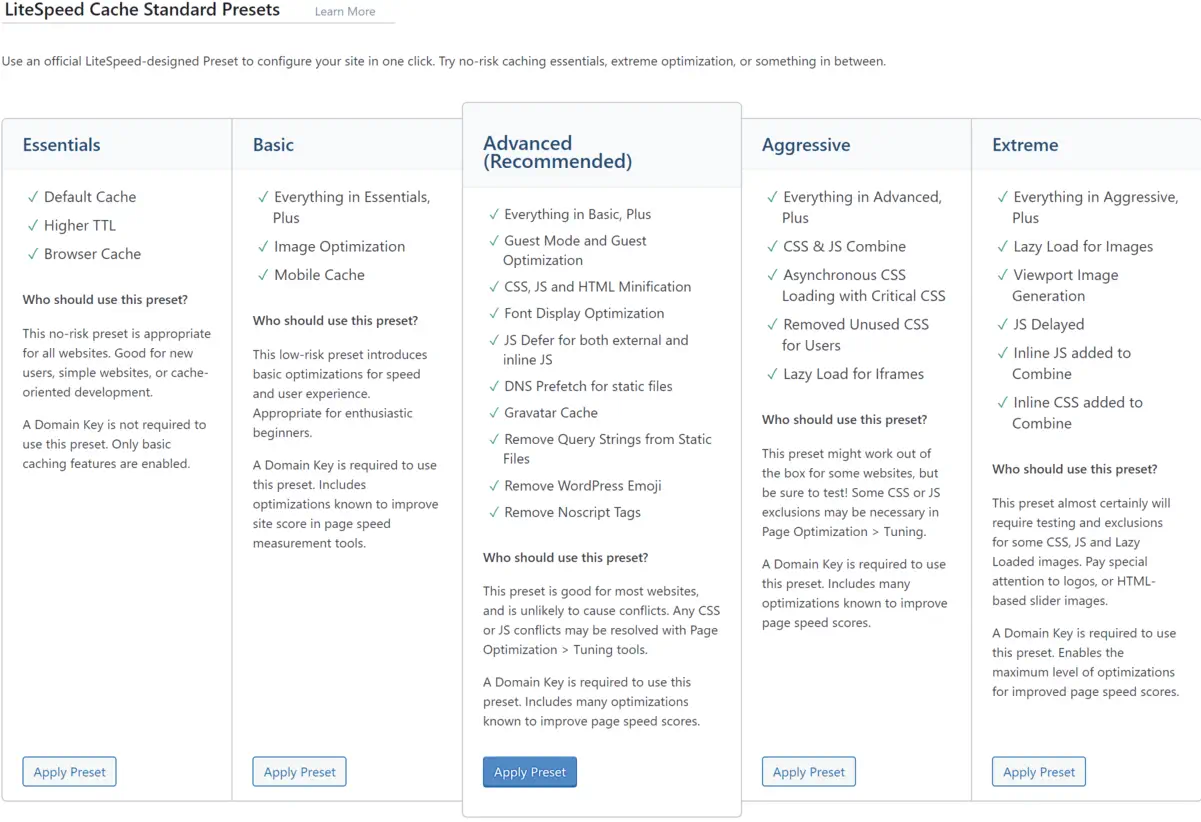
    Screenshot of LiteSpeed Cache preset options.

    When it comes to enhancing your WordPress site performance, installing and configuring the LiteSpeed cache plugin can be a game-changer. With LiteSpeed’s cutting-edge caching technology, fine-tuning your online presence for speed and efficiency is just a few steps away. I want to guide you through adding LiteSpeed’s power to your site.

    Simple Steps to Install LiteSpeed Cache Plugin for WordPress

    The journey to a faster WordPress begins with a straightforward LiteSpeed Cache plugin installation. After logging into the WordPress dashboard, navigate to the Plugins section—a quick search for ‘LiteSpeed Cache’ yields the desired plugin. With a single click on ‘Install Now’ followed by ‘Activate,’ the plugin is ready to contribute to your site’s excellent performance.

    Configuring LiteSpeed Plugin for Optimal Results

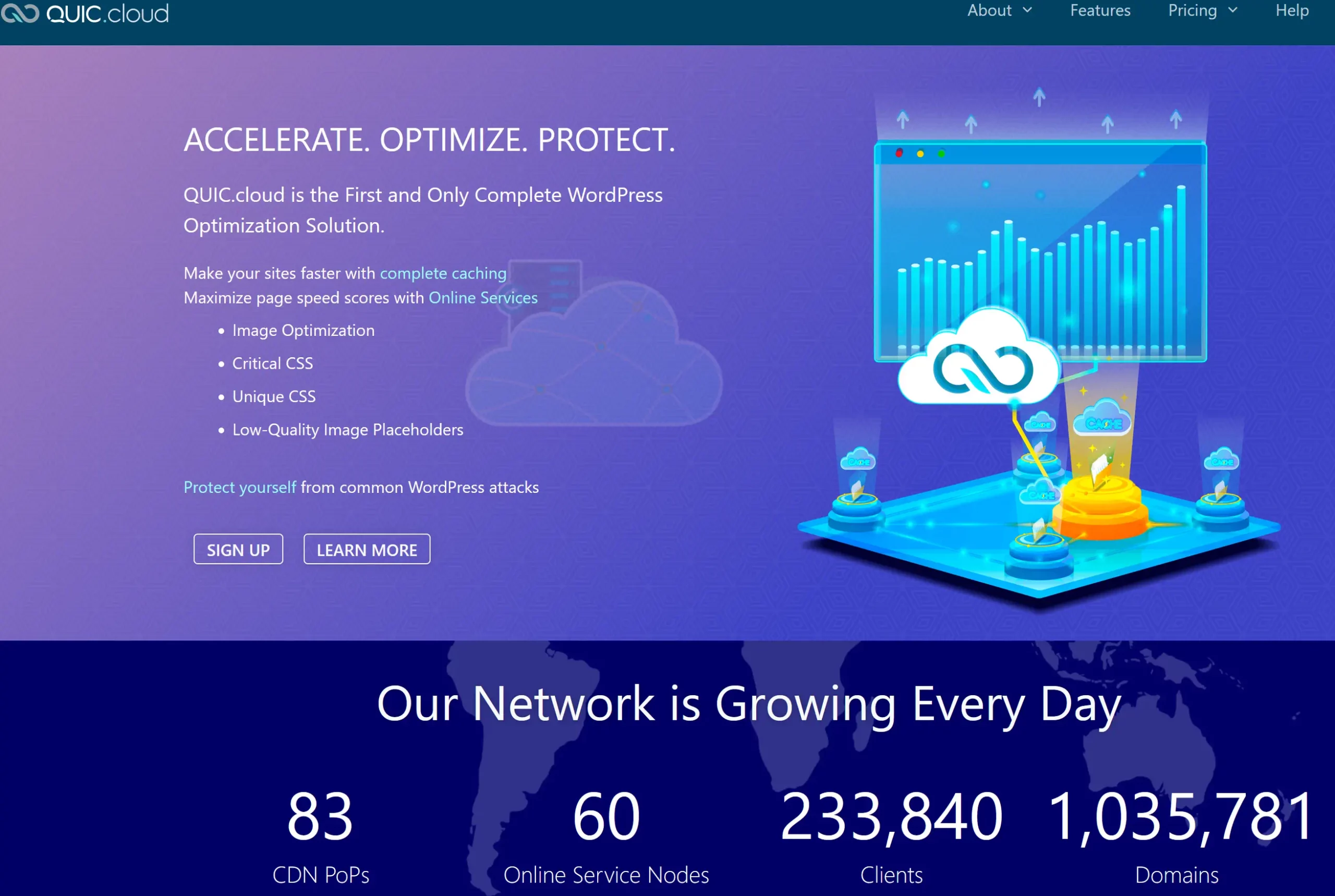
    The real power of the LiteSpeed cache for WordPress is unlocked through proper configuration. By ensuring that the plugin is set to update automatically, you are keeping your site equipped with the latest advancements from LiteSpeed. Adding a QUIC.cloud domain key can mark a considerable leap in cache synchronization with CDN services while enabling guest mode facilitates immediate access to the cached pages, reducing load times significantly. Tailoring these settings to align with your web content strategy can profoundly impact your site’s efficiency and speed.

    Testing and Comparing Performance on GTmetrix

    After configuring the LiteSpeed plugin for your WordPress site, the proof of improvement lies in performance testing. Utilizing platforms like GTmetrix, I’ve assessed the impact on LiteSpeed’s cache technology by comparing before and after results. The improvements are tangible, with GTmetrix reporting enhanced loading times and better scores across various performance matrices. These changes testify to the LiteSpeed plugin’s potency in elevating WordPress site performance.

    Advanced Optimization Features of the LiteSpeed Plugin

    Optimizing web performance is a multifaceted endeavor where every millisecond counts. I gravitate towards LiteSpeed optimization for its sophisticated capabilities that take website efficiency to the next level. In this section, we’ll dive into the nuanced features of the LiteSpeed Cache plugin that provides comprehensive optimization strategies to web developers and site owners looking to excel in site performance and user experience.

    Discussion on Image, CSS, and JS Optimization

    Initiating with image optimization, this feature compresses images without compromising quality. I have discovered that such compression significantly reduces page load times, enhancing the user experience, particularly for those with slower internet connections. The CSS and JS optimization process also lends itself to a sleeker content delivery. By minimizing these files, pages render faster, reducing user wait time and contributing positively to SEO metrics.

    Moving further into the intricacies, CSS optimization involves the removal of unnecessary spaces, comments, and line breaks from CSS files, condensing them without changing the functionality. Similarly, JS optimization reduces the size of JavaScript files through techniques like minification and combining multiple files into one. These granular details turn an ordinary online encounter into an immersive digital journey.

    Incorporating CDN Integration for Enhanced Global Delivery

    Another cornerstone of LiteSpeed optimization is its CDN integration. Employing a CDN is akin to establishing a global expressway for your content. Data is stored in multiple locations around the globe, ensuring that regardless of a user’s location, the content is delivered from the nearest server. This accelerates content delivery and can decrease server load and save bandwidth.

    For my part, I’ve noticed CDN integration’s tangible impact on international traffic; the enhanced reachability has a ripple effect, expanding audience engagement and retention.

    Customizing Cache Settings for Targeted Performance Gains

    Finally, the meticulous customization of cache settings within LiteSpeed tailors to the intricacies of a website’s unique needs. By adjusting these settings, I can pinpoint specific performance bottlenecks, ensuring that each web page is optimized for its intended purpose. Whether e-commerce, blogging, or multimedia showcases, tailored cache settings guarantee a vibrant and responsive user interface.

    Indeed, each of these advanced features—image, CSS, and JS optimization, CDN integration, and customized cache settings—put LiteSpeed optimization in a league of its own.

    LiteSpeed Technology: The Leading Edge in Webserver Optimization

    My experience as a web developer has allowed me to see firsthand the transformative effects of LiteSpeed web server optimization. By implementing LiteSpeed technology, I’ve consistently witnessed performance tuning take websites to new heights, ensuring they operate flawlessly even during peak traffic periods. Let me take you through some tangible benefits that LiteSpeed offers regarding webserver performance tuning.

    • Caching Capabilities: LiteSpeed’s technology is second to none, offering dynamic content caching that turns your website into a high-speed expressway.
    • Traffic Management: With LiteSpeed, your webserver can withstand the digital equivalent of rush hour without breaking a sweat. More resources for processing means less worry about site performance.
    • Alleviating Load: When complex tasks like heavy MySQL queries or resource-hungry plugins slow down your site, LiteSpeed technology balances the load and keeps things running smoothly.

    These key features prevent the typical bottlenecks experienced with other servers and guarantee a sturdy platform for web properties to grow. Outlined below is a comparative look highlighting the efficiency of LiteSpeed technology:

    Feature LiteSpeed Benefit Traditional Webserver
    Response Time Substantially reduced Often variable
    High Traffic Handling Exceptional performance Could be compromised
    Resource Usage Optimized efficiency Higher consumption
    Resource-Hungry Tasks Streamlined processing Potential for slowing
    Dynamic Content Delivery Accelerated loading Typically slower

    I’ve observed that websites optimized with LiteSpeed consistently deliver content faster, respond to user interactions without delay, and handle simultaneous visitors gracefully. It’s not just about keeping pace; it’s about setting the pace in a competitive online ecosystem.

    With LiteSpeed technology, I’m confident that the ceiling for webserver performance has been raised, allowing me and my clients to aim for and achieve unprecedented levels of web efficiency.

    Conclusion

    As we conclude, I want to emphasize the substantial benefits brought forth by LiteSpeed technologies within the realm of WordPress hosting. At the heart of modern-day site optimization, integrating the LiteSpeed server and LiteSpeed WordPress plugin has proven pivotal, boosting site performance and ensuring exceptional resource efficiency. In my evaluation, this harmonious blend of technologies facilitates significantly reduced loading times, propels SEO rankings, and fosters a superior user experience.

    Summarizing the Benefits of LiteSpeed Technologies for WordPress Hosting

    Throughout this exploration, the capabilities of LiteSpeed technology have reshaped my perspective on site fidelity and performance. Its aptitude in effortlessly serving up web pages and managing surging traffic while keeping resource use in check establishes it as an indispensable asset for WordPress hosting. The benefits of LiteSpeed, ranging from amplified server response times to improved SEO outcomes, have provided site administrators with the tools needed for fostering thriving, agile online spaces.

    Final Thoughts on the Importance of Site Optimization and Upcoming Trends

    Looking ahead, ongoing site optimization will continue to be a cornerstone of digital success. With emerging trends and evolving user expectations, the foresight in adopting LiteSpeed technologies could not be more timely. As we navigate the dynamic digital landscape, leveraging LiteSpeed server and plugin offerings is not just a strategic move but a vital one, ensuring WordPress sites remain resilient and ahead of the curve in a fiercely competitive market.

    FAQ

    What is LiteSpeed Webserver, and how does it benefit my WordPress site?

    LiteSpeed Webserver is a high-performance, event-driven web server that offers significant advantages in terms of speed and scalability for WordPress sites. Its optimized use of server resources helps minimize loading times, thereby improving user experience and SEO rankings.

    How does LiteSpeed Cache improve website performance?

    LiteSpeed Cache, a feature of LiteSpeed technology, enhances website performance by storing static snapshots of dynamic content and serving them to visitors at a much quicker rate than can be achieved by generating pages on the fly. This reduces server load and speeds up page delivery.

    Can LiteSpeed Cache and Plugins replace Apache, and are they compatible?

    Yes, LiteSpeed is designed to seamlessly replace Apache without changing the existing .htaccess configuration, making it fully compatible with Apache hosting environments. This ensures an easy transition to LiteSpeed for improved performance without compromising compatibility.

    What editions of LiteSpeed Web Server are available?

    There are two main editions of LiteSpeed Web Server: the Enterprise version, designed for hosting multiple websites with automatic .htaccess file management, and OpenLiteSpeed, which is the open-source version for individual sites and requires a server restart for .htaccess changes.

    What is dynamic content optimization, and how does LiteSpeed Cache handle it?

    Dynamic content optimization refers to the process of improving the loading and serving of web pages that are dynamically generated. LiteSpeed Cache handles this by caching the dynamic pages, thereby reducing the load on the server and quickly rendering pages to visitors.

    How do I install the LiteSpeed Cache Plugin on my WordPress site?

    You can install the LiteSpeed Cache Plugin by logging into your WordPress dashboard, navigating to Plugins, searching for LiteSpeed Cache, and installing and activating the plugin. Configuration settings can be adjusted to customize the caching and optimization features.

    What key performance metrics should improve after configuring LiteSpeed Cache?

    After adequately configuring LiteSpeed Cache, you should see improvement in key performance metrics such as load times, server response times, Time to First Byte (TTFB), and overall scores in performance testing tools like GTmetrix and Google PageSpeed Insights.

    Does the LiteSpeed Cache Plugin offer features beyond page caching?

    Yes, the LiteSpeed Cache Plugin offers advanced optimization features such as CDN integration, image optimization, and CSS/JS optimization, which go beyond standard page caching to enhance website performance further.

    Is CDN integration part of the LiteSpeed Cache solutions?

    Yes, CDN integration is a part of LiteSpeed’s caching solutions, which helps deliver content more efficiently to users worldwide by reducing geographical latency and offloading bandwidth from the origin server.

    How does LiteSpeed handle resource-intensive plugins or heavy MySQL queries?

    LiteSpeed technology helps optimize the handling of resource-intensive plugins or heavy MySQL queries by efficiently managing server resources. This streamlining enables the server to allocate more processing power to those demanding tasks, thus maintaining performance even under strain.

    Source Links

  • WooCommerce vs Shopify: Best E-Commerce Pick?

    WooCommerce vs Shopify: Best E-Commerce Pick?

    E-commerce comparison: WooCommerce versus Shopify graphic.

    When asked about the ideal eCommerce platform for online stores, the debate of WooCommerce vs Shopify often takes center stage. As a seasoned eCommerce developer, I have witnessed firsthand how choosing the right platform can significantly influence the success of an online business. You must assess user-friendliness, feature set, cost implications, user experience, and customer support. With their ardent followers, WooCommerce and Shopify have carved out substantial niches for themselves, reflecting the complexities and varied needs of millions of global users and their successful billion-dollar revenue streams.

    When advising my clients on their choice, I often distinguish between prioritizing a straightforward shopping cart system or a highly customizable website. Shopify is a buy-my-product forward approach to a website design and doesn’t offer the deep customization you can create with WordPress Woocommerce. Shopify leans towards a straightforward, product-focused website design with limited customization options compared to what’s achievable with WordPress WooCommerce. Although Shopify is beginning to embrace more third-party design tools, it still lags behind the extensive range of third-party add-ons available for WooCommerce, which offers richer customization possibilities.

    Streamlining the debate, both platforms proffer distinct experiences despite sharing some standard features. Shopify shines with its quick setup and superior customer support, while WooCommerce is widely acknowledged for its unrivaled customizability and SEO prowess. However, it’s also clear that WooCommerce demands more technical savvy. I aim to empower small business owners and entrepreneurs to make informed choices, aligning their online business objectives with the most fitting eCommerce system.

    Key Takeaways

    • Assessing both platforms’ user-friendliness is crucial in the WooCommerce vs Shopify debate.
    • Understanding the cost structures of WooCommerce and Shopify informs long-term financial planning for an online store’s budgeting needs.
    • Considering the technical proficiency required for WooCommerce instead of Shopify’s ease of use provides a clear perspective on their fit for different entrepreneurs.
    • Evaluating Shopify’s comprehensive customer support helps gauge the level of assistance an online store owner might need.
    • Reflecting on WooCommerce’s customizability and advantageous SEO capabilities outlines the potential for a unique and optimized online presence.
    • Acknowledging each platform’s global user base and revenue generation offers insight into their proven track records of success.

    Introduction to WooCommerce and Shopify

    When establishing an online store, WooCommerce or Shopify often enters the discussion as top contenders in the eCommerce space. I want you to know that choosing between WooCommerce and Shopify requires a good understanding of what each platform offers and how it aligns with your business objectives. As I go into their features, it’s clear that the decision isn’t black and white; it depends on various factors, including technical know-how, customization needs, and desired user experiences.

    WooCommerce, the robust plugin designed for WordPress, gives users significant creative control – a dream for professionals with development knowledge. Its open-source nature encourages a more hands-on approach, allowing businesses to craft a unique online presence. Meanwhile, Shopify is celebrated for its user-friendly platform that simplifies technical hurdles, providing everything you need in one place to get your shop up and running, making it highly appealing to those without a web development background.

    Determining which is better – WooCommerce or Shopify revolves around the users’ specific needs and the kind of online store they intend to build. Whether you prioritize complete design freedom or ease of use for a quick market entry, both platforms support your eCommerce goals.

    • For tech-savvy users who prefer to have detailed control over every aspect of their website, WooCommerce provides the flexibility that might be critical to success.
    • On the other hand, Shopify might be the better choice for entrepreneurs seeking to minimize the complexity and time invested in setting up their stores.

    Ultimately, my journey in choosing between WooCommerce and Shopify is a decision that weighs individual preferences for control and customization versus convenience and streamlined functionality. As we further explore their distinct features, we can see why each has attracted such a dedicated user base in their own right.

    Understanding the Basics: What WooCommerce and Shopify Offer

    As an e-commerce entrepreneur, choosing the right platform is a critical decision that can significantly impact your online business’s success. Two giants dominate the landscape, WooCommerce and Shopify, each with impressive features tailored to various business needs. In this section, we’ll explore the WooCommerce pros and cons and the Shopify advantages and disadvantages to help you make an informed decision.

    A comparison of WooCommerce and Shopify reveals that both platforms are equipped with distinctive features. My analysis will delve into these features and how they weigh against each other regarding benefits and drawbacks.

    Key Features of WooCommerce

    Running on nearly 28% of all e-commerce websites, WooCommerce is a powerful, extendable platform designed for seamless integration with WordPress. Here are some of the standout WooCommerce features:

    • Customization: WooCommerce provides extensive customization options through hundreds of themes and plugins, allowing for a tailored approach to e-commerce.
    • SEO Performance: Leveraging WordPress’s formidable SEO capabilities, WooCommerce stores often rank well in search results.
    • Open-Source: The open-source nature gives you full access to modify the code to suit specific requirements, offering unparalleled flexibility.
    • Cost-Effectiveness: Starting out is free, with costs mainly associated with additional plugins, themes and hosting.
    • Self-Hosted: You can own your website and have complete control.

    Despite the advantages, consider the following WooCommerce pros and cons. The open-source format means you’ll face continuous maintenance, and a certain level of proficiency is required to optimize the platform’s use. Over time, additional costs may accrue from leveraging premium plugins and themes to maintain or enhance your site’s capabilities.

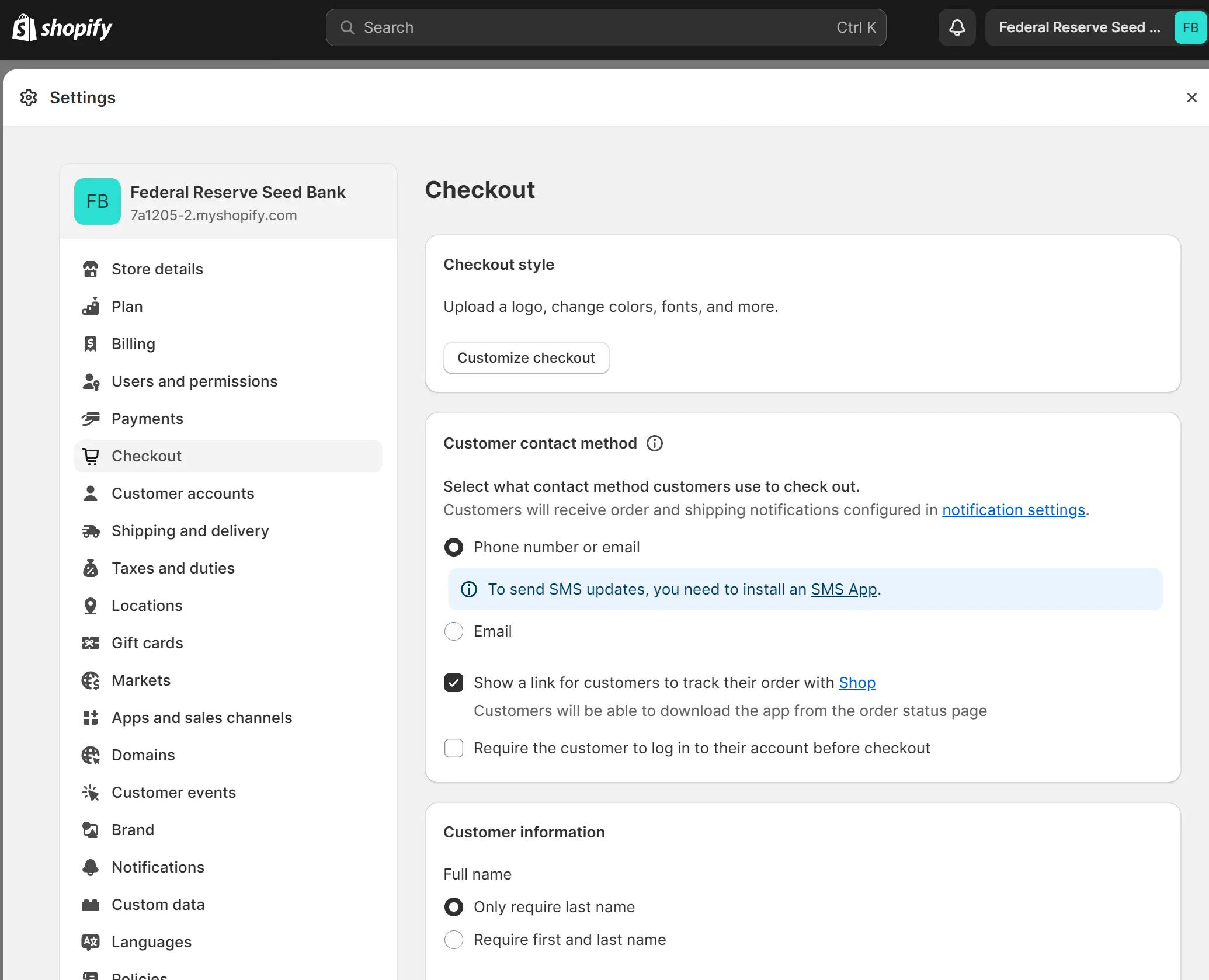
    Screenshot of Shopify checkout settings page.

    Key Features of Shopify

    Shopify simplifies the e-commerce experience with a comprehensive, all-in-one approach. Here are some Shopify features:

    • Simplicity: Shopify’s platform is known for its user-friendly interface, requiring less technical skill to get started.
    • Integrated Shipping Having shipping built into the website without needing to install 3rd party plugins is convenient.
    • Integrated Sales Features: From abandoned cart recovery to various payment gateways, Shopify equips you with tools that assist in managing sales efficiently.
    • Reliable Customer Support: With 24/7 support, Shopify takes pride in ensuring that help is available whenever you need it.

    When evaluating Shopify’s advantages and disadvantages, it’s essential to recognize its less customizable nature because it is a closed ecosystem compared to WooCommerce. Nevertheless, the platform’s ease of use and robust customer support make it a favored choice for entrepreneurs drawn to simplicity over flexibility.

    In your quest to evaluate the pros and cons of WooCommerce and Shopify, it’s crucial to consider your business’s unique requirements and technical capabilities. A careful assessment will guide you toward the best platform for your e-commerce vision.

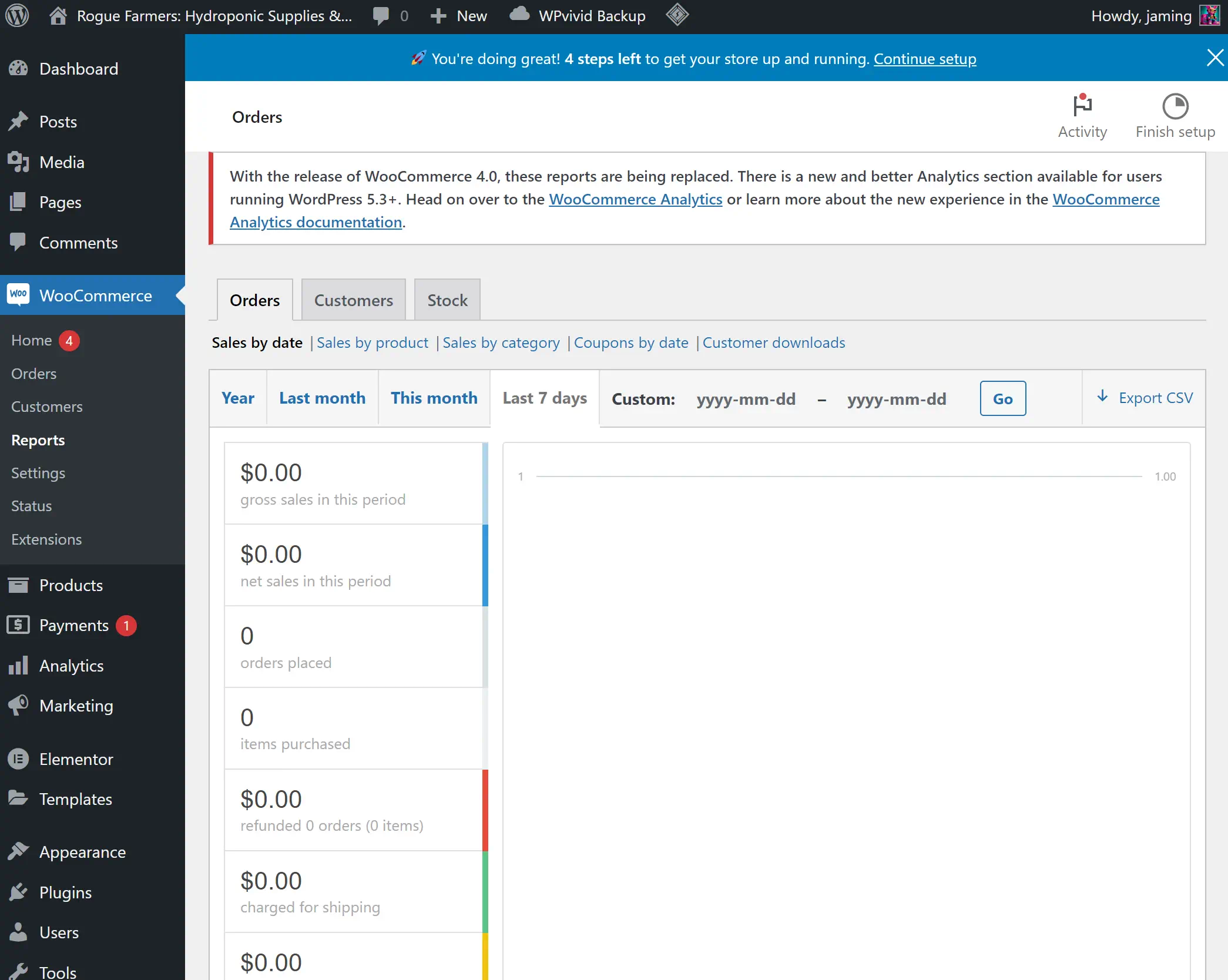
    WooCommerce dashboard displaying zero sales data.

    Diving Into WooCommerce: Advantages and Limitations

    Choosing between WooCommerce vs Shopify for small businesses involves an analysis deep enough to understand WooCommerce limitations and the advantages of WooCommerce. As an e-commerce platform built on the premise of flexibility, WooCommerce shows its strength in its capacity to be shaped and customized according to distinct business requirements, making it captivating for those looking to inject a unique flair into their online storefronts.

    The platform’s inherent affordability often entices small business owners; WooCommerce is free, and the primary expenses are tied to web hosting and domain registration. This compelling pricing structure is, however, just part of the picture. The reliance on plugins, which can amplify functionality, entails potential added costs. These additional expenses and the need for routine maintenance and updates must be considered when appraising the total cost of ownership.

    One must recognize the WooCommerce limitations that necessitate an understanding of web development. The platform demands more from you, urging the deployment of skills to manipulate an extensive array of themes and plugins effectively. This requirement may introduce a learning curve that some may need help with. Even though Shopify is easier to use, it still has many complexities that take time to learn, and if you have experience with WordPress, you might find it easier to use WooCommerce.

    If you want to build a great eCommerce website, you should hire a skilled web developer. Both eCommerce platforms overstate user-friendliness, and you don’t want a low-quality website representing your brand.

    With these considerations, the advantages of WooCommerce become clear with its high level of customizability and openness. The power to tweak every element of an e-commerce store to match a business’s precise vision and strategy is a lure strong enough to draw in those with the necessary technical savoir-faire. With WooCommerce, my experience has shown that the learning invested translates to greater control over your online presence—a nuanced advantage that should not be underestimated.

    1. Free platform with cost primarily from hosting and domain.
    2. High customizability and flexibility with open-source access.
    3. Requires web development knowledge for perfecting themes and plugins.
    4. Additional costs and maintenance associated with plugin reliance.

    WooCommerce’s New Integrated Payments and User-Friendly Product Editor Challenge Shopify’s Ease of Use

    WooCommerce has recently introduced new features that significantly enhance its product management capabilities, narrowing the gap in user-friendliness that has been a distinct advantage for Shopify. These updates include an integrated payments system similar to Shopify, offering a more streamlined and efficient checkout process.

    A standout improvement is the new product editor, currently in beta. This editor revolutionizes the way products are managed on WooCommerce. It adopts a tabbed workflow approach, simplifying product management by dividing it into specific sections such as descriptions, images, organization, pricing, inventory, shipping, and variations. This method allows users to concentrate on one aspect at a time, thereby improving efficiency and reducing distractions.

    Moreover, the introduction of Gutenberg blocks in the new editor offers enhanced design capabilities. Users can now create more engaging and visually appealing product descriptions, improving the overall aesthetic and information quality of product listings. The updated editor also makes adding and managing product images simpler, enhancing the visual appeal of products on the platform.

    These advancements in WooCommerce demonstrate a significant step towards providing a more user-friendly experience, rivaling the ease of use that Shopify is known for.

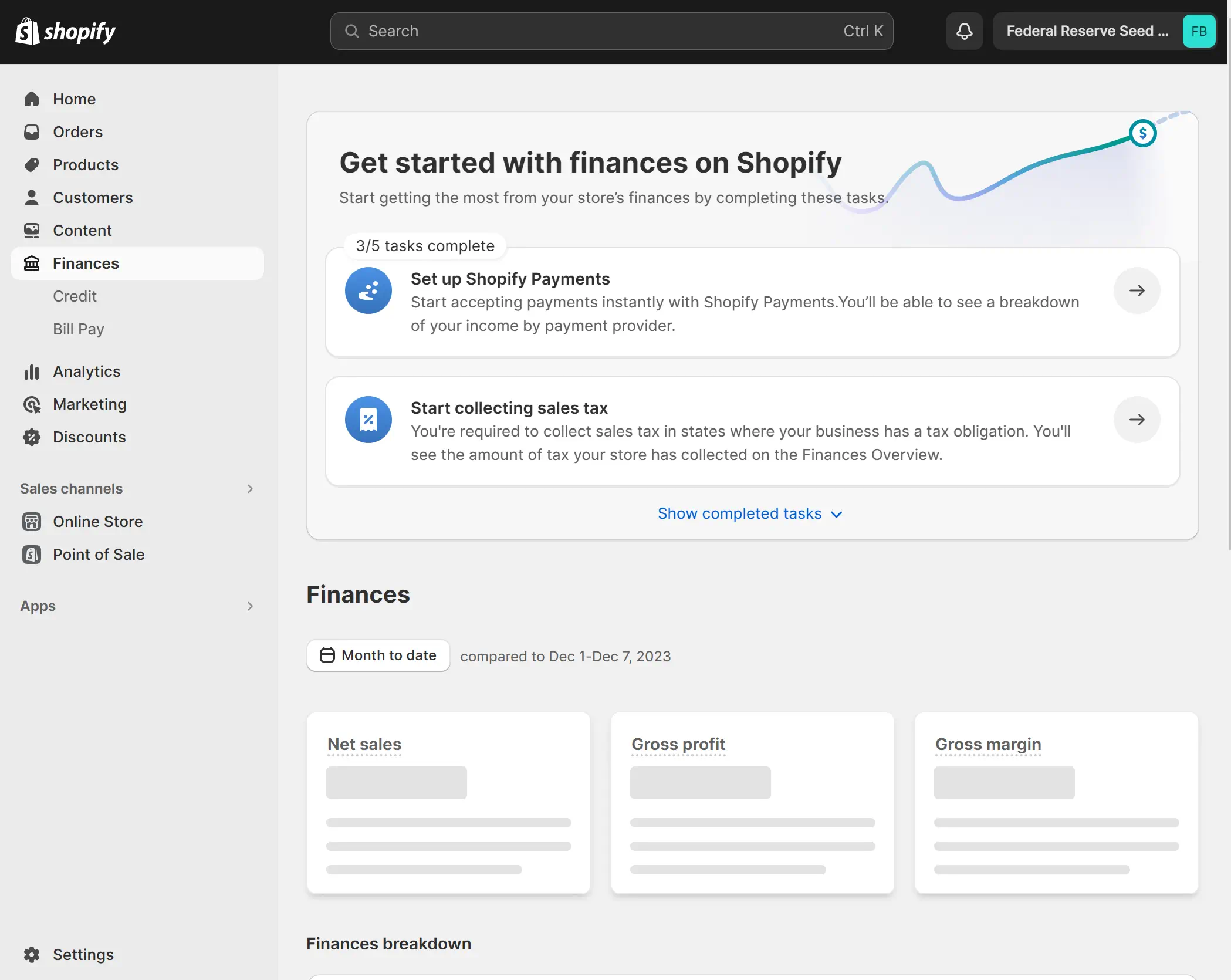
    Shopify dashboard displaying financial tasks and sales overview.

    Exploring Shopify: Pros and Cons

    When considering Shopify for online stores, it’s clear that the platform positions itself as the go-to choice for businesses seeking a seamless entry into e-commerce. I’ll explore the significant advantages of being user-friendly and customer-centric support.

    Ease of Use and Customer Support

    Shopify’s ease of use of Shopify is often highlighted by users who appreciate its intuitive interface. Setting up a shop is a hassle-free experience, guided by a clear dashboard and easy-to-follow steps. This simplicity is bolstered by Shopify customer support, a critical resource for users at all stages of building and managing their online presence. With a dedicated 24/7 Shopify Help Center and direct access to experts, merchants are assured they have the backing needed to resolve issues swiftly.

    Shopify Pricing and Transaction Fees

    Regarding Shopify costs, newcomers are sometimes surprised by the upfront price tag. Plans start at $39 monthly and can reach $399 for businesses scaling up their operations. They also have a Shopify Plus for $2000 monthly. These figures may initially overshadow the hidden costs of platforms with separate hosting fees. If you want to use a separate payment processor, Shopify charges transaction fees; these are forgone when utilizing Shopify Payments. Therefore, businesses opting for Shopify’s in-house payment processor stand to gain in the long run.

    Reflecting on these factors, it’s evident that Shopify presents an end-to-end solution that balances straightforward usability with a comprehensive support system. Despite these strengths, one must carefully assess ongoing transaction fees against the breadth of features and support provided. This evaluation is crucial in determining whether Shopify is the most cost-effective route for an online store, particularly when pitted against WooCommerce’s modular, but sometimes more complex, cost structure.

    WooCommerce vs Shopify: Core Differences

    When considering the options of WooCommerce versus Shopify, it’s essential to understand their core differences to make an informed decision that aligns with your business needs. These platforms diverge significantly, not just in terms of design and user experience but also regarding their fundamental structure and approach to e-commerce.

    With WooCommerce, the freedom it offers through its open-source nature is as expansive as it is demanding. The trade-off comes in the form of greater responsibility for your store’s maintenance and technical enhancements. In contrast, Shopify simplifies the process to a large extent, providing a hosted and comprehensive platform that spares you the intricacies of backend management.

    Here’s a concise WooCommerce vs Shopify comparison encapsulated in a table creates a clearer picture of their differences:

    Aspect WooCommerce Shopify
    Hosting Requires separate hosting services Includes centralized hosting solutions
    Customization Complete control with open-source customization Limited by the platform’s standardized features
    Technical Skill Required Higher technical understanding is needed for development and maintenance Designed for ease of use with minimal technical skill required
    Cost Free to start with, costs for extensions, themes, and hosting Monthly plans with various tiers, additional fees for extra features
    Payment Processing Flexibility in choosing payment gateways, potential additional fees Integrated payment solution with Shopify Payments, transaction fees can apply
    Support Community forums and developer resources are available 24/7 dedicated customer support

    While I contemplate the unique selling points of each platform, the choice between WooCommerce and Shopify can significantly impact the trajectory of your online business. Do you need control or prefer the ease of a pre-set structure? Analyzing the core differences between WooCommerce and Shopify is imperative to devise a strategy that’s not only compatible but also conducive to your online store’s growth.

    Real-World Performance: Case Studies and Success Stories

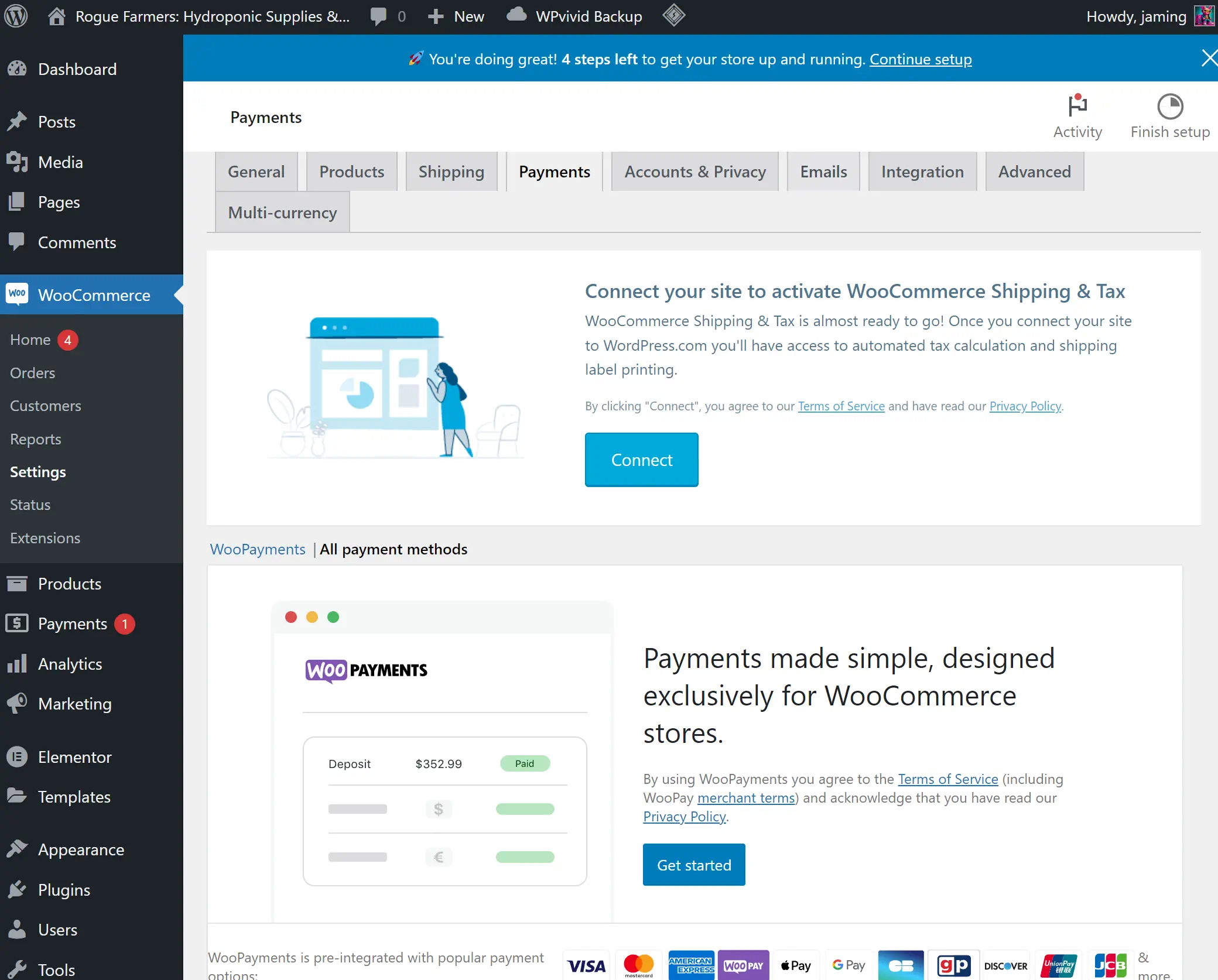
    WooCommerce Payments setup screen in WordPress dashboard.

    The true test for any platform is how it holds up in the real world. Let’s examine closely some of the real-world WooCommerce examples and Shopify success cases to understand the tangible impact these platforms have on the success of online stores.

    Success with WooCommerce

    One of the most compelling WooCommerce success stories comes from the famous home improvement brand Forage and Sundry. Beyond just selling products, the brand’s site provides a tailored experience with gardening tips and workshops, fully utilizing WooCommerce’s flexible nature to create a community around their niche. This level of customization is a testament to WooCommerce’s achievements, showcasing how a brand can leverage the platform to build a robust, content-rich, and distinct online presence.

    Success with Shopify

    A shining example of Shopify eCommerce success is seen with the fashion retailer Allure Bridals. Their transition to Shopify allowed for a more streamlined shopping experience, integrating multiple sales channels and simplifying inventory management. This case illustrates the Shopify store achievements that can be had when harnessing Shopify’s tools, making it easier for customers to purchase their dream wedding gowns.

    Platform Brand Key Achievements
    WooCommerce Forage and Sundry Customized content approach, community engagement, niche market leadership
    Shopify Allure Bridals Multichannel selling, simplified user experience, effective inventory management

    Both platforms have their myriad of success stories, but what’s clear is their capacity to scale and adapt to the specific needs of their users’ businesses. While WooCommerce offers a broad canvas for personalization and SEO strength, Shopify’s user-friendly interface and turnkey solutions provide quick market entry and operational simplicity.

    User Experience: Setting Up Your E-Commerce Store

    As someone who values the importance of user experience with WooCommerce and user experience with Shopify, I understand its critical role when setting up an eCommerce store. Crafting an appealing and functional storefront is essential, and the platform choice significantly impacts this process.

    From personal involvement with WooCommerce, I’ve come to recognize the depth and autonomy it provides. Yet, this comes with a caveat: a greater demand for technical knowledge. Acquiring a domain name, securing hosting services, and installing WordPress and its corresponding themes are steps that could intimidate novices, making it a better choice for those with technical proficiency or those willing to learn.

    Conversely, setting up an eCommerce store on Shopify is akin to having a personal assistant by your side. Its streamlined and guided setup processes offer a starkly different user experience—simplistic, direct, and beginner-friendly. This distinctive ease of Shopify use sparks a resonance with my clients who seek quick and efficient entry points into the online market.

    Shopify’s dashboard is designed for immediacy and ease, thriving as a turnkey solution for many aspiring online entrepreneurs.

    To show a clearer picture of these distinct set-up experiences, consider this comparative table highlighting the key steps and user involvement for both WooCommerce and Shopify.

    Set-Up Stage WooCommerce Shopify
    Domain Registration User Responsibility Guided Process
    Hosting Setup User Responsibility Included in Service
    Platform Installation Included with hosting Automatic Platform Setup
    Theme Installation Extensive Customization Curated Selection
    Adding Products Easy to use Product Builder Intuitive Product Builder
    Payment Gateway Configuration Multiple 3rd-Party Integrations Simple Native Solution
    Customer Support Community & Service Providers 24/7 Direct Support
    Launch Readiness Technical Testing User-Friendly Checklist

    Recognizing the strengths and constraints of WooCommerce and Shopify is integral for aspiring online retailers. One’s comfort with technology, desired control over their store, and support needs are all decisive factors—the final choice determines not only the set-up experience but possibly the trajectory of online business success.

    Conclusion

    The debate surrounding WooCommerce vs Shopify for online stores often boils down to choosing between personalization and convenience. I’ve taken a deep dive into both platforms and showed that the decision isn’t necessarily a matter of which is better—WooCommerce or Shopify—but rather which platform aligns seamlessly with your specific business needs and aspirations.

    Shopify has invested significantly in advertising, a stark contrast to WooCommerce’s more modest approach. Despite this disparity in marketing spend, with Shopify reportedly investing millions, the core functionalities of the two platforms are remarkably similar. Both Shopify and WooCommerce offer robust tools for building and managing online stores. Shopify’s extensive advertising budget, including a substantial investment in enhancing their software, doesn’t necessarily make it superior to WooCommerce, which maintains its strong position as a free, open-source solution. Each platform has its unique strengths, making them both excellent choices for different types of online businesses.

    For entrepreneurs with technical knowledge and a vision for a highly customized web store, WooCommerce presents an alluring choice. Its robust customization capabilities offer a hands-on approach to building an online store, and pairing it with a block builder like Elementor allows unlimited customization. On the flip side, Shopify shines in its ability to expedite the process with its user-friendly environment and dedicated support, making it a go-to for business owners seeking speed and ease in getting their store up and running in a shorter time.

    Deciding between WooCommerce and Shopify is akin to selecting a path in a choose-your-own-adventure story. Both platforms have significantly evolved from older systems such as Commerc.cgi, Zen Cart, and Magento. Nowadays, businesses can more easily create basic websites using these systems. However, to fully realize the website’s potential, the expertise of a dedicated team specializing in eCommerce is indispensable.

    Choosing between WooCommerce and Shopify depends on your digital expertise, business size, and eCommerce goals. Success comes from matching your platform choice with your business strategy and the customer experience you aim to provide. Whether it’s WooCommerce’s adaptability or Shopify’s user-friendly approach, the right fit is key.

    FAQ

    What are the key features of WooCommerce?

    WooCommerce is known for its flexibility and customizability due to being an open-source plugin for WordPress. It offers extensive customization options with hundreds of themes and plugins, allows for full control of your store’s functionality, and is known for its favorable SEO capabilities. However, it requires a higher level of technical expertise and may involve additional costs for hosting, themes, and plugins.

    What are the key features of Shopify?

    Shopify features an all-in-one, user-friendly platform that simplifies setting up and managing an eCommerce store. It includes hosting, security, and many payment gateway options. Its ease of use and 24/7 customer support appeal to those without extensive technical knowledge. The platform is less customizable than WooCommerce but offers a range of out-of-the-box sales features, such as abandoned cart recovery.

    What are the advantages and limitations of WooCommerce?

    WooCommerce offers a highly customizable platform, which is advantageous for those seeking to tailor their online stores to specific needs. The main advantages include no starting fees and expanding the functionality with plugins. However, the limitations involve the need for technical knowledge, additional costs for plugins, themes, hosting, and ongoing maintenance. It is ideal for those comfortable with the technical aspects of website development.

    What are the pros and cons of Shopify?

    The pros of Shopify include its hassle-free setup, comprehensive customer support, and inclusive package that covers hosting and security. It’s an excellent platform for entrepreneurs who prefer a straightforward approach to launching their online business. However, the cons involve higher monthly fees, less customizability, and transaction fees if using something other than Shopify Payments.

    What are the core differences between WooCommerce and Shopify?

    The core difference lies in their approach; WooCommerce is an open-source, highly customizable platform requiring more hands-on management and technical know-how. Shopify is a closed, all-encompassing platform known for its ease of use, making it ideal for those who prefer a more guided and maintenance-free pathway to establishing their online store.

    Can WooCommerce be more cost-efficient than Shopify?

    WooCommerce is free, making it appear more cost-efficient, especially for small businesses or startups on a tight budget. However, additional costs, such as hosting, can add up. Comparatively, Shopify has a monthly fee, which includes hosting and website security. The cost-effectiveness of either platform ultimately depends on the specific needs and budget of the business.

    What makes Shopify particularly appealing to new business owners?

    Shopify’s simplicity and ease of use appeal to new business owners. The platform is designed to help entrepreneurs set up their online stores quickly without needing advanced technical knowledge or understanding of web development. This simplicity, combined with its comprehensive customer support and all-in-one package, makes Shopify a go-to choice for those new to eCommerce.

    Are there any success stories from businesses using WooCommerce?

    Yes, many successful eCommerce websites have been built on WooCommerce, showcasing its scalability and ability to fit specific business needs through customization. Success stories often focus on the platform’s adaptable environment and efficient SEO management, which are pivotal to their growth and success.

    How do user experiences differ when setting up an online store on WooCommerce vs Shopify?

    Setting up an online store with WooCommerce can be more complex, involving the purchase of a domain, selecting hosting, installing WordPress, and setting up the WooCommerce plugin with the desired themes and extensions. On the other hand, Shopify users can enjoy a smoother initial setup due to Shopify’s guided process, comprehensive documentation, and user-friendly dashboard.

    Which platform is better for selling online – WooCommerce or Shopify?

    The better platform for selling online depends on the business owner’s specific needs and expertise. WooCommerce is suitable for those who want a highly customizable platform and are willing to manage the technicalities. Shopify is better for entrepreneurs looking for ease of use, quick setup, and minimal maintenance. Both platforms offer robust capabilities and have proven success, so the choice ultimately aligns with the individual’s business goals and technical aptitude.

    Source Links