Category: Uncategorized

  • A Note on the Recent Vercel Security Incident

    A Note on the Recent Vercel Security Incident

    Hi everyone — quick transparency note. Like many web shops, blog.popproxx.com/ builds and hosts client projects on Vercel, a platform we trust for its speed, reliability, and security posture. Earlier today, Vercel notified customers of a security incident involving unauthorized access to some of their internal systems. Per their notice, we have no indication that our credentials or any customer data tied to our account were compromised, and Vercel’s services remain operational. Out of an abundance of caution, we’re reviewing account activity, rotating environment variables on active projects, and monitoring Vercel’s Security Bulletin for further updates. We wanted to share the notice here verbatim so our clients can see exactly what we saw.

    Vercel’s notice, reproduced verbatim:

    We have discovered a security incident that involved unauthorized access to certain internal Vercel systems. We are actively investigating and have engaged incident response experts to help with investigation and remediation.

    Initially, we identified a limited subset of customers whose Vercel credentials were compromised. We reached out to that subset and recommended that they rotate their credentials immediately.

    At this time, we do not have reason to believe that your Vercel credentials or personal data have been compromised.

    We continue to investigate whether any data was exfiltrated and will contact customers if we discover further evidence of compromise. We’ve deployed extensive protective measures and monitoring, and our services remain operational.

    We recommend that all Vercel customers follow the Security Bulletin closely, which we will update regularly. Here are some best practices you should follow:

    • Review the activity log for any suspicious account activity
    • Review and rotate environment variables used in your projects
    • Take advantage of the sensitive environment variables feature

    Talk to a Vercel expert | Docs | Blog | Contact | Community | Careers

    Copyright © 2026 Vercel Inc. All rights reserved.
    440 N Barranca Ave #4133 Covina, CA 91723

    View our Privacy Policy

  • Top 10 Essential WordPress Maintenance Tasks for Smooth Website Operation

    Top 10 Essential WordPress Maintenance Tasks for Smooth Website Operation

    Essential website maintenance tasks infographic.Maintenance tasks for your WordPress website.

    Ensuring the seamless performance of your WordPress site requires a commitment to regular maintenance. Like any well-oiled machine, WordPress maintenance is your site’s routine tune-up to operate efficiently and securely.

    Neglect could lead to vulnerabilities, slow loading times, and a poor user experience that drives visitors away. From regular maintenance checks to selecting a quality maintenance service, each task plays a significant role in the health of your WP site.

    Whether you’re implementing a thorough maintenance plan or just starting to maintain your WordPress site, understanding the right WordPress maintenance tasks to perform is crucial.

    Proactive owners prioritize these essential WordPress maintenance tasks, creating a robust digital environment ready always to welcome visitors.

    Key Takeaways

    • Regular updates are crucial for maintaining security and performance.
    • Backups form the backbone of your WordPress website maintenance strategy.
    • Optimization is critical to ensuring your WordPress site is fast and efficient.
    • Proactive security measures protect against unauthorized access and data breaches.
    • You can enhance your site’s overall functionality through a consistent maintenance task checklist.
    • Enlisting a website maintenance service can save time and provide expertise.
    • Understanding the maintenance tasks you need can prevent costly interventions in the future.

    Understanding the Importance of Regular WordPress Maintenance

    For website owners, the health and reliability of their WordPress site is vital for success. This truth makes ongoing maintenance of a WordPress site non-negotiable. Often overlooked, important WordPress maintenance tasks are the linchpin of a secure, efficient, and visitor-friendly website. This article will explore why maintaining your website regularly is essential and how it can give you an edge in the digital landscape.

    Core updates to WordPress software are frequent and necessary. These updates contain essential security patches and feature enhancements that keep your site at the forefront of functionality and safety. A maintenance plugin can simplify this process. Still, whether you automate or do it manually, regular application of these updates is a must.

    • Fending off hackers and decreasing the likelihood of your site being compromised.
    • Optimizing site performance for faster load times and a better user experience.
    • Keeping your site’s SEO robust as search engines favor well-maintained websites.

    Regular WordPress maintenance includes but is not limited to updating plugins and themes, removing spam comments, optimizing your database, and ensuring all links are functioning as they should. These tasks contribute to a streamlined, speedy site that retains visitors and maintains a professional image.

    One frequently neglected aspect of WordPress website maintenance is the regular backing up of site data. Securing your content against data loss should be a primary concern—enabling you to restore your online environment quickly in case of an unforeseen issue.

    Regular backups and database optimization improve security and site performance, resulting in fast-loading pages critical to user retention and search engine rankings.

    Regular maintenance is not just about preventing the bad; it’s about proactively improving and refining your site to drive traffic and engagement.

    Ultimately, the importance of WordPress website maintenance cannot be overstated. It’s a vital ongoing task that protects and powers your online presence, ensuring you can continue reliably serving your audience and growing your brand as a website owner.
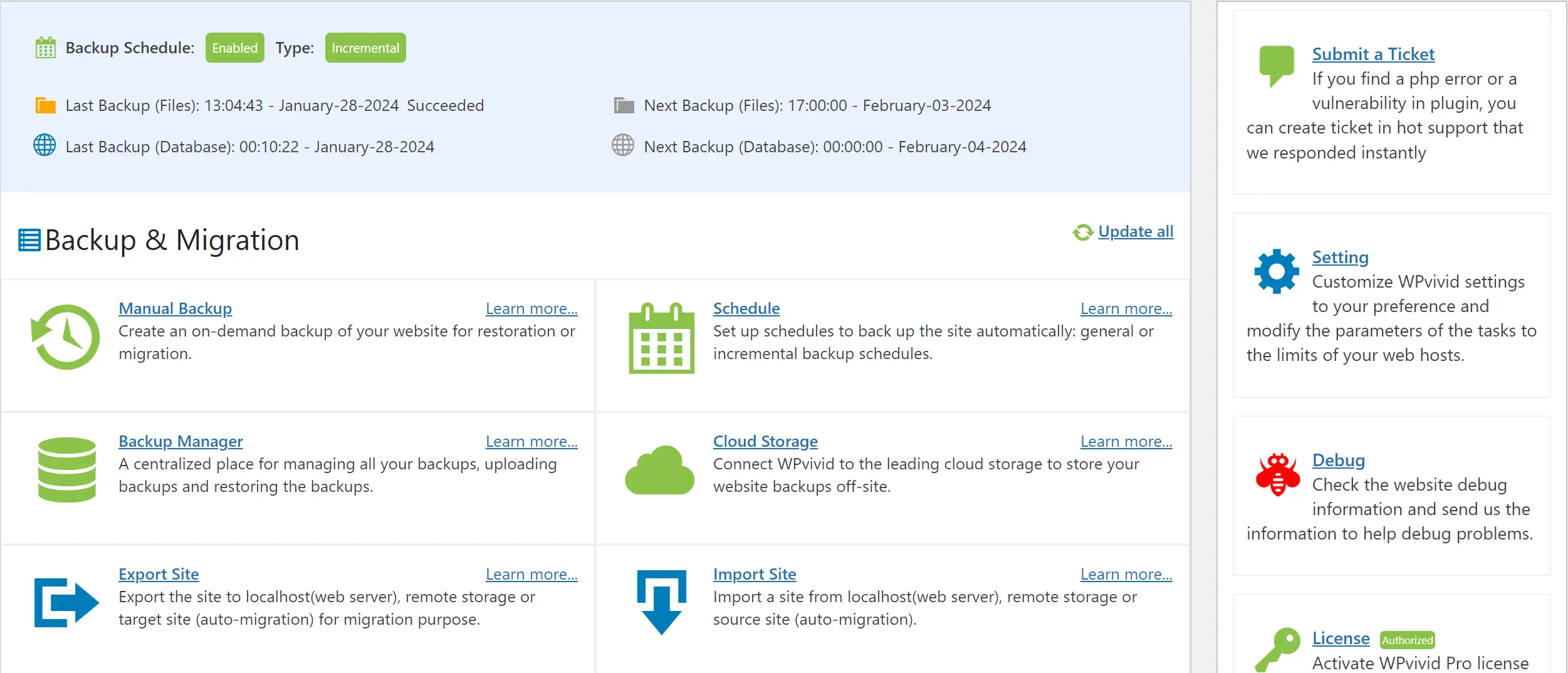
    Web backup and migration interface with options and settings.

    Comprehensive Backup Strategies for Your WordPress Site

    Ensuring your WordPress site remains secure and intact requires an effective backup strategy. With myriad challenges that can result in data loss, from accidental deletions to malicious attacks, having reliable website backups is non-negotiable.

    Choosing a robust backup plugin, deciding between automated or manual backups, and incorporating best practices for storing backups are all critical components of a complete backup plan for your WordPress database and files.

    Choosing the Right WordPress Backup Plugin

    With an array of WordPress plugins available, selecting one that suits your backup needs is essential. Plugins like DuplicatorUpdraftPlus, WPvivid, and BlogVault offer user-friendly interfaces and reliable automated backup services.

    They allow you to back up your site seamlessly and include features such as scheduling, direct cloud storage uploads, and easy restoration processes. Evaluate features and support options carefully to ensure the backup plugin meets your website maintenance requirements.

    Manual Backups vs Automated Backup Solutions

    While automated backups provide convenience and consistency, incorporating manual backups into your maintenance routine can offer additional security. A manual backup allows you to save a copy of your website immediately before making significant changes or updates.

    Although more time-consuming, this practice ensures that your site’s most up-to-date version is stored safely. Meanwhile, automated backups can be scheduled at regular intervals, ensuring regular snapshots of your site without direct intervention.

    Storing Your Backups: Best Practices

    Adequate storage of your WordPress site backups is crucial for data retrieval when needed. Cloud services like Dropbox or Google Drive can provide off-site copies and additional security for your backup files.

    These platforms also often offer versioning, which can be invaluable if you need to revert to an older version of your site. Below is a table highlighting key features of popular cloud storage providers for website backups.

    Service Free Storage Paid Plans Versioning Integration with Backup Plugins
    Dropbox 2 GB Starting at 2 TB Yes Widely Supported
    Google Drive 15 GB Starting at 100 GB Yes Widely Supported
    Amazon S3
    5 GB $0.023 per GB Yes Widely Supported

    Cloudflare Content Delivery Network graphic

    Optimizing WordPress Performance for Enhanced User Experience

    Enhancing WordPress performance and speed is essential for an exceptional user experience. Staying on top of WordPress updates, including plugin updates and WordPress themes, is critical. Regularly optimizing your WordPress database and using effective content delivery strategies can significantly improve the functionality and responsiveness of your site.

    Site maintenance should not be an afterthought. Keeping your WordPress site up-to-date is imperative for both security and efficiency. Below is a checklist of critical tasks to help maintain optimal performance:

    • Ensure all WordPress updates are installed promptly.
    • Check and update plugins and themes to leverage the latest improvements.
    • Optimize the WordPress database to prevent bloating and maintain speed.
    • Perform routine checks for 404 errors and fix any broken links.
    • Conduct content and SEO audits to align with best practices.
    • Optimize images to reduce load times, preferably in WebP format, enhancing content delivery.
    Task Description Impact on Performance
    WordPress Core Updates Introduces new features, fixes bugs, and improves security. Keeps site running smoothly and securely.
    Plugin & Theme Updates Updates features and patches security vulnerabilities. Prevents conflicts and enhances site speed.
    Database Optimization Cleans up obsolete data and streamlines database elements. Improves load times and overall site responsiveness.
    Content Delivery Network Distributes site content from multiple, global servers. Reduces latency and speeds up content delivery to users worldwide.
    Image Optimization Compresses images for faster page load without quality loss. Enhances loading speed, improving user retention.

    Committing to these site maintenance tasks forms the backbone of maintaining a swift, reliable WordPress website. Not only does this effort bolster your WordPress speed, but it also ensures the user experience is top-tier. A site that is a pleasure to navigate retains visitors and encourages conversions, which is the ultimate goal for any WordPress site owner.

    WordPress Website Maintenance for Improved Security

    To maintain a robust WordPress security posture, comprehensive measures must be taken to protect against potential threats and unauthorized access. This includes emphasizing regular password updates, the strategic deployment of security plugins and firewalls, and ongoing efforts to monitor vulnerabilities. By adhering to these practices, WordPress administrators can fortify their websites, ensuring a secure environment for users and owners.

    Regular Password Updates and Management

    One of the most fundamental steps in securing a WordPress website is enforcing regular password updates. A reliable password manager is advisable to streamline this process and enhance security.

    These tools not only assist in generating robust and unique passwords but also in securing them from potential breaches. Consider incorporating password managers such as Bitwarden or 1Password for effective password management.

    Implementing Security Plugins and Firewalls

    Integrating security plugins and firewalls like those from PatchStack or Solid Security can significantly enhance website security. These specialized tools offer real-time protection that prevents online threats, building a resilient barrier against cyber-attacks.

    Monitoring and Addressing Vulnerabilities

    Proactively monitoring vulnerabilities is imperative to shield WordPress sites from newly discovered exploits. A security audit plugin is essential to scan and secure your site regularly. By catching issues early on, one can implement fixes before they are exploited by attackers, thus maintaining a steadfast defense against any unauthorized access.

    Security Feature Benefits Recommended Tools
    Password Managers Automated, secure password storage and generation. Bitwarden, 1Password
    Security Plugins Enhanced protection with active threat mitigation. PatchStack, Solid Security
    Firewalls Real-time monitoring and blocking of suspicious activities. PatchStack, Solid Security
    Security Audit Plugins Detection of vulnerabilities for timely remediation. All-In-One Security, Solid Security

    Conclusion

    Maintaining your WordPress site cannot be overstated in the ever-evolving digital landscape. With the array of responsibilities that come with managing a vibrant virtual presence, routine WordPress maintenance tasks are the backbone that supports a website’s performance, security, and overall user satisfaction. Implementing a maintenance checklist, performing consistent updates, and ensuring robust security measures are all pillars of a strong maintenance strategy.

    These tasks can be complex, so many contact professional WordPress maintenance services for assistance. Such services offer the expertise to navigate the technical terrain of updates, backups, and optimizations, providing peace of mind and freeing up valuable time for business owners and site administrators. The best WordPress maintenance services align with your needs, offering tailored solutions to fortify your site’s health and longevity.

    A solid maintenance plan, equipped with WordPress website maintenance tips, ensures your website remains a step ahead in functionality and security. Remember, maintenance is essential for problem prevention and providing an optimal online experience to your visitors. In the grand scheme, the WordPress maintenance service can help elevate your site’s performance, demonstrating its essential role in maintaining a practical and secure online platform.

    Q: What is the importance of a maintenance service for my WordPress website?

    A: Regular maintenance services for your WordPress website are crucial to keep it functioning efficiently and provide an optimal user experience. Such services could include updating WordPress with new releases, checking and fixing any broken links, ensuring your website’s security, and optimizing your website’s performance. Ignoring these tasks could lead to a sluggish site or, even worse, site downtime.

    Q: What standard WordPress maintenance task should I never ignore?

    A: Updating WordPress is one of the most critical maintenance tasks that should never be overlooked. This includes updating the WordPress core, plugins, and themes to their latest versions. Regular updates help fix security vulnerabilities, improve functionality, and introduce new features.

    Q: How can I put my WordPress site in maintenance mode?

    A: You can put your WordPress site in maintenance mode by using a plugin or manually through coding. The WordPress system triggers its built-in maintenance mode when you update the core software or plugins. However, plugins such as “Coming Soon Page & Maintenance Mode by SeedProd” can help you customize the maintenance mode according to your requirements.

    Q: What is a WordPress maintenance plan, and do I need one?

    A: A WordPress maintenance plan “care plan” is a schedule of tasks to perform regularly to keep your WordPress website running smoothly. This could include periodically backing up your data, optimizing the database, checking and updating links, and auditing your content. Having a plan makes managing these tasks more manageable and ensures nothing slips through the cracks.

    Q: Can website maintenance services impact the cost of running my WordPress site?

    A: Yes, website maintenance services can impact the cost. Services like managed WordPress hosting, backups, security, and performance optimization can sometimes necessitate investment. However, considering their role in website efficiency and security, the price is often justifiable. Also, remember that the cost of not performing proper maintenance– like lost data or hacked sites– can be much higher.

    Q: How can a managed WordPress hosting be useful for website maintenance tasks?

    A: Managed WordPress hosting can be beneficial when performing WordPress maintenance tasks, as it provides an all-in-one solution. These services handle your hosting and manage software updates, do regular backups, offer security checks, and perform optimization – essentially all the tasks that form part of your maintenance checklist.

    Q: How important is it to perform WordPress maintenance tasks regularly?

    A: Performing WordPress maintenance tasks regularly is crucial for ensuring your site runs smoothly and safely. Regular maintenance helps secure your website, improve site speed, provide a better user experience, boost SEO, and prevent site downtime.

    Q: What are the best WordPress maintenance services available?

    A: The best WordPress maintenance services can vary depending on your needs. However, some popular ones include Popproxx, WP Buffs, WP Site Care, Valet.io, and Maintainn. These services typically provide regular updates, security checks, performance optimizations, and more.

    Q: What are the consequences of not adequately maintaining my WordPress website?

    A: Failing to maintain your WordPress website regularly can result in numerous problems like security vulnerabilities, slow site speed, higher bounce rates, lost data, lower SEO rankings, and, worst cases, site loss. Regular maintenance is critical to avoid these potential issues and to ensure smooth operation.

  • NeuronWriter Review: Boost Your Content Strategy

    NeuronWriter Review: Boost Your Content Strategy

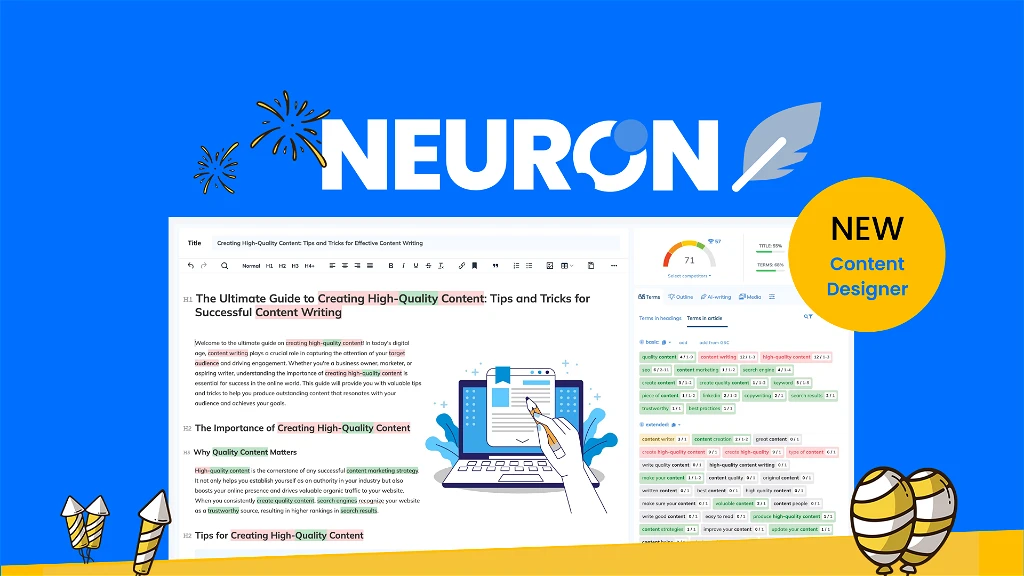
    NeuronWriter: AI-powered SEO Content Tool

    In the fast-paced world of digital marketing, we’re always searching for tools to improve our SEO efforts. Enter NeuronWriter, an AI-powered SEO tool that promises to revolutionize our approach to creating SEO content.

    We’ve had our eyes on this innovative platform since its inception by Contadu, under the stewardship of CEO Pawel Sokolowski, and the consistent praise it’s received intrigued us. Boasting an impressive suite of features, NeuronWriter aims to take our content strategy to new heights. Let’s dig into how it’s becoming the go-to for over 25,000 users pursuing high-ranking content optimization tools.

    Key Takeaways

    • NeuronWriter invigorates content strategy with AI-driven insights and semantic analysis.
    • Enhance your SEO content game with NeuronWriter’s sophisticated content optimization capabilities.
    • Uncover why NeuronWriter is lauded as the best AI writer through practical applications and results.
    • Gain a strategic edge with this AI-powered SEO tool as we break down its multifaceted features.
    • Read on for an impartial 2024 SEO tool review that checks NeuronWriter’s real value against industry buzz.

    Introduction to NeuronWriter: Revolutionizing SEO Content

     NeuronWriter is a tool that helps people write better content for websites. It uses AI, or artificial intelligence, to look at popular articles on Google. This allows writers and marketers to create content that is good for both readers and SEO (which means making content that shows up higher in Google searches). It’s like having a smart helper who guides you in writing excellent web content focusing on SEO.
    • The innovative nature of NeuronWriter is rooted in its ability to suggest critical semantic keywords that align with the latest SEO practices.
    • By recommending an optimal word count and a strategic number of headings, it assists in elevating the standard of content to meet the discerning demands of search engines.

    NeuronWriter uses OpenAI’s language technology to make writing easier. It has a simple design that anyone can use and works for different topics, countries, and languages. This means you can start writing projects more efficiently, no matter what you’re writing about or where you are.

    Feature Function Benefit
    AI-driven semantic analysis Scans top-performing content Enhances SEO potential of content
    Optimal word count and headings Guides structuring of articles Improves user readability and SEO rankings
    Targeted content optimization Initiates projects for specific SEO goals Precisely caters to varied audience demographics

    NeuronWriter helps people who create content for websites to make stuff that is SEO-optimized easily. This means their content has a better chance to appear at the top of Google’s search results. Using this tool can really boost their visibility online.

    NeuronWriter Review: Unveiling Game-Changing FeaturesNeuronWriter is a vital tool for people who write SEO content. It changes the way content is written by using the latest AI technology. This helps make top-quality content that meets the changing needs of search engines and readers. Let’s examine what makes NeuronWriter unique as a content writing tool.

    Understanding Semantic SEO RecommendationsNeuronWriter leads the way in making SEO content better by giving precise and practical advice. When people use NeuronWriter for writing, they get a guide on making articles that both their readers and search engines will like. This tool does more than use a lot of keywords. It understands the topic and what the readers want to know.

    Breaking Down Competitive SERP AnalysisNeuronWriter has a strong set of tools for SEO analysis. It lets users look closely at what their competitors are doing in search engine results. This isn’t just about seeing who your competitors are but also about understanding why their content works well with audiences and search engines. The SEO tips from NeuronWriter are customized. This helps content creators make a good SEO plan based on data and focus on the right things.

    The Power of NLP-Driven SEO OptimizationIn SEO optimization, NeuronWriter uses NLP (Natural Language Processing) to understand how language is used in the best-performing content on search engine results. The insights from AI ensure that every article uses the right keywords and has a natural style of writing that attracts readers. This sets a new standard for on-page SEO: making web pages rank higher and getting more traffic in search engines.

    • Semantic SEO recommendations streamline research and content development.
    • Competitor SERP analysis filters actionable data from top results.
    • NLP-driven SEO aligns content with both search engines and user expectations.

    In conclusion, NeuronWriter shows a unique ability to improve how we create content. It uses strategies based on data and advanced technology. Its focus on on-page SEO and content SEO optimization makes it stand out. This gives SEO content writers a solid platform to create content that is both engaging and competitive online.

    Efficient Content Creation Using AI Writer ToolsContent creation has changed a lot with AI writing tools like NeuronWriter, which help writers make content in new ways. These AI tools are more than just helpers; they’re like creative partners that make writing easier. Using NeuronWriter is a big step towards creating content that is engaging and great for SEO.

    As competition online grows, NeuronWriter stands out with its advanced AI writing features. This tool has changed things by letting content creators quickly make high-quality content. It’s a go-to for anyone wanting to boost their online presence, with features that turn an average article into one rich in SEO.

    One of the best parts of NeuronWriter is its keyword clustering. This feature is like having access to top-level research tools. As you write, it gives you evolving suggestions for keywords, making NeuronWriter a dynamic place for AI content creation. Every time you add a recommended keyword, your content’s score increases, which means it’s getting better and more relevant.

    1. Keyword Clustering: Building a content foundation on relevant terms.
    2. Semantic Suggestions: Real-time keyword assistance for SEO optimization.
    3. AI Writing Templates: Structured guides to kickstart your writing process.
    4. Content Score: Dynamic feedback on writing improves AI content.

    The table below demonstrates how AI-powered tools like NeuronWriter transform the traditional approach into an efficient, state-of-the-art process:

    Feature Function Impact
    Keyword Clustering Gathers related terms to target a comprehensive topic range Enhances the article’s relevance and search engine visibility
    Semantic Suggestions Provides context-aware keywords based on the AI’s understanding of content Increases the semantic quality and depth of the article
    AI Writing Templates Leverages AI’s ability to structure articles for better organization Streamlines the writing process, making it quicker and more efficient
    Content Score Offers real-time feedback on the SEO friendliness of the content Guides writers to create content that stands a better chance of ranking high

    Ultimately, utilizing an AI writing tool like NeuronWriter helps you generate content at an impressive pace and ensures the quality of your content meets the highest standards of today’s digital demands. It’s an essential component in the toolkit of every modern content creator aiming for peak online performance.

    Comparing NeuronWriter to Traditional Content Creation Processes

    An AI writing tool like NeuronWriter allows you to create content quickly and ensure it’s perfect. It meets the high standards needed for today’s online world. NeuronWriter is a must-have for any modern content creator who wants to do their best online.

    Content Planning and Execution with NeuronWriter

    Gone are the days when content creation entailed cumbersome research and extensive manual labor. NeuronWriter’s capacity to infuse AI into the planning and content generation phases has revolutionized the content creation process. With NeuronWriter, creators are equipped with over 20 pre-built templates and sophisticated algorithms that aid in structuring ideas. This foundation augments the traditional content creation process, allowing writers to effuse their efforts into more creative aspects of content planning.

    Optimizing Existing Content Versus Starting from Scratch

    Content creation used to be about doing a lot of research and hard work by hand. But now, things have changed. NeuronWriter has made using AI to help plan and create content easier. With NeuronWriter, you get more than 20 ready-made templates and intelligent algorithms to help organize your ideas. This new way of doing things adds to the old way of creating content. It lets writers focus more on the creative parts of planning their content.

    User-Friendly Interface: NeuronWriter Appsumo Lifetime Deal

    The NeuronWriter Appsumo Lifetime Deal offers a comprehensive package for content creators and digital marketers looking to optimize their content for SEO. This deal is available at $89 for a single code, which includes features like 2 projects, 25 content analyses, and 15,000 AI-writing credits per month. The package also comes with an automatic content outline generator and templates for on-page and off-page SEO. Users have the option to stack codes to unlock more features.

    NeuronWriter is praised for its AI-powered research and writing tools, which help users create content that ranks high on Google. It allows for easy research and planning, generating drafts and outlines based on automated recommendations. The tool also provides NLP and SERP-driven recommendations for optimizing content, along with an advanced plagiarism checker and internal linking suggestions.

    • Semantic analysis with Natural Language Processing (NLP)
    • Advanced AI-assisted writing tools
    • One-time purchase with lifetime access
    • Google Chrome extensions for increased productivity
    • Educational materials, including certificates and academy courses

    However, there are some noted limitations. For example, the plagiarism checker is only available in the Gold Plan and higher. Some users have also found the user interface complex for first-time users, and performance can occasionally become sluggish.

    Despite these cons, NeuronWriter’s lifetime deal is considered a valuable investment, especially for small businesses and individual content creators, due to its generous credit system and the range of features it offers.

    To get your NeuronWriter Appsumo Lifetime Deal, use our affiliate link. This special offer allows you to access the deal through our partnership.

    Conclusion

    NeuronWriter stands out in content strategy with its advanced AI tools and features. It helps you understand competitors’ actions to rank higher in search engines and gives competent SEO advice to keep your content relevant. The platform is designed for the changing needs of SEO content creation. Its advanced NLP (Natural Language Processing) technology makes sure your writing is good for SEO, high in quality, and makes sense.

    The NeuronWriter AppSumo lifetime deal makes this tool even more attractive. It offers endless chances to use these powerful features for creating the best SEO content. With strong customer support from NeuronWriter, users get the help they need to use the software entirely. This helps them rank higher in search results. This support shows a commitment to creating high-quality content, which allows users to stay visible and engaged online.

    In summary, NeuronWriter, with many success stories, is very important for marketers, content creators, and businesses. It’s a place where being efficient and effective comes together. This tool helps users deal with search engine algorithms confidently and skillfully. For anyone who wants to improve their content, using NeuronWriter’s tools could be a big step towards becoming more well-known online.

    FAQ

    What is NeuronWriter, and how does it integrate AI into content strategy?

    NeuronWriter is an AI-powered SEO tool designed to help content creators optimize and improve their search rankings using advanced content analyses and Natural Language Processing (NLP) technology. It assists in identifying semantic keywords, suggesting optimal structure, and generating content to enhance content quality and SEO performance.

    Can NeuronWriter help create high-quality SEO content?

    NeuronWriter is primed to create high-quality SEO content. It analyzes top-ranking content to provide SEO recommendations, generates content with AI writing tools, and ensures your content is optimized for search engines and readers using NLP-driven SEO optimization techniques.

    How does NeuronWriter’s semantic SEO recommendations work?

    NeuronWriter’s semantic SEO recommendations are based on analyzing competitors’ content and extracting relevant terms and phrases. These semantic suggestions aim to improve content relevance and naturally incorporate keywords without stuffing to better align with search engine algorithms and user intent.

    What details can NeuronWriter’s competitive SERP analysis provide?

    Its competitive SERP analysis provides a range of metrics supplied by Moz, including page authority, domain authority, and an examination of external links. It also delivers insights into the SERP layout, competitor content structure, and features to help users refine their content strategy.

    How does NeuronWriter utilize NLP for SEO optimization?

    NeuronWriter leverages NLP technology to perform semantic analysis, ensuring the content resonates with target audiences while adhering to SEO best practices. It helps identify critical on-page elements, enhances reader engagement, and aims to boost the content’s performance in search engine results pages (SERPs).

    Is creating content with AI writing tools like NeuronWriter easier than traditional methods?

    Yes, AI writer tools like NeuronWriter simplify the content creation process by offering AI-assisted research, content drafting, and semantic keyword inclusion. This contrasts with traditional methods that tend to be more manual and time-consuming, making NeuronWriter a more efficient alternative for content creators.

    Can NeuronWriter optimize existing content, or is it just for creating new articles?

    NeuronWriter is versatile enough to optimize existing content by entering a URL or to assist in crafting optimized content from scratch. This feature caters to various content needs, enabling users to enhance their content or embark on new content projects with a structured, SEO-focused approach.

    What is the NeuronWriter AppSumo lifetime deal, and how can I benefit from it?

    The NeuronWriter AppSumo lifetime deal is a one-time purchase offer that grants users access to all of NeuronWriter’s advanced features, including an AI-powered content editor and writing tools. This deal mainly benefits users seeking an affordable and comprehensive solution for their long-term content strategy needs.

    Does NeuronWriter provide support and resources for new users?

    Yes, NeuronWriter offers customer support along with educational materials. Users can use the academy section for learning, and certificates are available for users who want to validate their proficiency with the tool. This ensures that even newcomers to SEO and content optimization can get started with confidence.

    Would NeuronWriter be suitable for SEO professionals and content writers?

    NeuronWriter is well-suited for SEO professionals and content writers due to its comprehensive suite of SEO analysis tools, content optimization features, and AI writing assistance. It suggests improvements for on-page SEO and aids in the entire content creation workflow, making it a valuable asset for individuals in these roles.