Category: How To

  • Import Canadian Tax Rates WooCommerce Guide

    Import Canadian Tax Rates WooCommerce Guide

    Setting up tax rates for your WooCommerce store can be tricky, mainly with Canadian taxes. This guide will help you import Canadian tax rates into WooCommerce. We’ll cover GST, HST, and PST, as well as how to use a WooCommerce tax rates plugin and a Canadian GST/HST calculator.

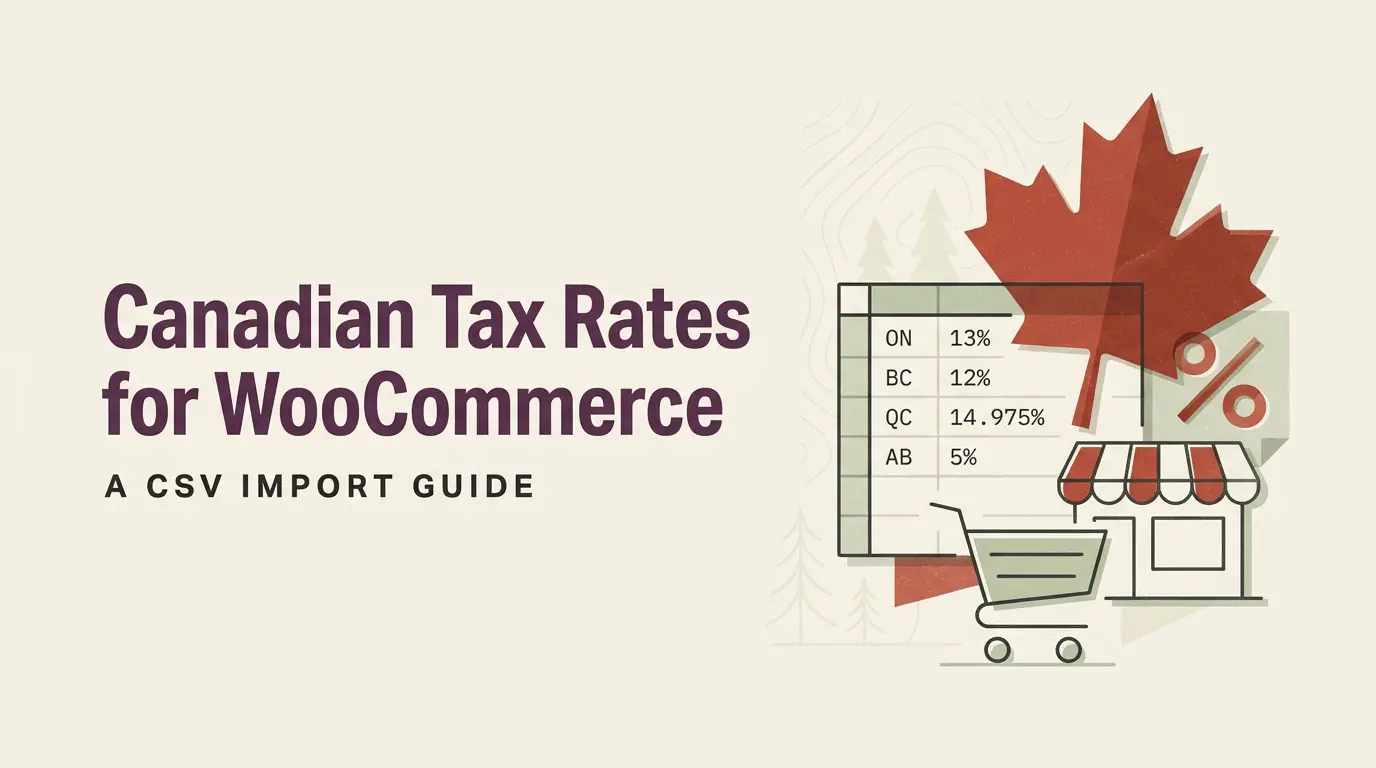
    Canadian tax rates differ a lot by province. For example, Alberta has a 5% HST, while British Columbia’s rate is 12% (5% GST and 7% PST). Ontario charges a 13% HST, and Quebec’s total is 14.975% (5% TPS and 9.975% TVQ). E-commerce businesses need to get these rates right in WooCommerce.

    To make this easier, you can use a CSV file with the correct tax rates for each province. We’ll show you how to download and import this file into WooCommerce. This way, you follow Canadian tax laws and avoid any financial trouble.

    Key Takeaways

    • Canadian tax rates vary by province, ranging from 5% to 14.975%
    • Importing tax rates using a CSV file simplifies WooCommerce setup
    • Accurate tax calculation is crucial for e-commerce compliance
    • WooCommerce tax rates plugins can automate the process
    • Understanding GST, HST, and PST is essential for Canadian e-commerce
    • Tax rates should be based on the shipping destination

    To simplify setting up Canadian taxes in WooCommerce, we’ve created an easy-to-use tax import file that includes all the necessary provincial tax rates. Download the file using the link below and follow our step-by-step guide to import it into your WooCommerce store. This ensures your tax calculations are accurate and compliant across Canada. Download the Canadian Tax Import File

    Understanding Canadian Tax Structure for E-commerce

    Understanding Canadian taxes for e-commerce can be tricky. With different tax rates in each province, automating tax compliance is key. This guide will help you understand Canadian taxes for online sales.

    GST, HST, and PST Explained

    Canadian sales tax has three main types: Goods and Services Tax (GST), Harmonized Sales Tax (HST), and Provincial Sales Tax (PST). GST is a federal tax of 5%. HST combines federal and provincial taxes. PST rates change by province.

    Provincial Tax Rate Variations

    Tax rates vary by province, making automation crucial for e-commerce. Some provinces use HST, while others apply GST+PST. Alberta, Northwest Territories, Nunavut, and Yukon only charge 5% GST.

    Province Tax Type Rate
    Ontario HST 13%
    New Brunswick HST 15%
    Alberta GST 5%
    British Columbia GST + PST 12% (5% + 7%)

    Tax Collection Based on Shipping Destination

    E-commerce businesses must collect taxes based on the customer’s shipping address. For example, Ontario-based stores charge 13% HST for Ontario customers but only 5% GST for Alberta buyers. This system needs strong ecommerce sales tax automation to handle different tax rates.

    Remember: Canadian businesses must register for a GST/HST number and start charging sales tax once their sales exceed $30,000 CAD in a single calendar quarter.

    Import Canadian Tax Rates WooCommerce

    Setting up tax rates for cross-border taxation in WooCommerce can be complex, mainly when dealing with Canadian provinces. This guide makes it easier to import Canadian tax rates into your WooCommerce store. It ensures accurate digital goods taxation and smooth woocommerce tax integration.

    Downloading the CSV Tax Rate Template

    The first step is to get the CSV template. You can find it in your WooCommerce dashboard under Settings > Tax > Standard Rates. Download it to your computer for editing.

    Step-by-Step Import Process

    Here’s how to import Canadian tax rates:

    1. Sign into your WordPress admin panel
    2. Navigate to WooCommerce > Settings > Tax
    3. Click on “Standard Rates”
    4. Select “Import CSV”
    5. Upload your completed CSV file

    Make sure to include specific postal codes for certain regions. This ensures precise tax calculations based on shipping destinations.

    After you upload and import the Canadian tax CSV file, your WooCommerce tax settings will look like this. In this example, the business is located in California, where the business is shipping the products to Canada.
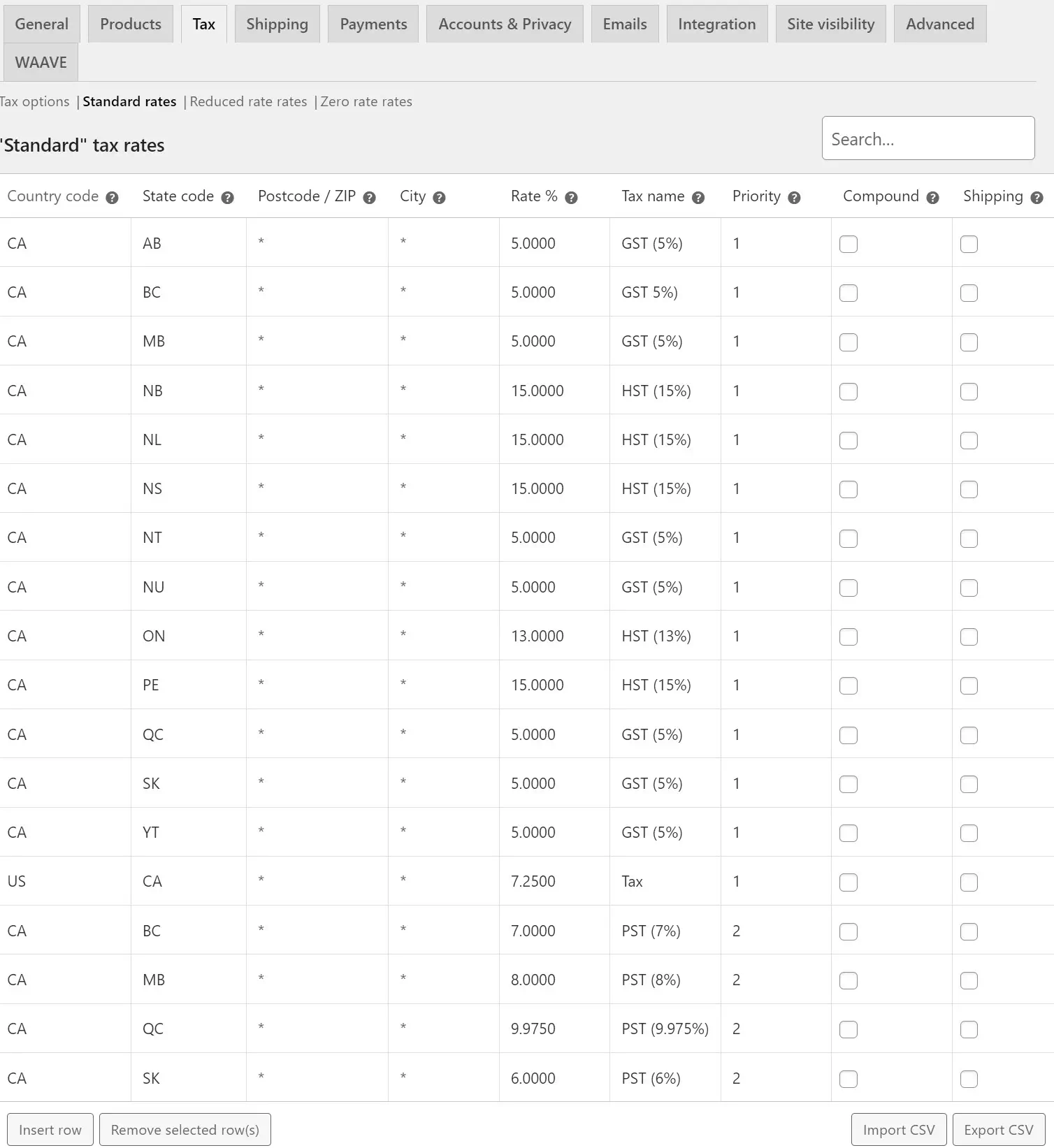
    Tax rates table for Canadian provinces and US states.

    Validating Imported Tax Rates

    After importing, it’s important to check the accuracy of your tax rates. Ensure each province has the correct rate applied. Here’s a quick reference table for some Canadian provinces:

    Province Tax Rate Breakdown
    Alberta 5% GST only
    British Columbia 12% 5% GST + 7% PST
    Ontario 13% HST
    Quebec 14.975% 5% TPS + 9.975% TVQ

    Following these steps and checking your rates will ensure accurate cross-border taxation for your WooCommerce store. This simplifies digital goods taxation across Canadian provinces.

    Configuring WooCommerce Tax Settings

    Setting up tax calculations in WooCommerce is key for managing taxes well. The platform has four tax settings pages. These let you tailor your tax setup for different situations.

    Enabling Tax Calculations

    To begin, go to Settings > General. Then, select “Enable Taxes and Tax Calculations.” This turns on WooCommerce’s tax features. It gets your store ready to handle taxes.

    Setting Up Tax Display Options

    WooCommerce lets you decide how prices are shown. You can choose to include or exclude tax. This meets different customer needs and legal rules.

    Managing Tax Classes and Rates

    WooCommerce has three default tax classes: Standard, Reduced, and Zero. You can set tax rates for each class. Use ISO 3166-1 alpha-2 codes to identify locations.

    Tax Class Example Rate Application
    Standard 20.0000% General products
    Reduced 5.0000% Specific goods
    Zero 0.0000% Tax-exempt items

    Price Display Configuration

    Set how prices look on your site. You can show prices with or without tax. You can also add suffixes to show tax inclusion. The WooCommerce tax rates plugin makes this easier, helping businesses in supported countries.

    Advanced Tax Management Solutions

    Managing taxes for your online store can be complex, with many jurisdictions to consider. Luckily, advanced solutions can make this easier. Automated tax compliance tools are key for ecommerce businesses looking to simplify their tax duties.

    Ecommerce sales tax automation brings big benefits to WooCommerce store owners. These tools can automatically figure out taxes based on where customers are. They also apply the right rates and update in real-time as tax laws change. This keeps your taxes accurate and up-to-date without manual updates.

    Let’s look at some important features of advanced tax management solutions:

    • Automatic tax calculations based on geolocation
    • Real-time updates to tax rates and rules
    • Support for multiple tax jurisdictions
    • Integration with popular ecommerce platforms
    • Detailed reporting for tax filing purposes

    For WooCommerce, options like Jetpack and WooCommerce Tax are popular. They work well with your store, offering automated tax services that are easy to turn on in your settings.

    Feature Manual Setup Automated Solution
    Tax Rate Updates Manual, time-consuming Automatic, real-time
    Accuracy Prone to human error High precision
    Time Investment High Low
    Compliance Risk Higher Lower

    Using these advanced tax management solutions lets you grow your business. You can focus on growth while keeping taxes in check across different places.

    Conclusion

    Learning how to import Canadian tax rates in WooCommerce is key for e-commerce success. This guide has shown you how to handle the complex Canadian tax system. This includes GST, HST, and PST.

    You can meet provincial rate requirements by following the steps and setting up tax settings right. This ensures you’re following the rules.

    Managing taxes in WooCommerce is more than just importing rates. You also need to understand how to display taxes, manage tax classes, and set up prices. These steps help create a smooth tax system based on where items are shipped.

    While you can do this manually, using advanced tax management tools can make it easier. These tools handle calculations and keep you up to date with tax law changes. Remember, good tax management builds trust with customers and avoids legal trouble.

    When you start using these strategies, think about getting advice from tax experts. They can give you advice that fits your business. With the right approach, tax compliance can be a way to stand out in the Canadian e-commerce world.

    FAQ

    How do I import Canadian tax rates into WooCommerce?

    To import Canadian tax rates into WooCommerce, first download the CSV template. You can find it in WooCommerce > Settings > Tax > Standard Rates. Fill the CSV with tax rates for each province.

    Then, import it by clicking “Import CSV” and uploading your file. WooCommerce will automatically update tax rates based on the provided information.

    What are the different types of Canadian taxes I need to consider for e-commerce?

    For e-commerce, you need to consider GST, HST, and PST. GST is a 5% federal tax. HST combines federal and provincial taxes.

    PST varies by province. Some provinces use HST, while others use a combination of GST and PST.

    How do I determine which tax rate to charge for different provinces?

    Tax rates vary by province. For example, Ontario charges 13% HST, while Alberta only charges 5% GST. You should charge tax based on the customer’s shipping destination.

    Use a current Canadian tax rate chart to apply the correct rates for each province.

    How can I enable tax calculations in WooCommerce?

    To enable tax calculations in WooCommerce, go to Settings > General. Select “Enable Taxes and Tax Calculations.” You can then configure tax display options, set up tax classes, and manage tax rates for different product types or regions.

    Are there automated solutions for managing Canadian taxes in WooCommerce?

    Yes, there are automated solutions like Jetpack and WooCommerce Tax. These extensions can automatically calculate taxes based on customer location and update according to legislative changes. Jetpack’s automatic tax calculation services can be enabled in WooCommerce > Settings > Taxes.

    WooCommerce Tax adds an “Automated taxes” setting to manage most tax calculations automatically.

    How often should I update my tax rates in WooCommerce?

    It’s important to regularly review and update your tax settings to maintain compliance with changing tax laws. While there’s no fixed schedule, it’s advisable to check for updates at least quarterly or whenever you become aware of tax rate changes in Canadian provinces.

    Can WooCommerce handle cross-border taxation for Canadian e-commerce businesses?

    Yes, WooCommerce can handle cross-border taxation. You can set up different tax rates based on the customer’s location, including international destinations. For complex cross-border scenarios, you might want to consider using specialized plugins or consulting with a tax professional.

    How do I handle digital goods taxation in WooCommerce for Canadian sales?

    You’ll need to set up a separate tax class in WooCommerce and apply the appropriate tax rates for digital goods. In Canada, digital goods are generally subject to GST/HST, but the rules can be complex. It’s advisable to consult with a tax professional to ensure compliance with the latest regulations for digital goods taxation.

    Source Links

  • AffiliateWP vs Solid Affiliate vs SliceWP Comparison

    AffiliateWP vs Solid Affiliate vs SliceWP Comparison

    “The best way to predict the future is to create it,” said Peter Drucker. This idea is very important in affiliate marketing plugins. Businesses want to grow, and WordPress affiliate management tools help a lot.

    In the world of affiliate tracking software, AffiliateWP, Solid Affiliate, and SliceWP are leaders. They each have special features to help with affiliate programs and increase sales. AffiliateWP is a big name, supporting over 30,000 affiliate programs1.

    SliceWP is great for small to medium-sized businesses just starting with affiliate marketing1. This shows that different businesses have different needs in affiliate management.

    Choosing the right plugin is important, and user satisfaction matters a lot. Solid Affiliate has a 4.5 Trustpilot rating from 23 reviews, and AffiliateWP has a 4.3 rating from 17 reviews2. SliceWP, without a Trustpilot score, has a perfect 5.0 rating on WordPress.org from 63 reviews2.

    We will look closer at these plugins’ features, prices, and value. Whether you’re experienced or new, knowing these tools is essential for a successful affiliate program.

    Key Takeaways:

    • AffiliateWP leads with over 30,000 businesses using its platform
    • SliceWP targets small to medium-sized businesses new to affiliate marketing
    • User ratings vary across platforms, with each plugin having strengths
    • Feature sets differ, catering to various business needs and sizes
    • Choosing the right plugin depends on specific business requirements and goals

    Understanding WordPress Affiliate Management Solutions

    WordPress affiliate management solutions help site owners manage referral programs easily. They make tracking affiliate links, managing commissions, and building partnerships simple.

    The Role of Affiliate Plugins in WordPress

    Affiliate plugins are key for managing commissions in WordPress. They track referrals, calculate commissions, and offer detailed reports. Plugins like AffiliateWP and SliceWP are great for businesses of all sizes3.

    Key Features of Modern Affiliate Systems

    Today’s affiliate systems have many advanced features:

    • Customizable commission structures
    • Real-time tracking of affiliate links
    • Detailed performance reports
    • Affiliate dashboards for easy management
    • Fraud prevention tools

    These features help both merchants and affiliates get the most from their programs.

    Integration Capabilities with eCommerce Platforms

    Working well with eCommerce platforms is important for affiliate management. Many WordPress plugins, like WP Affiliate Manager, work well with WooCommerce. WP Affiliate Manager has 25 add-ons, including 5 for WooCommerce4.

    Plugin Downloads Rating Starting Price
    AffiliateWP 23,000+ 4.6/5 $149.50/year
    SliceWP 2,000+ 5/5 $169/year
    Solid Affiliate N/A 4.5/5 $149/year

    Choosing the right affiliate management solution depends on your needs and budget. AffiliateWP is great for users of their other plugins. SliceWP is ideal for beginners. Solid Affiliate is known for its excellent support3.

    AffiliateWP vs Solid Affiliate vs SliceWP

    In this comparison, we’ll look at three top WordPress affiliate plugins: AffiliateWP, Solid Affiliate, and SliceWP. Each has special features to boost your site’s marketing power.

    AffiliateWP is trusted by over 30,000 businesses. It’s known for its advanced fraud tools and multi-tier commissions. It works well with popular e-commerce tools like Easy Digital Downloads, WooCommerce, and WP Simple Pay5. Its prices range from $150 to $300 a year, showing its strong features6.

    Solid Affiliate is easy to set up with its wizard and has a full affiliate portal. It’s unique because it offers a lifetime license without annual fees5. Prices range from $200 to $1,000 a year, meeting various business needs6.

    SliceWP has a free version and paid plans with all add-ons. It’s known for being easy to use and affordable, starting at $169 a year or $429 one-time6. It lets you set custom commission rates and offers one-click PayPal payouts. It also works with many WordPress eCommerce plugins7.

    Plugin Key Features Pricing
    AffiliateWP Fraud prevention, multi-tier commissions, e-commerce integrations $150 – $300/year
    Solid Affiliate Setup wizard, comprehensive affiliate portal, lifetime license option $200 – $1,000/year
    SliceWP Free version, customizable commissions, one-click PayPal payouts $169/year or $429 one-time

    Each plugin has its own strengths in managing affiliates. They cater to different business sizes and needs. Think about what you need before picking the right plugin for your WordPress affiliate program.

    Core Features Comparison

    When picking affiliate tracking software, it’s key to look at each option’s core features. We’ll compare AffiliateWP, Solid Affiliate, and SliceWP to guide you in choosing the best for your affiliate program.

    Affiliate Registration and Management

    All three plugins have strong features for managing affiliates. They make it easy to add new affiliates and keep an eye on them. This is vital for a healthy affiliate network and smooth operations.

    Commission Structure Options

    AffiliateWP is known for its flexible commission plans. It has global and per-product rates, custom tiers, and lifetime commissions. Solid Affiliate lets you set custom rates and override commissions for detailed control. SliceWP allows for customizable cookie durations, giving affiliates more chances to earn8.

    Tracking and Reporting Capabilities

    Good commission management tools are key for any affiliate program. AffiliateWP gives detailed reports and analytics for precise tracking. Solid Affiliate has advanced tracking and refund protection to protect profits. SliceWP offers real-time stats for affiliates, keeping them informed8.

    Payment Processing Systems

    Each plugin supports different payment options for timely and accurate payouts. Solid Affiliate, for example, has automatic PayPal payouts, making payments easier for everyone. This is especially helpful for WooCommerce users8.

    Feature AffiliateWP Solid Affiliate SliceWP
    Commission Flexibility High High Moderate
    Real-time Reporting Yes Yes Yes
    Automatic Payouts Available PayPal Integration Available
    Refund Protection Available Yes Available

    Choosing the right affiliate tracking software is vital for your program’s success. Affiliate marketing makes up 15% of digital ad revenue. Investing in good commission management tools is key to boosting your affiliate program’s success9.

    Pricing Models and Value Proposition

    When looking at affiliate marketing costs, WordPress plugin pricing is key. AffiliateWP, Solid Affiliate, and SliceWP have different pricing to fit various needs and budgets.

    AffiliateWP starts at $149 a year for small businesses. For more features, there are higher plans. Solid Affiliate offers all features for $49 a month, making it easy to choose without complicated pricing.

    SliceWP has a free version for testing. Paid plans start at $169 a year, offering great value for money. This pricing helps businesses of all sizes and budgets.

    Plugin Starting Price Key Value Proposition
    AffiliateWP $149/year Extensive features
    Solid Affiliate $49/month All-inclusive, easy to use
    SliceWP Free (Paid: $169/year) Affordability, scalability

    Each plugin has its own strengths. AffiliateWP has lots of features, Solid Affiliate is easy to use, and SliceWP is affordable with growth options. WordPress is used by over a third of global websites, making these plugins essential for many businesses10.

    When picking a WordPress plugin for affiliate marketing, think about your needs, budget, and future plans. The best choice depends on your business size, what features you need, and how you plan to grow.

    User Interface and Experience Analysis

    The design of affiliate management plugins is key to their success. A good affiliate dashboard makes work easier for both admins and affiliates.

    Admin Dashboard Functionality

    AffiliateWP has a detailed admin dashboard for managing affiliates. It shows real-time stats, makes adjusting commissions simple, and offers detailed reports. The design is easy to use, making it simple to find what you need6.

    Affiliate Portal Experience

    Solid Affiliate is known for its easy-to-use affiliate portal. Affiliates can quickly find promo links, coupons, and customize landing pages. The design works well on all devices11.

    SliceWP gives affiliates a dashboard with live stats. This helps keep affiliates motivated and lets them see how they’re doing. It also makes paying out via PayPal easy6.

    Customization Options

    Each plugin lets you customize the affiliate experience. AffiliateWP lets you change the affiliate area a lot, keeping your brand’s look consistent. Solid Affiliate and SliceWP also offer customization, but in different ways.

    Plugin Admin Dashboard Affiliate Portal Customization
    AffiliateWP Comprehensive Customizable Extensive
    Solid Affiliate User-friendly Feature-rich Moderate
    SliceWP Real-time stats Performance-focused Flexible

    User feedback shows how good these interfaces are. SliceWP gets a 4.9/5 rating on WordPress.org, showing users love its design and features12.

    Integration Capabilities

    Affiliate management plugins need strong e-commerce integrations and payment gateway support to work well. Let’s see how AffiliateWP, Solid Affiliate, and SliceWP do in these areas.

    eCommerce Platform Compatibility

    AffiliateWP is great because it works with many platforms. It easily connects with WooCommerce and Easy Digital Downloads. Solid Affiliate mainly works with WooCommerce, offering deep integration for quick setup and customization8. SliceWP also supports WooCommerce, providing key features for managing affiliate programs.

    Payment Gateway Support

    Good payment gateway support is key for smooth affiliate payouts. AffiliateWP supports many payment gateways, giving users flexibility. Solid Affiliate and SliceWP both offer PayPal for affiliate payouts, making sure affiliates get paid reliably.

    Third-party Tool Integration

    AffiliateWP is a leader in third-party integrations, thanks to its Zapier connection. Solid Affiliate integrates with WooCommerce subscriptions, which is great for businesses with ongoing revenue8. SliceWP, while focused, still has the integrations needed for good affiliate program management.

    Feature AffiliateWP Solid Affiliate SliceWP
    WooCommerce Integration Yes Yes (Deep) Yes
    Easy Digital Downloads Integration Yes No No
    PayPal Support Yes Yes Yes
    Zapier Integration Yes No No

    Each plugin has its own strengths in e-commerce integrations. AffiliateWP has the most integrations, Solid Affiliate is best for WooCommerce, and SliceWP is balanced for many WordPress businesses.

    Advanced Features and Add-ons

    Affiliate plugin add-ons and advanced features are key to improving WordPress affiliate management. AffiliateWP shines with its 33+ add-ons, helping users customize their affiliate programs13. These add-ons offer everything from fraud prevention to multi-tier commissions.

    SliceWP offers a unique solution with many advanced features in its main plugin. It includes customizable commission rates, real-time reporting, and easy PayPal integration for payouts7. This makes managing affiliates simple without needing extra add-ons.

    Both platforms have strong advanced features:

    • Affiliate coupon tracking
    • Lifetime commissions
    • Automated payouts
    • Custom affiliate dashboards
    • Social sharing tools

    AffiliateWP and SliceWP let users set up flexible commission structures. They can choose custom rates, product-based commissions, and bonuses for new sign-ups137. This customization helps businesses create programs that meet their goals and motivate their affiliates.

    Feature AffiliateWP SliceWP
    Add-ons 33+ available Built-in advanced features
    Commission Types Custom, product-based, lifetime Fixed, percentage-based, product-specific
    Payout Options Manual, PayPal, custom service One-click PayPal bulk payouts
    Reporting Detailed stats for affiliates and managers Real-time reports on visits, commissions, revenue

    Using these advanced features and add-ons, businesses can build complex affiliate programs. These programs can help grow and increase ROI. The choice between AffiliateWP’s modular approach and SliceWP’s all-in-one solution depends on what each business needs and prefers.

    Performance and Security Measures

    When picking an affiliate management solution, focus on performance and security. These plugins must protect data and keep your site running smoothly.

    Fraud Prevention Tools

    AffiliateWP is a leader in stopping affiliate fraud with its Fraud Prevention pro add-on. It blocks self-referrals and catches suspicious activity. This keeps your affiliate network clean. The plugin also tracks referrals smartly and blocks bad URLs14.

    System Performance Impact

    These plugins have strong features but aim to not slow down your site. AffiliateWP, with over 2,000 active installs, and SliceWP, with more than 5,000 active installs, handle big traffic well without slowing down15.

    Data Security Features

    Data security is crucial for affiliate management solutions. AffiliateWP’s Integrated Payouts Service makes secure payments to affiliates in 37 countries. Payments can be made from bank accounts or credit cards14. These plugins let site owners keep their affiliate data safe, boosting overall security.

    AffiliateWP, Solid Affiliate, and SliceWP all focus on security. But AffiliateWP stands out with its strong fraud protection and ability to remove affiliates who break rules14.

    Plugin Active Installs Pricing (Annual)
    AffiliateWP 2,000+ $134.55 (Personal)
    SliceWP 5,000+ $259 (Pro Plus, 10 sites)
    Solid Affiliate N/A $229 (One-time, single store)

    This comparison shows how these top affiliate management solutions balance performance, security, and value15.

    Support and Documentation Quality

    When picking an affiliate plugin, support and documentation quality matter a lot. AffiliateWP, Solid Affiliate, and SliceWP all have great resources to help users. They make it easier to use their platforms.

    AffiliateWP shines with its detailed documentation and top-notch support. Its Personal plan, at $149.50 a year, gives users access to these resources. This helps them solve problems fast16. Users rate AffiliateWP 4.3 out of 5 on Trustpilot, showing they’re happy with the support17.

    Solid Affiliate’s Personal plan, at $149.99 a year, also offers dedicated support and guides. Their help covers everything from setting up to advanced features like flexible commissions and automatic PayPal payouts16.

    SliceWP gives standard support and documentation to all users. But, premium support is available for higher plans. This lets users pick how much help they need.

    Plugin Documentation Support Type User Rating
    AffiliateWP Extensive Premium 4.3/5
    Solid Affiliate Comprehensive Dedicated N/A
    SliceWP Standard Tiered N/A

    The quality of support and documentation in affiliate plugins is key. It affects how well a program does. With the affiliate marketing market set to hit $39.8 billion by 2031, good support is crucial for growth17.

    Conclusion

    Choosing the right WordPress affiliate plugin is key to your affiliate program’s success. AffiliateWP, Solid Affiliate, and SliceWP each offer unique strengths. AffiliateWP stands out with advanced features like fraud prevention and real-time reporting for affiliate referrals18.

    Solid Affiliate makes creating an affiliate program easy and offers tiered commissions for top affiliates18. SliceWP is simple and affordable, perfect for small businesses or newcomers to affiliate marketing18. It also offers lifetime commissions, encouraging long-term customer loyalty19.

    The right choice depends on your needs, budget, and customization desires. Think about how well the plugin integrates with eCommerce platforms. Solid Affiliate integrates seamlessly with WooCommerce, eliminating the need for extra add-ons19. AffiliateWP ensures accurate tracking, even on servers with aggressive caching19.

    These features can greatly improve your affiliate program’s performance and management. Remember, the right plugin can significantly boost your affiliate marketing success. Studies show that using specialized plugins can lead to more sales and better tracking20.

    By carefully evaluating each plugin’s features and aligning them with your business goals, you can make a smart choice. This choice will help propel your affiliate program forward.

    FAQ

    What are the main differences between AffiliateWP, Solid Affiliate, and SliceWP?

    AffiliateWP has lots of features and works with many plugins. Solid Affiliate is easy to set up and has a great affiliate portal. SliceWP is affordable and has basic but solid features.

    AffiliateWP has advanced tools like fraud prevention and multi-tier commissions. Solid Affiliate has a setup wizard for quick start. SliceWP has a free version and paid plans with all add-ons.

    How do the pricing models compare among these three affiliate plugins?

    AffiliateWP starts at 9 per year for its personal version. Higher tiers add more features. Solid Affiliate starts at per month with all features included.

    SliceWP has a free version and paid plans start at 9 per year. Each plugin’s price reflects its unique features and value.

    Which plugin offers the best integration capabilities?

    AffiliateWP has the most integrations, including WooCommerce and Easy Digital Downloads. It also works with many membership and LMS plugins. Plus, it supports multiple payment gateways and has a Zapier integration.

    Solid Affiliate and SliceWP work well with WooCommerce and support PayPal. But they have fewer third-party integrations than AffiliateWP.

    How do these plugins handle fraud prevention?

    AffiliateWP has a Fraud Prevention pro add-on for blocking self-referrals and flagging suspicious activity. Solid Affiliate and SliceWP also have security measures against fraud.

    But the details of their fraud prevention tools differ. All three plugins focus on keeping data safe and reducing fraud.

    Can these plugins handle different commission structures?

    Yes, all three plugins offer flexible commission structures. AffiliateWP has global and per-product rates, custom tiers, and lifetime commissions.

    Solid Affiliate allows custom rates and commission overrides. SliceWP has customizable cookie durations and supports various commission models. The flexibility varies among plugins.

    How user-friendly are the affiliate portals in these plugins?

    Solid Affiliate is known for its excellent affiliate portal, with features like links, coupons, and landing pages. AffiliateWP has a customizable area with lots of features.

    SliceWP has a dashboard with real-time stats for affiliates. All three plugins let you customize the affiliate experience, but the options differ.

    What kind of support and documentation do these plugins offer?

    All three plugins have documentation and support resources. AffiliateWP has detailed documentation and premium support. Solid Affiliate offers dedicated support and guides.

    SliceWP has support and documentation, with premium support for higher plans. AffiliateWP is known for its comprehensive support.

    Do these plugins support multi-vendor or marketplace setups?

    AffiliateWP supports multi-vendor setups through integrations and advanced features. Solid Affiliate and SliceWP can also work in multi-vendor setups, especially with WooCommerce.

    But the native support for multi-vendor operations varies. It’s best to check each plugin’s specific capabilities for complex setups.

    How do these plugins handle affiliate coupon tracking?

    All three plugins support affiliate coupon tracking. AffiliateWP and Solid Affiliate have strong coupon tracking features, allowing affiliates to create and track custom codes.

    SliceWP also supports coupon tracking, but customization options may vary. This feature lets affiliates offer discounts while earning commissions.

    Can these plugins integrate with email marketing tools?

    AffiliateWP integrates with many email marketing tools, especially through Zapier. Solid Affiliate and SliceWP have limited direct integrations but can work with email marketing tools through shared integrations like WooCommerce.

    Check the specific email marketing integrations for each plugin based on your preferred solution.

    Source Links

    1. AffiliateWP vs. SliceWP: Which Is Better? (Compared)
    2. 8 Best WooCommerce Affiliate Plugins 2024
    3. 10 Best WordPress Affiliate Plugins to Boost Your Sales in 2024
    4. 7 Best Affiliate Plugins For WooCommerce
    5. The 10+ Best Affiliate WordPress Plugins
    6. Best WordPress Affiliate Plugins 🤑 Mega Comparison 2024
    7. SliceWP Showcase: Alternative to AffiliateWP & Solid Affiliate • SyncWin
    8. Best Automated Affiliate Marketing Software – Solid Affiliate
    9. 10 best affiliate plugins for wordpress
    10. Nexcess-Provided WordPress Plugins for Ecommerce and Sites | Nexcess
    11. The 10 Best WooCommerce Affiliate Plugins
    12. 10 best WooCommerce affiliate plugins to start an affiliate program
    13. AffiliateWP Review: Is It the Best WordPress Affiliate Plugin? (2023)
    14. AffiliateWP Review: An Ideal Blend of Flexibility and Control
    15. 7+ Best WordPress Plugins to Create Your Affiliate Program 
    16. Top 10 WordPress Plugins to Start an Affiliate Program – Monetize.info
    17. 11 Best WooCommerce Affiliate Plugins to Boost Sales (2024)
    18. 10 Best WooCommerce Affiliate Plugins To Increase Your Sales (2024) | RelyWP
    19. Best Affiliate Plugins for WordPress
    20. Best WordPress Plugins for Affiliate Marketing (Boost Your Earnings in 2024
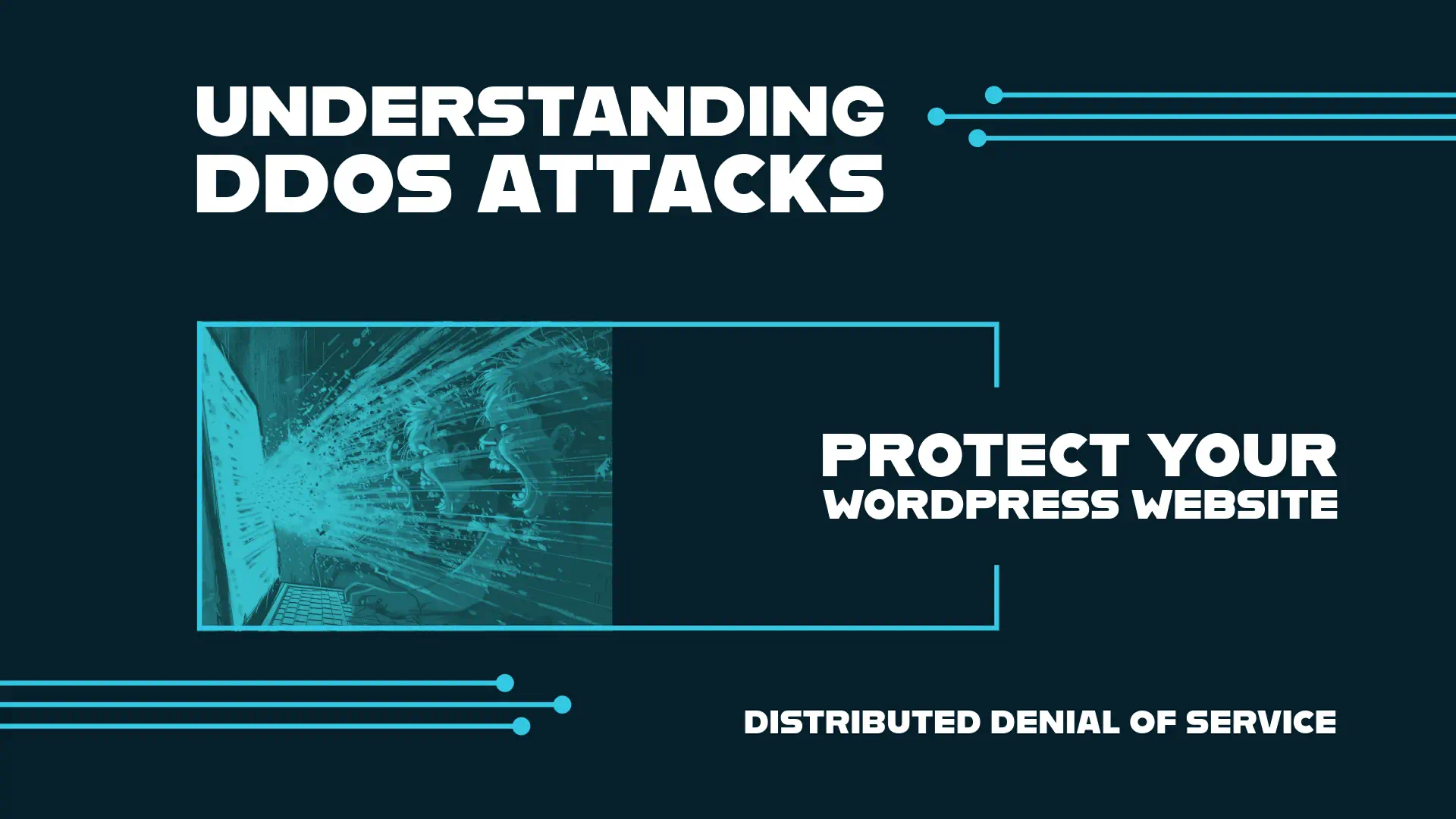
  • Understanding DDoS Attacks: Protect Your WordPress Website

    Understanding DDoS Attacks: Protect Your WordPress Website

    Understanding DDOS Attacks - Protect Your WordPress Website

    In 2018, GitHub faced a massive DDoS attack with 1.3 terabytes of traffic hitting their servers every second. This shows how big the threat of denial of service attacks has become. With WordPress running over 43% of all websites, it’s key to know how these threats can hurt your online presence.

    DDoS attacks try to overwhelm online services with lots of fake traffic. These attacks can cause big problems like downtime, money loss, and harm to your reputation. Since WordPress sites are often targeted, it’s vital to understand and fight against these attacks.

    Key Takeaways

    • DDoS attacks on WordPress sites are on the rise, causing downtime and financial losses
    • Various types of DDoS attacks exist, each targeting different vulnerabilities
    • Proper hosting, security tools, and monitoring are essential for protection
    • Botnets play a key role in executing high-volume DDoS attacks
    • Implementing a Web Application Firewall (WAF) and Content Delivery Network (CDN) can enhance security
    • Recognizing attack signs early is crucial for swift mitigation

    What is a DDoS Attack?

    A DDoS attack is a major cyber threat that can make websites and online services unavailable. It’s becoming more common, hitting big names like Amazon and Google.

    Definition and Basic Concepts

    A DDoS attack happens when many hacked devices send a lot of traffic to a target, overwhelming it. This makes it hard for real users to get through. In 2020, Amazon Web Services faced the biggest DDoS attack ever, showing how big this threat has become.

    How DDoS Attacks Work

    DDoS attacks often use botnets to carry out their plans. Criminals make botnets by infecting devices with malware, often through fake downloads or weak passwords. It’s thought that about 12.5 million devices could be turned into botnets.

    Common Motivations Behind DDoS Attacks

    DDoS attacks have different reasons. Some are done for fun, others for political reasons. Companies might face these attacks from rivals wanting to disrupt their work. In some cases, attackers ask for money to stop the attack. These attacks can last from a few hours to many months, really messing with online services.

    Attack Type Target Impact
    Volume-based Bandwidth Network congestion
    Protocol Network stack Service disruption
    Application-layer Server resources Website unavailability

    Types of DDoS Attacks

    DDoS attacks target different parts of a network or system. It’s key to know these types for good protection.

    Volumetric attacks are the most common. They try to use up a network’s bandwidth. These attacks started in the late 1990s and are measured in bits or Gigabits per second. UDP floods, CharGEN floods, and ICMP floods are examples.

    Application layer attacks hit web servers hard, using up CPU and memory. These attacks are counted in Requests per second (Rps). They take advantage of weaknesses in web apps. HTTP POST floods and HTTPS POST floods are types of these attacks.

    Protocol attacks work at layers 3 and 4 of the OSI model. They’re counted in packets per second (pps). UDP floods and TCP SYN floods are common. These attacks use network protocols to drain server resources.

    Nowadays, attacks are getting shorter but pack more packets per second. These attacks can come from many reasons, like ideology or business disputes. This makes them a big threat in many areas.

    Attack Type Measurement Examples
    Volumetric bps/Gbps UDP Flood, ICMP Flood
    Application Layer Rps HTTP POST Flood, HTTPS POST Flood
    Protocol pps SYN Flood, ACK Flood

    Knowing about these attack types helps website owners get ready for DDoS threats.

    The Impact of DDoS Attacks on WordPress Websites

    DDoS attacks are a big threat to WordPress websites, which run over 43.1% of all websites online. These attacks can seriously harm network security and affect businesses a lot.

    Immediate consequences

    When a DDoS attack happens, the problems start fast. Websites become slow, crash often, and show server errors like ‘503 Service Unavailable’. For example, one site faced 2.5 million attacks in an hour, causing 17 minutes of downtime even with Cloudflare’s free version.

    Long-term effects on business

    DDoS attacks have big long-term effects. Businesses lose money, their reputation gets hurt, and security risks go up. Customers lose trust, leading to financial problems and trouble keeping the business going. The brand’s image can be damaged, hurting its market position for a long time.

    SEO implications

    DDoS attacks can really hurt a website’s search engine rankings. Downtime and poor performance during attacks tell search engines the site is unreliable. This can lead to lower rankings, less organic traffic, and less visibility online. Getting back on track often takes a lot of time and work.

    Impact Area Short-term Effects Long-term Consequences
    Website Performance Slow loading, crashes Reduced user trust, traffic loss
    Business Operations Revenue loss, customer frustration Reputation damage, legal issues
    SEO Temporary ranking drops Long-term visibility decrease

    Recognizing a DDoS Attack in Progress

    Recognizing a DDoS attack on WordPress website alert

    Spotting a denial of service attack fast is key to keeping your WordPress site safe. Experts say 73% of companies have faced these attacks, with 85% hit by more than one. Catching it early can prevent big losses, as 49% of companies lose over $100,000 an hour during these attacks.

    Look out for these signs of a DDoS attack:

    • Sudden traffic spikes from unusual sources
    • Slow-loading or inaccessible web pages
    • Increased error rates (HTTP 503 or 504 codes)
    • High server resource utilization (CPU or memory)
    • Unexpected bot traffic

    To catch an attack early, try these tips:

    1. Use traffic monitoring tools to spot odd patterns
    2. Have clear steps for your team to follow when alerts pop up
    3. Work with your ISP to tackle and stop attacks
    4. Install DDoS detection and mitigation tools
    5. Look at past data to see where attacks might come from

    Quick action is crucial. Spotting a DDoS attack fast helps reduce its effects and keeps your WordPress site safe from big losses and data breaches.

    DDoS Attacks: A Growing Threat to WordPress Sites

    WordPress sites are facing more cyber threats as DDoS attacks grow in number and complexity. Since WordPress is so popular, it’s a top target for hackers who want to disrupt websites.

    WordPress as a Prime Target

    WordPress runs over 40% of all websites, making it a big target for cybercriminals. Many users don’t take the right steps to secure their sites, making them easy targets.

    Recent DDoS Attack Trends

    Cloudflare saw a 117% jump in network-layer DDoS attacks from last year. Retail, shipment, and public relations sites were hit hard, especially during busy times like Black Friday. In the first half of 2023, attacks rose by 31%, with 7.9 million DDoS attacks recorded.

    Evolving Attack Sophistication

    DDoS attacks are getting more complex and tough to stop. Kinsta, a managed WordPress hosting service, faced a huge attack in March with 318,930 requests per second. To fight these threats, hosting services are using better protection:

    • Dedicated DDoS protection layers
    • Web Application Firewalls (WAF)
    • Anycast routing and load balancers
    • Content Delivery Networks (CDNs)

    As cyber threats get worse, WordPress site owners need to be alert and use strong security to keep their sites safe.

    Essential WordPress DDoS Protection Measures

    Protecting your WordPress site from DDoS attacks means using a strong defense plan. It’s key to have good ddos protection strategies to keep your site safe and stable.

    First, make sure your hosting is secure. Pick a reliable provider that has DDoS protection built-in. This is a must for fighting off different kinds of attacks, like big traffic floods, protocol attacks, and application attacks.

    WordPress under DDoS attack, packet storm.

    Next, add a Web Application Firewall (WAF) to block bad traffic. WAFs are great against attacks that target your WordPress site’s code, plugins, or themes.

    Then, use a Content Delivery Network (CDN) to spread your site’s traffic over many servers. This helps lessen the blow of DDoS attacks and makes your site run smoother.

    • Disable XML-RPC and REST API if not needed
    • Use strong passwords and two-factor authentication
    • Keep all WordPress components updated
    • Conduct regular security audits

    Watch your site’s stats for any signs of an attack. If you see sudden spikes in traffic or strange patterns, it might be a DDoS attack. Having a plan for disaster recovery is key to acting fast.

    Protection Measure Purpose Effectiveness
    Web Application Firewall Filter malicious traffic High
    Content Delivery Network Distribute traffic load Medium
    Strong Authentication Prevent unauthorized access Medium
    Regular Updates Close security vulnerabilities High

    By using these ddos protection strategies, your WordPress site will be much stronger against attacks. Remember, fighting off ddos threats is an ongoing task. You need to stay alert and keep updating your security steps.

    Advanced Techniques for Enhanced WordPress DDoS Protection

    Protecting your WordPress site from DDoS attacks needs advanced strategies. These methods go beyond basic security to offer strong defense against complex threats.

    Implementing a Web Application Firewall (WAF)

    A WAF acts as a shield for your WordPress site. It checks incoming traffic and stops suspicious requests. This is key for fighting off ddos attacks aimed at the application layer. Many WAFs can be tailored to meet your site’s unique needs.

    Utilizing Content Delivery Networks (CDNs)

    CDNs are crucial for DDoS protection. They spread your site’s content over many servers worldwide. This setup helps soak up traffic surges during an attack. Cloudflare, a well-known CDN, has built-in DDoS protection features.

    Traffic Monitoring and Analysis

    It’s important to watch your traffic closely. Advanced tools can spot unusual spikes or patterns that might signal an attack. This early alert lets you act fast against threats.

    • Implement rate limiting to control traffic flow
    • Use geo-blocking to restrict access from high-risk regions
    • Regularly update and harden your WordPress core and plugins

    By using these advanced methods, you build a strong defense against DDoS attacks. This strategy greatly boosts your WordPress site’s ability to withstand threats.

    Best WordPress Security Plugins for DDoS Protection

    Protecting your WordPress site from DDoS attacks is key in today’s digital world. Let’s look at some top security plugins. They offer strong ddos protection and improve your network security.

    Sucuri Security is a top choice. Its premium version blocks 40 million attacks every day with a powerful firewall. It keeps your site safe from DDoS attacks and makes it faster with caching.

    WordFence is another favorite, with over 3 million users. It protects against many threats, including DDoS attacks, in its premium version.

    For focused DDoS protection, consider Limit Login Attempts Reloaded and Protection Against DDoS. These plugins prevent brute force attacks and fight DDoS threats.

    When picking a security plugin, think about WordPress compatibility and your needs. Remember, plugins are great but part of a full security plan. This includes good hosting and regular updates.

    Plugin Key Features DDoS Protection
    Sucuri Security Firewall, CDN, Daily Updates Premium Version
    WordFence Malware Scanning, Firewall Premium Version
    Limit Login Attempts Reloaded Brute Force Protection Basic Level

    Using these plugins and keeping up with security best practices can make your WordPress site much stronger against DDoS attacks.

    The Role of Hosting Providers in DDoS Mitigation

    Hosting providers are key in fighting off DDoS attacks. They use various strategies and security measures to protect websites. This keeps your online presence safe.

    Choosing a host with built-in DDoS protection

    When picking a hosting provider, find one with DDoS protection. These hosts have top-notch networking gear and strong data centers. They use traffic filtering and monitoring to catch and stop threats early.

    Managed WordPress hosting benefits

    Managed WordPress hosting comes with extra security. These services focus on WordPress protection. They offer automatic updates, regular backups, and special firewalls. This can greatly lower the chance of DDoS attacks.

    Scalability and resource allocation during attacks

    Good hosting providers can scale up and manage resources during attacks. This keeps your website up even when it’s flooded with traffic. Look for hosts that can move malicious traffic and add more resources as needed.

    Feature Standard Hosting DDoS-Protected Hosting
    Traffic Filtering Basic Advanced
    Network Monitoring Limited 24/7
    Resource Scalability Fixed Dynamic
    Uptime Guarantee 99.9% 99.99%

    Choosing a hosting provider with strong DDoS protection is a smart move for your WordPress site. These providers give you peace of mind. They make sure your website stays online, even against complex attacks.

    Conclusion

    DDoS attacks are a big threat to both network and WordPress security. They have taken down big names like Netflix, OpenAI, and Spotify, causing a lot of trouble. These attacks can cause minor issues or big financial losses, with an average cost of $218,000 per incident.

    To protect your WordPress site, you need a strong defense. Start with basic security steps and add advanced protection. Also, pick a hosting provider you can trust. Keep up with DDoS attack trends, which jumped by 150% worldwide in 2022. Update your security plans to fight different types of attacks, like volumetric, protocol, and application layer ones.

    Being proactive and watchful can greatly lower the chance of DDoS attacks. This keeps your WordPress site running smoothly in a tough digital world. Remember, having strong network security is crucial for protecting your online presence and keeping your users’ trust.

    FAQ

    What is a DDoS attack?

    A DDoS attack is when hackers try to flood a server with too much traffic. This makes it hard for the server to work right. They use many computers to send lots of data, overwhelming the server.

    What are the common types of DDoS attacks?

    There are many kinds of DDoS attacks. Some send lots of data (volumetric attacks). Others use special protocols to flood the server (protocol attacks). Some even use public UDP protocols to boost the attack (amplification attacks).

    What are the immediate consequences of DDoS attacks on WordPress websites?

    Right away, DDoS attacks can cause your website to go down. This can lead to losing money and making customers unhappy.

    What are the long-term effects of DDoS attacks on businesses?

    Long-term, DDoS attacks can hurt your brand’s reputation. They can also increase security risks, lead to legal problems, and affect your SEO because of slow performance during attacks.

    How can I recognize a DDoS attack in progress?

    Look out for sudden spikes in traffic and slow-loading pages. Watch for a flood of requests on certain pages, strange form submissions, and files that won’t load. If your website crashes or shows 504 errors, it might be under attack.

    Why are WordPress sites prime targets for DDoS attacks?

    WordPress sites are popular targets because they are widely used and sometimes not properly secured. Attacks are getting more common and sophisticated, making WordPress sites an easy target.

    What are the essential WordPress DDoS protection measures?

    To protect your WordPress site, make sure your hosting is secure. Pick a reliable provider with DDoS protection. Use a Web Application Firewall (WAF) and a Content Delivery Network (CDN). Disable XML-RPC and REST API if you don’t need them. Use strong passwords, keep everything updated, and use two-factor authentication.

    What are some advanced techniques for enhanced WordPress DDoS protection?

    For better protection, use a Web Application Firewall (WAF) to block suspicious requests. A Content Delivery Network (CDN) can spread your website’s data across many servers. Keep an eye on traffic to catch threats early. Use geo-blocking, IP blocklisting, and harden your WordPress site.

    What are some recommended WordPress security plugins for DDoS protection?

    For protection, try Sucuri Security with its AntiBot Detection Engine (ADE). WPCode and Disable WP Rest API can also help by stopping REST API for users who aren’t logged in.

    How can hosting providers help in DDoS mitigation?

    Choose a host that offers DDoS protection and has the right networking hardware. Look for data centers that are scalable and efficient during attacks. Managed WordPress hosting often includes better security and DDoS protection.

    Source Links

  • How to Choose Domain Name for Your Website

    How to Choose Domain Name for Your Website

    How to choose a domain name

    Choosing a domain name is key to online success. Think of it as your digital identity’s cornerstone. It either lifts or drops your brand in the digital world. How do you find the best domain name for your website? It’s more than combining words. It’s blending strategy and creativity. Whether you’re starting an online business or a blog, getting the right domain is crucial.

    In today’s competitive online world, finding a unique domain name is essential. It should capture your brand’s spirit and stand out. With tips from AI domain generators like namy.ai picking a domain name becomes easier. You can find a name that fits and also shines. Let’s explore how to pick a domain name that draws people in and represents your brand well.

    Key Takeaways

    • Identify a domain name that mirrors your brand and is easy for users to discover and remember.
    • Embrace the principles of simplicity and conciseness for a name that’s straightforward for web visitors.
    • Conduct extensive research and use tools to secure a domain void of legal encumbrances.
    • Tap into resources such as Porkbun.com or Namecheap.com for swift domain name registration, ensuring you don’t miss out on your ideal web address.
    • Choose an appropriate domain extension and consider brand-based versus keyword-focused names for optimal impact.

    Understanding the Importance of Domain Names

    Choosing the right domain name is crucial. It affects your online presence and brand recognition deeply. With millions of domain names out there, you need a smart strategy. A great domain name makes your business stand out online. It shapes first impressions and secures your internet spot.

    Picking your domain name is like placing the first stone in your online build. It’s where people find you and what you offer. The key is blending creativity with what’s available and SEO considerations. Think of your domain name as a key investment in your brand’s future online.

    Here are some tips for selecting a domain name:

    • Keep it concise and memorable: Shorter names stick in the mind, reducing typo errors.
    • Make it unique: Stand out with a unique name to boost brand recall.
    • Use keywords effectively: Right keywords can boost your site’s SEO, attracting more visitors.
    • Consider brand alignment: Your name should reflect your brand and attract your audience.

    “A great domain name is simple, memorable, and captures the essence of your brand.” — Successful Online Entrepreneurs

    A strong domain name is priceless. It’s a big part of your online marketing puzzle. By following these domain name selection tips, you’ll grab a unique spot for your brand online.

    Choose Domain Name for Your Website: Getting Started

    Starting your website journey begins with picking the right domain name. It’s about coming up with ideas and seeing what’s available. The choice of a domain name lays the foundation for your success. It’s not just a technical need but a piece of your brand’s image. It shapes how the online world sees you.

    Significance of a .com Extension

    The .com extension stands out in the online world. It’s known and trusted globally, adding credibility to your brand. This extension is popular and easily remembered by people. It’s a key factor in making your website easy to find. Plus, the .com button on phones makes visiting your site simpler.

    Brandable vs Descriptive Domain Names

    Choosing between unique brand names or clear descriptive names is crucial. Brand names are memorable but need to capture your brand’s spirit. Descriptive names tell directly what you offer but might lack uniqueness. This decision highlights the need for creativity and clear thinking right from the start.

    Your domain name tells your brand’s story. It’s how people find and remember you. So, it should mirror what you stand for and promise to offer. Making the right choice here is a step towards telling a compelling brand story.

    Using Keywords to Your Advantage

    Understanding how to use keywords in your domain is key for a strong online presence. By using targeted keywords, your business is clearly outlined for search engines and customers. It’s about selecting words that show the heart of what you offer.

    Precision is crucial for domain names. A domain name checker helps verify your domain’s availability and ensures it reflects your business essence. It’s like having a sign that tells people what you offer, attracting your ideal customers.

    Domain names with well-chosen keywords improve your search engine ranking. This leads to more website visitors and potentially more customers. A smart domain serves two purposes: it attracts people and tells search engines about your site’s relevance.

    • Consider what your business stands for.
    • Identify keywords that succinctly summarize your services.
    • Think about common queries your customers might use.
    • Use a domain name generator for creative inspiration.

    Using a domain name generator can provide many options. Choosing a domain that’s easy for users and good for search engines can give you a strong edge. A well-picked domain acts as a powerful marketing tool and digital identifier.

    Think of navigating digital space like sailing vast seas. Your domain name is your leading ship. Build it wisely to navigate towards success.

    Short and Simple Domain Selection

    https://www.youtube.com/watch?v=RUFV897DAGg

    Finding the best domain name for your website can be complex. Yet, experts suggest keeping the domain name short and simple. This makes it easy for users to remember your brand online.

    Avoiding Complexity in Domain Names

    Complex domain names can confuse and deter visitors. Using a domain name generator helps find clear, memorable names. It balances being memorable without being too plain.

    Character Limit Best Practices

    The number ‘6’ isn’t just any number in domain names. It marks the beginning. WebsiteSetup.org advises a domain name length of 6-14 characters. This length helps users remember and accurately type your domain. It’s key for short domain name benefits success.

    Character Range Typing Error Probability User Recall Ease Search Engine Performance
    6-10 characters Low High Generally better
    11-14 characters Moderate Moderate Can be effective
    15+ characters High Low Needs optimization

    In your search for the perfect domain name, simplicity is key. It’s not just about looks but how well it works. Choosing a simple domain name makes a big impact online.

    The Role of Domain Name Extensions

    Choosing the right domain name for your site is crucial. It’s important to know about what is a domain name and the types of domain name extension options. Each extension targets a specific audience, similar to how phone numbers have area codes. This article will help you understand domain name extensions. And show how they can effectively showcase your brand online.

    Differentiation Between .net, .org, and Newer Extensions

    .Net and .org are traditional domain extensions. .Net is for internet services, while .org is for non-profits. They are great alternatives to the common .com. However, new extensions are now available. They offer creative and precise web addresses. These extensions help businesses match their digital identity with their industry or community.

    1. .io – Popular with tech startups and gaming sites
    2. .ai – Chosen by artificial intelligence firms
    3. .co – Stands for company, commerce, and community

    Choose an extension that fits your brand’s field or values. New generic top-level domains (gTLDs) can help you stand out in the digital world.

    Geographic Domains for Local Relevance

    Geographic domain extensions are great for local businesses. They link your domain to a certain area, helping with SEO. Adding your location to your domain boosts visibility to local customers. It shows your community connection. These extensions make your location clear and memorable, which might improve your findability and brand loyalty.

    Some geographic domain extensions are:

    • .nyc
    • .london
    • .berlin

    Here’s a comparison of several geographic domain extensions:

    General Extension Geographic Extension Typical Use
    .com .vegas Businesses in Las Vegas
    .biz .tokyo Commerce in Tokyo
    .info .paris Info about Paris culture

    Picking the right domain extension can strengthen your market impact. It works whether you’re growing globally or focusing locally. Every part of your domain name says something about your online identity.

    Navigating Trademarks and Legal Considerations 

    Choosing a domain name involves more than picking something catchy. You must understand legal matters first. Ensuring your choice won’t step on anyone’s trademark is key. This can save you from legal issues and help maintain your brand’s image.

    Checking for Trademarked Terms

    Start by searching the U.S. Patent and Trademark Office’s database. It shows if your desired domain clashes with any trademarks. Skipping this might expose your business to legal troubles. So, always check the legality of your domain name.

    Avoiding Legal Pitfalls in Domain Naming

    Once trademarks are clear, make sure your domain has no other legal problems. Choosing a domain legally protects your online dreams. Consulting a lawyer adds more safety to your domain pick.

    Resource Purpose Benefit
    U.S. Patent and Trademark Office Trademark Search Identifies existing trademarks to avoid infringement
    ICANN WHOIS Domain Registration Lookup Checks current domain name registrations and availability
    Sedo , Buy, Park, Sell Domain Value & Legal Considerations Assesses the domain’s market value and legality

    Being diligent about checking domain name trademarks and considering domain name legality protects your business. It also builds a strong digital foundation. Remember these steps to avoid future legal issues and strengthen your online brand.

    Memorability and Phonetic Ease in Domain Names

    The right domain is key to brand success for businesses. It must be catchy yet easy to say, sticking in people’s minds. Creating memorable domain names is both creative and strategic.

    To make sure your domain name stands out and is easy to share, follow these tips:

    Crafting a Catchy Domain Name

    Think of iconic brands that are easy to recall. They have catchy domain names in common. Since ‘catchy’ varies by person, test your names with different groups. Get opinions from friends, family, and your target audience to find a universally appealing name. A catchy name is also a memorable one.

    Ensuring Easy Pronunciation and Spelling

    Complex or odd words can frustrate people or send them to the wrong place. Easy domain names help your brand grow. Pick names that sound natural and are easy to spell. This makes word-of-mouth promotion easier and prevents lost customers due to spelling mistakes.

    Quality Benefits Considerations
    Catchiness Instantly appeals, easy to remember, prompts curiosity Keep it relevant, suitable for brand personality, avoid fads
    Phonetic Simplicity Aids in word-of-mouth marketing, reduces confusion Ensure international appeal, avoid homophones
    Spelling Clarity Facilitates online searches, minimizes error rates Use familiar words, steer clear of made-up phrases

    The number 9 underlines that naming is an art. It combines marketing savvy with strategy. Remember, the power of nine stands for lasting success. Strive for a domain name that endures through time.

    Staying Away From Numbers and Hyphens

    Simple Domain Names

    When picking a domain, remember one important rule: avoid numbers and hyphens. These can make your address confusing to remember and share. It’s best to keep your domain name simple and easy to recall.

    Using a domain name checker can really help you find the right name. It shows which names are free and follow the good rules. But, if numbers or hyphens mean something special for your brand, think about getting several variations. This stops users from getting lost.

    Here are some examples to show why skipping these characters is a smart move:

    With Numbers/Hyphens Without Numbers/Hyphens Reason to Avoid
    best-deals4u.com bestdealsforyou.com Numbers/hyphens reduce clarity and can be misunderstood when spoken.
    buy2gether.com buytogether.com Number homophones cause confusion and misdirection.
    eco-friendly-cars.com ecofriendlycars.com Hyphens complicate verbal sharing and typing.
    x-treme.com extreme.com Hyphens and letter substitutions can make a domain seem dated or unprofessional.
    4ubaby.com foryoubaby.com Numbers can be mistaken for characters and vice versa (for/4).

    Choosing a domain without numbers and hyphens makes your site easier to remember and use. This improves your site’s memorability and reach. A domain name checker is your best friend in finding a simple name people won’t forget.

    Research Tools and Domain Name Generators

    Choosing the best domain name for their website is a big challenge for entrepreneurs and creatives. Luckily, domain name generator tools are here to help. They mix your keywords to come up with new domain name ideas. Plus, they check if these names are available, making it easier to start your website.

    Leveraging Technology for Domain Ideas

    Finding the right domain name can be hard at first. Yet, domain name generators make it easier by using your ideas creatively. They provide many possible names that might fit your brand and appeal to your audience.

    Evaluating Domain Name Suggestions

    After getting options from a domain name generator, you need to carefully pick the best one. Consider if it fits your brand, appeals to your target market, and has long-term potential. The right domain name should be easy to remember and could become your brand’s digital signature.

    Feature Benefit Tool Examples
    Keyword Integration Creates SEO-friendly domain names that match your business goals. Nameboy, Lean Domain Search
    Brandability Analysis Makes sure domain names are unique and stand out online. WPBeginner’s Business Name Generator
    Instant Availability Check Quickly shows if your chosen domain is available. Shopify Business Name Generator
    Thesaurus and Synonyms Offers more options by suggesting related words. Domain Puzzler

    Domain name generators are crucial for finding the perfect domain name. But, the final choice relies on your own judgment. The right domain will mirror your brand’s core and drive your online success. It’s a vital part of your digital strategy.

    Strategies for Domain Name Registration

    Securing a domain name is the first step to an online identity. A clear, memorable name helps with search rankings and user experience. We’ll share tips to find and register your ideal domain name quickly.

    Finding Available Domain Names

    Looking for a domain name involves creativity and smart tools. Use a domain name checker for help. Porkbun.com or Namecheap.com offers tools for an easy search among many choices.

    When you find your name, try to get it fast. Checkers also offer other catchy names for your brand.

    Securing Your Domain Quickly

    After finding the perfect name, act fast. Registering domain names is competitive. Domain registrars like Porkbun.com or Namecheap.com help grab your name quickly.

    Using real-time data helps make smart choices. We will explore domain registration trends:

    Year Domains Registered % Change from Previous Year
    2021 150 million +5%
    2022 157 million +4.7%
    2023 165 million +5.1%

    Domain registration grows each year. This table shows why securing your domain quickly is important.

    Conclusion

    Starting an online journey begins with one key step: picking a domain name. This name is more than just an address. It’s your brand’s online symbol and a light for potential visitors. Choosing the right name takes thought and care. It’s crucial in shaping your digital future.

    A good domain name matches your brand’s values and sticks in people’s minds. It must also be free from legal issues. Getting the perfect name quickly is important. With so many people looking for domain names, acting fast means securing your top choice.

    Your domain name plays a big role in how people see your website, its visibility, and where it ranks on search engines. Following good advice on choosing a domain sets a strong foundation for your site. Quick, informed decisions here help your online presence grow, making a strong mark in the digital world.

    FAQ

    What are the key factors to consider when choosing a domain name for my website?

    A domain name should be short, memorable, and easy to say and spell. Think about including keywords and representing your brand. Avoid hyphens and numbers. Check if the name is available and not already trademarked or close to another brand.

    Why is the choice of a domain name so important for my online presence?

    Your domain name is your web address and shapes your brand online. It helps people find you and affects your search engine ranking. A good name also boosts your site’s credibility and trust.

    What is the benefit of selecting a .com extension for my domain?

    The .com extension is widely recognized and adds credibility to your business. It’s what people usually think of first. Plus, there’s even a .com button on many keyboards, so it’s easier to type.

    Should I choose a brandable domain name or a descriptive one?

    Choosing between a brandable or descriptive domain depends on your branding needs. A brandable name stands out and is memorable. A descriptive one immediately tells what your site is about. Your business goals will guide your choice.

    How can keywords in my domain name improve my website’s visibility?

    Using relevant keywords in your domain helps show what your site offers. This improves your match with search queries, leading to better SEO rankings and more traffic.

    Why should I opt for a short and simple domain name?

    A short and simple domain name is easier to remember and share. It’s also less likely to be typed incorrectly by users.

    What are character limit best practices for domain names?

    Keep your domain name between 6 to 14 characters. Shorter names are easier to remember and less likely to be entered wrong.

    How should I choose between different domain name extensions?

    Choose an extension that fits your business type. Examples include .com for businesses, .org for nonprofits, and .net for tech companies. Use local extensions if targeting a local market.

    Why should my domain name include a geographic location if I’m serving a local market?

    Including a city or state in your domain name helps local customers identify you easier. It also boosts your ranking in local searches.

    How do I ensure my domain name doesn’t violate any trademarks?

    Make sure your domain name isn’t trademarked or copyrighted by searching databases like the USPTO. This prevents legal issues.

    What are some tips for avoiding legal pitfalls in domain naming?

    Check for existing trademarks and copyrights to avoid legal issues. If needed, seek legal advice to ensure your domain doesn’t infringe on any rights.

    How can I craft a domain name that is catchy and memorable?

    For a catchy domain name, try using puns, alliterations, or fun phrases. Make sure it resonates with your brand and ask for feedback.

    What steps can I take to ensure my domain name is easy to pronounce and spell?

    Test the spelling and pronunciation of your domain name with friends. This ensures it’s easy to share by word-of-mouth and avoids typing mistakes.

    Why should I avoid using numbers and hyphens in my domain name?

    Numbers and hyphens complicate your domain name, leading to errors and confusion. They also make it harder to share your site verbally.

    How can domain name generators help in selecting a great domain name?

    Domain name generators offer creative ideas based on your keywords. They’re great for brainstorming and finding relevant and available names for your brand.

    How should I evaluate domain name suggestions from generators?

    Assess suggestions for relevance, simplicity, memorability, and uniqueness. Keep your audience and SEO goals in mind when choosing.

    What’s the importance of finding available domain names and securing them quickly?

    Finding and securing your domain name quickly protects it from others. Fast action is key to safeguarding your brand and starting your web presence.

  • Unlocking New Heights in WordPress Design: The Ultimate 2024 Crocoblock Review for Elementor Users

    Unlocking New Heights in WordPress Design: The Ultimate 2024 Crocoblock Review for Elementor Users

    Imagine elevating your online presence to new frontiers of customization and design, seamlessly and without a single line of code. Many might think it sounds like the work of a full development team, but what if all it took was a powerful duo: Elementor and Crocoblock? With WordPress, where nearly every site fights to stand out, the pairing of the Elementor page builder with the versatile Crocoblock suite has revolutionized how we think about website creation. This Elementor Crocoblock Review for WordPress will show the strong features that change how you build websites with Elementor. It brings a new level of action to create clear website experiences. From sliders to forms, and the ability to create custom post types with ease, the toolkit bids a hearty farewell to the cumbersome intricacies of code.

    [object Object]

    Key Takeaways

    • Discover the synergistic power of integrating Crocoblock with Elementor page builder to transform your WordPress site.
    • Explore the extended functionalities that come with the suite, including 60+ templates and 200 Elementor widgets.
    • Understand how Crocoblock empowers you to create custom post types and tailor-make dynamic content with minimal effort.
    • Gain insight into building responsive, mobile-optimized websites using Crocoblock’s robust WordPress plugins.
    • Learn about the possibilities that a strong theme builder can unlock for your online identity and branding.
    • Unveil the secrets to crafting compelling e-commerce platforms with powerful Elementor widgets and designs.

    Why Choose Crocoblock for Your Elementor WordPress Site in 2024?

    If boosting the capability and design flair of your WordPress website using Elementor is your goal, Crocoblock offers a treasure trove of resources to elevate your site’s functionality and aesthetic appeal. With a comprehensive suite of robust crocoblock plugins at your service, the limitations of web design become a thing of the past. Let’s delve into how this toolkit stands apart in the realm of WordPress website building.

    Enhancing Your WordPress Website with Crocoblock and Elementor

    Utilizing Crocoblock with Elementor opens up a universe of design possibilities for your site, turning the act of building a website from a necessity into a creative endeavor. This powerful duo simplifies the process of creating custom post types and taxonomies, fleshing out dynamic templates, and integrating e-commerce functionalities that are vital for modern online presence.

    Crocoblock vs. Other Elementor Add-Ons: A Comparative Analysis

    It is vital to juxtapose Crocoblock against other plugins for Elementor to appreciate its comprehensive offering. As the latest reviews indicate, Crocoblock’s suite, with its regular updates and a strong supportive community of over 23,000 members, outperforms other elementor add-ons on multiple fronts, such as features, usability, and developer support.

    Is Crocoblock Worth the Investment for WordPress Users?

    Deciding to use the Crocoblock subscription is more than just a purchase—it’s an investment in your website’s future. With a starting point of $199, Crocoblock provides an all-encompassing toolkit that practically pays for itself, given the professional results and time saved. Whether enhancing an existing site or building a new one from scratch, Crocoblock’s suite is engineered to maximize your website’s potential in the competitive Internet of 2024.

    The price of Crocoblock varies based on the subscription plan chosen. Here are the main pricing options:

    • All-Inclusive Yearly Subscription: This plan costs $199 per year and provides access to all JetPlugins and pre-made templates for one year.
    • Freelance Lifetime Subscription: Priced at $750 per year, this lifetime package includes all Jet plugins, templates, and popups and can be used on 500 WordPress sites.
    • Lifetime Subscription: The Lifetime package costs $999 and offers unlimited access to all Crocoblock products and updates forever.

    These prices are subject to change, so it’s advisable to check the Crocoblock website for the most up-to-date pricing information.

    Discover a whole new level of WordPress design.

    Ready to enhance your WordPress site with the ultimate 2024 Crocoblock tools? Buy Now and experience the difference!

    Exploring the Core Features of Crocoblock Plugins

    For users seeking to augment their WordPress experience with unmatched flexibility and design potential, Crocoblock plugins emerge as a formidable choice. In this deep dive, we’ll explore how Crocoblock’s jetengine plugin, jet plugins, and additional tools harmoniously enhance Elementor, revolutionizing how we approach and execute web design.

    JetEngine: Extending the Power of Elementor with Dynamic Content

    JetEngine is a quintessential component for web professionals who want to break free from static page limitations and embrace dynamic content in their WordPress sites. This robust plugin is ideal for adding intricate details to your site through custom post types, fields, and taxonomies, thereby enabling sophisticated data management and display options that cater to complex web project demands.

    JetElements: Elevating Your Page Design with Unique Widgets

    With JetElements, your creative toolkit expands significantly. This plugin curates a curated collection of Elementor widgets, each designed to deliver not only visual flair but also functional sophistication to your web pages. The diversity of widgets ranges from simple buttons to advanced sliders, all engineered to amplify the user interface and user experience on your WordPress site.

    JetWooBuilder: Revolutionizing WooCommerce Product Pages

    The online shopping experience stands at the forefront of digital business success. JetWooBuilder addresses this priority by providing a rich array of tools tailored for WooCommerce product pages. Users gain access to numerous widgets and features, allowing for complete customization of product listings, and intricate layout options that engage customers and encourage sales.

    Feature Description Benefits
    Custom Post Types Add different types of content beyond posts and pages Enhanced site structure and SEO benefits
    Dynamic Field Widgets Display custom field data dynamically on the site Personalized user experience based on content
    WooCommerce Widgets Customize WooCommerce product and category pages Boosted conversion rates with tailored shopping experience
    Interactive Carousels & Sliders Create engaging visual displays for multimedia content Improved storytelling and visual appeal

    Each plugin and widget within the Crocoblock suite has been meticulously developed with user needs in mind, delivering both utility and elegance to any WordPress project. Layered with the possibilities of Elementor widgets and WooCommerce products, these tools evoke a new era of web building, where creativity is both accessible and boundless.

    The Crocoblock suite includes a comprehensive range of plugins and addons to enhance website design and functionality. Here is the full list of Crocoblock plugins and addons:

    Plugin/Addon Description
    JetEngine Develops website structure and dynamic content
    JetElements Adds various elements to Elementor for design
    JetStyleManager Manages styles and design settings
    JetSearch Enhances search functionality on websites
    JetSmartFilters Provides advanced filtering options
    JetGridBuilder Builds customizable grids for website layouts
    JetBlocks Customizes headers and footers on websites
    JetCompareWishlist Enables comparison and wishlist functionality
    JetBooking Offers booking services for websites
    JetPopup Creates eye-catching pop-ups with customization
    JetTabs Adds tabbed content sections to websites
    JetMenu Enhances website menus with design options
    JetReviews Improves audience engagement with better reviews
    JetWooBuilder Enhances WooCommerce experience
    JetBlog Improves blog functionality and design
    JetThemeCore Core functionalities for website themes
    JetAppointment Provides appointment scheduling services
    JetProductGallery Enhances product galleries on e-commerce sites
    JetTricks Adds visual effects and animations to websites
    JetFormBuilder Builds custom forms for websites

    How to Seamlessly Integrate Crocoblock with Your Elementor Workflow

    The synergy between Crocoblock and Elementor opens users to a world of possibilities within the realm of WordPress website creation. This powerful combo facilitates a user-centric approach to web design, making it a coveted duel for developers aiming for top-notch, dynamic websites. Below you’ll find pivotal steps and techniques to incorporate Crocoblock seamlessly into your Elementor page builder ecosystem.

    Step-by-Step Tutorial on Using Crocoblock Plugins with Elementor

    Integrating Crocoblock with Elementor is a straightforward process that boosts your webpage’s functionality. To start, install the Crocoblock plugin after purchase and activate it in your WordPress dashboard. Following this, navigate to Elementor’s visual interface where you can begin dragging and dropping Crocoblock’s widgets onto your pages. Each plugin, from creating a WooCommerce product showcase to adding attractive pricing tables, is designed to take full advantage of Elementor’s intuitive layout for an effortless user experience.

    Customizing WooCommerce Stores with JetWooBuilder and Elementor

    The JetWooBuilder plugin is a true game-changer for users keen on perfecting their e-commerce space. Using JetWooBuilder with Elementor, create bespoke WooCommerce product pages by selecting from a number of widgets specifically tailored for shop functionalities. Customize every aspect of your product listings and details to provide a unique shopping experience that stands out from the digital crowd.

    Maximizing Efficiency: Tips and Tricks for Crocoblock and Elementor Users

    1. Synchronize JetWooBuilder: Automatically link your WooCommerce products with Crocoblock’s widgets to display real-time updates.
    2. Utilize Theme Templates: Use Crocoblock’s theme builder capabilities to construct global templates for headers, footers, and more for a consistent look across your website.
    3. Apply Dynamic Content: Make content dynamic with JetEngine, bringing personalization to your audience for a fresher and more engaging user experience.

    When you marry Crocoblock’s multifaceted toolset with the prefacing Elementor page builder, the depth of customization and efficiency is unparalleled. Employ these practices consistently, and you will undeniably cultivate a standout digital space poised for growth and success in the vast, competitive landscape of the internet.

    Feature Benefits Elementor Integration
    Dynamic Templates Themes that adapt and change content based on user behavior or conditions Fully compatible with Elementor, which allows customization without coding skills
    WooCommerce Customization Specific widgets and blocks for tailoring the online shopping experience Widgets can be visually edited and placed within Elementor’s UI
    Responsive Design Adaptive and mobile-friendly interfaces for better user engagement Elementor and Crocoblock facilitate design coherence on all devices

    Crocoblock for WooCommerce: Transforming Your Online Store in 2024

    As the e-commerce world evolves, the need for robust and flexible web-building tools has never been greater. This is where Elementor Crocoblock Review WordPress steps in, providing a comprehensive suite of crocoblock plugins and jet plugins specifically tailored for WooCommerce users. The integration of these state-of-the-art tools can boost the functionality, appearance, and user experience of any WooCommerce product page and e-commerce site as a whole.

    Must-Have WooCommerce Plugins from Crocoblock for eCommerce Success

    To stay competitive in the online marketplace, an array of key plugins is essential. Crocoblock offers a range of JetPlugins that are unmatched in their capability to furnish a WooCommerce store with everything it needs for seamless operations and engaging customer interaction.

    • JetWooBuilder – Personalize your checkout page and product displays
    • JetSearch – Implement an intelligent search form that customers love
    • JetSmartFilters – Offer powerful filtering options for easier product navigation
    • JetPopup – Create enticing promotional pop-ups to capture customer attention

    Enhancing Your WooCommerce Store with JetPlugins

    Customizing your online storefront is a breeze with JetPlugins. These powerful extensions work in tandem with Elementor to give you an unrivaled level of customization. With tools designed for every aspect of the store, from product listings to user reviews, implementing advanced features is straightforward, thereby elevating the user experience to new heights.

    1. Create engaging product grids and lists tailored to your audience’s needs
    2. Design bespoke WooCommerce product pages that showcase items in the best light
    3. Easily manage inventory and pricing options with intuitive interface elements
    4. Incorporate dynamic pricing and sales badges to grab attention and boost conversions

    Creating a Seamless Shopping Experience with Elementor and Crocoblock

    A streamlined shopping journey is paramount for converting visitors into loyal customers. The combination of Crocoblock and Elementor is instrumental in crafting a shopping experience that users find both, seamless and enjoyable. With a focus on blending functionality with aesthetics, you can ensure that every element, from the contact form to the checkout page, works in harmony to deliver a high-quality user journey.

    Elementor Crocoblock Review WordPress is a testament to the versatility and efficiency that these powerful tools can bring to your online WooCommerce store, helping you stay a step ahead in the dynamic e-commerce landscape of 2024.

    Crocoblock Review: Real User Experiences and Success Stories

    The impact of Crocoblock paired with Elementor is best understood through the lens of those who have used it to transform their WordPress websites. It’s not just about the tools— it’s the real-world applications that show the power of the Crocoblock plugin and theme. Let’s dive into some of the narratives that define this powerful duo’s place in the WordPress community.

    Case Studies: Successful WordPress Sites Built with Crocoblock and Elementor

    Over the years, many businesses have harnessed the capabilities offered by Crocoblock and Elementor to create stunning, functional websites. These success stories come from a diverse range of industries, showcasing the versatility of the Crocoblock theme and its compatibility with Elementor add-ons. Tailored design, e-commerce expansion, and user engagement are just some of the highlights in these case studies.

    What the WordPress Community Says About Crocoblock in 2024

    The consensus among WordPress users is clear: the integration of Crocoblock plugins within a WordPress theme elevates the website building experience. Forums, discussion groups, and online communities often tout Crocoblock’s continuous innovation and compatibility with the latest version of Elementor, reinforcing its status as a top choice for website developers.

    Pros and Cons: Is Crocoblock the Right Choice for Your Website?

    When it comes to optimizing a WordPress site, every developer weighs the benefits and possible downsides. Crocoblock’s expansive features list and seamless Elementor integration stand as significant benefits. However, one must consider the possibility of needing additional plugins for certain niche functionalities, which can be a deciding factor for some. Here is a detailed comparison:

    Pros Cons
    Comprehensive WooCommerce integration Potential need for additional plugins
    Extensive library of prebuilt templates and advanced features Learning curve for maximizing all available tools
    Regular updates and a robust user community Cost may be prohibitive for small-scale projects
    Real-time customer support with a strong focus on user satisfaction Interdependency between plugins for certain complex functionalities

    Whether you’re a freelance developer or part of an agency, the experiences of real users and the vibrant community around Crocoblock and Elementor provide valuable insights for making an informed decision. It’s no wonder that Crocoblock remains a cornerstone for people looking to get the most out of their WordPress website in 2024 and beyond.

    Advanced Customization Techniques Using Crocoblock with Elementor

    In this Elementor Crocoblock Review for WordPress, we delve into the advanced customization potential that Crocoblock unleashes when paired with the Elementor page builder. The focus of Crocoblock on providing intricate tools that go beyond basic design allows savvy developers and WordPress enthusiasts to construct highly customized, complex websites that cater to specific audience needs. The dexterity of these tools, especially the celebrated JetEngine plugin, is central to bringing this unprecedented customization to life.

    Building Complex Websites with JetEngine and Custom Post Types

    The JetEngine plugin is a cornerstone in the Crocoblock suite for those wanting to create custom post types and extend functionality beyond the regular page content. This powerful plugin facilitates the structuring of a diverse range of content types, making it possible to design an elaborate WordPress site that can cater to varied and intricate data sets. Crafting complex websites is no longer a daunting task, as this seamless integration fits perfectly within the Elementor ecosystem, empowering creators to envision and execute with precision.

    Using Crocoblock to Create Advanced Elementor Designs

    Utilizing the Crocoblock plugin with Elementor elevates the design process, allowing for the creation of advanced, bespoke designs that resonate with users. The added widgets and features that come with Crocoblock are essential in fashioning experiences that are not just visually appealing but also highly functional and interactive. They serve as the backbone of a theme builder toolkit where limitless design possibilities await those who dare to push the envelope and think creatively.

    Integrating Custom Fields and Taxonomies with Your WordPress Theme

    Integration of custom fields and taxonomies into a WordPress theme is rendered effortless with the jetengine plugin, a testament to the sophisticated nature of Crocoblock. With these capabilities, website creators can tailor their sites to extraordinary levels, ensuring that each piece of content relates precisely to the bespoke structure of their theme. This transformative approach to content management and site architecture emphasizes Crocoblock’s commitment to maximizing the potential of websites using Elementor, guiding users towards developing truly unique digital experiences.

  • How to Setup Credit Card Payments on Website

    How to Setup Credit Card Payments on Website

    Group of credit cards
    Group of credit cards

    Did you know that businesses lose a staggering average of 5% in annual revenue due to issues related to payment processing, such as fraud or chargeback fees? In the digital marketplace, having robust online payment solutions is not just about convenience — it’s about survival. For a business to thrive in the e-commerce sphere, providing website payment options that include accepting credit card payments online is crucial. However, the linchpin of this operation isn’t just any system, but a secure online payments network. With the right credit card payment gateway, you can reassure your customers that their transactions are safe, which is paramount in an era where transactions no longer occur face to face.

    Key Takeaways

    • Understand the repercussions of not utilizing a secure credit card payment system, including potential revenue loss.
    • Learn the importance of selecting a reliable credit card payment gateway to instill consumer trust and facilitate secure transactions.
    • Recognize the necessity of balancing the management of transaction fees with effective fraud prevention.
    • Explore how the right online payment solutions can open gates for international sales and expand market reach.
    • Gain insights into establishing a secure and efficient payment processing system that aligns with global standards.

    The Essentials of Credit Card Payment Integration

    Integrating credit card payments into your website doesn’t just broaden your customer base; it’s a transformative step towards modernizing how your customers transact with your business. To streamline the process, it’s crucial to comprehend the dynamics of various payment components and how they converge to provide a seamless payment experience. Setting up a system that enables easy payment processing requires awareness of the different entities that handle these transactions.

    Understanding Merchant Accounts and Payment Gateways

    For businesses diving into online sales, it’s essential to know that a merchant account and a payment gateway are the backbone of accepting credit card payments. A merchant account, offered by financial institutions like SecureNet, is where funds are held before moving to your business bank account, and is pivotal in managing credit card payment methods. Coupled with this is a payment gateway such as Authorize.Net, acting as the intermediary to facilitate the transfer of information between the merchant account and the bank.

    Comparing Payment Processors: Fees, Contracts, and Security

    When determining the best website for credit card payments, it’s imperative to consider the processor’s fees, contract terms, and security measures. Here’s a comparison of vital factors you must evaluate:

    Payment Processor Fees Contract Terms Security Features
    Processor A 2.9% + 30¢ per transaction Month-to-month, no cancellation fee PCI DSS compliant, Encryption, Fraud detection
    Processor B 3.5% + 15¢ per transaction One-year contract, Early termination fee applies Tokenization, PCI DSS compliance

    Opting for a payment processor that aligns with your financial capabilities and security needs ensures not only cost-effectiveness but also the trust of your customers.

    The Role of Ecommerce Platforms in Payment Processing

    Ecommerce platforms such as Shopify and BigCommerce ease the intricacies of integrating credit card payments into websites. They offer built-in tools which support multiple credit card payment methods, making it straightforward for businesses of any size to use their services for easy payment processing. By handling the technical aspects, these platforms allow you to focus on other significant sides of your business, like growth and customer service.

    Online payment
    Online payment

    Choosing the Right Payment Processor for Your Business

    Selecting a payment processor is a critical step for any business intent on accepting credit card payments online. With the aim of maintaining secure online payments, the choice hinges on several key elements that businesses must consider to ensure smooth financial operations and bolster customer confidence.

    Foremost, the sheer volume of transactions your business will handle can influence which processor fits your needs. A company with high transactional volume may benefit from a dedicated credit card payment gateway to effectively handle rapid and numerous transactions, while smaller businesses might find an aggregator more cost-effective.

    1. Assessment of security measures and compliance with PCI DSS to ensure the highest standard of secure online payments.
    2. Evaluation of transaction fees and pricing structures for economical online payment solutions.
    3. Consideration of user experience to facilitate ease in accepting credit card payments online.

    Security concerns are also paramount, necessitating a processor that not only meets industry standards but exceeds them whenever possible. Comprehensive fraud detection and chargeback prevention capabilities are the bedrock of establishing trust with customers who expect their online payment data to be protected.

    Another critical aspect is the user experience. A payment processor should integrate seamlessly with your website, offering a straightforward, hassle-free transaction process. This includes quick loading times, minimal steps to complete a payment, and clear, concise instructions at every stage.

    Here is a comparative overview of key features offered by popular payment processors:

    Feature PayPal Commerce Platform Square Stripe
    Transaction Fees 2.9% + $0.30 per transaction 2.6% + $0.10 per transaction 2.9% + $0.30 per transaction
    Chargeback Fees $20 $0 (first chargeback) $15
    International Use Available in over 200 markets Available in multiple countries Global payment processing
    Fraud Protection Advanced fraud protection Standard detection tools Machine learning fraud prevention

    Take the time to research and understand the transaction fees, potential for account holds or freezes, and the kind of support offered by payment gateways. Customer support responsiveness can be a deal-breaker for businesses that operate around the clock.

    Ultimately, the decision lies in weighing these features against your company’s specific requirements to find a tailor-made solution that supports robust online payment solutions while fortifying customer trust.

    Cheerful young man shopping online satisfied making payment online payment for services
    Cheerful young man shopping online satisfied making payment online payment for services

    How to Credit Card Payments Website: Implementation Steps

    Embracing digital transactions is essential for businesses aiming to thrive in the e-commerce landscape. By enabling customers to use various credit card payment methods, merchants not only expand their market reach but also enhance user convenience. Let’s dive into the steps to set up and streamline easy payment processing on your website.

    Setting Up a Merchant Account and Payment Gateway

    To begin accepting credit card payments, you need to establish a merchant account—a bank account that allows your business to process electronic payment transactions. In tandem with a merchant account, a payment gateway serves as the bridge between your website and the payment processing network. Selecting a trusted online payment solution is critical for both security and efficiency.

    Configuring Your Website for E-Commerce Compatibility

    Your website requires certain functionalities to handle online transactions smoothly. Integration of a robust e-commerce platform such as Shopify or WooCommerce can provide you with the needed framework, including shopping carts and website payment options. This critical step ensures seamless checkout processes for your customers.

    Testing and Going Live with Your Payment Solution

    Prior to officially launching your payment system, thorough testing is indispensable. This phase detects potential issues affecting transaction success or security vulnerabilities that could jeopardize sensitive data. After comprehensive testing and ensuring all components work harmoniously, you’re ready to go live, offering your customers a secure and easy payment processing experience.

    Payment Processor Features Cost User Experience
    Stripe Global payments, recurring billing Competitive rates per transaction Straightforward API
    PayPal Buy now pay later, invoicing No monthly fees, percentage per sale Recognizable checkout
    Square Combined in-person and online sales Flat rates for card processing Easy to use POS system integration

    Choosing the right mix of online payment solutions and credit card payment methods can make a significant difference in the way your customers perceive your brand. Not just in terms of trust and security but also when it comes to ease of use—which together contribute to the overall success of your online sales platform.

    Conclusion

    Embarking on the digital journey of establishing secure online payments for a website is a significant step for any business looking to broaden its market reach and enhance customer experience. The process, though intricate, is fundamental in laying down a foundation of trust and professionalism that resonates with both the brand and its patrons. Selecting an exemplary credit card payment gateway and processor is crucial and sets the stage for the operational success of your e-commerce platform.

    At the heart of a competent e-commerce strategy is the unification of security and user-friendliness. When aiming to set up the best website for credit card payments, an enterprise must integrate these elements with precision. This requires a methodical approach to the technicalities of payment processing systems — from diligent testing to a thorough understanding of merchant accounts.

    In essence, the paramount goal is to master how to credit card payments website infrastructure supports and thereby facilitates global commerce. Businesses that can adeptly balance the trifecta of costs, security provisions, and a stellar user checkout experience are ideally positioned to thrive in the competitive landscape of online sales. As your online store gets ready to accept credit card payments, maintaining this equilibrium will be instrumental in defining your venture’s success and longevity in the digital marketplace.

    FAQ

    What are the key steps to setting up credit card payments on my website?

    To set up credit card payments on your website, you’ll need to choose a reliable credit card payment gateway, apply for a merchant account, ensure your website is e-commerce ready, integrate your shopping cart with the payment processor, and rigorously test the payment system before going live to ensure seamless and **secure online payments** from customers.

    How do I select a credit card payment gateway for my online business?

    When selecting a payment gateway, look for one that offers **online payment solutions**, compatibility with multiple currencies for international sales, competitive transaction fees, robust security features, fraud prevention tools, and excellent customer support. Gateways like Authorize.Net, PayPal, and Stripe are popular choices.

    What is the difference between a merchant account and a payment gateway?

    A merchant account is a bank account that allows you to accept credit card payments, whereas a payment gateway is the service that processes the transactions and facilitates the secure transfer of funds from the customer’s account to the merchant account. They often work together to enable **accepting credit card payments online**.

    Are there different types of payment processors, and how do I choose the best one?

    Yes, there are dedicated merchant accounts, payment service providers (PSPs), and merchant aggregators. To choose the best one, you should consider factors like transaction volume, security requirements, ease of integration, support for multiple **website payment options**, fee structures, and whether they offer features such as fraud protection and chargeback management. Merchant aggregators like PayPal are typically easier to set up but may have higher fees and risk of account holds, while dedicated merchant accounts offer more control but come with more stringent application processes.

    What role do ecommerce platforms play in payment processing?

    Ecommerce platforms like Shopify, WooCommerce, or BigCommerce facilitate the overall process of setting up an online store, including payment processing. They offer built-in integrations with various payment gateways and processors, making it easier for merchants to configure and manage **easy payment processing**. They also provide shopping cart functionality that’s crucial for a complete e-commerce experience.

    What are the best practices for ensuring secure online payments on my website?

    Best practices include choosing a PCI DSS-compliant payment gateway, using encryption via SSL certificates for your website, adding additional layers of security like 3D Secure, monitoring for fraudulent activities through the payment gateway’s tools, and being transparent with customers about your **secure online payments** policies.

    How can I test my website’s credit card payment system effectively?

    To effectively test your payment system, conduct transactions using test credit card numbers provided by the payment gateway, verify that all payment methods work as expected, check the responsiveness of your website across different devices, and ensure that transaction data is accurately captured in your dashboard or analytics tools. It’s crucial to smooth out any issues for **easy payment processing** before going live.

    What documentation is required to apply for a merchant account?

    Typically, applying for a merchant account requires business documentation such as your business license, articles of incorporation, EIN (Employer Identification Number), and possibly financial statements. You’ll also need to provide personal identification, such as a driver’s license or passport, for the individuals owning the company.

    Can I accept international credit card payments on my website?

    Yes, you can accept international payments, but you’ll need a payment gateway that supports currency conversion and international credit card transactions. Be aware of any additional costs or fees associated with **international sales**, and clearly communicate any extra charges to your international customers.

    How do fees from payment gateways impact my business’s bottom line?

    Payment gateway fees can include transaction fees, monthly fees, setup fees, and potential chargeback fees, which can add up and affect your profit margins. It’s important to understand the fee structure of any payment processor you’re considering to ensure you choose the **best website for credit card payments** that align with your business model and budget.

  • Understanding IP Addresses: Definition, How They Work, and Examples

    Understanding IP Addresses: Definition, How They Work, and Examples

    Educational IP address guide with smiling man holding laptop.How IP Addresses Work

    An IP (Internet Protocol) address is a unique numerical label assigned to each device connected to a computer network that uses the Internet Protocol for communication. Think of an IP address as a unique number that helps devices talk to each other on the internet. Each device has its own unique IP address, like an ID, so that it can send and receive information online. This isn’t just a bunch of random numbers – it’s crucial to ensure devices can communicate properly over the internet.

    It serves two primary functions: it identifies the host or network interface and provides the location of the host in the network, thus facilitating the routing of data packets between devices. IP addresses are an essential part of the internet’s infrastructure, allowing devices to communicate with each other over a network.

    Key Takeaways

    • The essence of an IP address lies in its role as a unique identifier for devices on a network.
    • Understanding how IP addresses work is fundamental to navigating and troubleshooting network communication.
    • Knowledge about IP addresses underpins sound network management and the use of the internet protocol.

    Exploring the Basics of IP Addresses

    An IP address, short for Internet Protocol address, is like a home address for your device on the Internet. It ensures that the information you send and receive online goes to the right place. As we increasingly use the internet, it’s essential to understand IP addresses.

    There are two main types of IP addresses: IPv4 and the newer IPv6. IPv4 has been around for a while, but because we have so many devices now, we started using IPv6, which has many more addresses available. Both kinds of IP addresses have important roles in making sure our devices can talk to each other over the internet.

    What is an Internet Protocol Address?

    At its core, an Internet protocol address is a unique, numerical label assigned to individual devices—a smartphone, printer, or web server—communicating over a network using the Internet Protocol. This address is more than just a random assortment of digits; it embodies the type of IP address, which can be public or private, dynamic or static, signifying the device’s identity and location within the greater network infrastructure.

    The Role of IP in Network Communication

    IP addresses are essential for two primary reasons: identification and location. Every time a device joins a network, it’s given an IP, a bit like a postal address, that ensures data sent across the internet arrives accurately to its endpoint. Whether it’s a simple web page request or a complex cloud service, IP addresses facilitate this exchange; non-routable IP addresses play a significant role within internal networks, ensuring secure and local communications.

    IPv4 vs. IPv6: Understanding the Standards

    With the original IPv4 address space becoming saturated due to the abundance of internet-connected devices, the need for a more expansive address space was apparent. Enter IPv6, with a considerably larger pool of addresses to accommodate the ever-growing internet, ensuring that we have enough for the foreseeable future.

    Aspect IPv4 IPv6
    Address Size 32-bit (4.3 billion addresses) 128-bit (340 undecillion addresses)
    Address Format Numerical, dotted decimal Alphanumeric, colon-separated hexadecimals
    Auto-Configuration Limited Improved with stateless address autoconfiguration (SLAAC)
    Address Types Broadcast addresses No broadcast addresses; uses multicast

    While IPv4 laid the foundation for modern internet protocol design, IPv6 represents the evolution of the protocol that meets the current and future demands of network communication. Whether it’s an IPv4 broadcast address or an IPv6 multicast address, both formats sustain a critical aspect of networking: the ability to send data to multiple recipients efficiently. Even though they’re different, both IPv4 and IPv6 are vital for keeping the internet connected. They both help make sure that devices can talk to each other and share information online.

    Abstract network connections with digital nodes and IP addresses.Let’s talk about IP Address Assignments and Structure

    The internet is a web of networks where every device needs an exclusive identifier to communicate effectively. This process of identifier assignment is critical for functional and secure network operations. Within this system, two distinct methods are predominantly used to assign an IP address—either through the automation of the Dynamic Host Configuration Protocol (DHCP) or the manual configuration of a static IP address.

    The Hierarchical System of IP Address Allocation

    IP address allocations follow a multi-tiered structure. At the apex of this hierarchy is the Internet Assigned Numbers Authority (IANA), responsible for the global coordination of the DNS Root, IP addressing, and other internet protocol resources. IANA allocation is a crucial step in the distribution process, supplying large blocks of addresses to five Regional Internet Registries (RIRs) demarcated by geographical regions, each managing the assignment delegations within their respective areas.

    Internet Assigned Numbers Authority (IANA) and Regional Internet Registries (RIRs)

    The interrelationship between IANA and RIRs exemplifies a distributed management approach ensuring efficient and context-appropriate IP address generation. Each Regional Internet Registry engages with local organizations, including internet service providers, to assign and administer IP addresses in line with regional protocol and needs—a model of hierarchical IP address generation that blends global oversight with regional application.

    Dynamic Host Configuration Protocol (DHCP) and Static Address Assignment

    Dynamic IP addresses are assigned by network servers using DHCP, a protocol that alleviates the need for a network administrator to assign an IP address to every device. A DHCP-assigned IP address can change over time—a dynamic IP address. This flexibility aids in efficient use of the limited IPv4 space and enhances security. Conversely, a static IP address remains consistent and requires manual setup. Servers and other critical equipment often use static IPs to ensure reliable and uninterrupted services.

    Comparison of Static vs. Dynamic IP Address Assignments:

    Criteria Static IP Address Dynamic IP Address
    Assignment Method Manually configured Automatically assigned via DHCP
    Change Frequency Remains the same unless altered manually Can change at the end of the lease time or upon reconnection
    Common Uses Servers, network printers, and other permanent network fixtures Consumer devices, such as desktops, laptops, and mobile phones
    Security and Management More vulnerable to targeted attacks, easier to manage once set up Better for privacy and reduces the risk of long-term network attacks
    Allocation Efficiency Can lead to inefficient use of IP addresses if not managed properly More efficient, particularly within large networks with many temporary devices

    Illustration of trucks and IP addresses sign on highway.Types and Classes of IP Addresses

    In the world of internet networking, knowing about IP addresses is important for both personal and work reasons. IP addresses are key for online communication. Each IP address belongs to certain types and classes, which helps make internet connections smoother and more organized.

    Private vs. Public IP Addresses: A Comparative Analysis

    Every device within a local network is assigned a private IP address by the network’s DHCP server, allowing for internal communication without exposure to the external internet. These address blocks, typically starting with ‘192.168’ for Class C or ’10’ for Class A, remain unique within the private network. Conversely, public IP addresses are designated to the network by an Internet Service Provider (ISP), acting as the primary identifier for the network on the global internet. The distinction between private and public IPs is foundational for network security and efficient management of IP address space.

    Static and Dynamic IP Addresses: Benefits and Challenges

    Both private and public IP addresses can be static or dynamic. A static IP address is a constant number assigned to a device, providing reliable and consistent connectivity ideal for hosting servers or services. In contrast, a dynamic IP address is allocated for only a certain period or until the network configuration changes, enhancing security through its transient nature.

    Network Address Translation (NAT) helps in this environment by allowing multiple devices on a local network to share a single public IP address, conserving addresses and adding a security layer by hiding individual device addresses, though it can complicate network setups.

    Unique Characteristics of Address Blocks and Subnets

    Address blocks are segments of IP addresses that serve specific purposes or are reserved for particular types of networks and hosts. For instance, the Class D block is dedicated to multicast addresses, enabling the dissemination of information to multiple devices simultaneously. Private (RFC 1918) address blocks facilitate internal network efficiency, differentiating the network infrastructure and allowing consistent operation. By subdividing these blocks into subnets, network administrators can further partition networks, reflecting the complexity and scalability of modern network design.

    Explainer illustration on how IP addresses function.How IP Addresses Work

    At the heart of network communication lies the essential function of IP addresses, which are integral in their role to connect devices across networks. Every device, upon connecting to the internet, is allocated an IP address, which is akin to a postal address for digital data, distinctly guiding each data packet to its proper destination.

    Allocating IP addresses is a structured process and varies depending on whether an IP is static or dynamic. Here’s an overview of how these different IP addresses play a pivotal role in seamless Internet protocol functions and robust network communication:

    • Dynamic IP addresses are assigned automatically and can change with each connection to the network – a feature that enhances security and optimizes available address space. They are commonly used for residential internet connections.
    • Static IP addresses, on the other hand, remain consistent across sessions and are typically used by servers that host websites or provide email services, ensuring that external devices can reliably connect to them.

    Internet Service Providers (ISPs) and network administrators must allocate IP addresses judiciously to ensure everything works well on large networks. Each unique IP address is important because when duplicate IP addresses exist on the same network, it leads to an IP address conflict, causing several network issues, including intermittent connectivity problems, error messages indicating a conflict, and potential packet loss due to confusion in data routing.

    Network administrators must identify and disconnect one of the conflicting devices to address this conflict and then reassign a unique IP address to prevent further packet loss and connectivity issues.

    Type of IP Address Usage Advantages Common Application
    Dynamic IP Address Automatically assigned and may change with each new session. Gives a degree of anonymity, reduces security risks, and makes optimal use of limited IP address resources. Most residential and consumer devices, smart home gadgets.
    Static IP Address Permanently assigned to a device or network. Provides reliable connectivity for services requiring constant access, like DNS or hosting. Web, email, and DNS servers, large organization networks.

    Conclusion

    In conclusion, IP addresses are fundamental to the functioning of networks, acting as unique identifiers for devices and facilitating their communication over the Internet. They come in two primary forms: static IP addresses, which are permanent and useful for stable services but require careful management, and dynamic IP addresses, which are temporary and efficiently allocate limited IP resources while enhancing security.

    The introduction of Network Address Translation (NAT) has further optimized the use of IP addresses by allowing multiple devices on a local network to share a single public IP, enhancing security and conserving the limited IPv4 addresses. Understanding how IP addresses work, including their allocation and potential conflicts like duplicate addresses, is crucial for maintaining a stable and secure network environment.

    Future Trends and IPv6 Adoption

    Looking ahead, the growing use of IPv6 marks a significant change in internet protocol. IPv6, with its strong design, is ready to support the growing number of devices connected to the internet. It offers so many addresses that it can easily handle the vast increase in smart devices, the Internet of Things (IoT), and other digital communication technologies. This big step in network infrastructure isn’t just a small change; it’s something we really need. It helps our digital world keep up with the needs of a world that’s more and more connected.

    FAQ

    What is an Internet Protocol Address?

    An Internet Protocol Address, commonly known as an IP address, is a numerical label assigned to each device connected to a computer network that uses the Internet Protocol for communication. It serves as a device identifier and is essential for network communication.

    How do IP addresses work?

    IP addresses enable devices to communicate over a network by providing unique identifiers for each device. When data is sent from one device to another over the Internet, the IP address is used to determine where to deliver the information, ensuring it reaches the correct destination.

    What is the difference between IPv4 and IPv6?

    IPv4 and IPv6 are two different versions of the Internet Protocol. IPv4 uses a 32-bit address space, which allows for about 4.3 billion unique addresses, while IPv6 uses a 128-bit address space, providing a virtually unlimited supply of IP addresses to accommodate future growth of the Internet.

    What are private and public IP addresses?

    Private IP addresses are used within a private network and aren’t routable on the internet, meaning they can’t be reached from outside the network. Public IP addresses are routable on the internet and are used to identify devices globally, allowing them to communicate with other networks worldwide.

    What is the role of IANA and RIRs in IP address allocation?

    The Internet Assigned Numbers Authority (IANA) allocates blocks of IP addresses to five Regional Internet Registries (RIRs) based on geographic region. RIRs then distribute IP addresses within their regions to Internet Service Providers (ISPs) and organizations.

    What is the DHCP and its role in IP assignment?

    The Dynamic Host Configuration Protocol (DHCP) is a network management protocol used to automate the process of configuring devices on IP networks. DHCP enables devices to be dynamically assigned IP addresses, along with other network configuration parameters, facilitating smooth and flexible network operations.

    What are the benefits and challenges of static and dynamic IP addresses?

    Static IP addresses remain the same over time, providing a reliable address for hosting servers or services that need to remain consistently accessible on the internet. The challenge with static IPs is that they can be more vulnerable to security risks if not managed properly. Dynamic IP addresses change periodically, which can provide some level of security through IP address variability. However, they can be less stable for hosting services that rely on a fixed IP address.

    How are IP addresses structured in terms of blocks and subnets?

    IP addresses are structured into blocks based on their class and usage. Subnets are smaller parts carved out of these blocks to organize and divide networks. Subnetting allows networks to be segmented for better performance and security. Each subnet has a network address, a range of host addresses, and a broadcast address that is used to communicate with all devices on that subnet.

    Why do we need to understand IP addresses?

    Understanding IP addresses is crucial for anyone involved in network management, IT, or cybersecurity. It allows for properly administrating networks, troubleshooting connectivity issues, and securing networks against unauthorized access and other cyber threats.

    What does the future look like for IPv6 adoption?

    The future of IPv6 adoption looks promising as the number of internet-connected devices continues to grow and the available IPv4 addresses become scarce. IPv6 provides a much larger address space, accommodating the internet’s expansion and allowing for more devices and services to be connected. Its adoption is steadily increasing, with ISPs, businesses, and governments investing in transitioning to the IPv6 infrastructure.