Author: Popproxx

  • Exploring the Future with Headless WordPress

    Exploring the Future with Headless WordPress

    As we navigate the digital landscapes, our quest for dynamic, future-proof websites has led us to embrace the pioneering realm of Headless WordPress. This powerful iteration of the well-established content management system (CMS) is revolutionizing how we think about website development, carving out a new frontier for creators and developers alike. By decoupling the WordPress backend via its robust API, we’re not just keeping pace with technological advancements but setting the stage for them.

    Our journey into this new paradigm is charged with the promise of limitless creativity and performance. The traditional boundaries that once confined our online experiences are now dissolved, giving rise to a CMS for headless websites that redefine what is possible. With Headless WordPress, we wield the tools to craft unparalleled digital narratives, all while ensuring that the foundational power of WordPress propels us forward.

    In recognizing the shift towards this decoupled architecture, we’ve committed ourselves to fully leveraging the WordPress backend API, ensuring our websites are not only built for today but are primed for the developments of tomorrow. Through this lens, we invite you to discover the potential that Headless WordPress holds—for us, for you, and for the future of web presence.

    Key Takeaways

    • Headless WordPress fosters future-proof websites poised for technological evolution.
    • Decoupled WordPress architecture invites innovation and superior user engagement.
    • Utilizing the WordPress backend API enhances our capability to build robust digital experiences.
    • Embracing CMS for headless websites ensures scalability and creative freedom.
    • Our commitment to headless solutions marks the dawn of a new era in web development.

    Defining Headless WordPress and Its Core Advantages

    As the digital landscape evolves, developers seek solutions that break away from traditional limits, embracing systems like headless CMS for WordPress. The headless approach offers new dimensions of flexibility and security, benefitting developers and content creators alike. Let’s delve into what makes headless WordPress an innovative shift in content management strategy.

    What Is Headless WordPress?

    Headless WordPress is a content management system that operates without a frontend, delegating the presentation layer to external applications. This approach utilizes the WordPress REST API, enabling the backend to serve content to many different frontends, from mobile apps to high-performance websites. Using WordPress as a headless CMS, developers can harness the power of popular frameworks like React or Vue.js to deliver enhanced user experiences.

    The Flexibility and Scalability of Headless Solutions

    The architecture of a headless CMS development inherently supports expansion and innovation. Decoupled WordPress systems separate concerns between the content repository and the presentation layer, offering the maneuverability needed to craft unique frontend experiences. Scalability is readily achieved, as headless setups can effortlessly handle increased demand, propelling businesses toward new heights without compromising performance or aesthetic coherence.

    Enhancing Security with a Decoupled System

    Regarding digital security, the enhanced security offered by headless approaches is not trivial. A decoupled WordPress architecture significantly reduces the risk associated with front-end attacks. Since the content delivery and management are separated, vulnerabilities typically exposed in more traditional WordPress setups are diminished, providing an extra layer of security and peace of mind for businesses and developers alike.

    Technical Insights: Implementing Headless WordPress
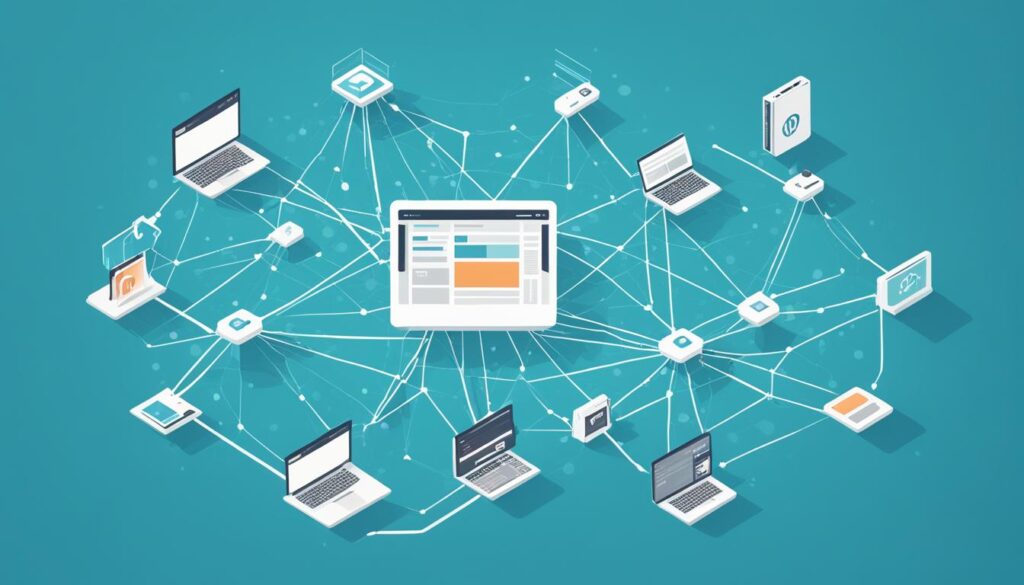
    Headless WordPress API Integration

    When approaching a headless WordPress setup, we begin with a foundational installation of WordPress to harness its backend’s robust content management capabilities. The journey to a fully operational headless environment relies heavily on the WordPress REST API, which facilitates a seamless bond between the backend and the chosen frontend landscape.

    Enabling the WordPress backend API is crucial. It acts as a dispatcher, conveying content to many frontends—web, mobile, or any other application interfacing with WordPress. This API-driven architecture demands a strategic, thoughtful implementation to ensure smooth retrieval and display of content, molded to fit the unique requirements of each digital experience we craft.

    By leveraging the REST API, WordPress evolves into a decoupled powerhouse, allowing us to dictate the frontend experience from any technological platform, unfettered by traditional WordPress theme constraints.

    Below is an outline of the critical steps in our process:

    1. Installation and setup of a clean WordPress instance.
    2. Activate and configure the WordPress REST API.
    3. Selection and preparation of the frontend technology stack.
    4. Ongoing development and integration of RESTful API calls.
    5. Iterative testing and customization phases to refine user interactions.

    Ahead of the curve, this configuration frees us from the trappings of monolithic architectures and places us squarely on the cutting edge of web development.

    In the table below, we compare the traditional WordPress flow with our headless WordPress approach:

    Traditional WordPress Headless WordPress
    Frontend tightly linked with the backend Backend and frontend are completely separated
    Limited to PHP and WordPress themes for frontend Freedom to use any frontend technology stack
    Content served directly from WordPress Content delivered through REST API calls
    Plugin-dependent extensions API-driven interactions allow for scalable extensions

    We’ve entered a new realm of possibilities with our headless approach, pushing the boundaries of what we can achieve with WordPress as a backend. It’s more than a mere trend; it is a resilient framework for future-proof digital platforms that call for agile, secure, and innovative solutions.

    The Future-Proof Benefits of a Decoupled CMS

    Performance optimization in a decoupled CMS

    The evolution of content management systems into decoupled architectures has marked a new era in web development. Not only do these systems offer enhanced agility, but they also pave the way for significant improvements in website maintenance and future scalability. Weaving in the principles of performance optimization and faster loading times, they serve as the backbone for creating a tailored user experience that can readily evolve with technology adaptation, ultimately future-proofing web entities against the ever-changing digital landscape.

    Speed and Performance Optimization

    A decoupled CMS infrastructure streamlines the user experience with rapid content delivery. With a focus on performance optimization, it eliminates unnecessary bulk, narrowing down front-end components to those essential for functionality and faster loading times. This refined approach ensures that users enjoy a seamless interaction with web applications, even during peak traffic conditions.

    Creating a Tailored User Experience

    By liberating the front-end development from a fixed presentation layer, we leverage the freedom to design custom interactions unique to our brand. This level of tailored user experience meets specific visitor needs and fosters a deeper connection with our audience. Our imaginative capabilities are boundless through headless WordPress, shaping experiences as bespoke as our vision.

    Staying Ahead with Technology Adaptation

    As innovators in the digital space, we recognize the importance of keeping pace with emerging technologies. The modular nature of a decoupled CMS facilitates technology adaptation, allowing us to swiftly incorporate cutting-edge features such as AI, AR, and IoT. This adaptability is not just about staying current; it’s about future-proofing our digital offerings to ensure longevity and relevance in a competitive market.

    Feature Benefit Impact on User Experience
    Performance Optimization Enhanced loading times and efficiency Reduced wait times, increased satisfaction
    Custom Interactions Unique branding opportunities Memorable, personalized engagement
    Technology Adaptation Integration of new digital innovations Continually evolving and dynamic content

    Real-World Applications of Headless WordPress

    At the core of modern web development, Headless WordPress stands as a testament to flexibility and performance across a broad spectrum of applications. Its most notable real-world implementations offer transformative outcomes for businesses and users alike. From robust e-commerce with headless WordPress platforms that provide finely-tuned shopping experiences to streamlined content management for mobile apps and dedicated interfaces for membership sites, the practical examples of Headless WordPress are as diverse as they are effective.

    Below, we’ve curated a selection of headless WordPress examples to showcase its potential in live environments:

    • E-Commerce Platforms: The flexibility of decoupled WordPress is revolutionizing the e-commerce sector, offering highly customizable shopper journeys and interactive UI elements, all tailored to enhance customer engagement.
    • Mobile Applications: For applications on the go, headless architecture provides a consistent and efficient system for content delivery, unifying user experience across diverse mobile ecosystems.
    • Membership Sites: Membership portals leverage headless setups to empower users with personalized dashboards, specialized content access, and seamless user account management.

    These examples showcase not just versatility but the strategic value of adopting a headless approach:

    Industry Benefits of Headless WordPress
    E-Commerce Custom shopping experiences, dynamic product displays, and enhanced performance during sales or high-traffic events.
    Mobile Apps Uniform content distribution, faster load times, and the ability to push updates without app store approvals.
    Membership Sites Personalized content based on user roles, secure data handling, and greater control over member interaction.

    Our understanding deepens when we consider these applications in context. Each sector harnesses the inherent strengths of Headless WordPress—speed, security, and scalability—to meet specific needs that standard WordPress configurations may not sufficiently address. The result? Sophisticated solutions that continue to push the boundaries of what’s possible in the digital realm.

    Conclusion

    In pursuing innovative CMS solutions, the momentum has decisively shifted towards Headless WordPress, charting a decoupled web development roadmap that promises to redefine how we conceive and deploy web content. This freedom allows us to innovate and tailor digital experiences that meet and exceed expectations for speed, performance, and engagement.

    Our commitment to harnessing headless WordPress is rooted in its capacity to deliver a genuinely future-proof foundation for web development. As we embrace its potential, we acknowledge the challenges inherent in adopting this approach; there is a learning curve, and complexities arise. Yet, the benefits far outweigh the initial hurdles. We are now empowered to create performance-driven sites and applications that are responsive and singular in their interaction and design.

    As we look toward the horizon of web technologies, it’s evident that the flexibility and robustness bestowed by Headless WordPress position us to adapt swiftly and effectively. The digital landscape is perpetually evolving, and through this advanced CMS, our digital platforms are well-equipped to grow alongside it, ensuring that our presence online remains cutting-edge and resolute in the face of perpetual change.

    FAQ

    What Is Headless WordPress?

    Headless WordPress refers to a content management system (CMS) configuration where a website’s front end, or the presentation layer, is decoupled from the WordPress back end. This allows developers to use WordPress as a headless CMS, managing content through the back end and delivering it to any front end via the WordPress REST API. It provides greater flexibility in designing the user experience across different digital platforms.

    What are the Core Advantages of Using WordPress as a Headless CMS?

    WordPress as a headless CMS offers several advantages, such as enhanced flexibility and scalability, better security, and the ability to create a tailored user experience. It also allows for performance optimization, with faster loading times, and facilitates the adoption of emerging technologies and future-proofing digital platforms.

    How Does a Decoupled System Enhance Security?

    A decoupled or headless system enhances security by reducing the potential attack surface. Since the front end is separate from the back end, potential vulnerabilities in themes or front-end plugins don’t affect the content management and storage systems, thereby minimizing the risk of security breaches.

    What Are the Flexibility and Scalability Benefits of Headless WordPress?

    Headless WordPress offers unprecedented flexibility and scalability for web applications, enabling developers to use any front-end technology stack. This means they can build fast, responsive interfaces that can be scaled up easily as user traffic grows. Additionally, it allows for creating custom experiences for different devices or platforms without altering the back-end infrastructure.

    How is Performance Optimized in a Decoupled WordPress Architecture?

    Performance is optimized in a decoupled WordPress architecture because the front end is purpose-built and streamlined for efficiency. Without the overhead of traditional theme rendering, decoupled front ends can serve content faster, cache more efficiently, and provide a better user experience, especially when dealing with high traffic.

    What Does Creating a Tailored User Experience Entail in the Context of Headless WordPress?

    Creating a tailored user experience in the context of headless WordPress involves customizing the front-end presentation independent of the back end. Designers have more control over how the content is displayed, which allows them to design unique user interfaces and interactions that align with specific brand standards or customer expectations.

    How Does Technology Adaptation Contribute to Future-Proofing with Decoupled CMS?

    Technology adaptation contributes to future-proofing in a decoupled CMS scenario by allowing developers to quickly and easily incorporate new technologies and tools, such as AI, AR, and IoT, into their front end. This agility ensures the digital experience stays current with web trends, offering enhanced functionality and engagement without overhauling the back-end content system.

    What Are Some Real-World Applications of Headless WordPress?

    Real-world applications of headless WordPress are diverse and include e-commerce platforms that require personalized shopping experiences, mobile applications benefiting from consistent content delivery, and membership sites featuring custom-tailored dashboards. These varied uses demonstrate the versatility and adaptability of headless WordPress in fulfilling specific digital needs across a broad range of industries.

  • Duplicate a Page in WordPress Easily & Quickly

    Duplicate a Page in WordPress Easily & Quickly

    Creating website
    Creating website

    Duplicating a page in WordPress can be a time-saving technique that helps streamline your content creation workflow. Whether you want to create a replica page for A/B testing, save design time for large sites, or maintain consistency in your pages, duplicating a page can be helpful.

    In this article, we will discuss the need to duplicate WordPress pages, how to copy a page in WordPress, and provide tips and best practices for page duplication.

    Key Takeaways:

    • Duplicating a page in WordPress can save you time and effort in content creation.
    • It can be used for A/B testing, design efficiency, and brand consistency.
    • You can duplicate a page in WordPress using built-in features or plugins.
    • Selecting the right plugin and configuring settings are essential for optimal duplication.
    • Modifying and personalizing duplicated pages allows customization according to your needs.

    Understanding the Need for Duplicating WordPress Pages

    Duplicating WordPress pages plays a crucial role in efficient content management. By duplicating pages, users can quickly create similar pages for various purposes, ensuring a seamless workflow and consistent branding. Understanding the need for page duplication allows users to make informed decisions and maximize the benefits of this feature while avoiding duplicate content issues.

    The Role of Page Duplication in Content Management

    Page duplication serves as a valuable asset in content management for WordPress websites. It offers a hassle-free way to create replica pages, allowing users to:

    • Conduct A/B testing: Duplicating pages enables users to test different versions of a webpage to determine which performs better in conversion, engagement, or user experience.
    • Enhance design process efficiency: By duplicating existing pages, users can save time and effort in designing new pages from scratch, especially in cases where consistent design elements are required.
    • Maintain consistent branding: Duplicating pages ensures that the branding elements, layout, and structure remain consistent across multiple pages, aligning with the overall brand identity and user experience.

    Scenarios That Require the Duplication of a WordPress Page

    Several scenarios necessitate the duplication of WordPress pages. These include:

    • Create landing pages for different campaigns: Duplicating pages allows users to quickly generate multiple landing pages tailored to specific marketing campaigns or target audiences.
    • Replicate template pages: Users can duplicate them to maintain a consistent structure and design across various sections or categories within their website.
    • Localize content: Duplicating pages can be beneficial when translating content into different languages or tailoring it for specific regions while keeping the original page intact.

    Avoiding Duplicate Content Issues During Duplication

    Although duplicating pages offers numerous advantages, it is essential to be aware of potential duplicate content issues that may arise. To avoid these issues, consider the following:

    • Modify page content: Ensure that the duplicated pages have unique and relevant content, avoiding the use of duplicate text or images.
    • Set canonical URLs: Configure canonical tags to inform search engines about the original page, preventing indexing of duplicate pages and potential penalties for the same content.
    • Utilize 301 redirects: If necessary, redirect duplicate pages to their original counterparts using 301 redirects, indicating to search engines the preferred page to crawl and index.

    How to Duplicate a Page in WordPress

    Duplicating a page in WordPress can be done using different methods and plugins. One approach is to use the built-in page duplication feature in WordPress. This can be accessed through the dashboard by selecting the desired page, clicking on the ellipses menu, and choosing the “Copy page” option.

    Another method is to use plugins designed explicitly for duplicating pages, such as the Duplicate Page plugin or the Divi Builder. These plugins provide additional functionality and customization options when duplicating pages.

    Utilizing these methods and plugins allows you to duplicate pages in WordPress quickly and efficiently, saving time and effort in your content creation process.

    Tips and Best Practices for Page Duplication in WordPress

    Selecting the Right Plugin for Duplicating Pages

    Selecting the right plugin can make all the difference when duplicating pages in WordPress. With numerous options available, it is essential to consider factors such as compatibility, functionality, and user reviews. A reliable plugin seamlessly integrates with WordPress, ensuring a smooth and efficient duplication process.

    Here are a few popular plugins to consider:

    • Duplicate Page: This plugin allows you to duplicate pages with a single click. It is lightweight, user-friendly, and compatible with most WordPress themes.
    • Yoast Duplicate Post: This plugin enables page duplication and allows the option to draft pages for future publishing. It is a versatile tool that offers advanced customization features.
    • Divi Builder: This plugin is an excellent choice if you use the Divi theme. It offers extensive customization options, including duplicating entire layouts and sections.

    Configuring Duplicate Page Settings Optimally

    Once you have selected a plugin, it is crucial to configure the duplicate page settings optimally. This ensures that the duplicated pages are created according to your specific requirements, saving you time and effort in the long run. Some key settings to consider include:

    1. Naming Convention: Choose a naming convention that is clear and identifiable. This could include adding a prefix or suffix to the page title, such as “Copy of” or “- Duplicate”.
    2. Permalinks: Decide whether you want the duplicate pages to have the same permalinks as the original or prefer custom permalinks for each duplicate.
    3. Include/Exclude Content: Determine whether you want to include all content elements from the original page or selectively exclude certain sections, such as comments or meta information.

    How to Modify and Personalize Duplicated Pages

    Once the pages have been duplicated, you can modify and personalize them according to your needs. This allows you to customize the content, design, and settings to create unique pages without starting from scratch. Here are a few tips for modifying and personalizing duplicated pages:

    • Update Content: Review the duplicated page’s content and make any necessary changes or updates to ensure relevance and accuracy.
    • Customize Design: Modify the layout, color scheme, and typography to align with your branding or specific design preferences.
    • Adjust Settings: Tailor the settings of the duplicated page, such as SEO elements, page attributes, and featured images, to meet your specific requirements.

    By following these tips and best practices, you can make the most of page duplication in WordPress and leverage its power to streamline your content creation process.

    Conclusion

    In conclusion, duplicating a page in WordPress can be a valuable tool for content creators and website managers. It provides an efficient way to create similar pages, streamline workflows, and maintain consistent branding. By understanding the need for page duplication, learning how to duplicate pages effectively, and following best practices, users can significantly enhance their WordPress experience.

    Duplicating pages in WordPress offers numerous benefits. Firstly, it saves time by allowing users to replicate existing pages instead of starting from scratch. This is particularly useful for large sites or when A/B testing is required. Secondly, it ensures consistency in design and branding, making maintaining a unified look throughout the website accessible.

    To duplicate a page in WordPress, users can either utilize the built-in page duplication feature or opt for plugins specifically designed for this purpose, such as the Duplicate Page plugin or the Divi Builder. These plugins offer additional functionality and customization options, allowing users to tailor duplicated pages to their unique requirements.

    To optimize the page duplication process, it is essential to select the right plugin that aligns with your needs, configure duplicate page settings optimally, and modify duplicated pages as required. By following these tips and best practices, users can harness the power of page duplication and improve their WordPress workflow.

    FAQ

    What is the purpose of duplicating a page in WordPress?

    Duplicating a page in WordPress serves various purposes, including A/B testing, design efficiency, and maintaining consistent branding.

    How can I duplicate a page in WordPress?

    There are multiple ways to duplicate a page in WordPress. You can use the built-in duplication feature in WordPress or opt for plugins like Duplicate Page or Divi Builder.

    What do you think I should consider when duplicating pages in WordPress?

    When duplicating pages in WordPress, choosing the right plugin is essential, as configuring duplicate page settings optimally and modifying the duplicated pages to meet your requirements.

    Are there any potential issues with duplicate content when duplicating pages in WordPress?

    Yes, duplicate content can be a concern when duplicating pages. However, you can avoid these issues by following best practices and making necessary modifications.

    How can duplicating pages benefit content creators and website managers?

    Duplicating pages in WordPress offers a quick and efficient way to create similar pages, streamline workflows, and maintain consistent branding, ultimately improving the overall WordPress experience.

  • Black Friday Social Media Event: Tactics for Success

    Black Friday Social Media Event: Tactics for Success

    As Black Friday approaches, we must perfect our social media strategies to ensure a profitable event. The significance of Black Friday and Cyber Monday is monumental, not just as dates on the calendar but as opportunities for us to amplify sales through effective black friday social media marketing. We understand that social media tactics for a profitable black friday event hinge on heightened engagement and tactical anticipation – planting seeds of curiosity that blossom into sales.

    With a vast array of platforms, spotlighting our offers on popular channels like Instagram can set the stage for a record-breaking sales performance. Our tried-and-true approaches, comprising teasers that tantalize yet reveal just enough, leverage social media’s power to inform and captivate our audience. It’s about transforming that black friday event on social media from a mere promotional period into an experience that customers eagerly await.

    Key Takeaways

    • Encourage sales by engaging with customers through sneak peeks and anticipatory content.
    • Utilize Instagram and other platforms to create a buzz around our Black Friday event.
    • Implement urgency and scarcity to heighten interest and drive immediate action.
    • Prepare comprehensive pre-made campaigns to ensure a cohesive marketing message.
    • Employ live interactions to address queries and dismantle customer hesitations.
    • Streamline the marketing process with tools designed for efficient campaign management.

    Pre-Event Buzz: Crafting an Unmissable Black Friday Build-Up

    As veterans in the social media marketing field, we understand the power of build-up. The frenetic energy of Black Friday can be harnessed days, even weeks, in advance with the right strategies. We’re here to share essential tips for running a successful Black Friday event on social media and how to optimize your event to capture the collective anticipation of your audience.

    To kick off the event build-up, could you consider unveiling sneak peeks that pique consumer interest? A well-crafted teaser can spark conversation and sharing as a prelude to the sales crescendo. Behind-the-scenes videos offering a glimpse of your brand’s preparation for the big day or revealing a tantalizing corner of a new product can stir the imaginations of potential customers.

    Building Anticipation through Sneak Peeks and Teasers

    Imagine your followers’ excitement as they encounter a curated series of posts that tease your Black Friday offers. This slow reveal engages your audience and solidifies their attention on your upcoming deals. Effective use of teasers is a strategic lever in optimizing your event for social media platforms, where engagement can spread like wildfire.

    Creating a Puzzle-Style Grid Pattern on Instagram

    Instagram is the visual storyboard for suspenseful campaigns. We’ve seen significant success with a puzzle-style grid pattern approach. Here, each post interlocks with the next, forming a cohesive teaser that only makes sense when viewed as a whole. Followers can’t help but revisit your page, trying to unlock the grand scheme of your offers. This clever method keeps your audience guessing and encourages them to interact with each piece of the puzzle.

    In summary, leveraging social media for a successful Black Friday event involves a blend of intrigue and engagement. Starting your event with a bang is good, but a thoughtful pre-event buzz can turn good into extraordinary. Below is a comparison of traditional and innovative pre-event strategies that demonstrate the transformative power of anticipation and engagement:

    Traditional Approach Innovative Pre-Event Strategy
    Basic Sale Announcements Teasers and Puzzle Posts
    Countdown Clocks Behind-The-Scenes Videos
    General Discounts Sneak Peek Exclusive Offers

    Our crafting of your Black Friday pre-event buzz will captivate and convert, ensuring that your audience will be primed for engagement and sales when the day arrives.

    Maximizing Engagement: Utilizing Instagram Reels and Stories

    In social media marketing, Instagram Reels and Stories have emerged as powerful tools for brands seeking innovative strategies for engaging their audience during a Black Friday event. Stories, known for their transient nature, create a sense of urgency. At the same time, Reels allows us to deliver dynamic content that captures the essence of our deals more nuanced and captivatingly. By integrating these formats into our Black Friday strategy, we’re aiming to engage and maximize ROI with a Black Friday social media event.

    Our approach to utilizing Instagram Reels involves creativity and strategic planning. The content is designed to be bite-sized, easily digestible, and, above all, shareable. This entices our audience with a sneak peek of what’s to come and inspires a chain reaction of shares and saves, potentially expanding our reach exponentially.

    We recognize that the key to effective engagement lies in crafting a narrative that resonates with our audience and blends anticipation with instant gratification.

    With Instagram Stories, the countdown stickers and polls become our allies in stoking the excitement and making the audience feel like active participants in the buildup to our Black Friday event. This interaction enriches the customer experience, making them feel valued and seen and, thus, more invested in the event itself.

    • Teaser Reels: Short, enticing videos offering a glimpse into Black Friday deals.
    • Story Polls: Interactive polls about what deals or products the audience is most excited about.
    • Countdown Stickers: Timers that build anticipation and remind viewers of the event’s launch.
    • Behind-the-Scenes Content: Authentic visuals that humanize our brand and create a closer bond with the audience.

    The table below outlines the content types we’ll use and their intended impact:

    Content Type Platform Feature Expected Impact
    Product Showcases Instagram Reels Increase in product interest and shares.
    Deal Teasers Instagram Stories Growth of audience anticipation and engagement.
    Customer Testimonials Instagram Stories Highlights Greater trust and social proof, leading to higher conversion rates.
    Interactive Elements Instagram Polls and Questions Direct audience input, providing a sense of ownership and excitement.

    We understand that harnessing the full potential of Instagram’s offerings is pivotal in solidifying our connection with the audience and ensuring our Black Friday promotions are not just seen but actively sought after. Our commitment to these strategies for engaging our audience during a Black Friday event on social media is not just about brand visibility; it’s about creating a compelling journey that leads to maximized ROI, with each Reel and Story paving the way to our event’s success.

    Exclusive Offers: How to Develop and Communicate Limited Deals

    In the competitive landscape of Black Friday sales, creating and effectively communicating exclusive offers are integral to driving traffic and conversions through a black Friday event on social media. Unique, limited-time deals can create a buying frenzy but require innovative promotion strategies. Let’s delve into how to make these offers irresistible.

    Creating a Sense of Urgency through Countdown Stickers

    Our use of countdown stickers on platforms like Instagram is a crucial tactic in best practices for Black Friday event promotion on social media. These stickers serve as a visual cue and a reminder for your audience that time is ticking—increasing the likelihood they’ll act swiftly. Here’s how we capitalize on these features:

    • Launch a countdown a few days before the sale to create anticipation.
    • Reinforce the countdown across other social channels for an omnichannel approach.
    • Update the sticker regularly to reflect the diminishing time, maintaining the urgency.

    Introducing Scarcity to Drive Immediate Action

    Alongside urgency, we introduce scarcity into our promotional narrative. Informing our audience that our Black Friday offers are available in limited quantities spurs the fear of missing out and prompts immediate purchases. The table below highlights successful tactics:

    Exclusive Offer Description Scarcity Element
    Early Bird Specials Limited deals for the first number of customers First 50 Purchases Only
    Flash Hour Sales Steep discounts for a very short period Available for Only 1 Hour
    Limited Edition Products Products exclusively available for Black Friday While Supplies Last

    We consistently communicate these scarcity-induced promotions via stories, posts, and direct messages to ensure our offers are seen—and acted upon—quickly. This strategy has proven pivotal in driving traffic and conversions through a Black Friday event on social media, contributing to the overall success of our campaign.

    Overcoming Hesitations: Using Lives to Address Customer Objections

    Black Friday shopping sign on orange baclground
    Black Friday shopping sign on orange background

    As we approach the hustle and bustle of Black Friday, it becomes essential for businesses to understand how to optimize their Black Friday event for social media. Live streaming has proved indispensable in engaging your audience on social media and mitigating their purchasing reservations. Through the intimate and immediate format of live videos, we find a unique opportunity to interact authentically and transparently with potential customers.

    Incorporating live Q&A sessions into your social media strategy allows us to address customer objections head-on. This might take the form of a segment where we directly answer questions from viewers, providing them with the assurance needed to move forward with their purchasing decisions. Such interactions humanize our brand and create trust, an invaluable asset for any business.

    • Going live to showcase product demos and offer a sneak peek of the Black Friday deals.
    • Hosting live interviews with team members or loyal customers to share experiences and answer questions.
    • Promptly addressing concerns about product availability, shipping times, and return policies live.

    By empathetically engaging with followers, we can swiftly eliminate their doubts, reinforcing their confidence in our products and promotions. This approach facilitates a smoother customer journey and enhances their overall experience, prompting further interactions and sharing amongst their circles.

    “Live streaming on social media is like opening the doors to your store; it invites customers in a personal space where trust is built and sales are made.”

    In essence, effective use of live streams can significantly amplify the success of your Black Friday event, serving as the bridge between initial customer interest and final purchase commitment.

    Running a Black Friday Event on Social Media and How to Do It Right

    Let’s dive straight into it. Black Friday events are essential to harness the power of social media effectively. Critical factors like direct engagement with our audience and tapping into the persuasive nature of user-generated content could be the linchpin in swinging the needle toward a successful sale. Here, we’ll explore some foundational tips for running a successful Black Friday event on social media, focusing on personalization and community-driven validation to leverage social media for a successful Black Friday event.

    Direct Engagement: Proactive Outreach and Personalized Messaging

    In today’s digital landscape, customers value a brand that connects with them more intimately. Personalized messages and proactive responses are not just about being social; they’re about creating a relationship beyond the transactional nature of buying and selling. By appreciating new followers or sending personalized outreach with exclusive discount codes, we can cultivate a sense of community and loyalty, which translates into increased sales.

    Sharing Success: Leveraging User-Generated Content and Testimonials

    There is no stronger endorsement than that of a satisfied customer. We provide tangible evidence of our product’s value by showcasing user-generated content such as product reviews and testimonials. This social proof is instrumental in validating our Black Friday offers and persuading undecided shoppers to make a move. Let’s not underestimate the power of a well-timed share of success stories or sales milestones; these moments of victory can create a contagious enthusiasm that spreads across the platform.

    Collaborative Impact: Partnerships and Cross-Promotions

    top view of black friday white lettering near presents on black background
    top view of black friday white lettering near presents on black background

    As we navigate the bustling landscape of Black Friday sales, strategies for engaging your audience on social media during a Black Friday event are critical to standing out in a crowded market. One of the most effective social media tactics for a profitable black friday event is forming partnerships and participating in cross-promotions. When we align our brand with complementary businesses and influencers, we cast a wider net and capture the attention of diverse consumer groups.

    Collaborative ventures, whether they share giveaways or mutual shoutouts, leverage the power of combined audiences. The mutual support bolstered by Instagram’s ‘support small business’ sticker or similar initiatives is beneficial; it’s a powerhouse move for driving traffic and heightening brand visibility. Let’s explore some essential methods that can amplify our Black Friday impact through collaboration:

    • Identify compatible brands or influencers that align with our company’s values and target demographics.
    • Curate cross-promotional content that speaks to our audience and our partner’s followers, creating a seamless blend of value.
    • Engage in mutual shoutouts and features, harnessing the power of social proof to enhance credibility and broaden our reach.
    • Launch shared giveaways encouraging participation and generating excitement, multiplying our promotional efforts.

    The table below illustrates the potential benefits of cross-promoting our deals with another brand compared to solo promotions.

    Marketing Approach Estimated Reach Engagement Rate Conversion Rate Increase
    Solo Promotion 10,000 3% 2%
    Cross-Promotion 20,000+ 6% 4%

    The engagement and conversion rates double by tapping into two sets of audiences, highlighting the strength of collaborative endeavors.

    “The whole is greater than the sum of its parts. In the context of Black Friday, strategic partnerships on social media can significantly magnify our promotion’s success.”

    To conclude, integrating collaborative tactics into our Black Friday strategy does not just elevate our campaign. Still, it sets a tone for lasting partnerships that can yield profitable returns beyond the holiday season.

    Driving Traffic and Conversions: Strategic Use of Giveaways

    As seasoned marketers, we understand the leveraging power of giveaways, especially when running a Black Friday event on social media. A well-orchestrated giveaway not only thrills participants but also attracts enormous attention to your event. Engaging your audience through this approach turns them into active promoters of your brand, growing your reach exponentially.

    Creating Excitement with Gifting Mechanisms

    Giveaways invoke a sense of enthusiasm, instilling in participants the eager anticipation of winning something of value. The trick lies in the art of excitement—crafting gifting mechanisms that resonate with the audience’s desires. By aligning the giveaway prizes with the products on sale, we intricately weave the narrative of the Black Friday deals into the excitement of the giveaway, ensuring participants are keyed into what’s on offer.

    Boosting Reach: Leveraging Followers’ Networks

    The ingenuity of giveaways is their innate capacity to turn each participant into a node within a vast network. With the right call-to-action, participants share the giveaway with friends and family, who propagate it through their networks. Each share translates to potential eyes on our Black Friday event, driving traffic and fostering conversions. To harness this power, we meticulously plan our giveaways to incentivize shares and tags, tapping into the virality that social media thrives.

    Giveaway Tactic Benefit Expected Outcome
    Hosting Exclusive Contests Drives direct interaction and brand immersion Increase in direct traffic and heightened brand loyalty
    Encouraging Shares and Tags Exploits networks for wider reach Growth in follower count and potential customer base
    Partnering with Influencers Leverages influencer trust and audience Enhanced credibility and higher engagement rates
    Incorporating Sponsored Posts Targets specific demographics effectively Precise customer targeting leading to improved conversion rates

    When executed aptly, a giveaway becomes more than a game of chance; it morphs into a strategic tool for magnifying the scope of your Black Friday campaign. By running a Black Friday event on social media and doing it right, we create a wave of anticipation and eagerness that serves the present and paves the way for future engagements. Follow these tips for running a successful Black Friday event on social media and watch as analytics reflect a tale of triumph.

    Conclusion

    In the vigorous landscape of Black Friday events, standing out on social media demands creativity and strategic choreography. Our guide illuminates how **running a Black Friday event on social media** is a nuanced dance of anticipation, engagement, and compelling market offers. Successful campaigns hinge on meticulously planned and executed strategies that tap into consumer behavior and trends.

    Our tool kit for a formidable **Black Friday event social media marketing** plan includes leveraging sneak peeks to build curiosity, employing Instagram’s dynamic features to maintain interest, and promulgating exclusivity to create a compelling call to action. By intertwining direct interactions with our audience and showcasing the authenticity of customer testimonials, we construct a trustworthy narrative that fosters sales. **Social media tactics for a profitable Black Friday event** are, at their core, about forming connections that transform prospects into buyers and buyers into brand advocates.

    As we navigate the frenetic energy of Black Friday and Cyber Monday, our collective focus remains clear: sow the seeds of excitement early, attentively nurture our digital relationships, and deftly deploy incentives and social proof to harvest the rewards. By doing this, we aim to elevate traffic and conversions and deliver an experience that resonates with our audience, ensuring our brand’s prominence in a sea of holiday promotions.

    FAQ

    How can we build anticipation for our Black Friday event on social media?

    Anticipation can be built through gradual sneak peeks and tantalizing teasers. Consider using captivating visuals, behind-the-scenes footage, or cryptic messages that hint at the upcoming deals without ultimately revealing them. Craft a puzzle-style pattern on your Instagram feed to create suspense and maintain audience engagement.

    What strategies should we use to engage our audience on social media during a Black Friday event?

    Engage your audience by utilizing Instagram Reels and Stories to share exciting content highlighting your offers. Create a sense of urgency with countdown stickers and communicate the scarcity of products to encourage fast action. Use live sessions to interact in real-time and directly address customer queries or hesitations.

    What are the best practices for promoting exclusive Black Friday deals on social media?

    Best practices include creating and communicating time-sensitive deals that convey exclusivity. Use strategic storytelling, emphasize the limited nature of the offer, and highlight the unique benefits of your products or services. Employ clear, enticing calls to action and create shareable content that encourages engagement.

    How can we drive traffic and conversions during our Black Friday event?

    Drive traffic and conversions by combining direct engagement and urgency and scarcity strategies. Encourage proactive outreach with personalized messaging, leverage user-generated content for social proof, and collaborate with influencers or partners for a wider reach. Organize giveaways to engage the community and boost your social media presence.

    Can partnerships and collaborations enhance our Black Friday social media campaign?

    Absolutely. Teaming with influencers, complementary brands, or industry peers can extend your reach and bring new customers. Consider joint promotions, shared giveaways, or co-created content. Make sure to align with partners communicating your brand values and target audience to ensure a cohesive campaign.

    How can we use giveaways to increase interest and sales during Black Friday?

    Giveaways can spark interest and increase engagement, leading to potential sales. Encourage followers to participate by sharing your posts or tagging friends, turning them into brand ambassadors. Partner with other businesses to expand the reach of the giveaway and tap into new audiences, increasing your visibility and potential sales.

    How can we leverage followers’ networks during our Black Friday event?

    Leverage followers’ networks by encouraging them to share your content, partake in challenges, or use branded hashtags. I’d like you to implement a referral program where current followers can invite friends to join the event for exclusive deals, fostering organic growth and word-of-mouth marketing.

    How early should we start our pre-event buzz for Black Friday on social media?

    Begin creating a pre-event buzz at least a few weeks before Black Friday. This lead time gives you ample opportunity to pique interest, tease upcoming deals, and ensure your audience is primed when the event starts. Moreover, it allows for orchestrating a coordinated, well-thought-out marketing campaign.

    Source Links

  • The Importance of Local Web Design: Why Southern Oregon Businesses Need Local Expertise

    The Importance of Local Web Design: Why Southern Oregon Businesses Need Local Expertise

    Why Southern Oregon Businesses Need Local Website Design Expertise

    For businesses in Southern Oregon, tapping into local website design expertise is not just beneficial; it’s a strategic necessity. Local designers bring a nuanced understanding of the regional market, which is vital for creating websites that appeal directly to the Southern Oregon audience. Their services are highly personalized, ensuring that each website reflects the unique identity of the business it represents. Beyond technical skills, these designers have a genuine connection to the community, often resulting in work that’s done with more passion and dedication. Furthermore, they are well-versed in local SEO practices, giving businesses a competitive edge in local search rankings. Opting for local talent also means contributing to the regional economy, fostering growth and prosperity within the community. Additionally, the proximity of these designers ensures readily available support and quick resolution of any issues, a significant advantage over distant providers. In essence, local website design expertise is a cornerstone for businesses looking to establish a strong online presence in Southern Oregon, marrying regional insights with technical know-how.

    Graphic promoting website design for Southern Oregon businesses.

    A website is more than just an online space; it embodies the core identity of a Southern Oregon business. At Popproxx, we understand how crucial it is to ensure a website’s features closely match the local language and style. For us, the website design for Southern Oregon businesses is an artistic endeavor, with the region’s culture as our inspiration. We focus on crafting websites that are so deeply connected to Southern Oregon that they transform from mere web pages into digital landmarks, symbolic of the area’s unique essence.

    Key Takeaways

    • Local expertise from website designers in Southern Oregon ensures an authentic digital representation of businesses.
    • Understanding Southern Oregon user habits leads to deeply resonant user experiences.
    • Popproxx’s local roots in website design amplify a business’s digital presence within the community.
    • Working with Popproxx aligns Southern Oregon businesses with local website design services that grasp the unique market.
    • An effective online presence tailored by Popproxx can enhance customer engagement and regional relevance.
    • Partnering with local experts is integral for a website that not only attracts but also retains the attention of the Southern Oregon demographic.

    The Importance of Understanding the Local Market for Southern Oregon Businesses

    When it comes to Southern Oregon website development, having an intimate knowledge of the local market is not just beneficial; it’s essential. My work with Popproxx has underscored the undeniable value that such insights bring to the table—especially for small business website design. This deep market understanding translates into websites that not only captivate but also convert, aligning perfectly with the unique consumer behaviors found in Southern Oregon.

    Our professional website design services are tailored to encapsulate the spirit of the region seamlessly. We dive into the fabric of the local community to ensure that each design reflects the nuances that make Southern Oregon distinctive.

    As a local web designer, I recognize that a ‘one-size-fits-all’ approach does not suffice. Each project is a new canvas, painted with the colors of our client’s brand and the culture of their target audience.

    From initial concept through to final design, our grasp of the Southern Oregon market is evident. Below is an illustration of how Popproxx’s insights into regional preferences have successfully guided web development strategies:

    Aspect Traditional Design Popproxx Customized Design
    Color Palette Generic Corporate Colors Vibrant Shades Reflecting Local Landscapes
    Imagery Stock Photos Authentic Local Imagery
    Content Standardized Copy Copy With Local Vernacular and References
    Functionality Basic User Interface Custom Tools Relevant to Local Users
    User Experience Uniform For All Markets Personalized For Southern Oregon Consumers

    My commitment to small business website design in Southern Oregon has not just been about crafting sites that look good, but those that perform well and resonate with a specific audience. Integrating professional website design services with regional insights is not just an advantage—it is the cornerstone of successful online business strategies in this vibrant community.

    Southern Oregon Businesses Local Website Design: Personalized Service Touch

    As the digital landscape becomes more crowded, a personalized service is the hallmark of an exceptional local web design agency. My experience with Popproxx validates that here in Southern Oregon, the infusion of local culture in our web design is vital to crafting an online presence with a personal touch.

    Face-to-Face Interaction and Clear Communication

    I have found that face-to-face meetings allow for clear and direct communication, ensuring that a website’s design conveys the nuances of Southern Oregon’s local culture. This personalized approach by the team at Popproxx transcends the quality offered by larger, more detached design firms.

    Mountain road scenery promoting local web design services.

    Localization of Web Design that Resonates with Regional Culture

    It is a different experience altogether when your web designers not only know the area but also live and breathe the regional ethos. My role in facilitating this localization of web design aims to mirror the vibrant community spirit that makes Southern Oregon so unique.

    Feature Benefits
    Customized Aesthetics Tailored to reflect Southern Oregon’s local beauty and charm
    Cultural Relevance Engages local audience with familiar cues and landmarks
    Community Engagement Encourages interaction by highlighting local events and news

    Teaming up with Popproxx, a local web design agency, I am reminded of their stellar capability to deliver tailored solutions that solidify a business’s roots in this magnificent region of Oregon. Their approach isn’t just about constructing websites; it is about building community pillars in the digital space.

    Local SEO Insights Specific to Southern Oregon

    As a dedicated professional at Popproxx, I have come to understand the importance of mastering local SEO insights for businesses within Southern Oregon. It’s not just about being seen; it’s about creating a meaningful connection with the community through highly targeted content and using localized keywords. We aim to magnify our website design that draws in local traffic and speaks to the heart of what it means to be a part of this vibrant region.

    Leveraging Localized Keywords and Phrases

    At Popproxx, our approach incorporates localized keywords and phrases deeply rooted in Southern Oregon’s local culture. We identify key phrases, notable landmarks, and significant local events familiar to the community, and weave these elements into our clients’ websites. This strategy extends beyond standard SEO practices, aiming to ensure that each brand we collaborate with connects genuinely and effectively with its target audience.

    Connecting with the Community through Targeted Content

    In Southern Oregon, building a relationship with the community goes beyond simple business transactions. At Popproxx, we create targeted content that not only tells a story but also mirrors the community’s values and deeply engages customers. Each article, blog post, and feature is meticulously designed to capture the essence of the region, promoting a feeling of connection and cultivating loyalty among local customers.

    Local SEO tips illustration for entrepreneurs

    My experience has taught me that the future of search engine optimization (SEO) lies in hyper-localization. A seo-friendly website design, which capitalizes on local insights, provides a unique edge in the digital market, especially in a community-centric place like Southern Oregon. By focusing on local relevance, we enable Southern Oregon businesses to excel online and add value to the region’s vibrant digital landscape.

    Benefits of Quick Response Times from Southern Oregon Website Designers

    As someone working with Southern Oregon website designers, Popproxx, in particular, has cemented its reputation for providing impressively quick response times to client needs. It’s clear why local businesses are choosing proximity to their web designers as a savvy strategy for web success.

    Graphic for Southern Oregon Web Design services.

    Local designers offer a level of prompt service that larger, remote firms often need help to compete with. Quick solutions are essential, not just convenient, in the rapid digital world, where any downtime can mean lost business. Popproxx excels in providing swift responses to technical problems or updates, showcasing our dedication to minimizing disruptions.

    Furthermore, the significance of mobile responsive website design must be balanced in our current mobile-first world. The proficiency of Southern Oregon designers in this realm ensures that your website is not only accessible but also optimized for any device. This mobile readiness is critical for maintaining an edge in a competitive market.

    • Quicker turnaround for website maintenance and updates
    • Enhanced communication channels leading to a clear understanding of your business needs
    • Local expertise translates into web designs that reflect the community’s pulse
    • Immediate troubleshooting reduces business downtime significantly

    Choosing a Southern Oregon website design agency translates into a smart business continuity plan. By partnering with Popproxx, companies rest assured that their online presence is entrusted to quick-thinking professionals who deliver time-sensitive solutions with a personal touch, positioning them well above the competition.

    Conclusion

    Reflecting on the synergy between digital presence and regional growth, I’m reminded of the power vested in local collaboration. My advocacy for partnerships with community-centric firms like Popproxx stems from a shared passion for igniting Southern Oregon’s economic development. It’s a relationship that does more than create visually stunning websites; it fuels a robust economy rooted in unity and shared success.

    Investing in Southern Oregon’s Economic Development through Local Collaboration

    Opting to harness the skills of a homegrown entity such as Popproxx translates directly into tangible benefits for our local economy. It’s an affordable website design solution in Southern Oregon that operates beyond mere transactions to contribute to a broader scope—fortifying the economic scaffold by pooling resources and talents within our community. This local collaboration is a conscious investment in our collective future, bolstered by the prowess of Popproxx’s exemplary services.

    Why Popproxx is the Optimal Choice for Local Web Design Expertise

    When I think about custom web design, Popproxx stands out for its reliability and professionalism. They don’t just offer services; they create experiences that reflect the spirit of Southern Oregon. This makes Popproxx the go-to choice for those who want more than just skill – they offer a deep understanding of the local area, leading to top-notch web design here.

    FAQ

    Why do Southern Oregon businesses need local website design expertise?

    Southern Oregon businesses require local website design expertise because a website that understands the specific market enhances digital user experiences and connects more effectively with the local demographic. A local web design agency, such as Popproxx, offers expertise and in-depth knowledge of Southern Oregon user habits, preferences, and expectations, leading to more engaging and successful online presences for these businesses.

    What is the importance of understanding the local market for website development in Southern Oregon?

    Understanding the local market is critical for website development in Southern Oregon because it leads to the creation of compelling websites that align with local consumer behavior. A local web design agency, equipped with insights into the regional market, can deliver designs that offer genuine value and enhance the ability of local businesses to reach and connect with their audience, such as the professional website design services provided by Popproxx.

    How does local website design offer a personalized service touch to Southern Oregon businesses?

    Local website design offers a personalized service touch through face-to-face interaction and clear communication, ensuring the web design truly reflects the Southern Oregon culture. Agencies like Popproxx use direct meetings and close client collaboration to create websites that not only meet individual business needs but also embody the regional ethos and authentically engage with the local community.

    How does leveraging localized keywords and phrases benefit Southern Oregon businesses?

    Leveraging localized keywords and phrases greatly benefits Southern Oregon businesses as it helps tailor their SEO to target their specific geographic area effectively. Popproxx specializes in identifying and integrating such local elements into websites. This ensures the business is not only visible but also resonates with the community, driving targeted traffic and increasing local relevance and visibility.

    Why is local SEO knowledge vital for Southern Oregon website design?

    Local SEO knowledge is vital because it enables Southern Oregon businesses to connect with their community through targeted content that attracts potential clients from the area. By understanding and implementing SEO-friendly website design that features local SEO insights, businesses can ensure the right audience sees them and strengthen their presence in the local online marketplace.

    What are the benefits of quick response times from Southern Oregon website designers?

    Southern Oregon website designers provide the advantage of quick response times, resulting in faster solutions to website issues. This proximity means that any technical challenges can be addressed swiftly, minimizing potential downtime or business interruption, and making it a practical choice for businesses that want to maintain a responsive and reliable online presence.

    How does investing in local web design contribute to Southern Oregon’s economic development?

    Investing in local web design contributes to Southern Oregon’s economic development by supporting the local economy and fostering a sense of collaborative community. Businesses like Popproxx not only provide affordable website design Southern Oregon services but also spur economic growth by creating a network of mutual support, enriching the local business landscape and ensuring that the financial benefits circulate within the region.

    Why is Popproxx the optimal choice for local web design expertise in Southern Oregon?

    Popproxx is the optimal choice for local web design expertise in Southern Oregon because it offers a combination of professional, affordable, and specialized web design services that are specifically tailored for the Southern Oregon market. With their in-depth understanding of the local consumer behavior and culture, as well as their commitment to local collaboration and economic development, Popproxx stands out as a partner that can drive business success in the digital age.

  • Link Whisper vs Internal Link Juicer: Best Pick for WordPress SEO?

    Link Whisper vs Internal Link Juicer: Best Pick for WordPress SEO?

    Cat with sunglasses, comparing Internal Link Juicer and Link Whisper.

    As a professional focused on optimizing WordPress sites, I’m always on the lookout for tools that can improve WordPress SEO performance. Lately, I’ve been particularly interested in two internal linking plugins that stand out for boosting website SEO: Link Whisper and Internal Link Juicer. These plugins are excellent for enhancing and managing internal links, which are crucial for the structure of a site and significantly impact search engine rankings. Each of them brings its own set of unique features to the table, making the process of internal linking more efficient.

    Key Takeaways

    • Internal Link Whisper and Juicer cater to WordPress SEO needs with divergent strategies.
    • Understanding each plugin’s strengths is key to improving website SEO through internal linking.
    • Link Whisper uses AI to generate link suggestions, aiming for ease of use.
    • Internal Link Juicer relies on keyword associations for tailored internal link creation.
    • Choosing the right internal linking plugin depends on one’s SEO goals and website structure.

    Understanding the Significance of Internal Linking for SEO

    As someone deeply involved in SEO, I understand how crucial website navigation and connectivity are. Internal linking goes beyond merely providing shortcuts for visitors; it forms a strategic framework that plays a key role in how search engines perceive and evaluate your site’s relevance and organization. This approach doesn’t just boost website traffic; it also forms the backbone of your site’s structure, linking your content in a coherent and strategic manner.

    Defining Internal Links and Their SEO Impact

    Internal links are the navigational threads that bind the pages of your website, creating a coherent map that users and search engines can easily traverse. By connecting these links to your content, search engines can efficiently crawl and index the site, amplifying the relevance and authority of your website. This practice is one of the essential Google SEO best practices.

    Automated Internal Linking Advantages

    Automatic internal linking plugins are a vital tool for SEO. Picture this: a tool that intelligently identifies linking opportunities within your content, optimizing your website’s SEO as it grows. This automation is a game-changer, liberating you from the manual tedium and endowing you with the precision only algorithms can provide. Whether you’re looking to enhance content discoverability or weave an intricate network of thematic relevance, the benefits of effective internal linking via automation are manifold.

    How Internal Linking Tools Enhance WordPress SEO

    By incorporate advanced internal linking tools into my WordPress toolkit. These tools meticulously analyze your content, identifying neglected pages in need of links, and offer recommendations that align with your story. With a primary focus on boosting website traffic, these tools are in sync with Google’s SEO best practices, paving the way for organic online visibility and engagement.

    SEO Factor Without Internal Linking Tools With Internal Linking Tools
    Indexing Efficiency Potential oversight of valuable content Faster and more comprehensive content discovery
    Link Relevance Manually configured, higher risk of error Algorithmically optimized for maximum relevance
    SEO Scalability Stagnates as manual effort increases with content Grows dynamically with content, minimizing manual labor
    Time Investment Significant due to manual link placement Reduces as automation streamlines the process
    Overall Traffic Potential Limited due to potential suboptimal linking Enhanced with strategic, data-driven link placement

    These tools are more than mere conveniences; they are the vessels through which the lifeblood of your site—its content—flows freely and effectively, reaching every corner of its digital existence. The automatic internal linking feature, a stalwart of these tools, deftly functions in the background, uniting pages in a cohesive whole that not only satisfies the algorithmic cravings of search engines but captivates your audience with a curated journey through your offerings.

    The Core Features and Capabilities of Link Whisper

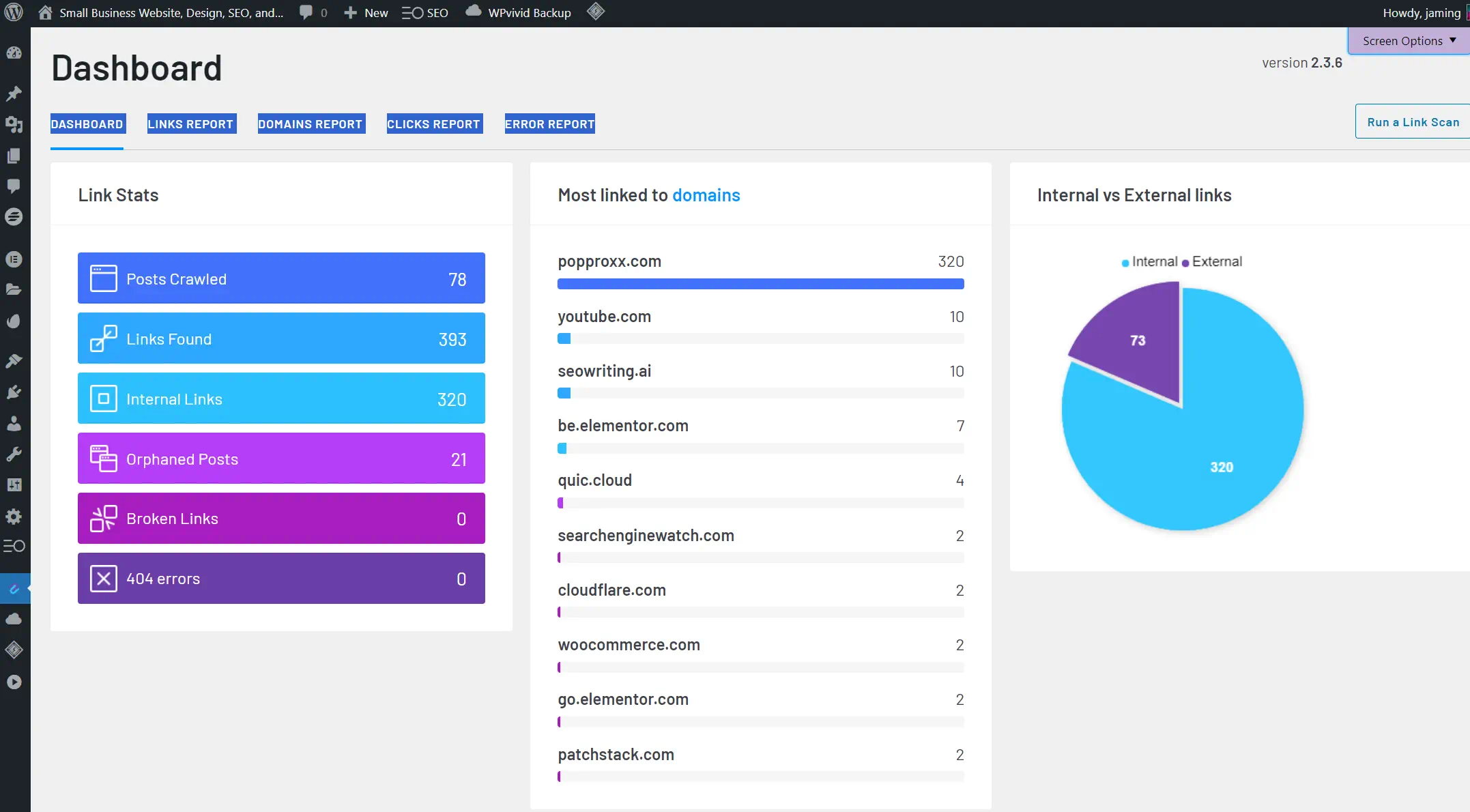
    Website link analytics dashboard with pie chart and domains.

    My in-depth exploration of Link Whisper has revealed a suite of Link Whisper features that stand out in the realm of WordPress plugins for internal linking. One of the most commendable is automatic linking, which seamlessly integrates with the Links Report dashboard. This capability goes beyond just providing static reports; it proactively suggests relevant connections to content within your site, an especially crucial feature for mitigating the issue of orphaned articles.

    Another standout feature deserving mention is the link suggestions component. When drafting content, I’m met with AI-powered link recommendations that take into context both the article at hand and the broader content landscape of the site—an impeccable blend of innovation and user convenience.

    The comprehensive reporting dashboard further elevates the user experience by offering a clear overview of the internal link landscape. Such visibility is invaluable, as it includes metrics that could potentially influence both rankings and user engagement through effective internal link strategies.

    Lastly, the internal link audit feature deserves recognition. With a quick scan, Link Whisper facilitates the identification and resolution of broken internal links, thus ensuring the robustness and reliability of my website’s internal structure. These integral tools collectively enhance my SEO workflow efficiency and efficacy. Below I’ve articulated how each feature of Link Whisper contributes to a streamlined SEO process:

    • Automatic linking injects efficiency into building internal connections.
    • Intelligent link suggestions via AI minimizes manual effort.
    • A detailed reporting dashboard aids in strategic planning.
    • An automated internal link audit ensures the health of the site’s link architecture.

    The benefits of deploying Link Whisper are manifold; it not only saves time by automating tedious processes but also aids in crafting a well-knitted content tapestry that search engines love to crawl.

    The Competing Tactics of Internal Link Juicer

    While exploring Internal Link Juicer, I’ve discovered a suite of functions that distinctly mark it as a proactive tool in the world of WordPress SEO. Its features emphasize a meticulous internal linking strategy that relies on keyword associations, enabling far-reaching control over how links are distributed throughout a website’s content. This particular emphasis gives users the power to execute proactive linking with refinement and precision.

    Keyword Associations and Proactive Linking

    Incorporating Internal Link Juicer features into my internal linking protocol, I’ve observed how keyword associations drive its engine. The plugin’s proactive linking ensures that relevant internal links are generated, not at random, but rooted deeply in content relevance and strategic keyword placement. Such capabilities reflect a thoughtful approach to connecting content meaningfully.

    Customization and Control Over Internal Linking Strategy

    Having the ability for customization and control in an internal linking strategy is something I prize. Internal Link Juicer respects that philosophy by providing a set of user-defined rules and parameters that govern how internal links are orchestrated across the website’s landscape. It is this granular level of control that caters to an enhanced user experience, as well as SEO buoyancy.

    A comparison of customization features between standard and advanced settings in Internal Link Juicer showcases the extensiveness of control available:

    Feature Standard Settings Advanced Settings
    Keyword Assignation Limited Unlimited
    Link Occurrences per Page Fixed Limit Customizable
    Anchor Text Variation None Keyword Gaps
    User-defined Linking Rules Basic Options Extensive Rule-sets
    Content Priority Standard Algorithm User-driven Prioritization

    The level of adjustment available goes a long way to ensure that your internal links behave in line with your vision, rather than adhering to a one-size-fits-all linking pattern. A meticulously crafted internal linking strategy is at the heart of what makes Internal Link Juicer an adept tool for those seeking to enhance their WordPress site’s SEO capabilities.

    Comparative Analysis: Link Whisper VS Internal Link Juicer

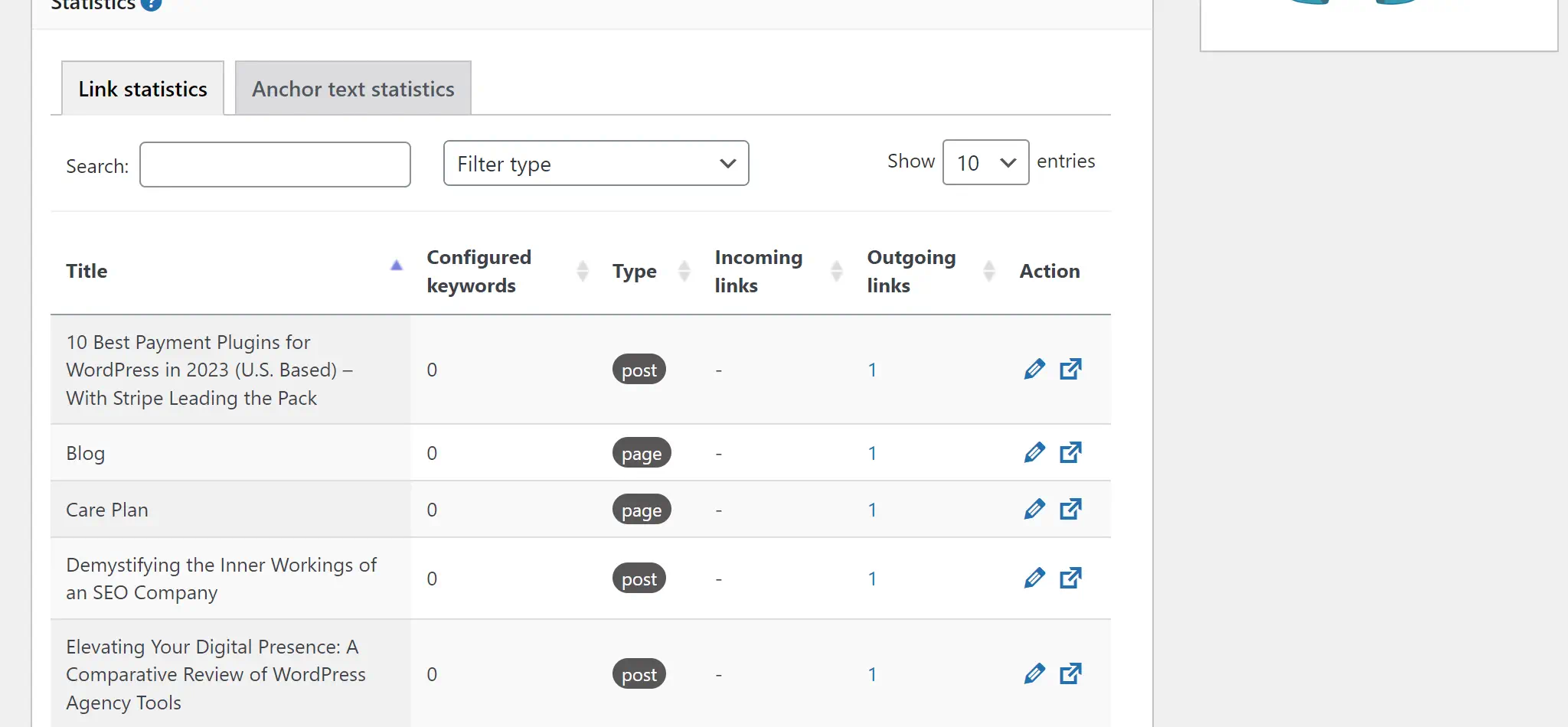
    SEO link statistics dashboard screenshot.

    As a professional in the WordPress ecosystem, I frequently explore tools that can amplify the SEO potential of websites. Today, I dive into an in-depth comparison of two highly talked-about plugins: Link Whisper and Internal Link Juicer. Both claim to be among the best internal linking tools available, but they approach the challenge of internal linking from different angles.

    Link Whisper operates on an AI-powered engine that simplifies creating interlinking within content. It automatically suggests links, which can save considerable time and aligns with my preference for efficiency. Internal Link Juicer empowers users to define keyword-based strategies, offering a hands-on experience that can be more tailored to specific content goals.

    Feature Link Whisper Internal Link Juicer
    Methodology AI-driven automated suggestions Keyword association for links
    User Engagement Low – automation handles the bulk High – requires active participation
    Orphaned Content Linking Yes – highlights and connects orphaned content No – focuses on active content
    Customization Limited – AI decides on best links High – full control over linking keywords

    Drawing from my WordPress plugin comparison research, it’s clear that the decision between Link Whisper and Internal Link Juicer isn’t about which tool is superior. Instead, it’s about aligning a tool’s capabilities with my SEO strategy and workflow. Those who prefer a set-and-forget style may gravitate towards Link Whisper. At the same time, professionals who desire granular control will find Internal Link Juicer’s approach compelling.

    In the face-off of Link Whisper vs Internal Link Juicer, it’s important to consider the features and how these tools blend into the overall SEO plan. An effective strategy hinges on more than just the tools; it’s about how seamlessly they integrate into your process to strengthen your website’s internal link structure and SEO performance.

    Evaluating User Experience: Ease of Use and Interface

    When selecting the right WordPress plugin for SEO, particularly concerning internal linking, my focus invariably shifts towards the ease of use and the user interface offered by the options. As a WordPress Agency owner, I am committed to providing transparent insight into the usability of Link Whisper and Internal Link Juicer, two leading contenders in the market.

    Installation and Setup

    Beginning with installation and setup, both Link Whisper and Internal Link Juicer introduce a user-friendly process that’s relatively straightforward. Link Whisper is especially notable for its effortless activation and initial configuration, directing users into its sleek dashboard. On the other hand, Internal Link Juicer’s setup is also intuitive, with a simplicity that welcomes users of all proficiency levels.

    Analyzing Dashboard Usability and Reporting Features

    Looking at dashboard usability and report features, Link Whisper’s dashboard is more elegant, with a streamlined design that emphasizes automation and ease of navigation. Its reporting tools are not only accessible but also rich in data, simplifying the complex task of link management. Conversely, Internal Link Juicer offers a pragmatic interface that, while not as automated in suggesting links, compels admiration for its adaptability and straightforward display of actionable insights.

    Feature Link Whisper Internal Link Juicer
    Setup Simplicity User-friendly with quick start Intuitive with simple customization
    Automation Highly automated link suggestions Keyword-driven proactive linking
    Dashboard Design Clean and intuitive Functional with essential controls
    Data Reporting Comprehensive and insightful Transparent and easy to interpret

    The user interface and dashboard usability are essential in the WordPress plugin comparison. Link Whisper and Internal Link Juicer demonstrate strengths in these areas, albeit with differing approaches catering to diverse user preferences. Focusing on ease of use, selecting between these plugins comes down to matching their interface sophistication with one’s unique SEO workflow and expertise. Conclusively, Link Whisper stands out with a superior dashboard and interface that feels more modern and up-to-date and boasts an intuitive design, enabling users to get started and benefit from its features more quickly.

    Financials: Pricing Models of Link Whisper and Internal Link Juicer

    When it comes to enhancing WordPress SEO, considering the financial considerations of WordPress plugins is crucial. With Link Whisper pricing details and Internal Link Juicer pricing, comparing their models to help you make an informed decision based on your budget and needs.

    Link Whisper Yearly Pricing Internal Link Juicer Yearly Pricing
    • Free Version: Basic features for introductory purposes
    • Single Site: $97, full access to all features
    • 3 Sites: $137, best for small blog networks or agencies
    • 10 Sites: $187, best for Medium businesses or agencies
    • 50 Sites: $367,  ideal for larger agencies with many clients
    • Free Version: Basic features for introductory purposes
    • Single Site: $69.99, full access to all features
    • 5 Sites: $149.99, best for small blog networks or agencies
    • 10 Sites: $189.99, best for Medium businesses or agencies
    • Unlimited: $1299.00,  ideal for larger agencies with many clients

    Other than the single site license, Link Whisper and Internal Link Juicer pricing is competitive. Link Whisper doesn’t offer an unlimited site plan, but 50 sites will usually cover most use cases, and the unlimited license from Internal Link Juicer is absurd; I had to double-check that it wasn’t for a lifetime license.

    Strategic Insights: Boosting Traffic with Effective Internal Linking

    One key strategy that often gets overlooked for effective website optimization is internal linking. Many focus solely on external links to drive traffic, but neglecting internal links can be a missed opportunity to improve website SEO. Internal linking refers to linking between different pages within your website. By strategically incorporating internal links throughout your website, you can enhance the user experience, improve search engine rankings, and boost traffic.

    To improve website SEO with internal linking, it’s important to keep a few key strategies in mind. First, focus on using descriptive anchor text that accurately reflects the content of the linked page. This helps both users and search engines understand what they can expect when they click on the link. Additionally, consider the relevance and context of the links you create. Linking to related content reinforces the topic and can help search engines establish the authority and credibility of your website.

    Link Building Strategies and Best Practices

    Creating successful link-building strategies requires developing a network of links that mimic a neatly planned roadmap. This strategy focuses on the quantity and quality of links, aiming to provide users with meaningful connections while offering search engines clear indicators of the site’s structure. The best method involves leveraging tools such as Link Whisper and Internal Link Juicer, which streamline the intricate task of creating these important internal links.

    Improving Site Navigation and Content Discoverability

    One significant benefit of internal linking is improved navigation for users. Adding relevant internal links helps visitors explore and discover more content on your website. This not only keeps them engaged and increases their time on site, but it also provides them with a better overall experience. When users can easily find what they’re looking for, they are more likely to stay on your website and become repeat visitors.

    Another advantage of internal linking is its boost to search engine optimization. Internal links help search engines crawl and index your website more effectively. When you link from one page to another, search engines can follow these links to discover and understand the structure of your website. This improves the visibility of your content in search results and increases the chances of attracting organic traffic.

    Screenshot of a website SEO linking tool interface.

    Real-world SEO: Case Studies and Success Stories

    SEO success stories and real-world case studies provide an eye-opening perspective on the efficacy of innovative SEO tools. As I’ve monitored various WordPress sites, I’ve documented significant enhancements in site structure and search ranking efforts due to proficient internal linking—clearly correlating with WordPress SEO improvement.

    An exemplary display of this comes from a wellness blog that integrated Link Whisper into its SEO strategy. Through smart, AI-driven internal linking, this site saw a lift in user engagement, with visitors staying longer and exploring more pages. Similarly, a tech review platform leveraged Internal Link Juicer’s keyword association capability, which led to a notable rise in organic traffic and an improved crawl rate. These instances not only show real-world SEO examples but also highlight the critical role internal linking plays in a content-rich website.

    Likewise, another series of case studies concentrated on e-commerce sites where the application of these plugins steered a substantive increase in sales. It was remarkable to see how strategic internal linking could funnel potential customers through a sales-oriented journey, encouraging more in-depth interactions with product pages and increasing conversions. Without a doubt, these outcomes serve to underscore the edge that targeted SEO strategies contribute to an online business’s success.

    • Improved site navigation and usability
    • Enhanced visibility and organic reach
    • Better user engagement and reduced bounce rates
    • Increased number of indexed pages

    Conclusion

    After delving deep into the functionalities and advantages of Link Whisper and Internal Link Juicer, my analysis underscores unique attributes tailored for various SEO necessities and preferences. In this WordPress plugin comparison, we’ve seen how Link Whisper excels with AI-driven suggestions, providing a primarily automated experience geared towards users who value sophisticated reporting and ease of use. On the other hand, Internal Link Juicer focused on keyword-based linking, offering granular control for those who prioritize a hands-on approach to their optimal internal linking strategy.

    Final Recommendation Based on Comprehensive Plugin Comparison

    As I wrap up this comparison, my final recommendation must consider the specific goals and skills of the SEO professional or team. If you’re looking for a solution that diminishes the labor-intensive aspects of SEO, Link Whisper may be your ideal internal linking plugin. However, if your strategy depends on keyword associations, Internal Link Juicer’s customization abilities could be better. Every robust SEO strategy requires tools that align with intended outcomes, and these plugins offer ways to improve your website’s internal linking framework.

    FAQ

    What are the main differences between Link Whisper and Internal Link Juicer?

    Link Whisper offers AI-powered automatic linking and suggestions for orphaned content, focusing on ease and automation. Internal Link Juicer is centered around keyword associations for manual, proactive linking within the content creation process, with more customization options.

    How does internal linking impact SEO on a WordPress site?

    Internal linking on a WordPress site helps establish content hierarchy, improves navigation, and allows search engines to better index pages, directly affecting a site’s SEO by indicating which pages are most valuable and influencing user engagement and traffic.

    Can Internal Link Juicer and Link Whisper improve website traffic?

    Yes, both plugins aim to improve website traffic by optimizing the internal linking structure, thus enhancing the user experience and making content more discoverable, which aligns with Google SEO best practices and can result in better search rankings.

    Which plugin is more user-friendly for beginners in WordPress SEO?

    Link Whisper is often considered more user-friendly for beginners due to its AI-driven automatic suggestions and an intuitive dashboard which simplifies the internal linking process.

    Can these internal linking plugins help with Google SEO best practices?

    Absolutely, both Link Whisper and Internal Link Juicer are designed to facilitate effective internal linking, which is a key aspect of Google SEO best practices, helping to structure content in a way that’s favorable to search algorithms.

    What are the pricing models for Link Whisper and Internal Link Juicer?

    Link Whisper offers three annual pricing tiers aimed at different levels of site usage and a free version for basic features. Internal Link Juicer provides a free version with core capabilities and a premium version that includes advanced features and options.

    Are the dashboards for Link Whisper and Internal Link Juicer suitable for detailed reporting?

    Yes, both platforms have dashboards that provide reporting features. Link Whisper’s dashboard features comprehensive internal link stats, while Internal Link Juicer offers insights that can be useful for a more controlled and strategic approach.

    How do keyword associations work in Internal Link Juicer?

    In Internal Link Juicer, users can assign specific keywords to their posts, and the plugin will automatically suggest or create internal links when these keywords appear in the content, allowing for a proactive and targeted internal linking strategy.

    Does automatic linking provided by these plugins align with effective internal linking strategies?

    Yes, automatic linking from plugins like Link Whisper and Internal Link Juicer can align with effective internal linking strategies by simplifying the process of link creation, which helps improve site structure and user experience while adhering to SEO best practices.

    How do you decide which internal linking plugin is the best choice for your WordPress site?

    Choosing an internal linking plugin should be based on your site’s specific needs, your SEO strategy, and whether you prefer more automated solutions like Link Whisper or more control over link placement and keyword strategy, which Internal Link Juicer offers.

    Source Links

  • SEOwriting.ai 1-Click Blog Post Creation

    SEOwriting.ai 1-Click Blog Post Creation

    SEOwriting.ai 1-click blog post technology represents a new chapter in content creation. As a professional content producer, I’ve witnessed how this blog writing tool speeds up the process of creating great content. The power to generate and automate blog posts with precision and speed streamlines my workflow and enhances the published material’s SEO strength.

    AI-powered blog post generation tool interface.

    Integrating SEO tools into my routine is critical for maintaining a competitive edge. SEO content generators like SEOwriting.ai have been nothing short of revolutionary.

    Unveiling the Power of Automated SEO Content with SEOwriting.ai

    content marketing has undergone a transformative shift with the advent of advanced AI tools. For someone who manages multiple aspects of a digital presence, the capability to quickly produce content that adheres to the rigors of SEO optimization is nothing short of a revolution. My firsthand experience with SEOwriting.ai has convinced me of the importance of leveraging AI to amplify my content strategy.

    Intuitive Interface and 1-Click Post to WordPress

    Navigating the SEOwriting.ai platform is a breeze, thanks to an intuitive interface and SEO writer. I can quickly generate an online blog post and then rewrite it for better clarity and my personal touch. A standout feature for me has consistently been the WordPress autopost function. It saves precious time and maintains a seamless workflow, transforming my posts from conception to live on my WordPress site in a single click.

    Mastering Keyword Optimization with SEOwriting.ai

    Regarding keyword optimization, SEOwriting.ai stands as a powerful blog post tool. Inputting my targeted keywords into the system, I align my content with SEO best practices, pushing for a high-quality SEO score that reflects a meticulously executed SEO strategy. The built-in checker feature is an indispensable asset, as it consistently tracks my writing progress and keyword distribution, ensuring the final product is primed for optimal search engine performance.

    A Picture is Worth a Thousand Words: AI Image Generation

    The visual appeal of a blog post cannot be underrated, and with SEOwriting.ai’s AI image generation, each post I publish commands attention. This feature automatically introduces high-quality, relevant images that complement the article’s narrative, satisfying SEO content generator objectives and user engagement metrics. Enhancing not just the aesthetic but also the functional aspect of the blog, these AI-generated images are instrumental in improving search rankings and enriching the overall reader experience. Some of the images are great, and others could be better. I can regenerate a new image with SEOwriting.ai, which uses OpenAI’s Dall-e, or use a tool like MidJourney or one of my many stock art sites. Having great images is important, and I will usually make the first ‘featured image’ in Adobe Express. This step helps with my workflow because, using Adobe Express, I can quickly push my blog post to my social media accounts.

    Creating High-Quality Long-Form Content Effortlessly

    SEOwriting.ai has unlocked my potential to produce high-quality, long-form content that captivates readers and ranks well in SEO. This innovative tool has refined my approach to SEO writing, allowing me to draft elaborate and sophisticated blog posts that could span up to 3000 words effortlessly, even though I keep my blog posts below 2000 words unless the content really warrants it.

    The strength of SEOwriting.ai lies in its dynamic capability to cater to a wide array of content needs. Whether it’s an in-depth how-to guide, a comprehensive review, or a detailed product roundup, each piece is meticulously crafted, ensuring maximum reader engagement and conversion potential. Pairing this SEOwriting.ai with Grammarly has allowed me to create better content than I was able to create before, even including hiring professional blog writers. As writers, we would often stray from the outline and break key SEO fundamentals without the structured approach we use today with AI.

    With SEOwriting.ai, content creation becomes not a task but a creative journey with a powerful, intuitive ally to get started with.

    The Checker tool is, without a doubt, a standout feature. It meticulously analyzes my content’s SEO as I write, providing real-time feedback to ensure every article is primed for the best search engine performance. This tool acts as my structure, keeping my articles in line with SEO fundamentals.

    Effortless High-Quality Long-Form Content Creation

    Image generated with Dall-E in SEOwriting.ai

    Beyond the drafting process, SEOwriting.ai offers support by suggesting enhancements and fine-tuning elements to elevate my content’s readability and search relevance.

    1. Analyzing keyword density for optimal search engine visibility.
    2. Structuring content with the right balance of headings and paragraphs.
    3. Incorporating targeted SEO strategies to foster organic growth.

    This approach not only simplifies content creation but also infuses a sense of confidence, knowing each article is fortified with SEO best practices and is worthy of the high standards my audience expects.

    SEOwriting.ai Feature Benefits
    1-click Long-form Content Ease of creating detailed content
    Checker Tool Real-time SEO optimization
    Diverse Content Capabilities Adaptability to various topics and styles
    Engagement and Conversion Content primed for audience interaction

    In conclusion, SEOwriting.ai has revolutionized how I approach long-form content, offering an unrivaled blend of efficiency and effectiveness in SEO-driven digital storytelling—a vital component in today’s content-competitive landscape.

    SEOwriting.ai 1-Click Blog Post: Revolutionizing Blog Writing

    The emergence of SEOwriting.ai marks a pivotal shift in my writing process, offering a suite of powerful AI-driven tools designed for SEO-optimized blog content. Creating personalized content that simultaneously caters to audience interests and ensures search engine visibility is a cornerstone of my content strategy. SEOwriting.ai’s innovative SEO content generator is my go-to solution for crafting tailored and effective posts with advanced technology integration. It’s not just about writing; it’s about creating with precision and authority as an internet content creator.

    Screenshot of an SEO content creation dashboard.

    Embracing SEO Excellence with Personalized Content Creation

    My approach to crafting outstanding content begins with a clear vision. It involves researching topics and keywords with low competition yet strongly resonates with the audience and performs well in SEO rankings. Utilizing SEOwriting.ai, I implement a custom 7-step method for SEO writing that operates as follows:

    1. Topic research with Ahrefs
    2. 1-Click blog creation with SEOwriting.ai
    3. Rewriting, plagiarism checks, and correcting with Grammarly
    4. Creating images in Dall-e, Midjourney, Stock Art, and Adobe Express
    5. Build keywords with ChatGPT and Ahrefs
    6. Push the post to WordPress with SEOwriting
    7. Push the post from Adobe Express to Social media

    From Product Reviews to Inspiring Blog Posts: Content Diversity at its Best

    The breadth of content diversity attainable through SEOwriting.ai is impressive. Whether I’m compiling in-depth product reviews or crafting inspiring narratives, the platform’s versatile AI blog writing tool adapts to various needs and formats. This adaptability is critical, allowing me to seamlessly pivot between topics and content types, ensuring that each blog post reflects quality and expertise.

    Advanced Technology Integration: The Role of GPT-3 and GPT-4

    At the heart of SEOwriting.ai lies the integration of cutting-edge technologies like GPT-3 and GPT-4. These advanced algorithms drive the platform’s capability to generate high-quality, contextually relevant content across a wide array of subject matter. This powerful combination of GPT-3 and GPT-4 makes it the exemplary SEO content generator, pushing the boundaries of what’s possible in automated, intelligent blog post creation.

    Feature Benefit to SEOwriting.ai Users Technology Utilized
    Personalized SEO Content High engagement and conversion rates GPT-3, Proprietary AI
    Automated Blog Posts Efficient publishing cycle GPT-4, Machine Learning
    Diverse Content Types Appeal to a broad audience spectrum Advanced Content Analysis
    SEO Optimization Improved search engine rankings SEO Performance Algorithms

    Why You Need To Add SEOwriting.ai To Your Content Creation Tool Kit

    Visit the SEOwriting.ai pricing page here and create your account (website with official pricing)Unlock the power of optimized content creation with SEOwritingAI and enjoy a special offer: use coupon code POPPROXX2024 to save 25% on your subscription. Sign up today and enhance your SEO efforts with cutting-edge AI tools!

    In digital marketing, creating and optimizing content can be a significant challenge—yet it’s one that I have managed to navigate efficiently, thanks to SEOwriting.ai. This sophisticated SEO tool is more than just a blog post tool; it’s a multifaceted companion in crafting compelling narratives that capture readers’ attention and excel in search engine rankings. By leveraging its 1-click blog post capabilities, I’ve transformed my writing process into a streamlined, automated operation, ensuring SEO optimization without sacrificing content quality.

    The effectiveness and utility of SEOwriting.ai as a content creation tool are undeniable. Its seamless integration with WordPress streamlines my workflow by automating the posting process, thereby removing the hassle of manual uploads. As someone who values high-quality content, witnessing the AI generate pertinent images that visually enhance the post is genuinely a cool feature. Furthermore, the blend of GPT-3 and GPT-4 LLMs in the platform gives me confidence that the content is unique and crafted with a level of sophistication that only ChatGPT can achieve.

    Any content creator who is serious about leaving a digital footprint must notice the marriage between human creativity and AI efficiency. With SEOwriting.ai as the cornerstone of my automated blog post production, I am assured of maintaining a competitive edge in an increasingly saturated online space. Embracing such an innovative tool into your content strategy is advantageous and a strategic imperative for success in today’s AI-dominated SEO landscape.

    Source Links

  • Elementor Launches Image Optimizer Early Access

    Elementor Launches Image Optimizer Early Access

    Screenshot of Image Optimizer software settings.

    This is a screenshot of the setting in Elementor Image Optimizer

    My first impression

    In recent years, Elementor has faced criticism for its slow performance and bloated code. The team has been diligently working to resolve these issues, and I believe their new Image Optimization Plugin is a strategic move in this direction. Although it doesn’t directly address the codebase, it’s a significant step towards enhancing overall performance.

    At first, I was really exicited when I saw the blog post that Elementor released a new image optimizer plugin (still in beta). I thought I would give it a try. After getting everything set up on a test WordPress website, I clicked the optimize button in the media library, and it was taking a while. I was like this is not good. So, maybe it is still a little early to use this plugin, but I am sure they will get it working. So, for now, I will continue using my offline WebP compressor on the desktop. Anyways, here are the plugin’s features so we can get excited as they get the plugin closer to release. 

    Effortlessly Enhance Your Website’s Performance

    Your website’s design and appearance have a considerable impact and value. The necessity of keeping your website’s speed and performance at an optimal level is not a question. Your efforts have been put into creating a stunning site, only to discover that your site needs to be better with loading speed and causing visitors to wander away. Don’t fret – there’s a solution that is designed specifically for web designers that is now available! Prepare to change how you manage images for your site. The new plugin developed by Elementor, Image Optimizer, offers powerful compression and optimization tools and seamless integration and performance improvements.

    Start a Free Trial

    Visit the Elementor Hosting pricing page here and create your account (website with official pricing)

    The Role of Image Optimization

    Images are the primary visual element of your WordPress website, bringing aesthetic appeal and narrative depth. However, even the most innocent pictures can lead to slow loading times and poor performance. Most likely to be the culprit? Size of the image. Images that are large cause slow loading. This is a concern we’ll tackle in greater detail later.

    Knowing the root cause of websites that load slowly is essential. Speed tests play a role in helping you understand the root of your site’s performance concerns.

    A deep dive into Image Optimizer developed by Elementor

    Larger images, though visually appealing, can be an issue for slow loading speeds, affecting user experience. Use Image Optimizer by Elementor Image Optimizer from Elementor to effortlessly combine captivating images with maximum performance.

    The extensive capabilities of Elementor’s design tools allow users to display images often without consideration about their size.
    This easy-to-use WordPress plugin makes it easier to manage the process of compressing, scaling, or optimizing images. Supporting the most popular formats such as JPEG, PNG, WebP and GIF The plugin will ensure that the visuals on your site are of top quality and significantly reduces the size of your files.

    Set and Forget With the Default Settings

    After installation, the plug-in has default settings that are perfectly designed for all websites. It doesn’t end after that point. From then onwards it is possible to let the Image Optimizer can work seamlessly as a background process. You can say goodbye to worries regarding image size, install, connect, and let the optimizer perform its job.

    Bulk or Single Image Optimization: Tailoring to Your Needs

    The plugin allows flexibility when it comes to managing media assets. It allows optimizing by one image at a given time or in a series of. Set the plugin up to increase or decrease the size of images at a time or immediately upon upload. If you already have a library of images that are optimized for bulk, this feature allows for rapid resizing and compression to ensure that your site’s performance stays at the top of its game.

    Two beverage cans on colorful background.

    It errors out!

    It might be wise to wait before installing the plugin. I’m not certain about the cause of the failure, but I’m hopeful it’ll be resolved in the upcoming update. I’ll review my settings or perhaps give it another try tomorrow, as it’s already past 8pm and I’m still blogging on a Sunday night. Meanwhile, let’s return to exploring the features.

    Optimizing Images: Various Techniques

    1. Compressing Images:

    The use of compression techniques can achieve the delicate balance between decreasing the size of the files and preserving maximum image quality. Two different types of compression techniques ensure the perfect balance of image quality and compression quality.

    Lossless compression: Reduces the size of images but without altering the quality or integrity of the images. The method eliminates unnecessary or redundant data, guaranteeing that the most important aspects are lost in the process. In the end, you’ll see the reduction of file size and still preserve the original high-quality of your photo.

    Lossy Compression: Maximizes compression to create lighter images, with smaller size files. This method reduces size by eliminating image information, which is usually invisible to the naked eye, which means there is no compromise to the quality of images. It results in a smaller dimension of the image without any noticeable distinctions, perfect to maximize storage capacity and enhance the performance of websites.

    2. Resize Larger Images:

    The process of resizing large images is to adjust the size or dimensions of the images that exceed set thresholds. This process is especially relevant to bigger images, which can burden servers or contribute to slow loading speeds on websites. You can set the maximum size of pixels for the image to avoid overloading servers. The default is set at 1920 pixels.

    The ability to select the maximum width in pixels that is available in the Image Optimizer from Elementor allows users to customize image sizes according to specific requirements or requirements for their website.

    3. Convert to WebP for Even Better Optimization:

    Convert to WebP is the process of converting images into WebP format. WebP format. It is an advanced and effective format for compressing images that Google developed. WebP uses advanced compression techniques that significantly reduce the file size but maintain a high-quality image. One of the main advantages of WebP is the ability to give substantial savings in size when compared with standard formats such as JPEG and PNG. This means that WebP can speed up website load times, resulting in a more pleasant customer experience and better website performance.

    4. EXIF Metadata:

    EXIF (Exchangeable Image Format for Files) metadata is a collection of data contained within the image file, which contains information about the camera’s settings, the conditions, and other technical details present when the picture was captured. It contains essential information, including the time and date of the photo’s capture, the camera model and shutter speed aperture ISO, and geolocation information, providing a complete overview of the conditions that led to the making of the picture. Although EXIF metadata can be helpful to enthusiasts and photographers when it comes to analyzing and gaining knowledge from their photos, it also plays an essential part in optimizing websites. For optimizing images, eliminating EXIF metadata may further shrink the size of files without degrading image quality. This can lead to an increase in speed and shorter loading speeds.

    5. Image Thumbnails:

    Resize all sizes of pictures as default. It also allows users to pick specific sizes according to WordPress-registered thumbnail dimensions. The plugin defaults to automatically adjust all size images, such as thumbnails, to maximize their size. This setting will ensure that your site benefits from an improved visual appearance, resulting in faster page loading times and a better overall user experience.

    6. Other Features for Enhanced Workflow and Abilities:

    • Backup original images and selectively delete backups to make the most efficient use of space.
    • Restore original images to selected media files if needed.

    Start a Free Trial

    Visit the Elementor Pro pricing page here and create your account (website with official pricing)

    Image Optimization: A Game-Changer for Performance and SEO

    Are you still unsure about the transformational effects of the optimization of images? Let’s explore the many benefits of this seemingly insignificant but important change

    1. Faster Loading Times:

    Optimized images allow speedy page loading times, providing a superior user experience.

    2. Improved Google PageSpeed Score:

    A well-designed, optimized site will improve your Google PageSpeed score. This indicates to search engines the efficacy and usability of your online domain.

    3. Enhanced Search Engine Rankings:

    Google prefers optimized sites with more search engine rank, increasing your website’s visibility and exposure.

    4. Reduced Bounce Rate:

    Speedier loading pages result in low bounce rates and entice visitors to stay longer and browse your site.

    5. Efficiency in Resource Usage:

    Optimized photos require less server storage, reducing resource requirements and resulting in bigger savings in the long run.

    6. Cost Savings on Mobile Data:

    A lower consumption of optimized image data can mean price savings for both you and the users on data plans for mobile devices.

    Make Your Website Faster With Image Optimization

    The Image Optimizer tool from Elementor looks to be an effective and straightforward solution that tackles optimization. From selecting the format to compression and resizing, this tool allows users to build websites that function unmatched efficiently while increasing search engines’ speed and ranking. 

    Start a Free Trial

    Elementor Product Starting Price Learn More
    Elementor Hosting $9.99/mo. Visit Pricing
    Elementor Plugin $59.00/yr. Visit Pricing
  • WooCommerce vs Shopify: Best E-Commerce Pick?

    WooCommerce vs Shopify: Best E-Commerce Pick?

    E-commerce comparison: WooCommerce versus Shopify graphic.

    When asked about the ideal eCommerce platform for online stores, the debate of WooCommerce vs Shopify often takes center stage. As a seasoned eCommerce developer, I have witnessed firsthand how choosing the right platform can significantly influence the success of an online business. You must assess user-friendliness, feature set, cost implications, user experience, and customer support. With their ardent followers, WooCommerce and Shopify have carved out substantial niches for themselves, reflecting the complexities and varied needs of millions of global users and their successful billion-dollar revenue streams.

    When advising my clients on their choice, I often distinguish between prioritizing a straightforward shopping cart system or a highly customizable website. Shopify is a buy-my-product forward approach to a website design and doesn’t offer the deep customization you can create with WordPress Woocommerce. Shopify leans towards a straightforward, product-focused website design with limited customization options compared to what’s achievable with WordPress WooCommerce. Although Shopify is beginning to embrace more third-party design tools, it still lags behind the extensive range of third-party add-ons available for WooCommerce, which offers richer customization possibilities.

    Streamlining the debate, both platforms proffer distinct experiences despite sharing some standard features. Shopify shines with its quick setup and superior customer support, while WooCommerce is widely acknowledged for its unrivaled customizability and SEO prowess. However, it’s also clear that WooCommerce demands more technical savvy. I aim to empower small business owners and entrepreneurs to make informed choices, aligning their online business objectives with the most fitting eCommerce system.

    Key Takeaways

    • Assessing both platforms’ user-friendliness is crucial in the WooCommerce vs Shopify debate.
    • Understanding the cost structures of WooCommerce and Shopify informs long-term financial planning for an online store’s budgeting needs.
    • Considering the technical proficiency required for WooCommerce instead of Shopify’s ease of use provides a clear perspective on their fit for different entrepreneurs.
    • Evaluating Shopify’s comprehensive customer support helps gauge the level of assistance an online store owner might need.
    • Reflecting on WooCommerce’s customizability and advantageous SEO capabilities outlines the potential for a unique and optimized online presence.
    • Acknowledging each platform’s global user base and revenue generation offers insight into their proven track records of success.

    Introduction to WooCommerce and Shopify

    When establishing an online store, WooCommerce or Shopify often enters the discussion as top contenders in the eCommerce space. I want you to know that choosing between WooCommerce and Shopify requires a good understanding of what each platform offers and how it aligns with your business objectives. As I go into their features, it’s clear that the decision isn’t black and white; it depends on various factors, including technical know-how, customization needs, and desired user experiences.

    WooCommerce, the robust plugin designed for WordPress, gives users significant creative control – a dream for professionals with development knowledge. Its open-source nature encourages a more hands-on approach, allowing businesses to craft a unique online presence. Meanwhile, Shopify is celebrated for its user-friendly platform that simplifies technical hurdles, providing everything you need in one place to get your shop up and running, making it highly appealing to those without a web development background.

    Determining which is better – WooCommerce or Shopify revolves around the users’ specific needs and the kind of online store they intend to build. Whether you prioritize complete design freedom or ease of use for a quick market entry, both platforms support your eCommerce goals.

    • For tech-savvy users who prefer to have detailed control over every aspect of their website, WooCommerce provides the flexibility that might be critical to success.
    • On the other hand, Shopify might be the better choice for entrepreneurs seeking to minimize the complexity and time invested in setting up their stores.

    Ultimately, my journey in choosing between WooCommerce and Shopify is a decision that weighs individual preferences for control and customization versus convenience and streamlined functionality. As we further explore their distinct features, we can see why each has attracted such a dedicated user base in their own right.

    Understanding the Basics: What WooCommerce and Shopify Offer

    As an e-commerce entrepreneur, choosing the right platform is a critical decision that can significantly impact your online business’s success. Two giants dominate the landscape, WooCommerce and Shopify, each with impressive features tailored to various business needs. In this section, we’ll explore the WooCommerce pros and cons and the Shopify advantages and disadvantages to help you make an informed decision.

    A comparison of WooCommerce and Shopify reveals that both platforms are equipped with distinctive features. My analysis will delve into these features and how they weigh against each other regarding benefits and drawbacks.

    Key Features of WooCommerce

    Running on nearly 28% of all e-commerce websites, WooCommerce is a powerful, extendable platform designed for seamless integration with WordPress. Here are some of the standout WooCommerce features:

    • Customization: WooCommerce provides extensive customization options through hundreds of themes and plugins, allowing for a tailored approach to e-commerce.
    • SEO Performance: Leveraging WordPress’s formidable SEO capabilities, WooCommerce stores often rank well in search results.
    • Open-Source: The open-source nature gives you full access to modify the code to suit specific requirements, offering unparalleled flexibility.
    • Cost-Effectiveness: Starting out is free, with costs mainly associated with additional plugins, themes and hosting.
    • Self-Hosted: You can own your website and have complete control.

    Despite the advantages, consider the following WooCommerce pros and cons. The open-source format means you’ll face continuous maintenance, and a certain level of proficiency is required to optimize the platform’s use. Over time, additional costs may accrue from leveraging premium plugins and themes to maintain or enhance your site’s capabilities.

    Screenshot of Shopify checkout settings page.

    Key Features of Shopify

    Shopify simplifies the e-commerce experience with a comprehensive, all-in-one approach. Here are some Shopify features:

    • Simplicity: Shopify’s platform is known for its user-friendly interface, requiring less technical skill to get started.
    • Integrated Shipping Having shipping built into the website without needing to install 3rd party plugins is convenient.
    • Integrated Sales Features: From abandoned cart recovery to various payment gateways, Shopify equips you with tools that assist in managing sales efficiently.
    • Reliable Customer Support: With 24/7 support, Shopify takes pride in ensuring that help is available whenever you need it.

    When evaluating Shopify’s advantages and disadvantages, it’s essential to recognize its less customizable nature because it is a closed ecosystem compared to WooCommerce. Nevertheless, the platform’s ease of use and robust customer support make it a favored choice for entrepreneurs drawn to simplicity over flexibility.

    In your quest to evaluate the pros and cons of WooCommerce and Shopify, it’s crucial to consider your business’s unique requirements and technical capabilities. A careful assessment will guide you toward the best platform for your e-commerce vision.

    WooCommerce dashboard displaying zero sales data.

    Diving Into WooCommerce: Advantages and Limitations

    Choosing between WooCommerce vs Shopify for small businesses involves an analysis deep enough to understand WooCommerce limitations and the advantages of WooCommerce. As an e-commerce platform built on the premise of flexibility, WooCommerce shows its strength in its capacity to be shaped and customized according to distinct business requirements, making it captivating for those looking to inject a unique flair into their online storefronts.

    The platform’s inherent affordability often entices small business owners; WooCommerce is free, and the primary expenses are tied to web hosting and domain registration. This compelling pricing structure is, however, just part of the picture. The reliance on plugins, which can amplify functionality, entails potential added costs. These additional expenses and the need for routine maintenance and updates must be considered when appraising the total cost of ownership.

    One must recognize the WooCommerce limitations that necessitate an understanding of web development. The platform demands more from you, urging the deployment of skills to manipulate an extensive array of themes and plugins effectively. This requirement may introduce a learning curve that some may need help with. Even though Shopify is easier to use, it still has many complexities that take time to learn, and if you have experience with WordPress, you might find it easier to use WooCommerce.

    If you want to build a great eCommerce website, you should hire a skilled web developer. Both eCommerce platforms overstate user-friendliness, and you don’t want a low-quality website representing your brand.

    With these considerations, the advantages of WooCommerce become clear with its high level of customizability and openness. The power to tweak every element of an e-commerce store to match a business’s precise vision and strategy is a lure strong enough to draw in those with the necessary technical savoir-faire. With WooCommerce, my experience has shown that the learning invested translates to greater control over your online presence—a nuanced advantage that should not be underestimated.

    1. Free platform with cost primarily from hosting and domain.
    2. High customizability and flexibility with open-source access.
    3. Requires web development knowledge for perfecting themes and plugins.
    4. Additional costs and maintenance associated with plugin reliance.

    WooCommerce’s New Integrated Payments and User-Friendly Product Editor Challenge Shopify’s Ease of Use

    WooCommerce has recently introduced new features that significantly enhance its product management capabilities, narrowing the gap in user-friendliness that has been a distinct advantage for Shopify. These updates include an integrated payments system similar to Shopify, offering a more streamlined and efficient checkout process.

    A standout improvement is the new product editor, currently in beta. This editor revolutionizes the way products are managed on WooCommerce. It adopts a tabbed workflow approach, simplifying product management by dividing it into specific sections such as descriptions, images, organization, pricing, inventory, shipping, and variations. This method allows users to concentrate on one aspect at a time, thereby improving efficiency and reducing distractions.

    Moreover, the introduction of Gutenberg blocks in the new editor offers enhanced design capabilities. Users can now create more engaging and visually appealing product descriptions, improving the overall aesthetic and information quality of product listings. The updated editor also makes adding and managing product images simpler, enhancing the visual appeal of products on the platform.

    These advancements in WooCommerce demonstrate a significant step towards providing a more user-friendly experience, rivaling the ease of use that Shopify is known for.

    Shopify dashboard displaying financial tasks and sales overview.

    Exploring Shopify: Pros and Cons

    When considering Shopify for online stores, it’s clear that the platform positions itself as the go-to choice for businesses seeking a seamless entry into e-commerce. I’ll explore the significant advantages of being user-friendly and customer-centric support.

    Ease of Use and Customer Support

    Shopify’s ease of use of Shopify is often highlighted by users who appreciate its intuitive interface. Setting up a shop is a hassle-free experience, guided by a clear dashboard and easy-to-follow steps. This simplicity is bolstered by Shopify customer support, a critical resource for users at all stages of building and managing their online presence. With a dedicated 24/7 Shopify Help Center and direct access to experts, merchants are assured they have the backing needed to resolve issues swiftly.

    Shopify Pricing and Transaction Fees

    Regarding Shopify costs, newcomers are sometimes surprised by the upfront price tag. Plans start at $39 monthly and can reach $399 for businesses scaling up their operations. They also have a Shopify Plus for $2000 monthly. These figures may initially overshadow the hidden costs of platforms with separate hosting fees. If you want to use a separate payment processor, Shopify charges transaction fees; these are forgone when utilizing Shopify Payments. Therefore, businesses opting for Shopify’s in-house payment processor stand to gain in the long run.

    Reflecting on these factors, it’s evident that Shopify presents an end-to-end solution that balances straightforward usability with a comprehensive support system. Despite these strengths, one must carefully assess ongoing transaction fees against the breadth of features and support provided. This evaluation is crucial in determining whether Shopify is the most cost-effective route for an online store, particularly when pitted against WooCommerce’s modular, but sometimes more complex, cost structure.

    WooCommerce vs Shopify: Core Differences

    When considering the options of WooCommerce versus Shopify, it’s essential to understand their core differences to make an informed decision that aligns with your business needs. These platforms diverge significantly, not just in terms of design and user experience but also regarding their fundamental structure and approach to e-commerce.

    With WooCommerce, the freedom it offers through its open-source nature is as expansive as it is demanding. The trade-off comes in the form of greater responsibility for your store’s maintenance and technical enhancements. In contrast, Shopify simplifies the process to a large extent, providing a hosted and comprehensive platform that spares you the intricacies of backend management.

    Here’s a concise WooCommerce vs Shopify comparison encapsulated in a table creates a clearer picture of their differences:

    Aspect WooCommerce Shopify
    Hosting Requires separate hosting services Includes centralized hosting solutions
    Customization Complete control with open-source customization Limited by the platform’s standardized features
    Technical Skill Required Higher technical understanding is needed for development and maintenance Designed for ease of use with minimal technical skill required
    Cost Free to start with, costs for extensions, themes, and hosting Monthly plans with various tiers, additional fees for extra features
    Payment Processing Flexibility in choosing payment gateways, potential additional fees Integrated payment solution with Shopify Payments, transaction fees can apply
    Support Community forums and developer resources are available 24/7 dedicated customer support

    While I contemplate the unique selling points of each platform, the choice between WooCommerce and Shopify can significantly impact the trajectory of your online business. Do you need control or prefer the ease of a pre-set structure? Analyzing the core differences between WooCommerce and Shopify is imperative to devise a strategy that’s not only compatible but also conducive to your online store’s growth.

    Real-World Performance: Case Studies and Success Stories

    WooCommerce Payments setup screen in WordPress dashboard.

    The true test for any platform is how it holds up in the real world. Let’s examine closely some of the real-world WooCommerce examples and Shopify success cases to understand the tangible impact these platforms have on the success of online stores.

    Success with WooCommerce

    One of the most compelling WooCommerce success stories comes from the famous home improvement brand Forage and Sundry. Beyond just selling products, the brand’s site provides a tailored experience with gardening tips and workshops, fully utilizing WooCommerce’s flexible nature to create a community around their niche. This level of customization is a testament to WooCommerce’s achievements, showcasing how a brand can leverage the platform to build a robust, content-rich, and distinct online presence.

    Success with Shopify

    A shining example of Shopify eCommerce success is seen with the fashion retailer Allure Bridals. Their transition to Shopify allowed for a more streamlined shopping experience, integrating multiple sales channels and simplifying inventory management. This case illustrates the Shopify store achievements that can be had when harnessing Shopify’s tools, making it easier for customers to purchase their dream wedding gowns.

    Platform Brand Key Achievements
    WooCommerce Forage and Sundry Customized content approach, community engagement, niche market leadership
    Shopify Allure Bridals Multichannel selling, simplified user experience, effective inventory management

    Both platforms have their myriad of success stories, but what’s clear is their capacity to scale and adapt to the specific needs of their users’ businesses. While WooCommerce offers a broad canvas for personalization and SEO strength, Shopify’s user-friendly interface and turnkey solutions provide quick market entry and operational simplicity.

    User Experience: Setting Up Your E-Commerce Store

    As someone who values the importance of user experience with WooCommerce and user experience with Shopify, I understand its critical role when setting up an eCommerce store. Crafting an appealing and functional storefront is essential, and the platform choice significantly impacts this process.

    From personal involvement with WooCommerce, I’ve come to recognize the depth and autonomy it provides. Yet, this comes with a caveat: a greater demand for technical knowledge. Acquiring a domain name, securing hosting services, and installing WordPress and its corresponding themes are steps that could intimidate novices, making it a better choice for those with technical proficiency or those willing to learn.

    Conversely, setting up an eCommerce store on Shopify is akin to having a personal assistant by your side. Its streamlined and guided setup processes offer a starkly different user experience—simplistic, direct, and beginner-friendly. This distinctive ease of Shopify use sparks a resonance with my clients who seek quick and efficient entry points into the online market.

    Shopify’s dashboard is designed for immediacy and ease, thriving as a turnkey solution for many aspiring online entrepreneurs.

    To show a clearer picture of these distinct set-up experiences, consider this comparative table highlighting the key steps and user involvement for both WooCommerce and Shopify.

    Set-Up Stage WooCommerce Shopify
    Domain Registration User Responsibility Guided Process
    Hosting Setup User Responsibility Included in Service
    Platform Installation Included with hosting Automatic Platform Setup
    Theme Installation Extensive Customization Curated Selection
    Adding Products Easy to use Product Builder Intuitive Product Builder
    Payment Gateway Configuration Multiple 3rd-Party Integrations Simple Native Solution
    Customer Support Community & Service Providers 24/7 Direct Support
    Launch Readiness Technical Testing User-Friendly Checklist

    Recognizing the strengths and constraints of WooCommerce and Shopify is integral for aspiring online retailers. One’s comfort with technology, desired control over their store, and support needs are all decisive factors—the final choice determines not only the set-up experience but possibly the trajectory of online business success.

    Conclusion

    The debate surrounding WooCommerce vs Shopify for online stores often boils down to choosing between personalization and convenience. I’ve taken a deep dive into both platforms and showed that the decision isn’t necessarily a matter of which is better—WooCommerce or Shopify—but rather which platform aligns seamlessly with your specific business needs and aspirations.

    Shopify has invested significantly in advertising, a stark contrast to WooCommerce’s more modest approach. Despite this disparity in marketing spend, with Shopify reportedly investing millions, the core functionalities of the two platforms are remarkably similar. Both Shopify and WooCommerce offer robust tools for building and managing online stores. Shopify’s extensive advertising budget, including a substantial investment in enhancing their software, doesn’t necessarily make it superior to WooCommerce, which maintains its strong position as a free, open-source solution. Each platform has its unique strengths, making them both excellent choices for different types of online businesses.

    For entrepreneurs with technical knowledge and a vision for a highly customized web store, WooCommerce presents an alluring choice. Its robust customization capabilities offer a hands-on approach to building an online store, and pairing it with a block builder like Elementor allows unlimited customization. On the flip side, Shopify shines in its ability to expedite the process with its user-friendly environment and dedicated support, making it a go-to for business owners seeking speed and ease in getting their store up and running in a shorter time.

    Deciding between WooCommerce and Shopify is akin to selecting a path in a choose-your-own-adventure story. Both platforms have significantly evolved from older systems such as Commerc.cgi, Zen Cart, and Magento. Nowadays, businesses can more easily create basic websites using these systems. However, to fully realize the website’s potential, the expertise of a dedicated team specializing in eCommerce is indispensable.

    Choosing between WooCommerce and Shopify depends on your digital expertise, business size, and eCommerce goals. Success comes from matching your platform choice with your business strategy and the customer experience you aim to provide. Whether it’s WooCommerce’s adaptability or Shopify’s user-friendly approach, the right fit is key.

    FAQ

    What are the key features of WooCommerce?

    WooCommerce is known for its flexibility and customizability due to being an open-source plugin for WordPress. It offers extensive customization options with hundreds of themes and plugins, allows for full control of your store’s functionality, and is known for its favorable SEO capabilities. However, it requires a higher level of technical expertise and may involve additional costs for hosting, themes, and plugins.

    What are the key features of Shopify?

    Shopify features an all-in-one, user-friendly platform that simplifies setting up and managing an eCommerce store. It includes hosting, security, and many payment gateway options. Its ease of use and 24/7 customer support appeal to those without extensive technical knowledge. The platform is less customizable than WooCommerce but offers a range of out-of-the-box sales features, such as abandoned cart recovery.

    What are the advantages and limitations of WooCommerce?

    WooCommerce offers a highly customizable platform, which is advantageous for those seeking to tailor their online stores to specific needs. The main advantages include no starting fees and expanding the functionality with plugins. However, the limitations involve the need for technical knowledge, additional costs for plugins, themes, hosting, and ongoing maintenance. It is ideal for those comfortable with the technical aspects of website development.

    What are the pros and cons of Shopify?

    The pros of Shopify include its hassle-free setup, comprehensive customer support, and inclusive package that covers hosting and security. It’s an excellent platform for entrepreneurs who prefer a straightforward approach to launching their online business. However, the cons involve higher monthly fees, less customizability, and transaction fees if using something other than Shopify Payments.

    What are the core differences between WooCommerce and Shopify?

    The core difference lies in their approach; WooCommerce is an open-source, highly customizable platform requiring more hands-on management and technical know-how. Shopify is a closed, all-encompassing platform known for its ease of use, making it ideal for those who prefer a more guided and maintenance-free pathway to establishing their online store.

    Can WooCommerce be more cost-efficient than Shopify?

    WooCommerce is free, making it appear more cost-efficient, especially for small businesses or startups on a tight budget. However, additional costs, such as hosting, can add up. Comparatively, Shopify has a monthly fee, which includes hosting and website security. The cost-effectiveness of either platform ultimately depends on the specific needs and budget of the business.

    What makes Shopify particularly appealing to new business owners?

    Shopify’s simplicity and ease of use appeal to new business owners. The platform is designed to help entrepreneurs set up their online stores quickly without needing advanced technical knowledge or understanding of web development. This simplicity, combined with its comprehensive customer support and all-in-one package, makes Shopify a go-to choice for those new to eCommerce.

    Are there any success stories from businesses using WooCommerce?

    Yes, many successful eCommerce websites have been built on WooCommerce, showcasing its scalability and ability to fit specific business needs through customization. Success stories often focus on the platform’s adaptable environment and efficient SEO management, which are pivotal to their growth and success.

    How do user experiences differ when setting up an online store on WooCommerce vs Shopify?

    Setting up an online store with WooCommerce can be more complex, involving the purchase of a domain, selecting hosting, installing WordPress, and setting up the WooCommerce plugin with the desired themes and extensions. On the other hand, Shopify users can enjoy a smoother initial setup due to Shopify’s guided process, comprehensive documentation, and user-friendly dashboard.

    Which platform is better for selling online – WooCommerce or Shopify?

    The better platform for selling online depends on the business owner’s specific needs and expertise. WooCommerce is suitable for those who want a highly customizable platform and are willing to manage the technicalities. Shopify is better for entrepreneurs looking for ease of use, quick setup, and minimal maintenance. Both platforms offer robust capabilities and have proven success, so the choice ultimately aligns with the individual’s business goals and technical aptitude.

    Source Links